


🔢 WayGrow EA MT4 – Complete Settings & Input Parameters Guide
WayGrow EA is a fully automated MetaTrader 4 Expert Advisor (EA) designed for traders who want intelligent money management, spread filtering and time-based trading automation.
The EA includes adjustable risk settings, moving average filters, lot control systems, and trading session customization, making it suitable for Forex traders looking for flexible automated trading performance across different market conditions.
🔢 WayGrow EA MT4 Settings Explained
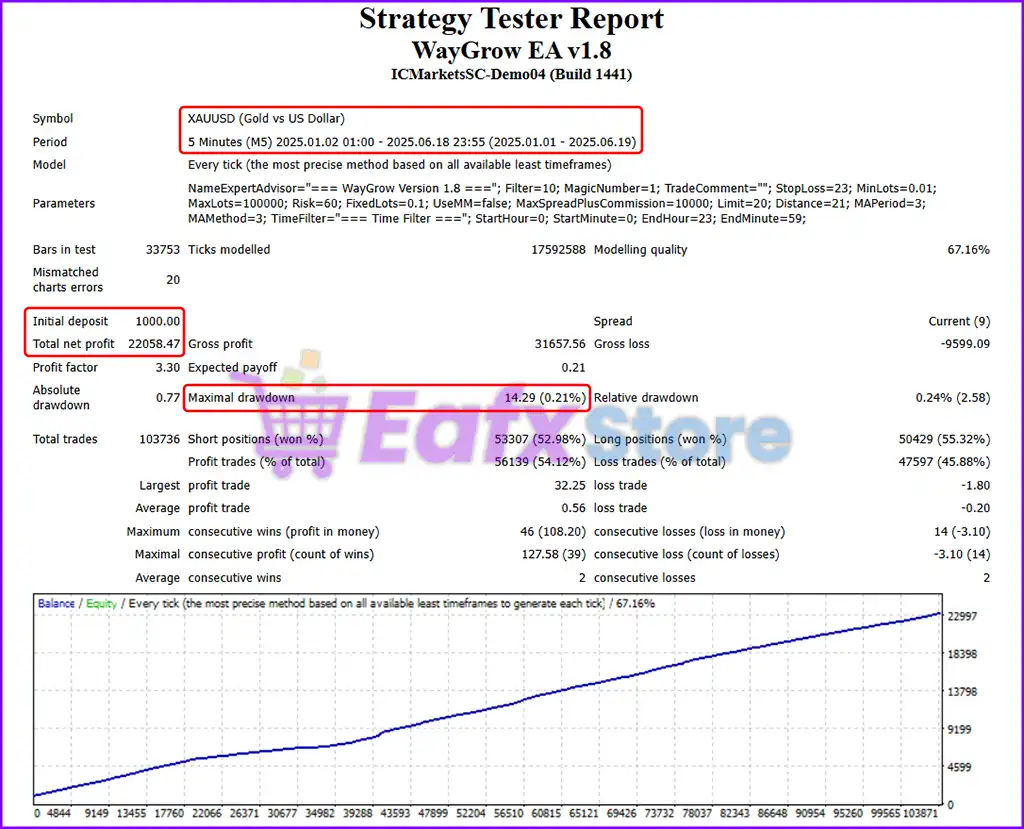
Below are the details of the parameters in the advisor’s trading system settings table:
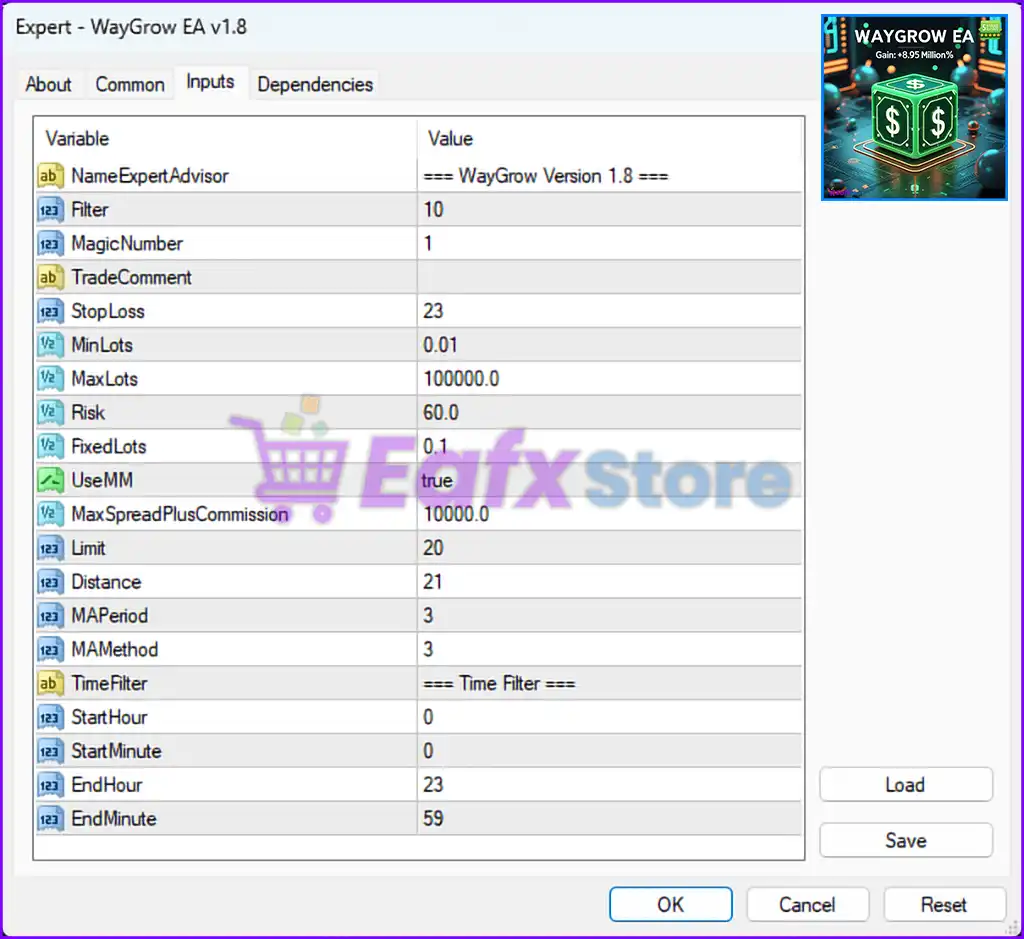
🔶 General Expert Advisor Settings
🔹 NameExpertAdvisor = === WayGrow Version 1.8 ===: Displays the current EA version name and identification label.
🔹 Filter = 10: Sets the trading signal filter sensitivity level to 10.
🔹 MagicNumber = 1: Unique identifier 1 used by the EA to manage and track trades.
🔹 TradeComment = blank: Allows traders to add custom comments to opened positions.
🔶 Trade Protection & Risk Settings
🔹 StopLoss = 23: Sets the Stop Loss distance to 23 points or pips depending on broker configuration.
🔹 MinLots = 0.01: Defines the minimum trading lot size as 0.01.
🔹 MaxLots = 100000.0: Sets the maximum allowed lot size to 100000.0.
🔹 Risk = 60.0: Configures the money management risk percentage to 60.0.
🔹 FixedLots = 0.1: Uses a fixed lot size value of 0.1 when money management is disabled.
🔹 UseMM = true: Enables automatic money management functionality.
🔶 Spread & Trade Limitation Settings
🔹 MaxSpreadPlusCommission = 10000.0: Defines the maximum allowed spread plus commission value as 10000.0.
🔹 Limit = 20: Sets the maximum trade or signal limit to 20.
🔹 Distance = 21: Defines the minimum trade distance or order spacing as 21.
🔶 Moving Average Settings
🔹 MAPeriod = 3: Sets the Moving Average calculation period to 3.
🔹 MAMethod = 3: Uses Moving Average method type 3 for market analysis calculations.
🔶 Time Filter Settings
🔹 TimeFilter = === Time Filter ===: Section label for trading session configuration.
🔹 StartHour = 0: Trading session starts at hour 0.
🔹 StartMinute = 0: Trading session starts at minute 0.
🔹 EndHour = 23: Trading session ends at hour 23.
🔹 EndMinute = 59: Trading session ends at minute 59.
🔢 Conclusion
WayGrow EA MT4 is a flexible automated trading robot that combines money management, spread filtering, Moving Average analysis, and customizable trading sessions into one powerful MetaTrader 4 Expert Advisor. With adjustable risk controls, dynamic lot sizing, and time-based filters, the EA offers traders a scalable solution for automated Forex trading strategies.
🔢 FAQs
❓ What is WayGrow EA MT4?
WayGrow EA MT4 is an automated Forex trading Expert Advisor for MetaTrader 4 with money management and filtering features.
❓ Does WayGrow EA MT4 support automatic lot sizing?
Yes, UseMM = true enables automatic money management and dynamic lot calculation.
❓ What does the MagicNumber setting do?
The MagicNumber = 1 uniquely identifies trades opened by the EA.
❓ Can I limit trading hours in WayGrow EA MT4?
Yes, the Time Filter section allows traders to define custom start and end trading times.
❓ What is the purpose of MaxSpreadPlusCommission?
It limits trading execution when spreads and commissions exceed the defined threshold.



