


🔢 Dow Dax Forex EA MT4 Settings Guide: Complete Input Parameters Explained
Dow Dax Forex EA is an automated trading Expert Advisor with configurable trading hours, range-based entry levels, pending-order placement, lot sizing, and position-management controls. Its inputs allow traders to define the trading window, determine how far entry orders are placed above or below a price range, set take-profit and stop-loss distances, and manage trades with trailing stops or breakeven functionality.
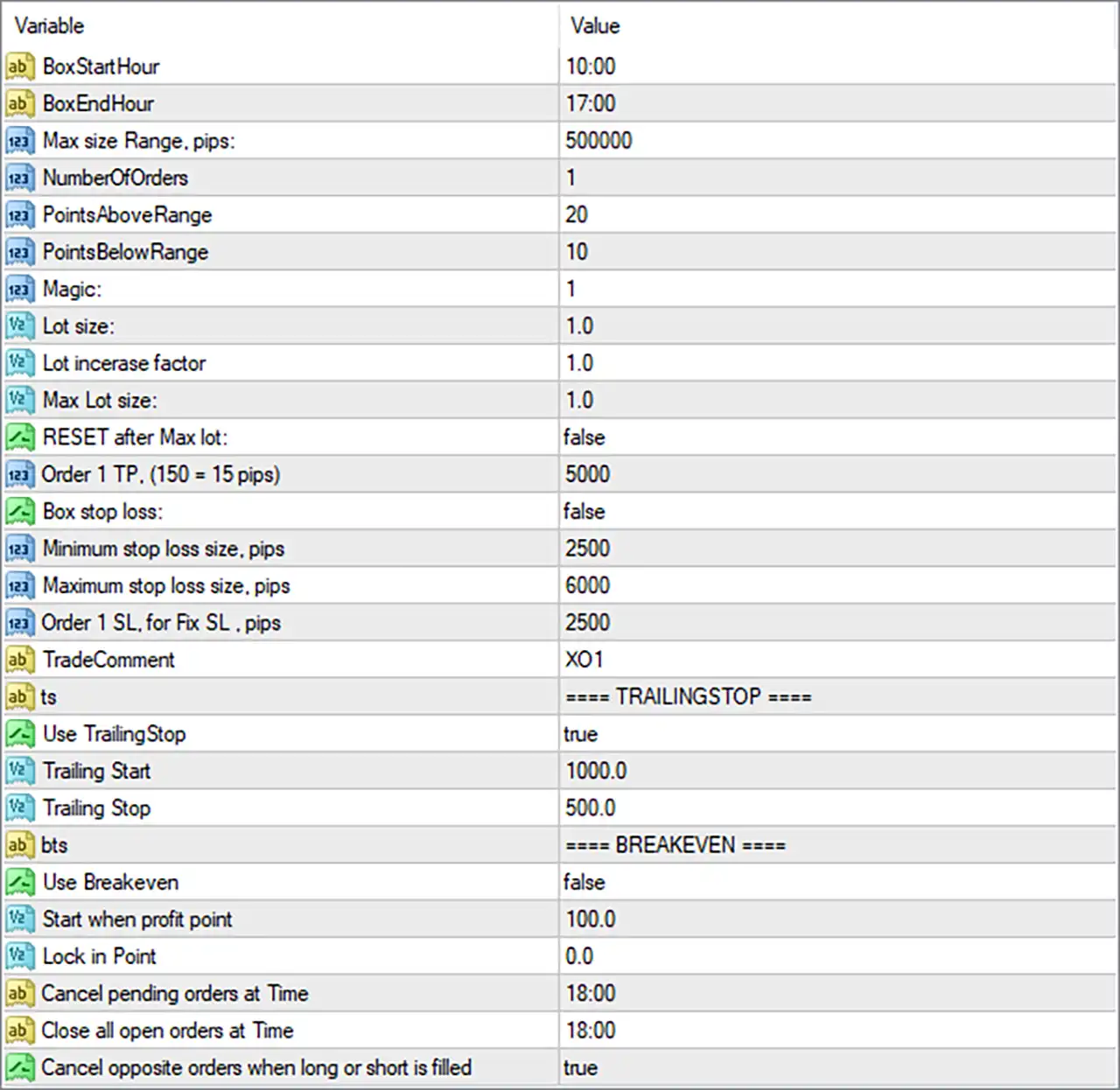
⚙️ Trading Time and Range Settings
🔹 BoxStartHour = 10:00: Defines the start of the time window used to establish the EA's trading box or price range. The EA may use price activity during this period to calculate the levels for subsequent orders.
🔹 BoxEndHour = 17:00: Defines the end of the box-building period at 17:00. The range formed between 10:00 and 17:00 may be used as the reference for pending-order placement, depending on the EA's internal logic.
🔹 Max size Range, pips = 500000: Sets the maximum permitted range size to 500000 in the parameter's stated pip units. This is an unusually large value, so it is important to verify whether the EA interprets this setting as pips, points, or another internal unit for the selected instrument.
🔹 NumberOfOrders = 1: Sets the configured number of orders to 1, limiting the order count according to the EA's order-placement logic.
🔹 PointsAboveRange = 20: Sets the entry offset above the calculated range to 20 points, potentially defining where a buy-stop order is placed relative to the upper boundary.
🔹 PointsBelowRange = 10: Sets the entry offset below the calculated range to 10 points, potentially defining where a sell-stop order is placed relative to the lower boundary.
⚙️ Lot Size and Position Sizing
🔹 Magic = 1: Assigns the magic number 1 to identify trades managed by this EA, helping distinguish them from trades opened by other automated strategies.
🔹 Lot size = 1.0: Sets the initial trading volume to 1.0 lot, which is a substantial position size for many retail accounts and should be assessed against account equity, leverage, and the instrument's contract specifications.
🔹 Lot incerase factor = 1.0: Sets the lot-size increase factor to 1.0, meaning the configured multiplier does not increase the lot size when applied mathematically.
🔹 Max Lot size = 1.0: Sets the maximum permitted lot size to 1.0 lot, subject to the EA's position-sizing rules and the broker's trading-volume limits.
🔹 RESET after Max lot = false: Disables the reset option associated with reaching the maximum lot size. The precise reset behavior depends on how the EA manages its order sequence or lot progression.
⚙️ Take-Profit and Stop-Loss Settings
🔹 Order 1 TP. (150 = 15 pips) = 5000: Sets the first order's take-profit parameter to 5000. The input label indicates that 150 corresponds to 15 pips, suggesting a scaling convention in which 5000 may represent 500 pips; however, the exact conversion should be verified for the instrument and broker.
🔹 Box stop loss = false: Disables the box-based stop-loss option, so the EA may not use the calculated trading range itself as the stop-loss reference.
🔹 Minimum stop loss size, pips = 2500: Sets the minimum permitted stop-loss distance to 2500 in the configured pip units.
🔹 Maximum stop loss size, pips = 6000: Sets the maximum permitted stop-loss distance to 6000 in the configured pip units.
🔹 Order 1 SL. for Fix SL, pips = 2500: Sets the first order's fixed stop-loss distance to 2500 pips when the relevant fixed-stop-loss logic is used. Since Box stop loss = false, confirm whether this parameter is active under the current configuration.
🔹 TradeComment = XO1: Assigns the trade comment XO1 to orders, making it easier to identify the EA's trades in the trading terminal or account history.
⚙️ Trailing Stop Settings
🔹 ts = TRAILINGSTOP: Section heading for the trailing-stop configuration.
🔹 Use TrailingStop = true: Enables trailing-stop management, allowing the EA to adjust stop-loss levels as a trade moves in a favorable direction.
🔹 Trailing Start = 1000.0: Sets the profit-distance threshold for starting the trailing stop to 1000.0 in the EA's internal units. Confirm whether this is measured in points, pips, or another value before trading.
🔹 Trailing Stop = 500.0: Sets the trailing distance to 500.0 in the EA's internal units, defining how far the stop-loss may remain behind the current favorable price according to the programmed trailing logic.
⚙️ Breakeven Settings
🔹 bts = BREAKEVEN: Section heading for breakeven management.
🔹 Use Breakeven = false: Disables automatic breakeven management. The EA will not be expected to move the stop-loss to the entry price through this feature while the setting remains disabled.
🔹 Start when profit point = 100.0: Sets the profit threshold for activating breakeven to 100.0 points or the EA's applicable internal unit. This threshold is currently inactive because Use Breakeven = false.
🔹 Lock in Point = 0.0: Sets the profit-locking offset to 0.0. If breakeven is enabled, this value may indicate that the stop-loss is moved to the entry price without locking in additional profit, depending on the EA's implementation.
⚙️ Time-Based Order Management
🔹 Cancel pending orders at Time = 18:00: Schedules pending-order cancellation at 18:00, helping prevent unfilled entry orders from remaining active beyond the configured time.
🔹 Close all open orders at Time = 18:00: Schedules the closure of all open orders managed by the EA at 18:00, according to its programmed time-based exit logic.
🔹 Cancel opposite orders when long or short is filled = true: Enables cancellation of opposite pending orders after a buy or sell order is filled. This can help prevent both sides of a breakout setup from triggering separate positions after the first entry has been executed.
🔢 Conclusion
Dow Dax Forex EA MT4 is configured around a time-defined trading range, with the box period running from 10:00 to 17:00. Its entry offsets are 20 points above the range and 10 points below it, while the initial lot size and maximum lot size are both set to 1.0.
Trailing-stop management is enabled with a start threshold of 1000.0 and a trailing distance of 500.0, while breakeven is disabled. The EA is also configured to cancel pending orders and close open orders at 18:00, and to cancel the opposite pending order when one side is filled.
Important configuration checks: The Max size Range, pips = 500000 setting and the stop-loss/take-profit distances are unusually large. The take-profit label's example (150 = 15 pips) also suggests that the EA may use a custom scaling convention. Before using this configuration on a live account, verify the units, confirm whether fixed stop-loss settings are active, and test the order behavior on a demo account. A 1.0-lot position can expose an account to substantial losses depending on the instrument and leverage.


