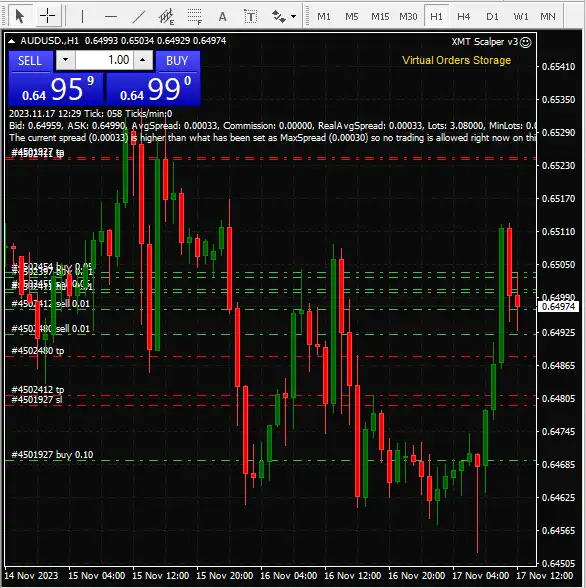


XMT Scalper EA v3.0 Source Code MQ4
Subscriptions for Special Plan
- 30 EA package is more economical!
- Special package with 99%
- Download 1 EA/Day

Subscriptions for Premium Membership
- Download Unlimited in 1 Year
- Get 100% Discount
- Get free access to all

Subscriptions for Gold Membership
- 1 Year Membership
- Get 100% Discount
- Access EA+Indicator+Course
Frequently bought together 🎁
Add these products to enhance your purchase

What is XMT Scalper EA?
XMT Scalper EA is an automated scalping system designed to identify short-term trading opportunities while adapting its activity to changing market conditions.
The strategy combines volatility analysis, Moving Average and Bollinger Bands filters, virtual order management, virtual protection, execution controls and dynamic money management.
Key Features of XMT Scalper EA
Advanced Scalping Algorithm
XMT Scalper EA employs an advanced scalping algorithm designed to capitalize on short-term market movements.
This algorithmic approach aims to execute trades swiftly and efficiently.
Dynamic Risk Management
The EA integrates dynamic risk management strategies, adapting to market conditions and optimizing risk-reward ratios.
This feature enhances capital protection and overall trading performance.
Multi-Currency Compatibility
XMT Scalper EA is designed to be compatible with multiple currency pairs, providing flexibility for traders to diversify their portfolios.
This versatility is crucial in adapting to various market dynamics.
XMT Scalper EA Review
XMT Scalper EA is known for its precision in scalping, capturing small price movements with accuracy.
This makes it suitable for traders looking to capitalize on short-term market fluctuations.
The EA comes with a user-friendly interface, ensuring ease of installation and configuration. This makes it accessible to both novice and experienced traders.

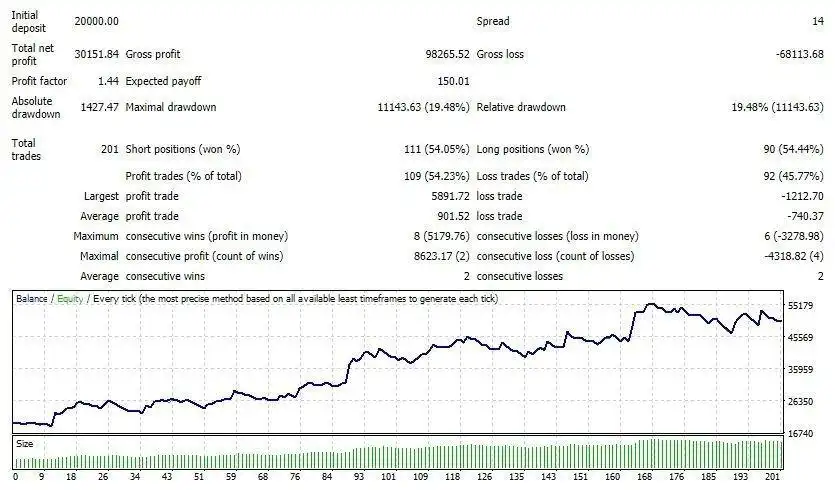
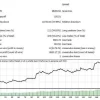
XMT Scalper EA Backtest Results

XMT Scalper EA Review
XMT Scalper EA MT4 Trading Strategy
Market Analysis
The EA first evaluates market volatility using dynamic and percentage-based volatility filters.
This allows the system to adapt its trading activity to changing market conditions.
A Moving Average filter is used to assess market direction, while Bollinger Bands provide additional confirmation of price behavior and volatility.
Trade Execution
When the configured market conditions are satisfied, the EA manages potential entries through virtual pending orders.
Virtual Stop Loss and Take Profit functions are also used to manage positions internally.
The system includes spread, slippage, execution-time, and order-expiration controls to improve execution quality and prevent outdated trading opportunities from remaining active.
Money Management
The automated money-management module controls position sizing according to the configured risk framework.
Minimum and maximum lot limits provide additional control over trading exposure.
Trading Specifications
Recommended settings and parameters to pay attention to from developers and experts:
| Features | Type |
|---|---|
| Trading platform | MetaTrader 4 (MT4) |
| Minimum / Recommended deposit | $100+ |
| Minimum / Recommended leverage | 1:100+ |
| Time frames | M5 (5 minute chart) |
| Currency pairs | EURUSD, GPBUSD |
| Product type | Unlimited |
| Additional services | Unlock And Decompile |
| Recommended brokers | Exness Broker, Icmarkets Broker |
| Recommended VPS | MyfxVPS.com ( Blue VPS, Golden VPS). Lowest Latency, 2 week Free Trial, 100% Free for 12-18 Months. |
Product Download Package?
The download package of the product suite includes:
✅ XMT Scalper v3.ex4
✅ XMT Scalper v3.mq4
➡️ Reviewed by David Easton
Conclusion
XMT Scalper EA stands out as a tool for traders looking to engage in precision scalping in the forex market. With its advanced algorithm, dynamic risk management, and multi-currency compatibility, this EA offers a solution for those seeking efficient automated trading.
Whether you’re a seasoned scalper or exploring short-term trading strategies, the XMT Scalper EA provides a platform for precision and efficiency in the ever-changing landscape of forex trading.
🔢 XMT Scalper EA MT4 – Complete Settings Guide
XMT Scalper EA is a configurable automated scalping system built around execution control, virtual orders, virtual stops, volatility filtering, technical indicators, money management, and chart-based monitoring.
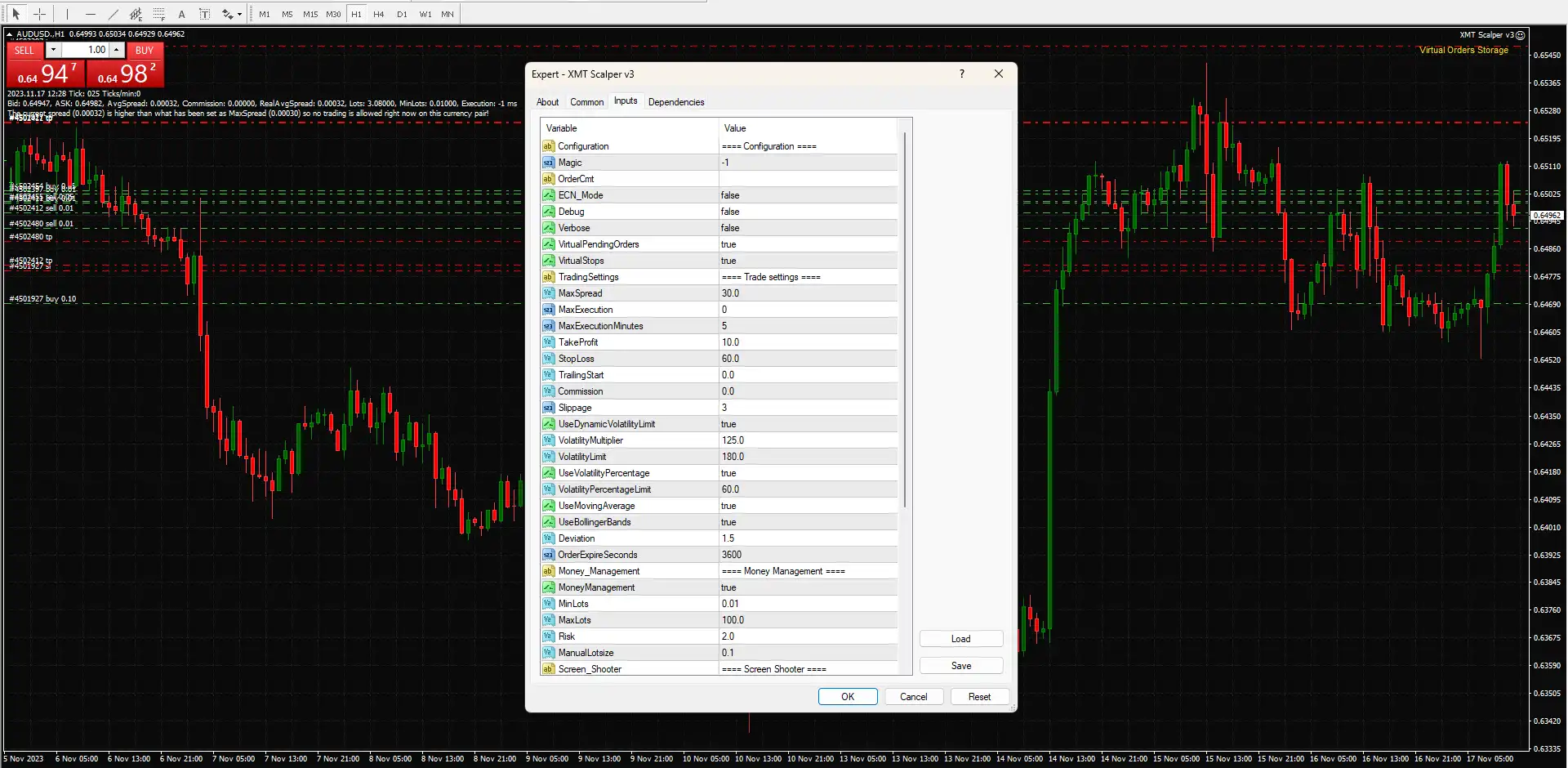
The supplied configuration shows a system designed to adapt its trading activity to market volatility while combining Moving Average and Bollinger Bands filters with configurable Take Profit, Stop Loss, execution limits, expiration controls, and dynamic position sizing.
This guide explains every visible parameter and preserves all numerical values exactly as shown in the supplied settings.

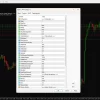
XMT Scalper EA MT4 Settings Panel
🔄 Configuration Settings
🔹 Configuration: ==== Configuration ==== — Section header separating the EA’s main configuration parameters.
🔹 Magic: -1 — Sets the EA’s Magic Number to -1, which determines how its trades are identified and managed.
🔹 OrderCmt: — The order-comment field is blank, so no specific custom order comment is configured.
🔹 ECN_Mode: false — Disables ECN-specific execution mode.
🔹 Debug: false — Disables debugging output.
🔹 Verbose: false — Disables detailed/verbose logging.
🔹 VirtualPendingOrders: true — Enables virtual pending-order handling instead of relying exclusively on standard broker-side pending orders.
🔹 VirtualStops: true — Enables virtual Stop Loss and Take Profit management.
🔄 Trade Settings
🔹 TradingSettings: ==== Trade settings ==== — Section header for the EA’s trading and execution parameters.
🔹 MaxSpread: 30.0 — Sets the maximum permitted spread threshold to 30.0.
🔹 MaxExecution: 0 — Sets the maximum execution count to 0; according to the displayed configuration, no specific execution-count limit is applied.
🔹 MaxExecutionMinutes: 5 — Sets the execution-time window/limit to 5 minutes.
🔹 TakeProfit: 10.0 — Sets the Take Profit distance to 10.0.
🔹 StopLoss: 60.0 — Sets the Stop Loss distance to 60.0.
🔹 TrailingStart: 0.0 — Sets the trailing activation level to 0.0, meaning no positive activation threshold is configured.
🔹 Commission: 0.0 — Sets the configured commission value to 0.0.
🔹 Slippage: 3 — Allows a maximum slippage setting of 3.
🔄 Dynamic Volatility Settings
🔹 UseDynamicVolatilityLimit: true — Enables the dynamic volatility-limit system.
🔹 VolatilityMultiplier: 125.0 — Sets the volatility multiplier to 125.0, influencing how the EA evaluates acceptable market volatility.
🔹 VolatilityLimit: 180.0 — Sets the standard volatility threshold to 180.0.
🔹 UseVolatilityPercentage: true — Enables percentage-based volatility filtering.
🔹 VolatilityPercentageLimit: 60.0 — Sets the volatility percentage limit to 60.0.
🔄 Technical Indicator Settings
🔹 UseMovingAverage: true — Enables the Moving Average filter for trading decisions.
🔹 UseBollingerBands: true — Enables the Bollinger Bands filter.
🔹 Deviation: 1.5 — Sets the Bollinger Bands standard-deviation parameter to 1.5.
🔄 Order Expiration
🔹 OrderExpireSeconds: 3600 — Sets the order expiration period to 3600 seconds, equivalent to 60 minutes.
🔄 Money Management
🔹 Money_Management: ==== Money Management ==== — Section header for position-sizing and risk-management parameters.
🔹 MoneyManagement: true — Enables the EA’s money-management system.
🔹 MinLots: 0.01 — Sets the minimum allowed lot size to 0.01.
🔹 MaxLots: 100.0 — Sets the maximum allowed lot size to 100.0.
🔹 Risk: 2.0 — Sets the configured risk parameter to 2.0.
🔹 ManualLotsize: 0.1 — Sets the manual lot size to 0.1 when manual lot sizing is used.
🔄 Screen Shooter Settings
🔹 Screen_Shooter: ==== Screen Shooter ==== — Section header for the screenshot/chart-capture function.
🔹 TakeShots: false — Disables automatic screenshot capture.
🔹 DelayTicks: 1 — Sets the screenshot delay parameter to 1 tick.
🔹 ShotsPerBar: 1 — Configures the system to take 1 screenshot per bar when screenshot functionality is enabled.
🔄 Virtual Orders – Graphic Display
🔹 tmp50: --- Virtual Orders: graphic --- — Section header for virtual-order graphical display settings.
🔹 VOrdText_corner: Right upper chart corner — Positions the virtual-order information in the upper-right corner of the chart.
🔹 VOrdText_x: 25 — Sets the horizontal X-coordinate of the virtual-order text to 25.
🔹 VOrdText_dx: 60 — Sets the horizontal spacing/offset parameter to 60.
🔹 VOrdText_y: 20 — Sets the vertical Y-coordinate of the virtual-order text to 20.
🔹 VOrdText_dy: 14 — Sets the vertical spacing/offset between displayed virtual-order text elements to 14.
🔹 VOrdText_font: Arial — Uses the Arial font for virtual-order information.
🔹 VOrdText_font_size: 8 — Sets the virtual-order display font size to 8.
🔹 VOrdText_font_color: Gold — Sets the virtual-order display text color to Gold.
🔢 XMT Scalper EA MT4 Settings Summary
🔹 Magic Number: -1
🔹 ECN Mode: false
🔹 Debug: false
🔹 Verbose Logging: false
🔹 Virtual Pending Orders: true
🔹 Virtual Stops: true
🔹 Maximum Spread: 30.0
🔹 Maximum Execution: 0
🔹 Maximum Execution Minutes: 5
🔹 Take Profit: 10.0
🔹 Stop Loss: 60.0
🔹 Trailing Start: 0.0
🔹 Commission: 0.0
🔹 Slippage: 3
🔹 Dynamic Volatility Limit: true
🔹 Volatility Multiplier: 125.0
🔹 Volatility Limit: 180.0
🔹 Volatility Percentage Filter: true
🔹 Volatility Percentage Limit: 60.0
🔹 Moving Average Filter: true
🔹 Bollinger Bands: true
🔹 Bollinger Deviation: 1.5
🔹 Order Expiration: 3600 seconds / 60 minutes
🔹 Money Management: true
🔹 Minimum Lot: 0.01
🔹 Maximum Lot: 100.0
🔹 Risk: 2.0
🔹 Manual Lot Size: 0.1
🔹 Take Screenshots: false
🔹 Screenshot Delay: 1 tick
🔹 Screenshots Per Bar: 1
🔹 Virtual Order Display Position: Right upper chart corner
🔹 Virtual Order X Position: 25
🔹 Virtual Order X Offset: 60
🔹 Virtual Order Y Position: 20
🔹 Virtual Order Y Offset: 14
🔹 Virtual Order Font: Arial
🔹 Virtual Order Font Size: 8
🔹 Virtual Order Font Color: Gold
🔢 Conclusion
XMT Scalper EA MT4 provides a broad set of configuration controls for automated scalping, with particular emphasis on execution management, volatility adaptation, virtual order handling, technical filtering, and money management.
The supplied configuration has both VirtualPendingOrders = true and VirtualStops = true, giving the EA a virtual execution and protection layer. Its trading parameters include Take Profit = 10.0, Stop Loss = 60.0, MaxSpread = 30.0, and Slippage = 3.
Market-condition filtering is an important part of this setup. UseDynamicVolatilityLimit = true, UseVolatilityPercentage = true, UseMovingAverage = true, and UseBollingerBands = true are all enabled. The volatility configuration uses 125.0, 180.0, and 60.0, while the Bollinger Bands deviation is set to 1.5.
The money-management module is also active, with MoneyManagement = true, a minimum lot of 0.01, maximum lot of 100.0, risk value of 2.0, and manual lot size of 0.1. These parameters should be evaluated carefully against account size, broker contract specifications, leverage, and the actual risk characteristics of the strategy.
Overall, the configuration offers considerable flexibility for traders who want to adjust the EA’s execution behavior and market filters rather than relying on a fixed trading profile.
🔢 FAQs
❓ What is XMT Scalper EA MT4?
XMT Scalper EA MT4 is an automated trading system featuring virtual orders, virtual stops, volatility filtering, Moving Average and Bollinger Bands filters, and configurable money management.
❓ Does XMT Scalper EA MT4 use virtual trading protection?
Yes. VirtualPendingOrders = true and VirtualStops = true, so both virtual pending-order and virtual-stop functionality are enabled.
❓ What are the Take Profit and Stop Loss settings?
The supplied configuration uses TakeProfit = 10.0 and StopLoss = 60.0.
❓ Which market filters are enabled?
The EA has dynamic volatility filtering, volatility-percentage filtering, Moving Average filtering, and Bollinger Bands filtering enabled.
❓ What are the lot-size settings?
Money management is enabled with MinLots = 0.01, MaxLots = 100.0, Risk = 2.0, and ManualLotsize = 0.1.
User Reviews
Only logged in customers who have purchased this product may leave a review.
❓ What is the main trading focus of XMT Scalper EA?
XMT Scalper EA is built for automated scalping with execution controls, volatility filters, technical indicators, virtual orders, and configurable money management.
❓ Does XMT Scalper EA use virtual pending orders and stops?
Yes. XMT Scalper EA has both VirtualPendingOrders and VirtualStops enabled, providing virtual handling for pending orders and Stop Loss or Take Profit.
❓ What are the Take Profit and Stop Loss settings?
XMT Scalper EA uses a 10.0 Take Profit and 60.0 Stop Loss in the supplied configuration, with virtual stop management enabled.
❓ How does XMT Scalper EA filter market volatility?
XMT Scalper EA enables dynamic volatility and percentage filters, using a 125.0 multiplier, 180.0 threshold, and 60.0% percentage limit.
❓ Which technical indicators does XMT Scalper EA use?
XMT Scalper EA uses both Moving Average and Bollinger Bands filters. Bollinger Bands are configured with a 1.5 deviation value.
❓ What is the maximum spread allowed by XMT Scalper EA?
The XMT Scalper EA configuration sets MaxSpread = 30.0, helping restrict trading when market spread conditions exceed the configured threshold.
❓ Does XMT Scalper EA support automatic money management?
Yes. XMT Scalper EA has MoneyManagement enabled, with a 0.01 minimum lot, 100.0 maximum lot, and risk parameter set to 2.0.
❓ Can XMT Scalper EA use a fixed lot size?
Yes. When manual sizing is used, XMT Scalper EA has ManualLotsize = 0.1 in the supplied configuration, while automatic money management remains enabled.
❓ How long do virtual orders remain active in XMT Scalper EA?
XMT Scalper EA sets OrderExpireSeconds = 3600, meaning the configured order expiration period is 60 minutes.
❓ Does XMT Scalper EA support trailing stops?
The supplied configuration sets TrailingStart = 0.0. The source does not state that a separate trailing function is actively enabled in this setup.
🔥 Get This EA for FREE with Our Membership! 🚀🚀
Unlock access to this EA, premium Indicators, and exclusive trading tools completely FREE with any of our Membership Plans! Thousands of traders already benefit from our VIP library—join them and level up your trading instantly. Choose Your Membership:
- SPECIAL – 1 Month Membership
- GOLD – 1 Year Membership
- PREMIUM – 1 Year Membership


There are no reviews yet.