🔄 Introduction to Pulse Engine EA MT5
Pulse Engine EA is an advanced automated trading system designed for MetaTrader 5 (MT5). It focuses on multi-asset trading with built-in risk management, drawdown control and broker compatibility features.
The Expert Advisor (EA) allows traders to automate strategies across Forex, indices, and cryptocurrencies while maintaining strict control over risk exposure—making it especially suitable for prop firm challenges and disciplined trading environments.
🔄 Broker Symbol Mapping
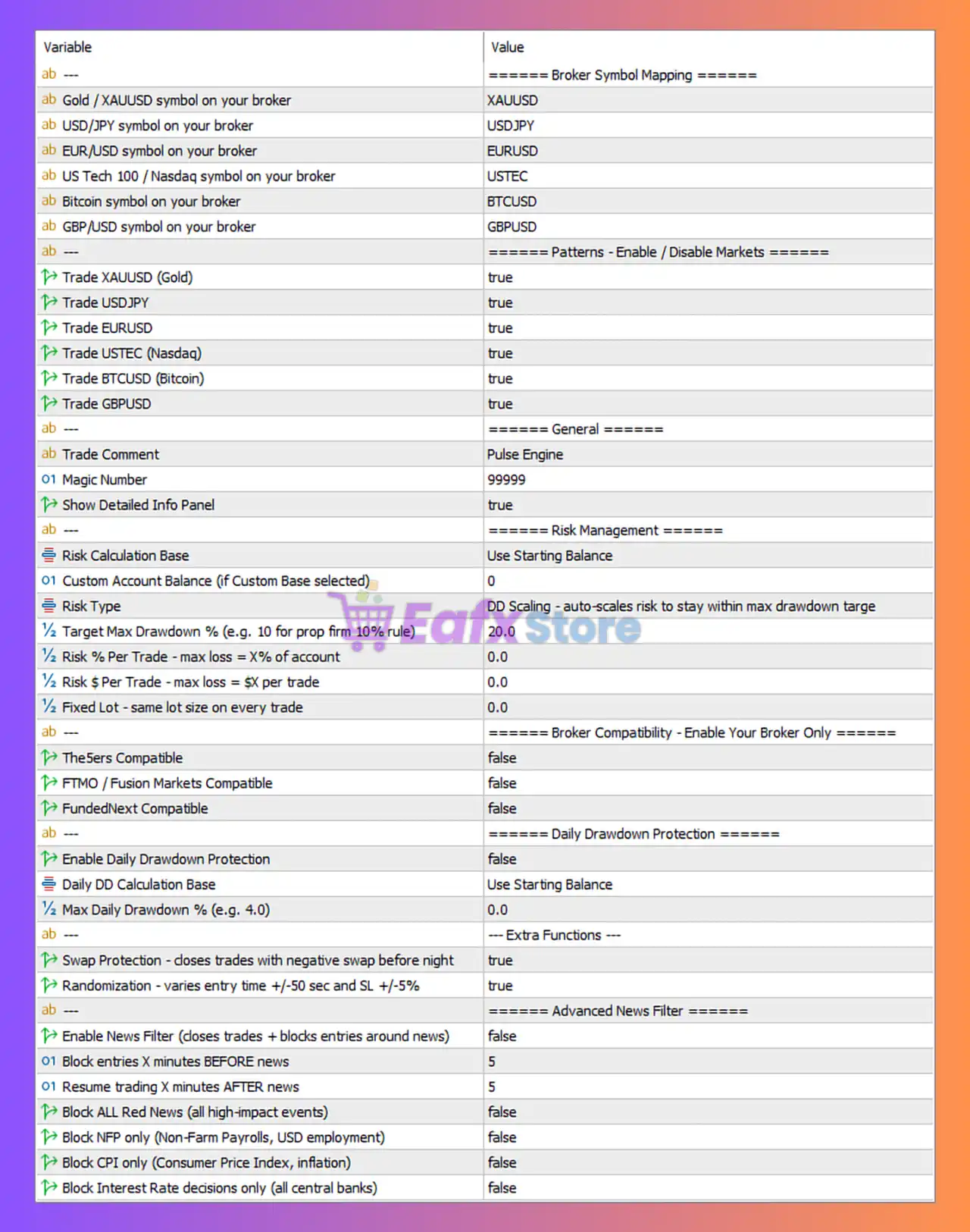
This section ensures the EA correctly recognizes asset symbols based on your broker.
| Setting | Value | Explanation |
|---|---|---|
| Gold Symbol | XAUUSD | Gold trading pair |
| USDJPY Symbol | USDJPY | Japanese Yen pair |
| EURUSD Symbol | EURUSD | Euro/USD pair |
| NASDAQ (US100) | USTEC | Broker-specific NASDAQ symbol |
| Bitcoin | BTCUSD | Crypto trading |
| GBPUSD | GBPUSD | Pound/USD pair |
👉 Why it matters:
Different brokers use different symbol names (e.g., US100 vs USTEC). Incorrect mapping = EA won’t trade.
🔄 Market Enable / Disable Settings
| Asset | Status |
|---|---|
| XAUUSD (Gold) | Enabled |
| USDJPY | Enabled |
| EURUSD | Enabled |
| USTEC (Nasdaq) | Enabled |
| BTCUSD | Enabled |
| GBPUSD | Enabled |
👉 Analysis:
All major assets are active → This creates high diversification, but also increases risk exposure if not controlled properly.
🔄 General Settings
| Setting | Value | Explanation |
|---|---|---|
| Trade Comment | Pulse Engine | Label for trades |
| Magic Number | 99999 | Unique ID for EA trades |
| Info Panel | Enabled | Displays EA data on chart |
👉 Best Practice:
Always use a unique Magic Number when running multiple EAs.
🔄 Risk Management Configuration
This is the most critical section of the EA.
| Setting | Value | Explanation |
|---|---|---|
| Risk Calculation Base | Starting Balance | Uses initial balance instead of equity |
| Custom Balance | 0 | Disabled |
| Risk Type | DD Scaling | Auto-adjusts risk based on drawdown |
| Target Max Drawdown | 20% | Limits total loss |
| Risk % Per Trade | 0 | Disabled |
| Fixed $ Risk | 0 | Disabled |
| Fixed Lot | 0 | Disabled |
👉 Key Insight:
The EA is using Drawdown Scaling, meaning:
- It dynamically reduces risk as losses increase
- Helps protect accounts in prop firm conditions
- No fixed lot or fixed % → Fully adaptive system
🔄 Broker Compatibility Settings
| Setting | Status |
|---|---|
| The5ers Compatible | Disabled |
| FTMO Compatible | Disabled |
| FundedNext Compatible | Disabled |
👉 Analysis:
- No prop firm rules are enforced
- Suitable for personal accounts
- If using FTMO → This should be enabled
🔄 Daily Drawdown Protection
| Setting | Value |
|---|---|
| Daily DD Protection | Disabled |
| DD Calculation Base | Starting Balance |
| Max Daily DD | 0% |
👉 Risk Warning:
This is disabled, meaning:
- No daily loss limit
- Account can exceed prop firm limits
⚠️ Recommendation: Enable this if trading funded accounts.
🔄 Extra Functions
| Feature | Status | Explanation |
|---|---|---|
| Swap Protection | Enabled | Closes trades before negative swap |
| Randomization | Enabled | Adds execution randomness |
👉 Benefits:
- Avoid overnight fees
- Makes trading behavior less predictable (useful vs brokers)
🔄 Advanced News Filter
| Setting | Value |
|---|---|
| News Filter | Disabled |
| Block Before News | 5 min |
| Resume After News | 5 min |
| Block Red News | Disabled |
| Block NFP | Disabled |
| Block CPI | Disabled |
| Block Interest Rate | Disabled |
👉 Analysis:
- News filter is OFF → EA trades during high volatility
- Can lead to large slippage or losses
⚠️ Recommended for safer trading:
- Enable news filter
- Block high-impact events (NFP, CPI, interest rates)
🔄 Overall Strategy Evaluation
🎯 Strengths
- Adaptive Drawdown Scaling risk system.
- Multi-asset diversification.
- Swap protection enabled.
- Randomization adds execution realism.
🎯 Weaknesses
- No daily drawdown protection.
- News trading not filtered.
- Prop firm compatibility disabled.
- All markets active → higher correlation risk.
🔄 Optimization Recommendations
🎯 For Prop Firm Accounts
- Enable FTMO / FundedNext compatibility.
- Turn ON Daily Drawdown Protection.
- Set daily DD to 4–5%.
- Enable News Filter.
🎯 For Personal Accounts
- Keep DD scaling.
- Consider reducing number of active pairs.
- Add fixed risk per trade (1–2%) for consistency.
Conclusion
The Pulse Engine EA configuration shown is aggressive but flexible, relying heavily on dynamic drawdown-based risk management instead of fixed risk rules. While this setup allows the EA to adapt to market conditions, it lacks critical protections such as daily drawdown limits and news filtering, making it less suitable for prop firm trading in its current form.
With a few adjustments—especially enabling risk controls and news filters—this EA can become a powerful and stable automated trading system for both retail and professional traders.