





Reactor EA MT5 with SetFiles (Latest version) – GroupBuy
Select a variant to see availability.
Quick Verdict
Best For
✅ Intraday Forex traders looking for a highly customizable EA.
✅ Traders who prefer multi-indicator confirmation systems.
✅ Experienced users who want complete control over trading parameters.
✅ Portfolio traders operating multiple major currency pairs.
Overall Rating
⭐⭐⭐⭐⭐ 9.0/10
Reactor EA MT5 is a powerful fully automated Expert Advisor built for traders who value flexibility and deep customization. Combining multiple technical indicators, configurable confirmation filters, advanced money management, and extensive exit options, it offers a professional framework for systematic Forex trading across several major currency pairs.
 Vendor Website: View here
This is GroupBuy ==> How to Join
Reactor EA MT5 Review
What is Reactor EA MT5?
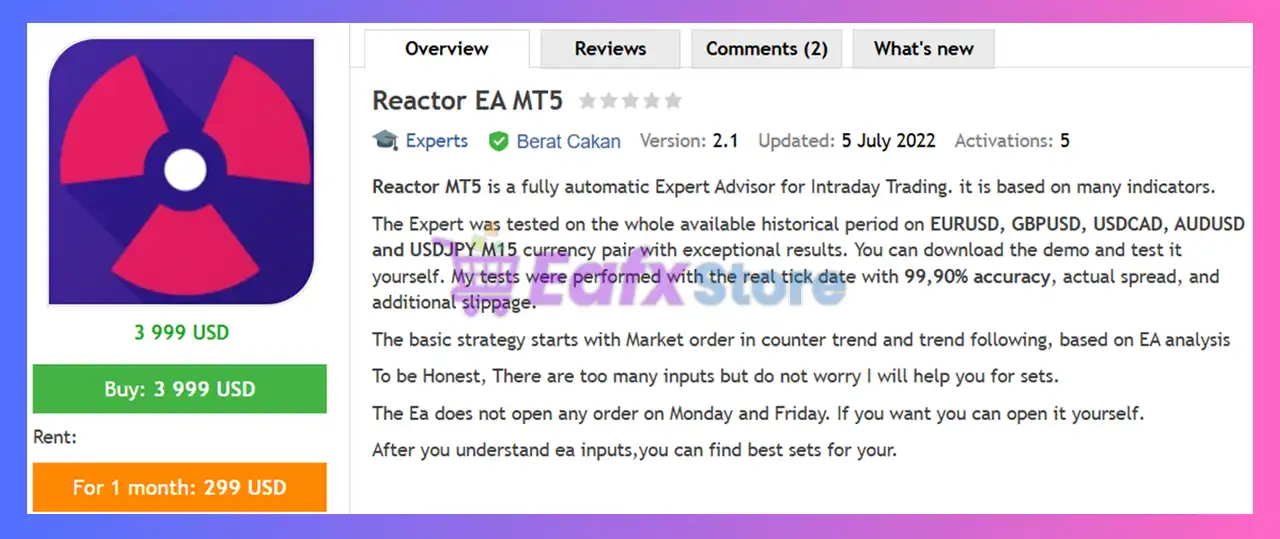
Reactor EA MT5 is a fully automated intraday trading Expert Advisor (EA) designed for MetaTrader 5. It utilizes multiple technical indicators, intelligent trade analysis, configurable confirmation filters, and advanced money management to identify trading opportunities across major Forex pairs.
Unlike single-strategy Expert Advisors, Reactor EA MT5 provides a modular trading engine where traders can activate or disable numerous indicators, risk controls, and trade management options according to their preferred trading style.
How Does Reactor EA MT5 Work?
Reactor EA MT5 combines counter-trend and trend-following logic with multiple technical indicators to generate trading signals.
Intelligent Signal Generation
The EA primarily uses MACD-based entries while allowing confirmation from additional indicators such as RSI, ATR, SuperTrend, ZigZag, Moving Averages, Stochastic, SAR, and Solar Wind.
Flexible Entry Management
Traders can choose immediate market execution or configure additional confirmation rules before trades are opened.
Advanced Position Management
The EA supports configurable Martingale recovery, virtual order simulation, dollar-based exits, indicator-driven closing logic, and multiple profit management methods.
Complete Trading Automation
Time filters, weekday restrictions, event filters, and trade management functions work together to automate the entire trading process.
Main Features of Reactor EA MT5
Multi-Indicator Trading Engine
Supports MACD, RSI, ATR, SuperTrend, ZigZag, Moving Averages, Stochastic, SAR, and Solar Wind for highly customizable trade confirmation.
Advanced Strategy Customization
Nearly every aspect of the EA can be configured, allowing traders to create conservative or aggressive trading profiles.
Intelligent Intraday Trading
Designed specifically for intraday market conditions with flexible entry timing and indicator confirmation.
Virtual Order Simulation
Virtual trading logic allows the EA to validate market conditions before committing to live positions.
Comprehensive Exit Management
Supports dollar targets, pip targets, percentage exits, indicator-based closing, and basket management.
Multi-Pair Compatibility
One trading system can be deployed across five major Forex pairs, increasing diversification opportunities.
Historical Backtest Performance
The developer tested Reactor EA MT5 using real tick data with 99.90% modeling quality, actual spreads, and additional slippage over long historical periods beginning in 2013.
Sample Backtest Results
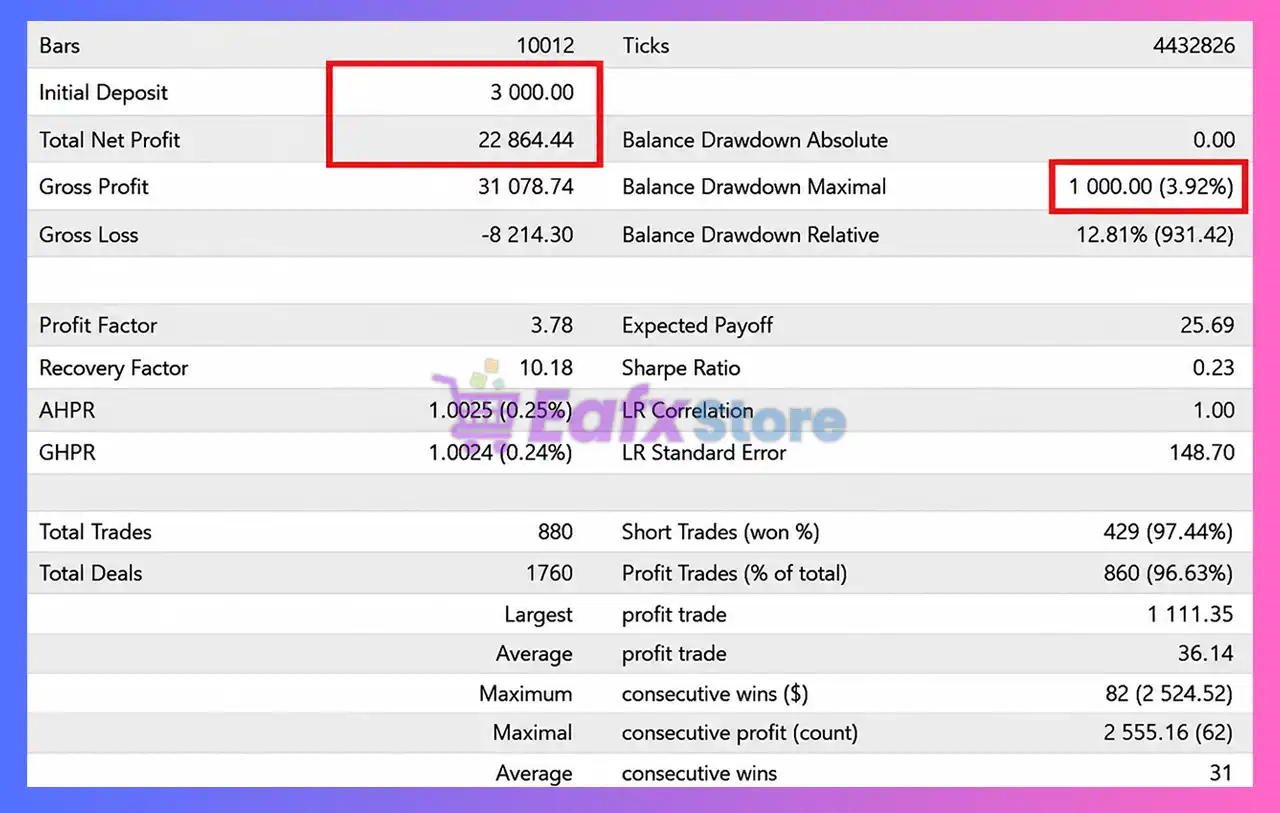
Reactor EA MT5 Backtest
| Metric | Result |
|---|---|
| Initial Deposit | $3,000 |
| Total Net Profit | $22,864.44 |
| Profit Factor | 3.78 |
| Recovery Factor | 10.18 |
| Winning Trades | 96.63% |
| Total Trades | 880 |
| Maximum Balance Drawdown | 3.92% |
Performance Analysis
Reactor EA MT5 Backtests Results
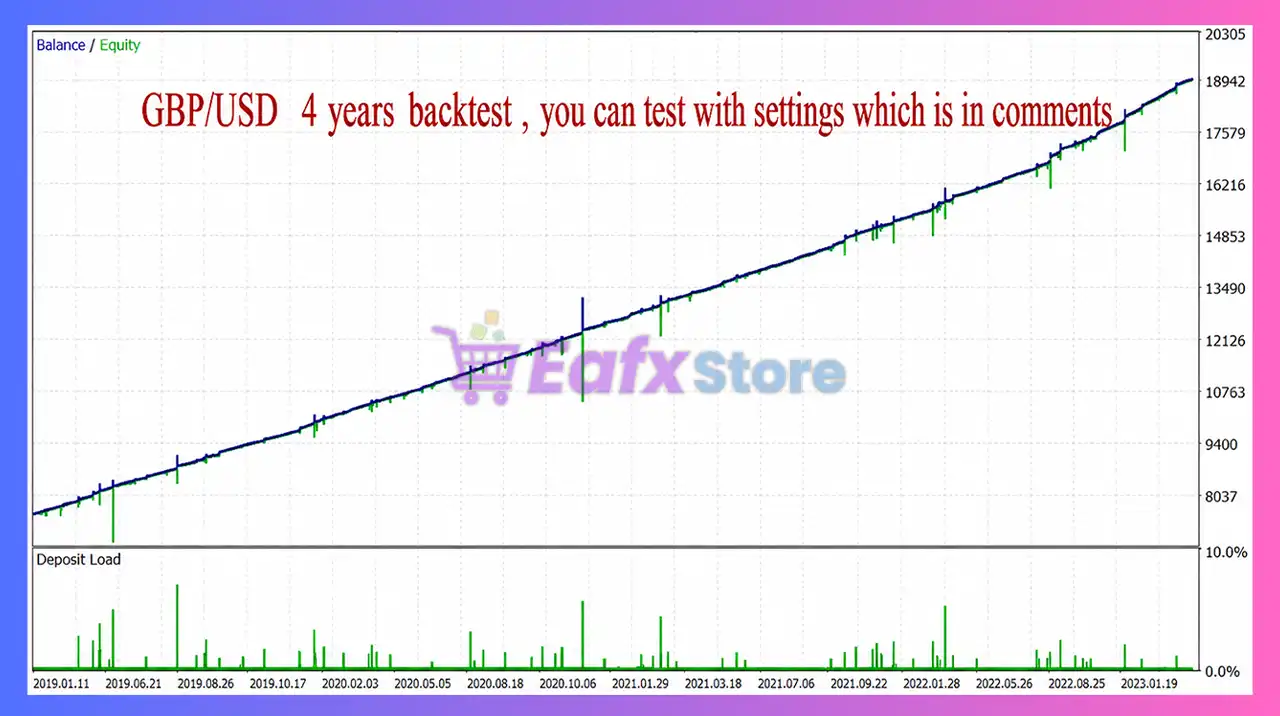
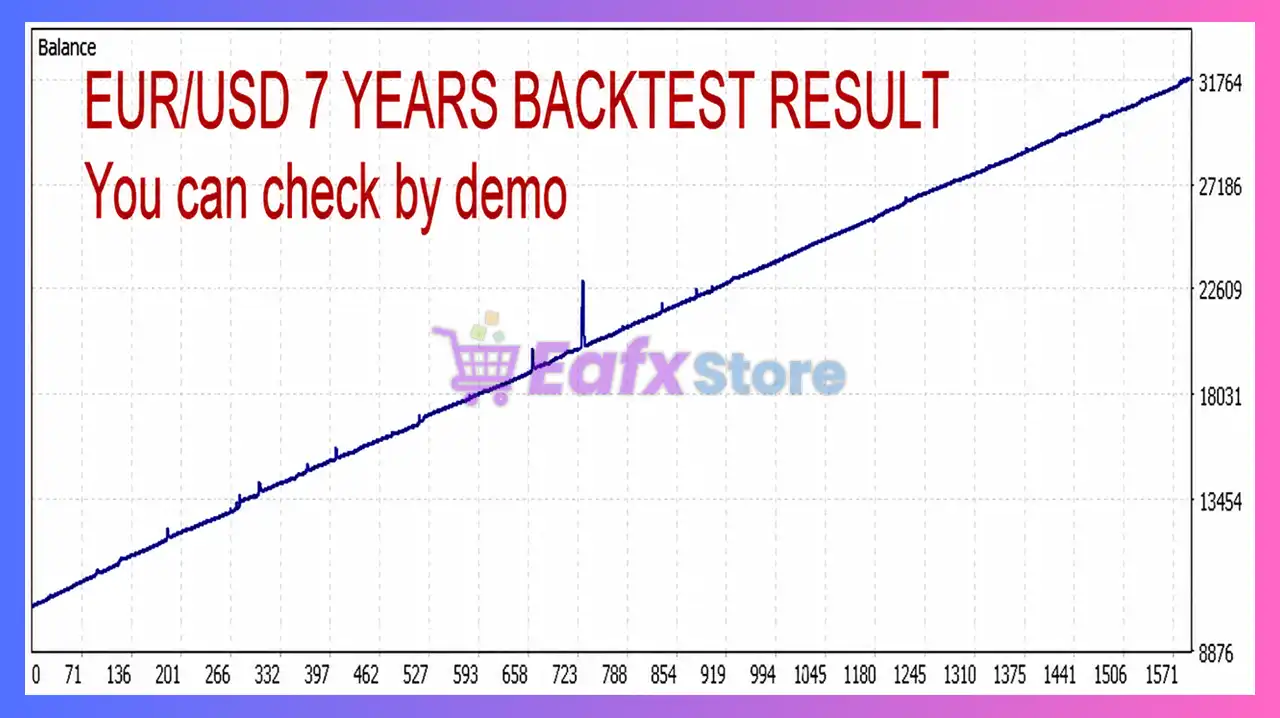
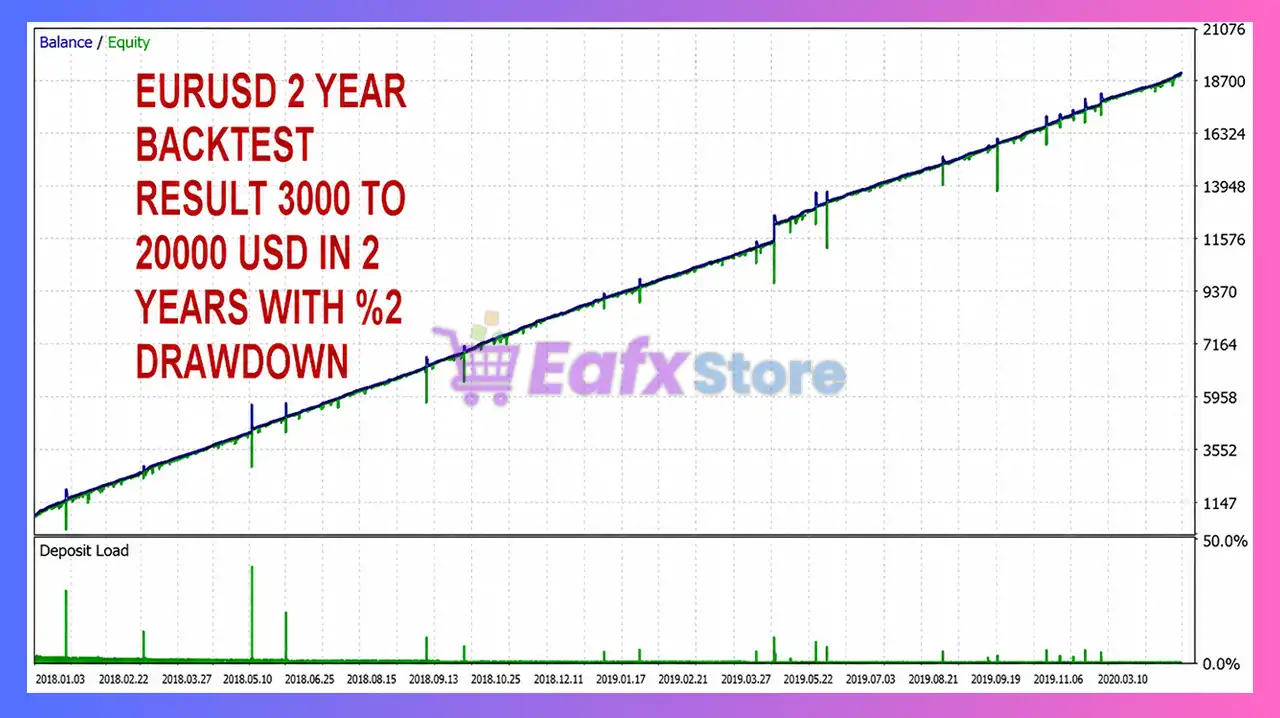
The published backtests demonstrate a remarkably smooth long-term equity curve across multi-year testing periods. Starting with a $3,000 account, the strategy generated over $22,800 in net profit while maintaining a relatively low 3.92% maximum balance drawdown. The reported 96.63% winning trade ratio and 3.78 Profit Factor suggest strong historical consistency under the tested conditions.
As with every automated trading system, historical performance should be considered as reference data only and should be validated through forward testing before live deployment.
Why Reactor EA MT5 Stands Out
Extremely Flexible Architecture
Few Expert Advisors offer as many configurable trading components as Reactor EA MT5, making it suitable for a wide range of trading styles.
Multi-Layer Confirmation
Instead of relying on a single indicator, traders can build sophisticated confirmation systems using multiple technical tools.
Long-Term Historical Testing
The developer recommends testing from 2013 onward, providing a broad statistical sample across different market cycles.
Professional Trade Management
Flexible exits, virtual orders, money management, and time filters allow Reactor EA MT5 to adapt to changing market environments.
Risk Management Features
Flexible Money Management
Supports fixed lots, configurable lot multipliers, maximum lot limits, and customizable investment sizing.
Trading Session Control
Built-in weekday filters and time restrictions help avoid periods with historically unfavorable market conditions.
News Event Protection
Optional economic event filtering allows the EA to reduce exposure around major market announcements.
Configurable Exit Logic
Traders can choose dollar-based targets, percentage exits, pip targets, or indicator-based closing strategies to better manage overall portfolio risk.
Recommended Trading Conditions
Recommended settings and parameters to pay attention to from developers and experts:
| Features | Type |
|---|---|
| Trading platform | MetaTrader 5 (MT5) |
| Time frames | M15, M30, H1, H4 |
| Currency pairs | EURUSD, GBPUSD, USDCAD, AUDUSD and USDJPY |
| Minimum / Recommended deposit | $100 |
| Minimum / Recommended leverage | 1:200+ |
| Product type | Original version |
| Additional services | Unlock and Decompile |
| Recommended brokers | Exness Broker, Icmarkets Broker |
| Recommended VPS | MyfxVPS.com ( Blue VPS, Golden VPS). Lowest Latency, 2 week Free Trial, 100% Free for 12-18 Months. |
Product Download Package?
The download package of the product suite includes:
Experts
 Setting (If Any).docx
Installation Guide.docx
SetFiles
H1_EURUSD.set
 Reviewed by David Easton
Weaknesses and Risk Warnings
High Number of Parameters
Reactor EA MT5 includes a very large number of configurable settings. New users may require time to understand and optimize the available options.
Martingale Capability
The EA supports Martingale money management. While configurable, aggressive settings can significantly increase trading risk if not managed carefully.
Optimization Is Important
Performance depends heavily on selecting appropriate parameter sets for individual brokers and market conditions.
Historical Results Are Not Guarantees
Although extensive historical testing has been provided, future market conditions may differ. Traders should always perform forward testing on a demo account before trading live capital.
Who Should Use Reactor EA MT5?
Ideal For
🔹 Intermediate and advanced Forex traders
🔹 Traders who enjoy strategy optimization
🔹 Multi-pair portfolio traders
🔹 VPS users running automated systems
🔹 Traders seeking highly configurable Expert Advisors
Less Suitable For
🔹 Complete beginners
🔹 Traders wanting a simple plug-and-play EA
🔹 Very small trading accounts
🔹 Users unwilling to optimize trading parameters
Final Verdict
Reactor EA MT5 is a professional-grade automated Forex trading system built for traders who demand maximum flexibility and control. Its modular architecture combines multi-indicator analysis, advanced confirmation filters, configurable money management, virtual order simulation, and comprehensive exit strategies into a single powerful trading solution.
The EA’s long-term historical testing, support for multiple major currency pairs, and extensive customization options make it particularly attractive for experienced traders seeking a scalable automated trading framework. While the large number of parameters may require a learning curve, the flexibility it provides is one of Reactor EA MT5’s greatest strengths.
🔢 Reactor EA MT5 Settings Explained – Complete Parameter Guide
Reactor EA MT5 is a highly configurable MetaTrader 5 Expert Advisor that combines indicator-based trade entries, Martingale money management, virtual order simulation, advanced confirmation filters, event filtering and flexible exit management.
With support for MACD, RSI, Stochastic, ATR, SuperTrend, ZigZag, Solar Wind, Moving Average, and multiple time filters, Reactor EA MT5 allows traders to build highly customized automated trading strategies for different market conditions.
Reactor EA MT5 Settings
🔢 Installation Panel Parameters
Below are the details of the parameters in the advisor’s trading system settings table:
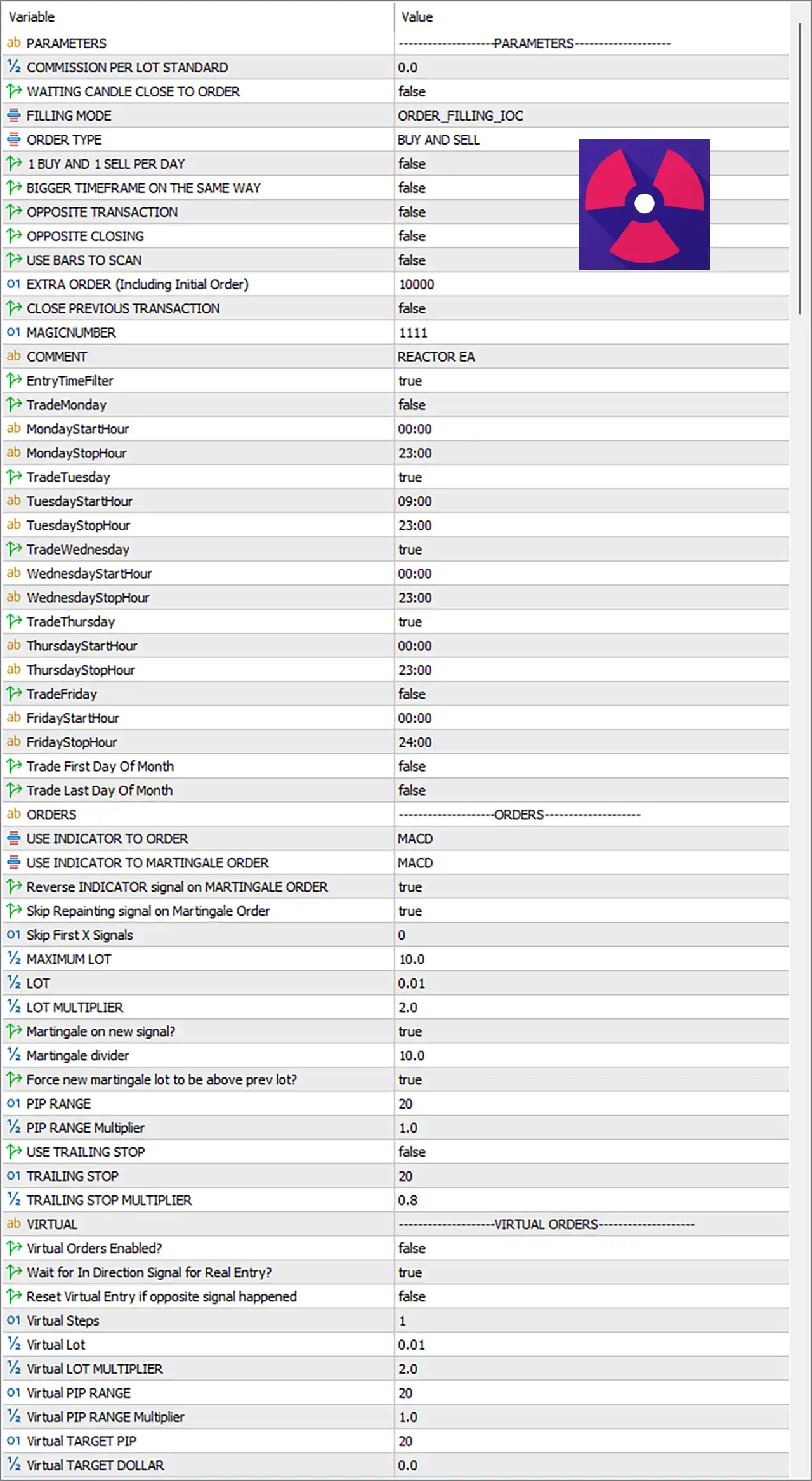
Reactor EA MT5 Settings Panel
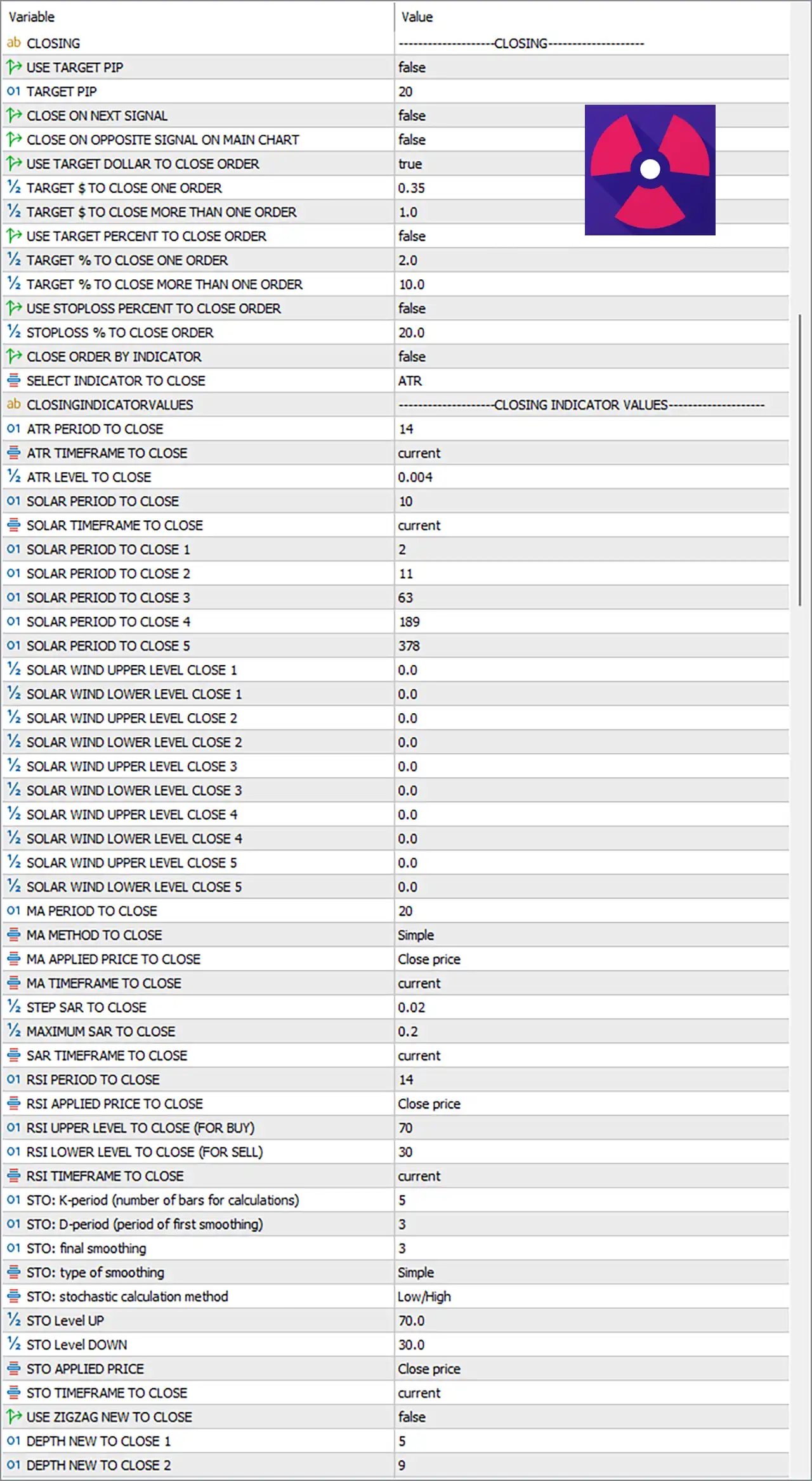
Reactor EA MT5 Setting Panel
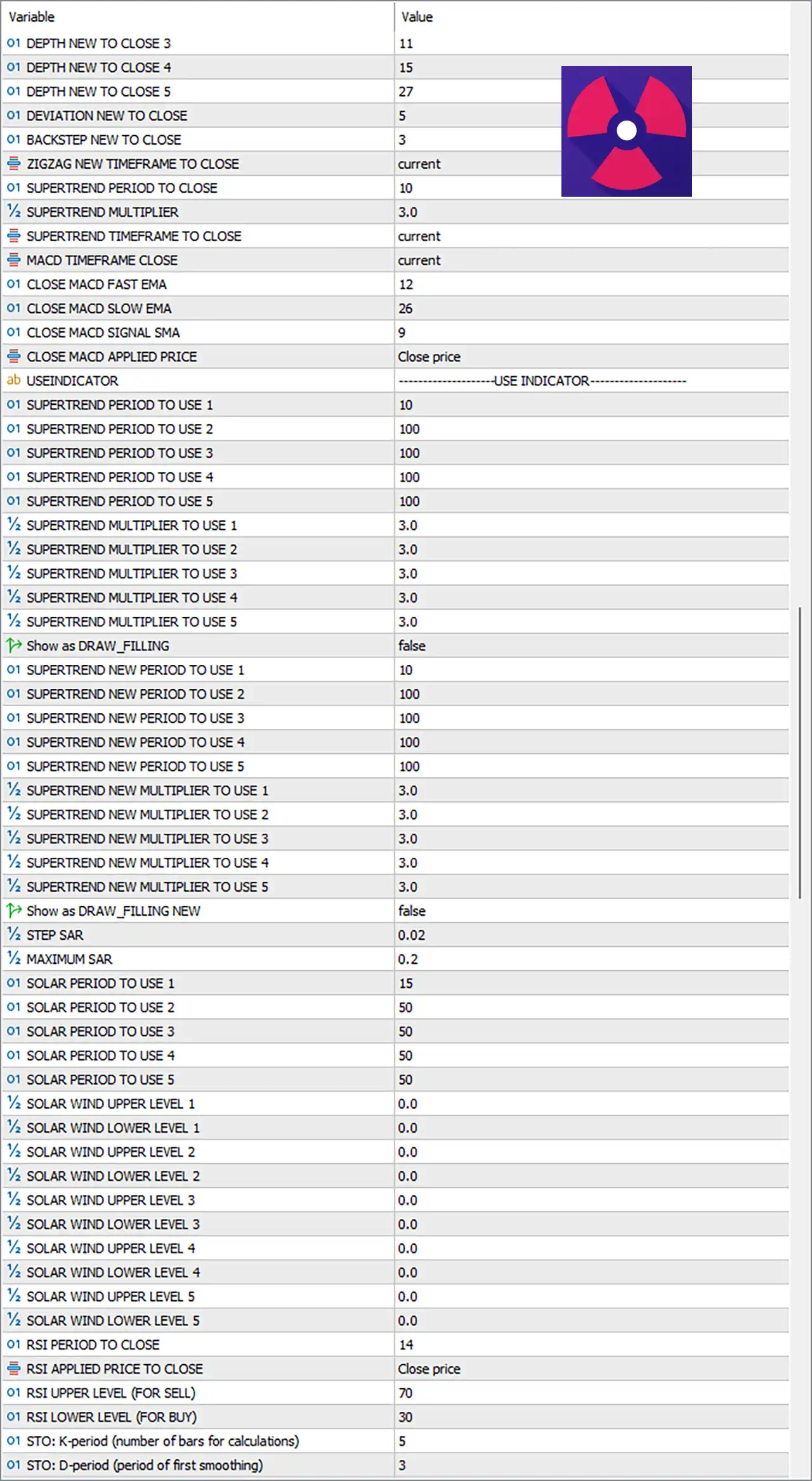
Reactor EA MT5 Settings Explained
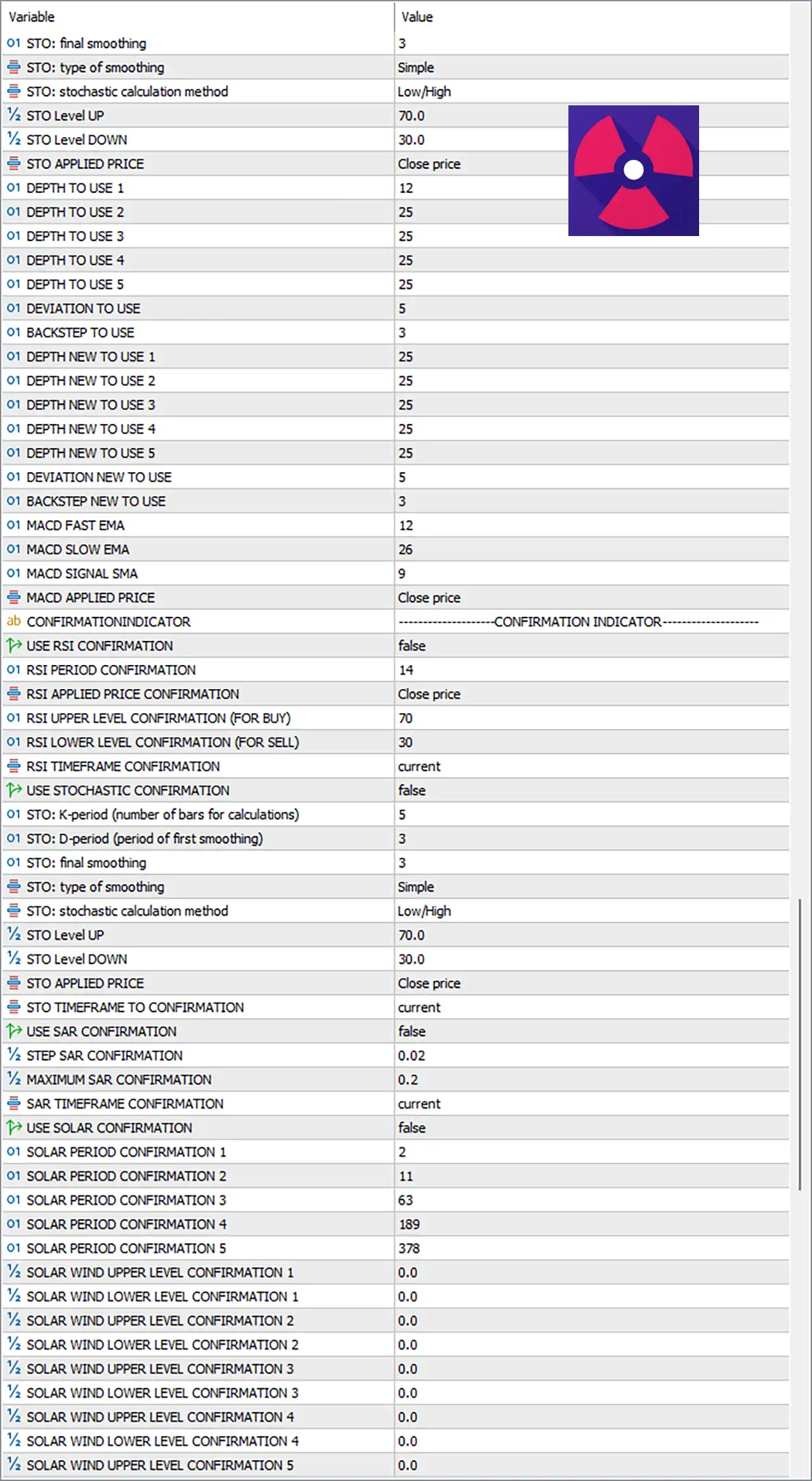
Reactor EA MT5 Setting Explained
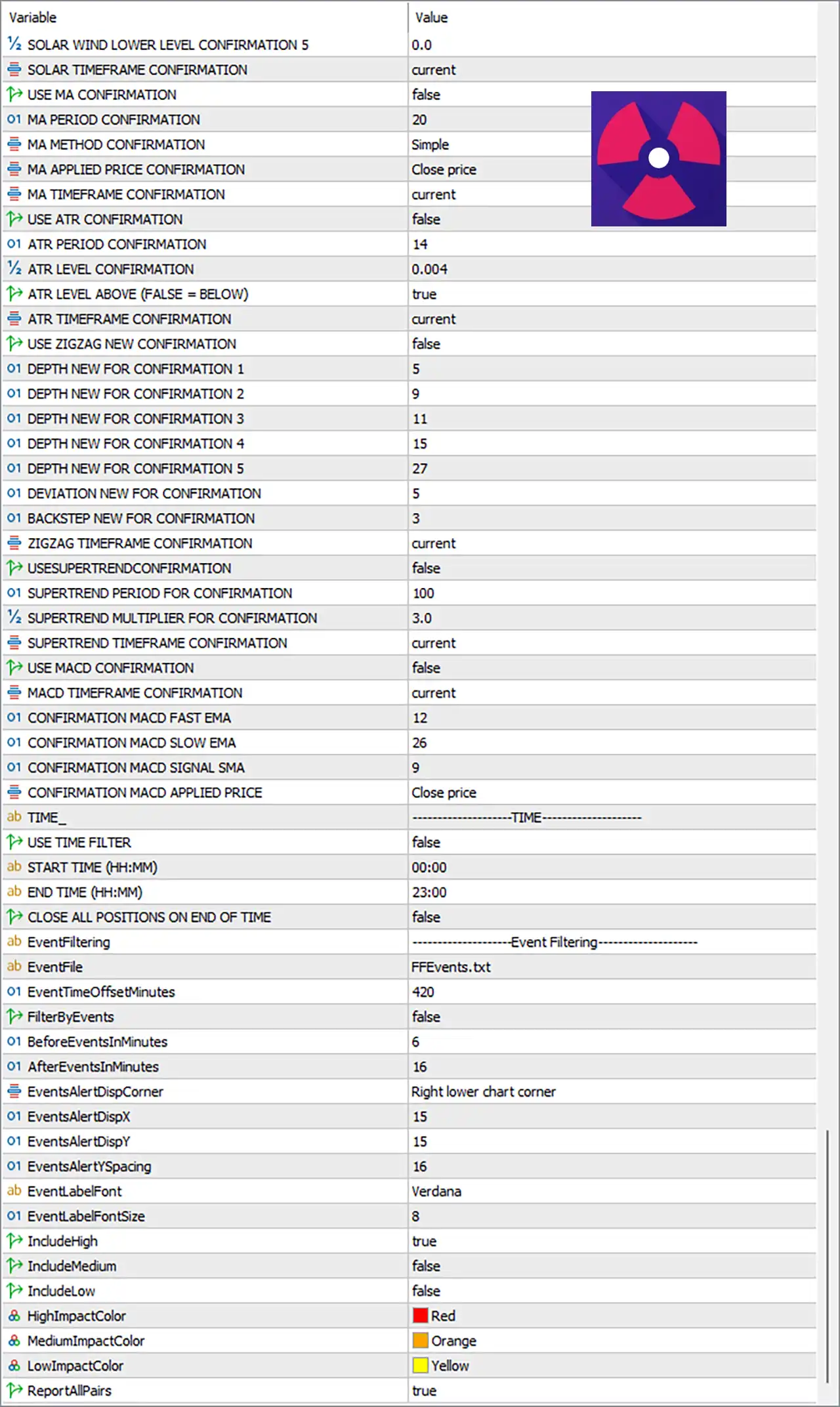
Reactor EA MT5 Parameters
🔶 Parameters
🔹 COMMISSION PER LOT STANDARD = 0.0 – Sets the commission per standard lot to 0.0 for profit and money management calculations.
🔹 WAITTING CANDLE CLOSE TO ORDER = false – Opens trades immediately without waiting for the candle to close.
🔹 FILLING MODE = ORDER_FILLING_IOC – Uses the Immediate-Or-Cancel (IOC) order filling method.
🔹 ORDER TYPE = BUY AND SELL – Allows both Buy and Sell positions.
🔹 1 BUY AND 1 SELL PER DAY = false – Does not limit trading to one Buy and one Sell order per day.
🔹 BIGGER TIMEFRAME ON THE SAME WAY = false – Disables higher timeframe trend alignment.
🔹 OPPOSITE TRANSACTION = false – Prevents opening opposite-direction positions.
🔹 OPPOSITE CLOSING = false – Does not close trades when an opposite signal appears.
🔹 USE BARS TO SCAN = false – Disables historical bar scanning before opening trades.
🔹 EXTRA ORDER (Including Initial Order) = 10000 – Allows up to 10000 total orders including the initial trade.
🔹 CLOSE PREVIOUS TRANSACTION = false – Keeps existing positions open before opening new trades.
🔹 MAGICNUMBER = 1111 – Assigns the Magic Number 1111 to all EA positions.
🔹 COMMENT = REACTOR EA – Adds REACTOR EA as the trade comment.
🔶 Entry Time Filter
🔹 EntryTimeFilter = true – Enables trading schedule control.
🔹 TradeMonday = false – Disables trading on Monday.
🔹 MondayStartHour = 00:00 – Monday trading starts at 00:00.
🔹 MondayStopHour = 23:00 – Monday trading ends at 23:00.
🔹 TradeTuesday = true – Enables Tuesday trading.
🔹 TuesdayStartHour = 09:00 – Tuesday trading starts at 09:00.
🔹 TuesdayStopHour = 23:00 – Tuesday trading ends at 23:00.
🔹 TradeWednesday = true – Enables Wednesday trading.
🔹 WednesdayStartHour = 00:00 – Wednesday trading starts at 00:00.
🔹 WednesdayStopHour = 23:00 – Wednesday trading ends at 23:00.
🔹 TradeThursday = true – Enables Thursday trading.
🔹 ThursdayStartHour = 00:00 – Thursday trading starts at 00:00.
🔹 ThursdayStopHour = 23:00 – Thursday trading ends at 23:00.
🔹 TradeFriday = false – Disables Friday trading.
🔹 FridayStartHour = 00:00 – Friday start time.
🔹 FridayStopHour = 24:00 – Friday stop time.
🔹 Trade First Day Of Month = false – Ignores first-day-of-month restriction.
🔹 Trade Last Day Of Month = false – Ignores last-day-of-month restriction.
🔶 Order Settings
🔹 USE INDICATOR TO ORDER = MACD – Uses the MACD indicator to generate entry signals.
🔹 USE INDICATOR TO MARTINGALE ORDER = MACD – Uses MACD for Martingale recovery entries.
🔹 Reverse INDICATOR signal on MARTINGALE ORDER = true – Reverses MACD signals when placing Martingale orders.
🔹 Skip Repainting signal on Martingale Order = true – Ignores repainting signals during Martingale recovery.
🔹 Skip First X Signals = 0 – Uses every signal without skipping.
🔹 MAXIMUM LOT = 10.0 – Maximum trading volume is 10.0 lots.
🔹 LOT = 0.01 – Initial trading lot size.
🔹 LOT MULTIPLIER = 2.0 – Multiplies each Martingale position by 2.0.
🔹 Martingale on new signal? = true – Opens Martingale trades only after receiving a new signal.
🔹 Martingale divider = 10.0 – Uses 10.0 as the Martingale spacing/divider value.
🔹 Force new martingale lot to be above prev lot? = true – Ensures every new Martingale lot exceeds the previous lot.
🔹 PIP RANGE = 20 – Distance between Martingale entries is 20 pips.
🔹 PIP RANGE Multiplier = 1.0 – Uses a multiplier of 1.0 for grid spacing.
🔹 USE TRAILING STOP = false – Disables trailing stop.
🔹 TRAILING STOP = 20 – Defines a trailing stop distance of 20 pips if enabled.
🔹 TRAILING STOP MULTIPLIER = 0.8 – Trailing multiplier equals 0.8.
🔶 Virtual Orders
🔹 Virtual Orders Enabled? = false – Disables virtual order simulation.
🔹 Wait for In Direction Signal for Real Entry? = true – Waits for a valid confirmation before placing a real trade.
🔹 Reset Virtual Entry if opposite signal happened = false – Keeps virtual entries active despite opposite signals.
🔹 Virtual Steps = 1 – Uses 1 virtual step.
🔹 Virtual Lot = 0.01 – Virtual order size.
🔹 Virtual LOT MULTIPLIER = 2.0 – Virtual Martingale multiplier.
🔹 Virtual PIP RANGE = 20 – Virtual order spacing.
🔹 Virtual PIP RANGE Multiplier = 1.0 – Virtual spacing multiplier.
🔹 Virtual TARGET PIP = 20 – Virtual profit target of 20 pips.
🔹 Virtual TARGET DOLLAR = 0.0 – Dollar target disabled.
🔶 Confirmation Filters
🔹 USE MA CONFIRMATION = false – Disables Moving Average confirmation.
🔹 MA PERIOD CONFIRMATION = 20 – Moving Average period is 20.
🔹 MA METHOD CONFIRMATION = Simple – Uses a Simple Moving Average.
🔹 MA APPLIED PRICE CONFIRMATION = Close price – MA is calculated using closing prices.
🔹 MA TIMEFRAME CONFIRMATION = current – Uses the current chart timeframe.
🔹 USE ATR CONFIRMATION = false – ATR confirmation disabled.
🔹 ATR PERIOD CONFIRMATION = 14 – ATR period is 14.
🔹 ATR LEVEL CONFIRMATION = 0.004 – ATR threshold value.
🔹 ATR LEVEL ABOVE (FALSE = BELOW) = true – Requires ATR to remain above the threshold.
🔹 ATR TIMEFRAME CONFIRMATION = current – Uses current timeframe ATR.
🔹 USE ZIGZAG NEW CONFIRMATION = false – ZigZag confirmation disabled.
🔹 DEPTH NEW FOR CONFIRMATION 1–5 = 5, 9, 11, 15, 27 – Defines ZigZag depth settings.
🔹 DEVIATION NEW FOR CONFIRMATION = 5 – ZigZag deviation.
🔹 BACKSTEP NEW FOR CONFIRMATION = 3 – ZigZag backstep.
🔹 ZIGZAG TIMEFRAME CONFIRMATION = current – Uses the current timeframe.
🔹 USE SUPERTREND CONFIRMATION = false – SuperTrend confirmation disabled.
🔹 SUPERTREND PERIOD FOR CONFIRMATION = 100 – SuperTrend period.
🔹 SUPERTREND MULTIPLIER FOR CONFIRMATION = 3.0 – SuperTrend multiplier.
🔹 SUPERTREND TIMEFRAME CONFIRMATION = current – Uses current timeframe.
🔹 USE MACD CONFIRMATION = false – MACD confirmation disabled.
🔹 MACD TIMEFRAME CONFIRMATION = current – Uses current timeframe.
🔹 CONFIRMATION MACD FAST EMA = 12 – Fast EMA period.
🔹 CONFIRMATION MACD SLOW EMA = 26 – Slow EMA period.
🔹 CONFIRMATION MACD SIGNAL SMA = 9 – Signal SMA period.
🔹 CONFIRMATION MACD APPLIED PRICE = Close price – Uses closing prices.
🔹 USE RSI CONFIRMATION = false – RSI confirmation disabled.
🔹 RSI PERIOD CONFIRMATION = 14 – RSI period.
🔹 RSI APPLIED PRICE CONFIRMATION = Close price – RSI calculation price.
🔹 RSI UPPER LEVEL CONFIRMATION (FOR BUY) = 70 – Buy threshold.
🔹 RSI LOWER LEVEL CONFIRMATION (FOR SELL) = 30 – Sell threshold.
🔹 RSI TIMEFRAME CONFIRMATION = current – Uses current timeframe.
🔹 USE STOCHASTIC CONFIRMATION = false – Stochastic confirmation disabled.
🔹 STO K-period = 5 – K period.
🔹 STO D-period = 3 – D period.
🔹 STO final smoothing = 3 – Final smoothing value.
🔹 STO type of smoothing = Simple – Simple smoothing method.
🔹 STO stochastic calculation method = Low/High – Uses Low/High calculation.
🔹 STO Level UP = 70.0 – Upper stochastic level.
🔹 STO Level DOWN = 30.0 – Lower stochastic level.
🔹 STO APPLIED PRICE = Close price – Uses closing price.
🔹 STO TIMEFRAME TO CONFIRMATION = current – Uses current timeframe.
🔹 USE SAR CONFIRMATION = false – SAR confirmation disabled.
🔹 STEP SAR CONFIRMATION = 0.02 – SAR step.
🔹 MAXIMUM SAR CONFIRMATION = 0.2 – Maximum SAR value.
🔹 SAR TIMEFRAME CONFIRMATION = current – Uses current timeframe.
🔹 USE SOLAR CONFIRMATION = false – Solar Wind confirmation disabled.
🔹 SOLAR PERIOD CONFIRMATION 1–5 = 2, 11, 63, 189, 378 – Solar Wind periods.
🔹 SOLAR WIND UPPER/LOWER LEVEL CONFIRMATION 1–5 = 0.0 – Solar Wind threshold values.
🔶 Time Settings
🔹 USE TIME FILTER = false – Global time filter disabled.
🔹 START TIME (HH:MM) = 00:00 – Trading start time.
🔹 END TIME (HH:MM) = 23:00 – Trading end time.
🔹 CLOSE ALL POSITIONS ON END OF TIME = false – Keeps trades open after trading hours.
🔶 Event Filtering
🔹 EventFile = FFEvents.txt – Uses FFEvents.txt for news events.
🔹 EventTimeOffsetMinutes = 420 – Applies a 420-minute time offset.
🔹 FilterByEvents = false – News filtering disabled.
🔹 BeforeEventsInMinutes = 6 – Minutes before events.
🔹 AfterEventsInMinutes = 16 – Minutes after events.
🔹 EventsAlertDispCorner = Right lower chart corner – Alert position.
🔹 EventsAlertDispX = 15 – Horizontal offset.
🔹 EventsAlertDispY = 15 – Vertical offset.
🔹 EventsAlertYSpacing = 16 – Vertical spacing.
🔹 EventLabelFont = Verdana – Font family.
🔹 EventLabelFontSize = 8 – Font size.
🔹 IncludeHigh = true – Includes high-impact events.
🔹 IncludeMedium = false – Excludes medium-impact events.
🔹 IncludeLow = false – Excludes low-impact events.
🔹 HighImpactColor = Red – High-impact news color.
🔹 MediumImpactColor = Orange – Medium-impact news color.
🔹 LowImpactColor = Yellow – Low-impact news color.
🔹 ReportAllPairs = true – Displays news for all currency pairs.
🔶 Closing Settings
🔹 USE TARGET PIP = false – Disables pip-based closing.
🔹 TARGET PIP = 20 – Profit target equals 20 pips if enabled.
🔹 CLOSE ON NEXT SIGNAL = false – Ignores opposite signals for closing.
🔹 CLOSE ON OPPOSITE SIGNAL ON MAIN CHART = false – Main-chart opposite signal closing disabled.
🔹 USE TARGET DOLLAR TO CLOSE ORDER = true – Uses dollar profit targets.
🔹 TARGET $ TO CLOSE ONE ORDER = 0.35 – Closes one order at $0.35 profit.
🔹 TARGET $ TO CLOSE MORE THAN ONE ORDER = 1.0 – Basket closes at $1.0 profit.
🔹 USE TARGET PERCENT TO CLOSE ORDER = false – Percentage closing disabled.
🔹 TARGET % TO CLOSE ONE ORDER = 2.0 – Percentage target.
🔹 TARGET % TO CLOSE MORE THAN ONE ORDER = 10.0 – Basket percentage target.
🔹 USE STOPLOSS PERCENT TO CLOSE ORDER = false – Percentage stop loss disabled.
🔹 STOPLOSS % TO CLOSE ORDER = 20.0 – Stop-loss percentage.
🔹 CLOSE ORDER BY INDICATOR = false – Indicator-based exits disabled.
🔹 SELECT INDICATOR TO CLOSE = ATR – ATR selected as exit indicator when enabled.
🔹 ATR PERIOD TO CLOSE = 14 – ATR exit period.
🔹 ATR TIMEFRAME TO CLOSE = current – Current timeframe.
🔹 ATR LEVEL TO CLOSE = 0.004 – ATR exit threshold.
🔹 SOLAR, MA, SAR, RSI, STOCHASTIC, ZIGZAG, SUPERTREND Closing Parameters – Configure indicator-specific values used when indicator-based closing is enabled.
🔢 Conclusion
Reactor EA MT5 is an advanced automated trading system that offers exceptional flexibility through indicator-driven entries, Martingale recovery, virtual order simulation, sophisticated confirmation filters, news event management and multiple exit methods.
Whether you prefer MACD-based strategies or highly customized multi-indicator confirmation systems, Reactor EA MT5 provides extensive parameter control to adapt the EA to various trading styles and market environments.
🔢 FAQs
❓ What is the primary entry indicator used by Reactor EA MT5?
By default, the EA uses the MACD indicator for both initial and Martingale trade entries.
❓ Does Reactor EA MT5 support Martingale trading?
Yes. It includes configurable Martingale lot multipliers, pip spacing, maximum lot limits, and recovery settings.
❓ Can I enable multiple indicator confirmations?
Yes. The EA supports MA, ATR, RSI, Stochastic, MACD, SuperTrend, ZigZag, SAR, and Solar Wind confirmations.
❓ Does Reactor EA MT5 include a built-in news filter?
Yes. It supports FFEvents.txt event filtering with customizable impact levels, although it is disabled in this preset.
❓ Can Reactor EA MT5 close trades using different methods?
Yes. It supports closing by profit in dollars, pips, percentages, ATR, RSI, MACD, SuperTrend, ZigZag, SAR, Solar Wind, Stochastic, and other configurable indicators.
User Reviews
Only logged in customers who have purchased this product may leave a review.
❓ What is Reactor EA MT5 designed for?
Reactor EA MT5 is a fully automated intraday trading system that combines multiple technical indicators to identify market opportunities and execute trades efficiently.
❓ Which currency pairs work best with Reactor EA MT5?
Reactor EA MT5 is optimized for EURUSD, GBPUSD, USDCAD, AUDUSD, and USDJPY, delivering reliable performance across major Forex pairs on MT5.
❓ What timeframe is recommended for Reactor EA MT5?
Reactor EA MT5 performs best on M15, M30, H1, and H4 charts, providing flexible trading options for both short-term and medium-term strategies.
❓ Does Reactor EA MT5 use trend-following or counter-trend strategies?
Reactor EA MT5 combines both counter-trend and trend-following logic, allowing it to adapt automatically to changing market conditions for better entries.
❓ Can Reactor EA MT5 be customized with different settings?
Yes. Reactor EA MT5 offers extensive input parameters, enabling traders to customize indicators, filters, money management, and trading behavior to fit their goals.
❓ Does Reactor EA MT5 trade every day of the week?
No. Reactor EA MT5 is configured to avoid opening new trades on Mondays and Fridays, helping reduce exposure during less favorable trading sessions.
❓ What is the recommended account size for Reactor EA MT5?
Reactor EA MT5 is recommended for accounts starting from $1,000, although larger balances generally provide greater flexibility and improved risk management.
❓ Has Reactor EA MT5 been thoroughly backtested?
Yes. Reactor EA MT5 has been tested with high-quality tick data from 2013, achieving 99.90% modeling accuracy using realistic spreads and slippage conditions.
❓ What leverage is recommended for Reactor EA MT5?
Reactor EA MT5 is recommended for trading with leverage of 1:200 or higher, providing sufficient margin for its automated strategy and position management.
-
 Original price was: $500.00.$89.00Current price is: $89.00.
 -
 Original price was: $1,499.00.$199.00Current price is: $199.00.
 -
 Original price was: $3,999.00.$299.00Current price is: $299.00.
 -
 Price range: $60.00 through $599.00
-
 2
2 -
 2
2 -
 2
2 -
 0
0
There are no reviews yet.