
🔢 Devils Contract EA MT5 Settings Guide
Devils Contract EA is a configurable automated trading Expert Advisor built around a multi-strategy execution framework.
The supplied configuration combines money management, drawdown protection, economic-news filtering, basket visualization, trading controls and 36 individually switchable strategies.
This settings guide explains every visible parameter from the supplied screenshots, preserving all numerical values, Boolean states, currencies, URLs, and configuration details exactly as shown.
🔄 Money Management Settings
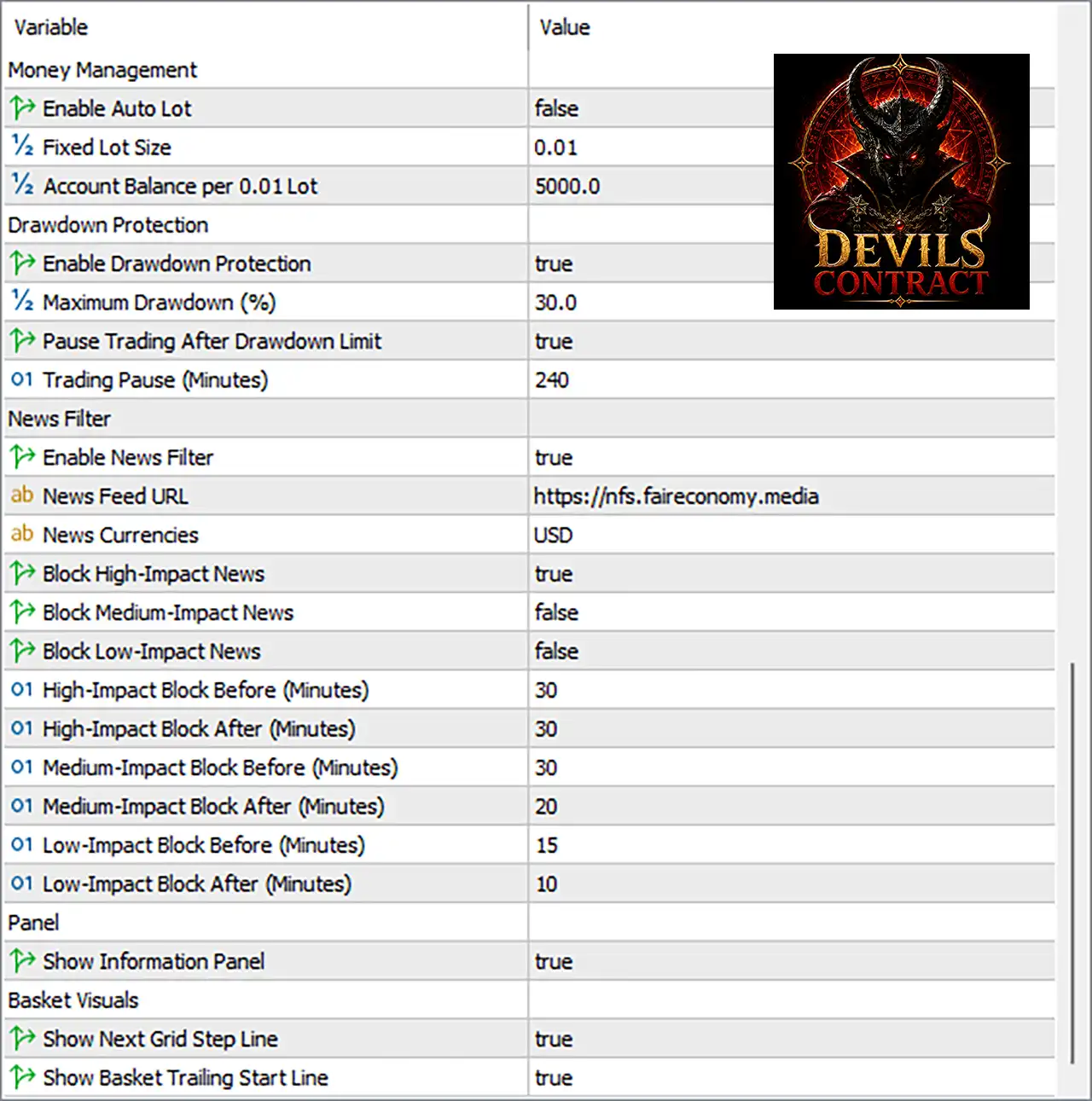
🔹 Enable Auto Lot: false — Disables automatic lot calculation, so the EA uses the configured fixed lot size instead.
🔹 Fixed Lot Size: 0.01 — Sets the trading volume to 0.01 lots when Auto Lot is disabled.
🔹 Account Balance per 0.01 Lot: 5000.0 — Defines 5000.0 units of account balance as the reference amount corresponding to 0.01 lot when automatic sizing is used.
🔄 Drawdown Protection
🔹 Enable Drawdown Protection: true — Enables the EA's drawdown protection mechanism.
🔹 Maximum Drawdown (%): 30.0 — Sets the maximum permitted drawdown threshold to 30.0%.
🔹 Pause Trading After Drawdown Limit: true — Instructs the EA to pause new trading after the configured drawdown limit is reached.
🔹 Trading Pause (Minutes): 240 — Sets the trading suspension period to 240 minutes after the drawdown protection is triggered.
🔄 News Filter Settings
🔹 Enable News Filter: true — Activates the economic-news filtering system.
🔹 News Feed URL: https://nfs.faireconomy.media — Specifies the external news-feed source used by the EA.
🔹 News Currencies: USD — Configures the news filter to monitor economic events associated with the USD.
🔹 Block High-Impact News: true — Enables trading protection around high-impact economic announcements.
🔹 Block Medium-Impact News: false — Disables blocking around medium-impact economic events.
🔹 Block Low-Impact News: false — Disables blocking around low-impact economic events.
🔹 High-Impact Block Before (Minutes): 30 — Blocks trading 30 minutes before a high-impact event.
🔹 High-Impact Block After (Minutes): 30 — Blocks trading for 30 minutes after a high-impact event.
🔹 Medium-Impact Block Before (Minutes): 30 — Defines a 30-minute pre-event window if medium-impact blocking is enabled.
🔹 Medium-Impact Block After (Minutes): 20 — Defines a 20-minute post-event window if medium-impact blocking is enabled.
🔹 Low-Impact Block Before (Minutes): 15 — Defines a 15-minute pre-event window if low-impact blocking is enabled.
🔹 Low-Impact Block After (Minutes): 10 — Defines a 10-minute post-event window if low-impact blocking is enabled.
🔄 Information Panel
🔹 Show Information Panel: true — Displays the EA's information panel on the trading chart.
🔄 Basket Visual Settings
🔹 Show Next Grid Step Line: true — Displays the next grid-step level on the chart when applicable.
🔹 Show Basket Trailing Start Line: true — Displays the basket trailing-start level visually on the chart.
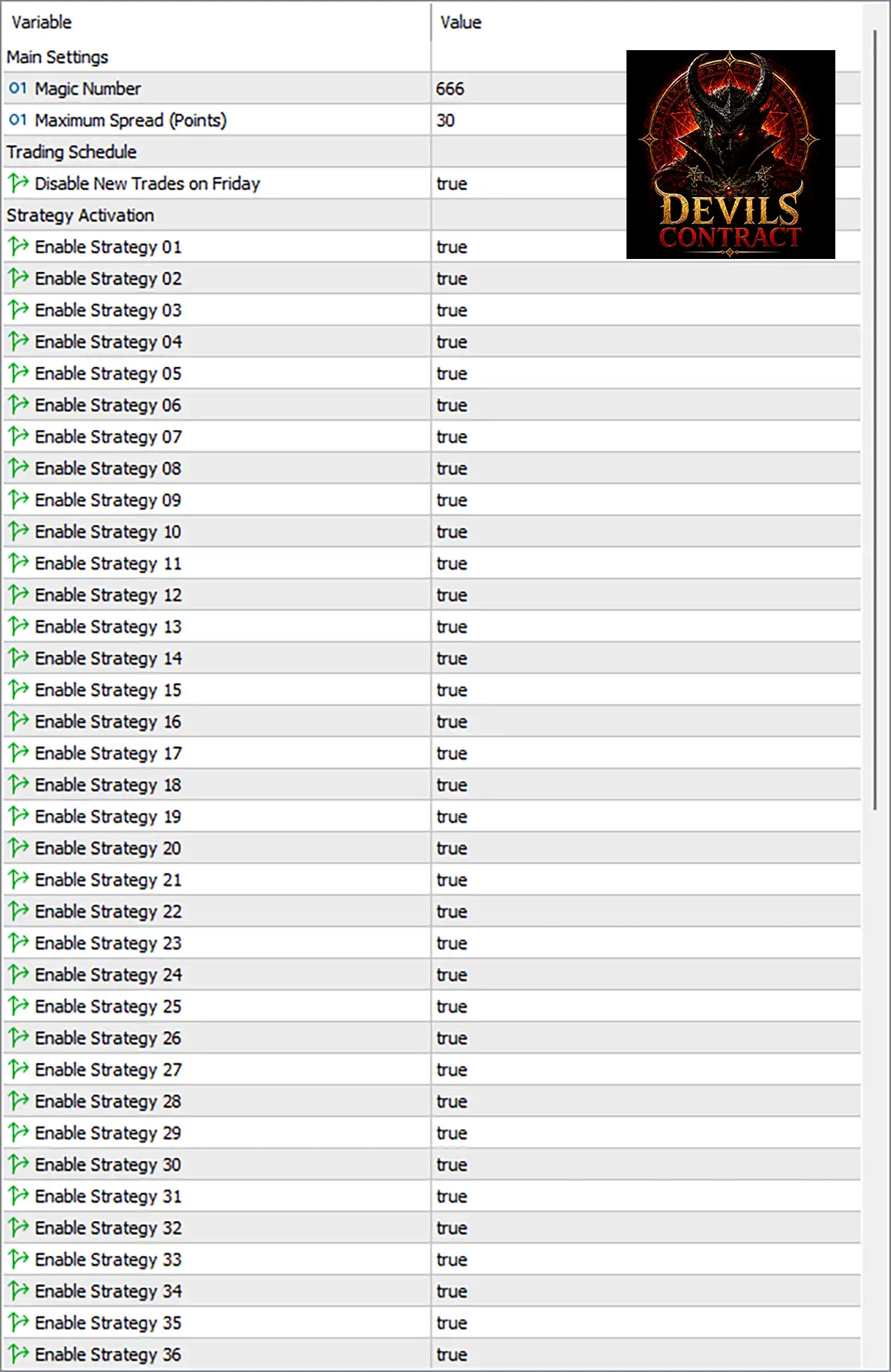
🔢 Devils Contract EA MT5 Main Settings
Main Settings
🔹 Magic Number: 666 — Provides the unique trade identifier used by Devils Contract EA MT5 to recognize and manage its positions.
🔹 Maximum Spread (Points): 30 — Sets the maximum allowed spread to 30 points for trading conditions.
🔄 Trading Schedule
🔹 Disable New Trades on Friday: true — Prevents the EA from opening new trades on Friday when this setting is active.
🔄 Strategy Activation
The EA provides 36 independently configurable strategies. Every strategy shown in the supplied screenshot is currently enabled.
🔹 Enable Strategy 01: true — Activates Strategy 01 for trading.
🔹 Enable Strategy 02: true — Activates Strategy 02 for trading.
🔹 Enable Strategy 03: true — Activates Strategy 03 for trading.
🔹 Enable Strategy 04: true — Activates Strategy 04 for trading.
🔹 Enable Strategy 05: true — Activates Strategy 05 for trading.
🔹 Enable Strategy 06: true — Activates Strategy 06 for trading.
🔹 Enable Strategy 07: true — Activates Strategy 07 for trading.
🔹 Enable Strategy 08: true — Activates Strategy 08 for trading.
🔹 Enable Strategy 09: true — Activates Strategy 09 for trading.
🔹 Enable Strategy 10: true — Activates Strategy 10 for trading.
🔹 Enable Strategy 11: true — Activates Strategy 11 for trading.
🔹 Enable Strategy 12: true — Activates Strategy 12 for trading.
🔹 Enable Strategy 13: true — Activates Strategy 13 for trading.
🔹 Enable Strategy 14: true — Activates Strategy 14 for trading.
🔹 Enable Strategy 15: true — Activates Strategy 15 for trading.
🔹 Enable Strategy 16: true — Activates Strategy 16 for trading.
🔹 Enable Strategy 17: true — Activates Strategy 17 for trading.
🔹 Enable Strategy 18: true — Activates Strategy 18 for trading.
🔹 Enable Strategy 19: true — Activates Strategy 19 for trading.
🔹 Enable Strategy 20: true — Activates Strategy 20 for trading.
🔹 Enable Strategy 21: true — Activates Strategy 21 for trading.
🔹 Enable Strategy 22: true — Activates Strategy 22 for trading.
🔹 Enable Strategy 23: true — Activates Strategy 23 for trading.
🔹 Enable Strategy 24: true — Activates Strategy 24 for trading.
🔹 Enable Strategy 25: true — Activates Strategy 25 for trading.
🔹 Enable Strategy 26: true — Activates Strategy 26 for trading.
🔹 Enable Strategy 27: true — Activates Strategy 27 for trading.
🔹 Enable Strategy 28: true — Activates Strategy 28 for trading.
🔹 Enable Strategy 29: true — Activates Strategy 29 for trading.
🔹 Enable Strategy 30: true — Activates Strategy 30 for trading.
🔹 Enable Strategy 31: true — Activates Strategy 31 for trading.
🔹 Enable Strategy 32: true — Activates Strategy 32 for trading.
🔹 Enable Strategy 33: true — Activates Strategy 33 for trading.
🔹 Enable Strategy 34: true — Activates Strategy 34 for trading.
🔹 Enable Strategy 35: true — Activates Strategy 35 for trading.
🔹 Enable Strategy 36: true — Activates Strategy 36 for trading.
🔄 Current Configuration Overview
🔹 Automatic Lot Sizing: false — The current setup does not use Auto Lot and instead uses Fixed Lot Size 0.01.
🔹 Drawdown Protection: true — The protection system is active with a 30.0% maximum drawdown.
🔹 Drawdown Trading Pause: true — Trading pauses for 240 minutes after the configured drawdown limit is reached.
🔹 News Filter: true — Economic-news protection is enabled.
🔹 News Currency: USD — The news filter monitors USD-related events.
🔹 High-Impact News Protection: true — Trading is blocked 30 minutes before and 30 minutes after high-impact news.
🔹 Medium-Impact News Protection: false — Medium-impact events are not currently blocked.
🔹 Low-Impact News Protection: false — Low-impact events are not currently blocked.
🔹 Maximum Spread: 30 points — The EA is configured to reject trading conditions above the specified spread limit.
🔹 Friday New Entries: Disabled with Disable New Trades on Friday = true.
🔹 Information Panel: true — The chart information panel is enabled.
🔹 Next Grid Step Visualization: true — The next grid level is shown on the chart.
🔹 Basket Trailing Visualization: true — The basket trailing-start line is displayed.
🔹 Active Strategies: 36/36 — All 36 strategies visible in the supplied configuration are enabled.
🔢 Conclusion
Devils Contract EA MT5 provides a highly configurable framework centered on multi-strategy trading, automated execution controls, drawdown protection, news filtering, and visual basket management.
The supplied configuration is particularly notable for having all 36 strategies enabled, while maintaining several protective mechanisms. Drawdown Protection = true with a 30.0% maximum drawdown and a 240-minute trading pause provides a defined account-level trading restriction. The news filter is also active, specifically blocking USD high-impact events for 30 minutes before and 30 minutes after the release.
The EA currently operates with Auto Lot disabled and a Fixed Lot Size of 0.01, while the Maximum Spread is 30 points and new trades are disabled on Friday.
For live deployment, traders should carefully evaluate the combination of 36 enabled strategies, fixed position sizing, grid-related visual controls, and a 30.0% drawdown threshold through backtesting and forward testing. The displayed settings describe configuration parameters, not a guarantee of profitability or a particular future trading result.
🔢 FAQs
❓ What is the Magic Number of Devils Contract EA MT5?
The Magic Number is 666, which is used to identify and manage the EA's trades.
❓ How many strategies are enabled in Devils Contract EA MT5?
All 36 strategies, from Strategy 01 through Strategy 36, are set to true in the supplied configuration.
❓ Does Devils Contract EA MT5 use automatic lot sizing?
No. Enable Auto Lot = false, so the current configuration uses a Fixed Lot Size of 0.01.
❓ Does the EA have drawdown protection?
Yes. Enable Drawdown Protection = true, with a Maximum Drawdown of 30.0% and a Trading Pause of 240 minutes after the limit is reached.
❓ Does Devils Contract EA MT5 filter high-impact news?
Yes. The News Filter is enabled, USD is the monitored currency, and Block High-Impact News = true with protection of 30 minutes before and 30 minutes after the event.


