
🔢 Reactor EA MT5 Settings Explained – Complete Parameter Guide
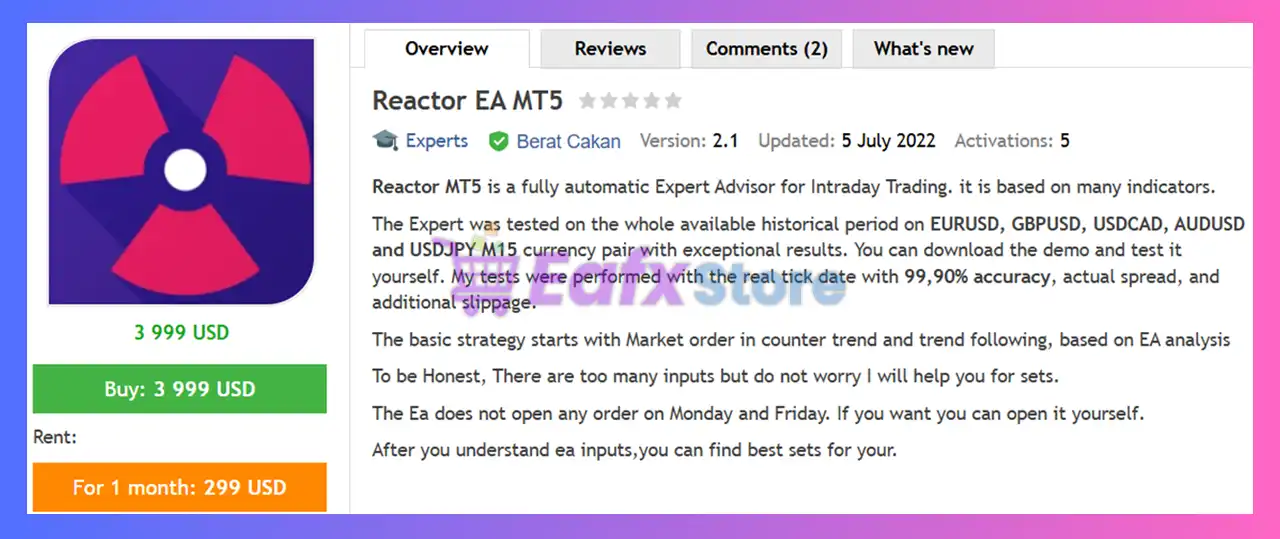
Reactor EA MT5 is a highly configurable MetaTrader 5 Expert Advisor that combines indicator-based trade entries, Martingale money management, virtual order simulation, advanced confirmation filters, event filtering and flexible exit management.
With support for MACD, RSI, Stochastic, ATR, SuperTrend, ZigZag, Solar Wind, Moving Average, and multiple time filters, Reactor EA MT5 allows traders to build highly customized automated trading strategies for different market conditions.
🔢 Installation Panel Parameters
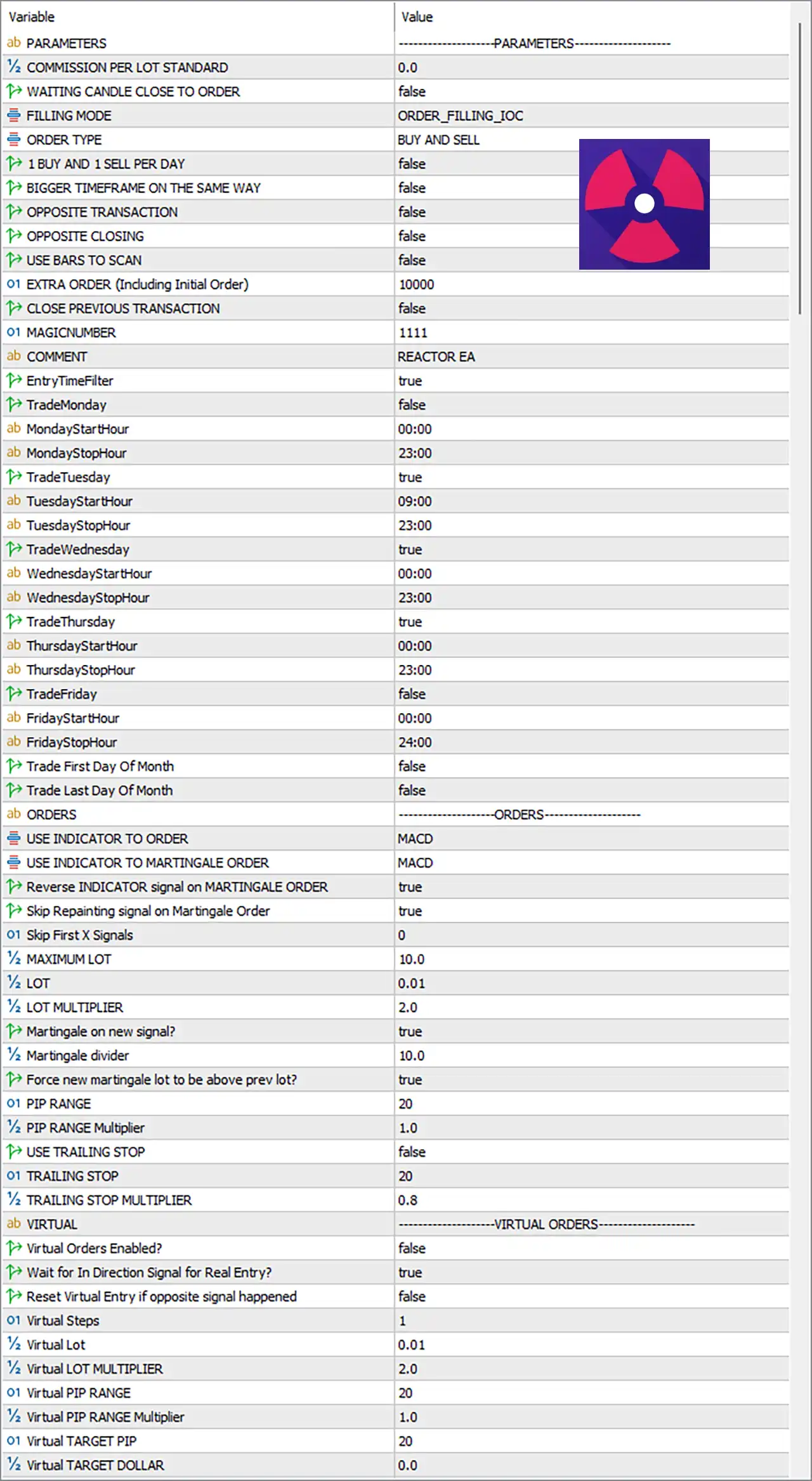
Below are the details of the parameters in the advisor’s trading system settings table:
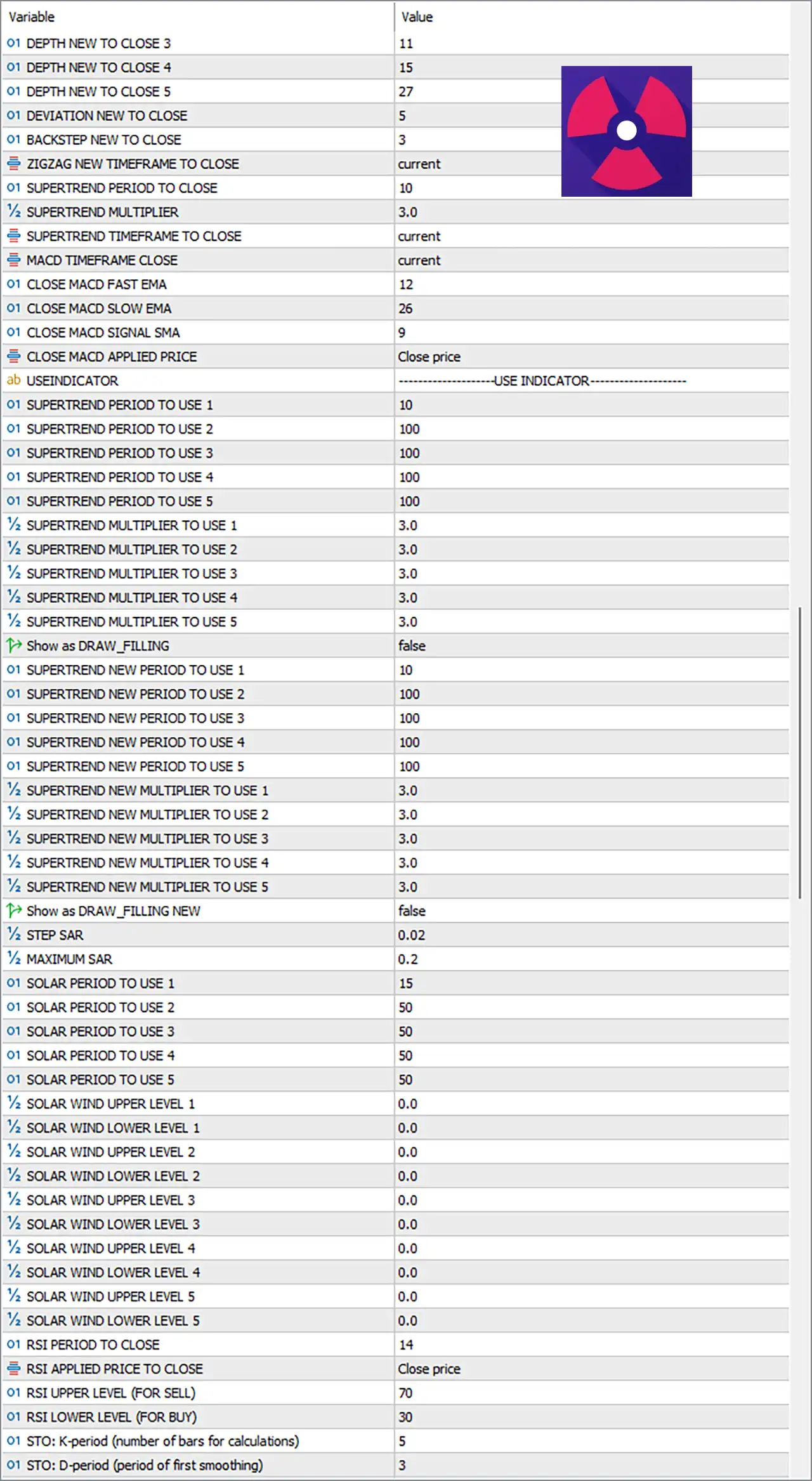
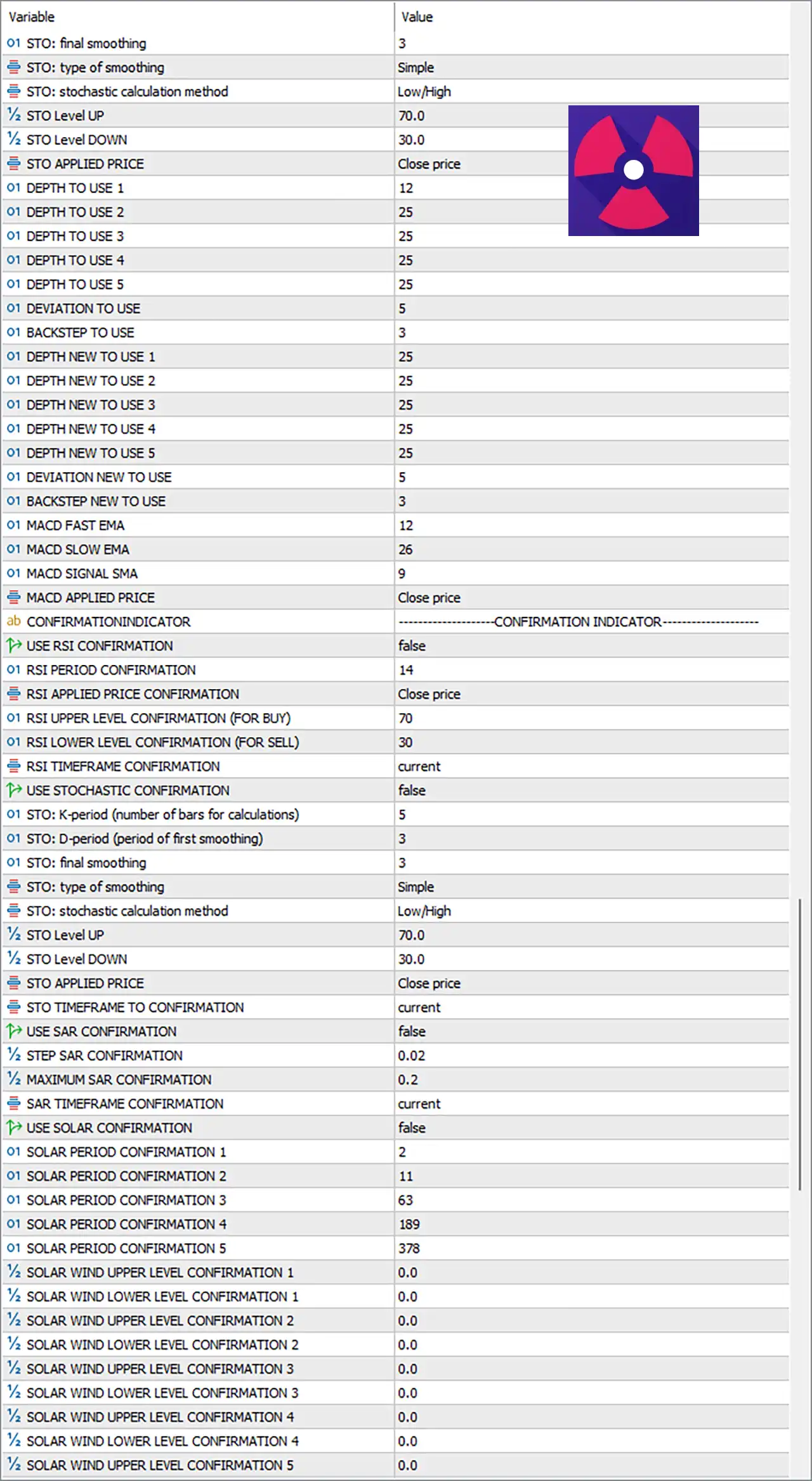
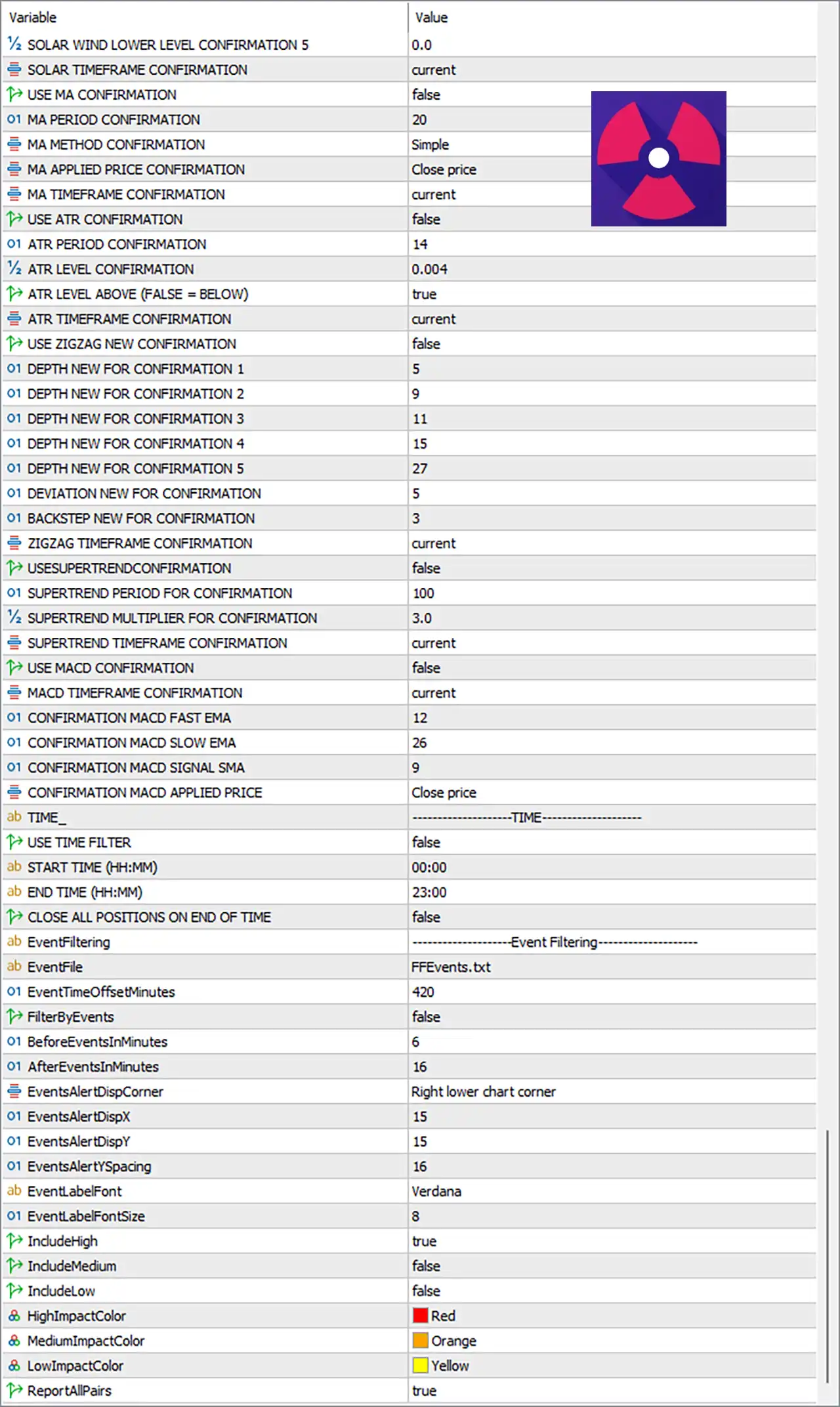
🔶 Parameters
🔹 COMMISSION PER LOT STANDARD = 0.0 – Sets the commission per standard lot to 0.0 for profit and money management calculations.
🔹 WAITTING CANDLE CLOSE TO ORDER = false – Opens trades immediately without waiting for the candle to close.
🔹 FILLING MODE = ORDER_FILLING_IOC – Uses the Immediate-Or-Cancel (IOC) order filling method.
🔹 ORDER TYPE = BUY AND SELL – Allows both Buy and Sell positions.
🔹 1 BUY AND 1 SELL PER DAY = false – Does not limit trading to one Buy and one Sell order per day.
🔹 BIGGER TIMEFRAME ON THE SAME WAY = false – Disables higher timeframe trend alignment.
🔹 OPPOSITE TRANSACTION = false – Prevents opening opposite-direction positions.
🔹 OPPOSITE CLOSING = false – Does not close trades when an opposite signal appears.
🔹 USE BARS TO SCAN = false – Disables historical bar scanning before opening trades.
🔹 EXTRA ORDER (Including Initial Order) = 10000 – Allows up to 10000 total orders including the initial trade.
🔹 CLOSE PREVIOUS TRANSACTION = false – Keeps existing positions open before opening new trades.
🔹 MAGICNUMBER = 1111 – Assigns the Magic Number 1111 to all EA positions.
🔹 COMMENT = REACTOR EA – Adds REACTOR EA as the trade comment.
🔶 Entry Time Filter
🔹 EntryTimeFilter = true – Enables trading schedule control.
🔹 TradeMonday = false – Disables trading on Monday.
🔹 MondayStartHour = 00:00 – Monday trading starts at 00:00.
🔹 MondayStopHour = 23:00 – Monday trading ends at 23:00.
🔹 TradeTuesday = true – Enables Tuesday trading.
🔹 TuesdayStartHour = 09:00 – Tuesday trading starts at 09:00.
🔹 TuesdayStopHour = 23:00 – Tuesday trading ends at 23:00.
🔹 TradeWednesday = true – Enables Wednesday trading.
🔹 WednesdayStartHour = 00:00 – Wednesday trading starts at 00:00.
🔹 WednesdayStopHour = 23:00 – Wednesday trading ends at 23:00.
🔹 TradeThursday = true – Enables Thursday trading.
🔹 ThursdayStartHour = 00:00 – Thursday trading starts at 00:00.
🔹 ThursdayStopHour = 23:00 – Thursday trading ends at 23:00.
🔹 TradeFriday = false – Disables Friday trading.
🔹 FridayStartHour = 00:00 – Friday start time.
🔹 FridayStopHour = 24:00 – Friday stop time.
🔹 Trade First Day Of Month = false – Ignores first-day-of-month restriction.
🔹 Trade Last Day Of Month = false – Ignores last-day-of-month restriction.
🔶 Order Settings
🔹 USE INDICATOR TO ORDER = MACD – Uses the MACD indicator to generate entry signals.
🔹 USE INDICATOR TO MARTINGALE ORDER = MACD – Uses MACD for Martingale recovery entries.
🔹 Reverse INDICATOR signal on MARTINGALE ORDER = true – Reverses MACD signals when placing Martingale orders.
🔹 Skip Repainting signal on Martingale Order = true – Ignores repainting signals during Martingale recovery.
🔹 Skip First X Signals = 0 – Uses every signal without skipping.
🔹 MAXIMUM LOT = 10.0 – Maximum trading volume is 10.0 lots.
🔹 LOT = 0.01 – Initial trading lot size.
🔹 LOT MULTIPLIER = 2.0 – Multiplies each Martingale position by 2.0.
🔹 Martingale on new signal? = true – Opens Martingale trades only after receiving a new signal.
🔹 Martingale divider = 10.0 – Uses 10.0 as the Martingale spacing/divider value.
🔹 Force new martingale lot to be above prev lot? = true – Ensures every new Martingale lot exceeds the previous lot.
🔹 PIP RANGE = 20 – Distance between Martingale entries is 20 pips.
🔹 PIP RANGE Multiplier = 1.0 – Uses a multiplier of 1.0 for grid spacing.
🔹 USE TRAILING STOP = false – Disables trailing stop.
🔹 TRAILING STOP = 20 – Defines a trailing stop distance of 20 pips if enabled.
🔹 TRAILING STOP MULTIPLIER = 0.8 – Trailing multiplier equals 0.8.
🔶 Virtual Orders
🔹 Virtual Orders Enabled? = false – Disables virtual order simulation.
🔹 Wait for In Direction Signal for Real Entry? = true – Waits for a valid confirmation before placing a real trade.
🔹 Reset Virtual Entry if opposite signal happened = false – Keeps virtual entries active despite opposite signals.
🔹 Virtual Steps = 1 – Uses 1 virtual step.
🔹 Virtual Lot = 0.01 – Virtual order size.
🔹 Virtual LOT MULTIPLIER = 2.0 – Virtual Martingale multiplier.
🔹 Virtual PIP RANGE = 20 – Virtual order spacing.
🔹 Virtual PIP RANGE Multiplier = 1.0 – Virtual spacing multiplier.
🔹 Virtual TARGET PIP = 20 – Virtual profit target of 20 pips.
🔹 Virtual TARGET DOLLAR = 0.0 – Dollar target disabled.
🔶 Confirmation Filters
🔹 USE MA CONFIRMATION = false – Disables Moving Average confirmation.
🔹 MA PERIOD CONFIRMATION = 20 – Moving Average period is 20.
🔹 MA METHOD CONFIRMATION = Simple – Uses a Simple Moving Average.
🔹 MA APPLIED PRICE CONFIRMATION = Close price – MA is calculated using closing prices.
🔹 MA TIMEFRAME CONFIRMATION = current – Uses the current chart timeframe.
🔹 USE ATR CONFIRMATION = false – ATR confirmation disabled.
🔹 ATR PERIOD CONFIRMATION = 14 – ATR period is 14.
🔹 ATR LEVEL CONFIRMATION = 0.004 – ATR threshold value.
🔹 ATR LEVEL ABOVE (FALSE = BELOW) = true – Requires ATR to remain above the threshold.
🔹 ATR TIMEFRAME CONFIRMATION = current – Uses current timeframe ATR.
🔹 USE ZIGZAG NEW CONFIRMATION = false – ZigZag confirmation disabled.
🔹 DEPTH NEW FOR CONFIRMATION 1–5 = 5, 9, 11, 15, 27 – Defines ZigZag depth settings.
🔹 DEVIATION NEW FOR CONFIRMATION = 5 – ZigZag deviation.
🔹 BACKSTEP NEW FOR CONFIRMATION = 3 – ZigZag backstep.
🔹 ZIGZAG TIMEFRAME CONFIRMATION = current – Uses the current timeframe.
🔹 USE SUPERTREND CONFIRMATION = false – SuperTrend confirmation disabled.
🔹 SUPERTREND PERIOD FOR CONFIRMATION = 100 – SuperTrend period.
🔹 SUPERTREND MULTIPLIER FOR CONFIRMATION = 3.0 – SuperTrend multiplier.
🔹 SUPERTREND TIMEFRAME CONFIRMATION = current – Uses current timeframe.
🔹 USE MACD CONFIRMATION = false – MACD confirmation disabled.
🔹 MACD TIMEFRAME CONFIRMATION = current – Uses current timeframe.
🔹 CONFIRMATION MACD FAST EMA = 12 – Fast EMA period.
🔹 CONFIRMATION MACD SLOW EMA = 26 – Slow EMA period.
🔹 CONFIRMATION MACD SIGNAL SMA = 9 – Signal SMA period.
🔹 CONFIRMATION MACD APPLIED PRICE = Close price – Uses closing prices.
🔹 USE RSI CONFIRMATION = false – RSI confirmation disabled.
🔹 RSI PERIOD CONFIRMATION = 14 – RSI period.
🔹 RSI APPLIED PRICE CONFIRMATION = Close price – RSI calculation price.
🔹 RSI UPPER LEVEL CONFIRMATION (FOR BUY) = 70 – Buy threshold.
🔹 RSI LOWER LEVEL CONFIRMATION (FOR SELL) = 30 – Sell threshold.
🔹 RSI TIMEFRAME CONFIRMATION = current – Uses current timeframe.
🔹 USE STOCHASTIC CONFIRMATION = false – Stochastic confirmation disabled.
🔹 STO K-period = 5 – K period.
🔹 STO D-period = 3 – D period.
🔹 STO final smoothing = 3 – Final smoothing value.
🔹 STO type of smoothing = Simple – Simple smoothing method.
🔹 STO stochastic calculation method = Low/High – Uses Low/High calculation.
🔹 STO Level UP = 70.0 – Upper stochastic level.
🔹 STO Level DOWN = 30.0 – Lower stochastic level.
🔹 STO APPLIED PRICE = Close price – Uses closing price.
🔹 STO TIMEFRAME TO CONFIRMATION = current – Uses current timeframe.
🔹 USE SAR CONFIRMATION = false – SAR confirmation disabled.
🔹 STEP SAR CONFIRMATION = 0.02 – SAR step.
🔹 MAXIMUM SAR CONFIRMATION = 0.2 – Maximum SAR value.
🔹 SAR TIMEFRAME CONFIRMATION = current – Uses current timeframe.
🔹 USE SOLAR CONFIRMATION = false – Solar Wind confirmation disabled.
🔹 SOLAR PERIOD CONFIRMATION 1–5 = 2, 11, 63, 189, 378 – Solar Wind periods.
🔹 SOLAR WIND UPPER/LOWER LEVEL CONFIRMATION 1–5 = 0.0 – Solar Wind threshold values.
🔶 Time Settings
🔹 USE TIME FILTER = false – Global time filter disabled.
🔹 START TIME (HH:MM) = 00:00 – Trading start time.
🔹 END TIME (HH:MM) = 23:00 – Trading end time.
🔹 CLOSE ALL POSITIONS ON END OF TIME = false – Keeps trades open after trading hours.
🔶 Event Filtering
🔹 EventFile = FFEvents.txt – Uses FFEvents.txt for news events.
🔹 EventTimeOffsetMinutes = 420 – Applies a 420-minute time offset.
🔹 FilterByEvents = false – News filtering disabled.
🔹 BeforeEventsInMinutes = 6 – Minutes before events.
🔹 AfterEventsInMinutes = 16 – Minutes after events.
🔹 EventsAlertDispCorner = Right lower chart corner – Alert position.
🔹 EventsAlertDispX = 15 – Horizontal offset.
🔹 EventsAlertDispY = 15 – Vertical offset.
🔹 EventsAlertYSpacing = 16 – Vertical spacing.
🔹 EventLabelFont = Verdana – Font family.
🔹 EventLabelFontSize = 8 – Font size.
🔹 IncludeHigh = true – Includes high-impact events.
🔹 IncludeMedium = false – Excludes medium-impact events.
🔹 IncludeLow = false – Excludes low-impact events.
🔹 HighImpactColor = Red – High-impact news color.
🔹 MediumImpactColor = Orange – Medium-impact news color.
🔹 LowImpactColor = Yellow – Low-impact news color.
🔹 ReportAllPairs = true – Displays news for all currency pairs.
🔶 Closing Settings
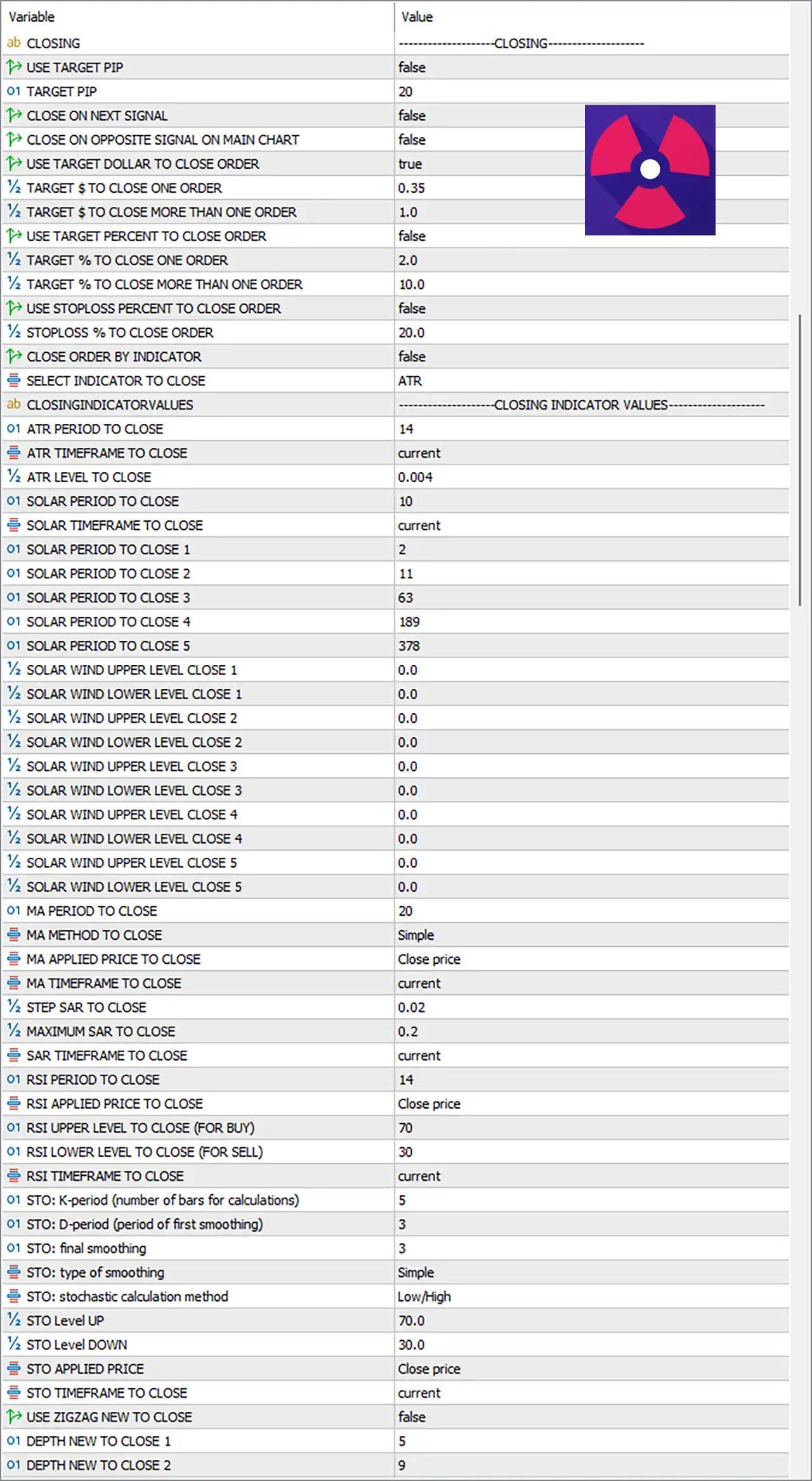
🔹 USE TARGET PIP = false – Disables pip-based closing.
🔹 TARGET PIP = 20 – Profit target equals 20 pips if enabled.
🔹 CLOSE ON NEXT SIGNAL = false – Ignores opposite signals for closing.
🔹 CLOSE ON OPPOSITE SIGNAL ON MAIN CHART = false – Main-chart opposite signal closing disabled.
🔹 USE TARGET DOLLAR TO CLOSE ORDER = true – Uses dollar profit targets.
🔹 TARGET $ TO CLOSE ONE ORDER = 0.35 – Closes one order at $0.35 profit.
🔹 TARGET $ TO CLOSE MORE THAN ONE ORDER = 1.0 – Basket closes at $1.0 profit.
🔹 USE TARGET PERCENT TO CLOSE ORDER = false – Percentage closing disabled.
🔹 TARGET % TO CLOSE ONE ORDER = 2.0 – Percentage target.
🔹 TARGET % TO CLOSE MORE THAN ONE ORDER = 10.0 – Basket percentage target.
🔹 USE STOPLOSS PERCENT TO CLOSE ORDER = false – Percentage stop loss disabled.
🔹 STOPLOSS % TO CLOSE ORDER = 20.0 – Stop-loss percentage.
🔹 CLOSE ORDER BY INDICATOR = false – Indicator-based exits disabled.
🔹 SELECT INDICATOR TO CLOSE = ATR – ATR selected as exit indicator when enabled.
🔹 ATR PERIOD TO CLOSE = 14 – ATR exit period.
🔹 ATR TIMEFRAME TO CLOSE = current – Current timeframe.
🔹 ATR LEVEL TO CLOSE = 0.004 – ATR exit threshold.
🔹 SOLAR, MA, SAR, RSI, STOCHASTIC, ZIGZAG, SUPERTREND Closing Parameters – Configure indicator-specific values used when indicator-based closing is enabled.
🔢 Conclusion
Reactor EA MT5 is an advanced automated trading system that offers exceptional flexibility through indicator-driven entries, Martingale recovery, virtual order simulation, sophisticated confirmation filters, news event management and multiple exit methods.
Whether you prefer MACD-based strategies or highly customized multi-indicator confirmation systems, Reactor EA MT5 provides extensive parameter control to adapt the EA to various trading styles and market environments.
🔢 FAQs
❓ What is the primary entry indicator used by Reactor EA MT5?
By default, the EA uses the MACD indicator for both initial and Martingale trade entries.
❓ Does Reactor EA MT5 support Martingale trading?
Yes. It includes configurable Martingale lot multipliers, pip spacing, maximum lot limits, and recovery settings.
❓ Can I enable multiple indicator confirmations?
Yes. The EA supports MA, ATR, RSI, Stochastic, MACD, SuperTrend, ZigZag, SAR, and Solar Wind confirmations.
❓ Does Reactor EA MT5 include a built-in news filter?
Yes. It supports FFEvents.txt event filtering with customizable impact levels, although it is disabled in this preset.
❓ Can Reactor EA MT5 close trades using different methods?
Yes. It supports closing by profit in dollars, pips, percentages, ATR, RSI, MACD, SuperTrend, ZigZag, SAR, Solar Wind, Stochastic, and other configurable indicators.