
AiX Gold MT5 is an advanced automated trading Expert Advisor (EA) specifically designed for the XAUUSD (Gold) market on MetaTrader 5. It combines multiple breakout trading strategies across daily and hourly timeframes, allowing traders to capture potential market movements through structured entry conditions.
The EA features seven expandable trading strategies (S1–S7), automatic strategy selection, configurable lot sizing, spread and slippage protection, and built-in economic news management. It also incorporates an optional AI review system designed to evaluate trading setups before execution, together with an integrated chart dashboard for monitoring trading activity.
With flexible risk management, pending order controls, advanced breakout detection, and customizable execution settings, AiX Gold MT5 provides traders with a comprehensive framework for automated Gold trading.
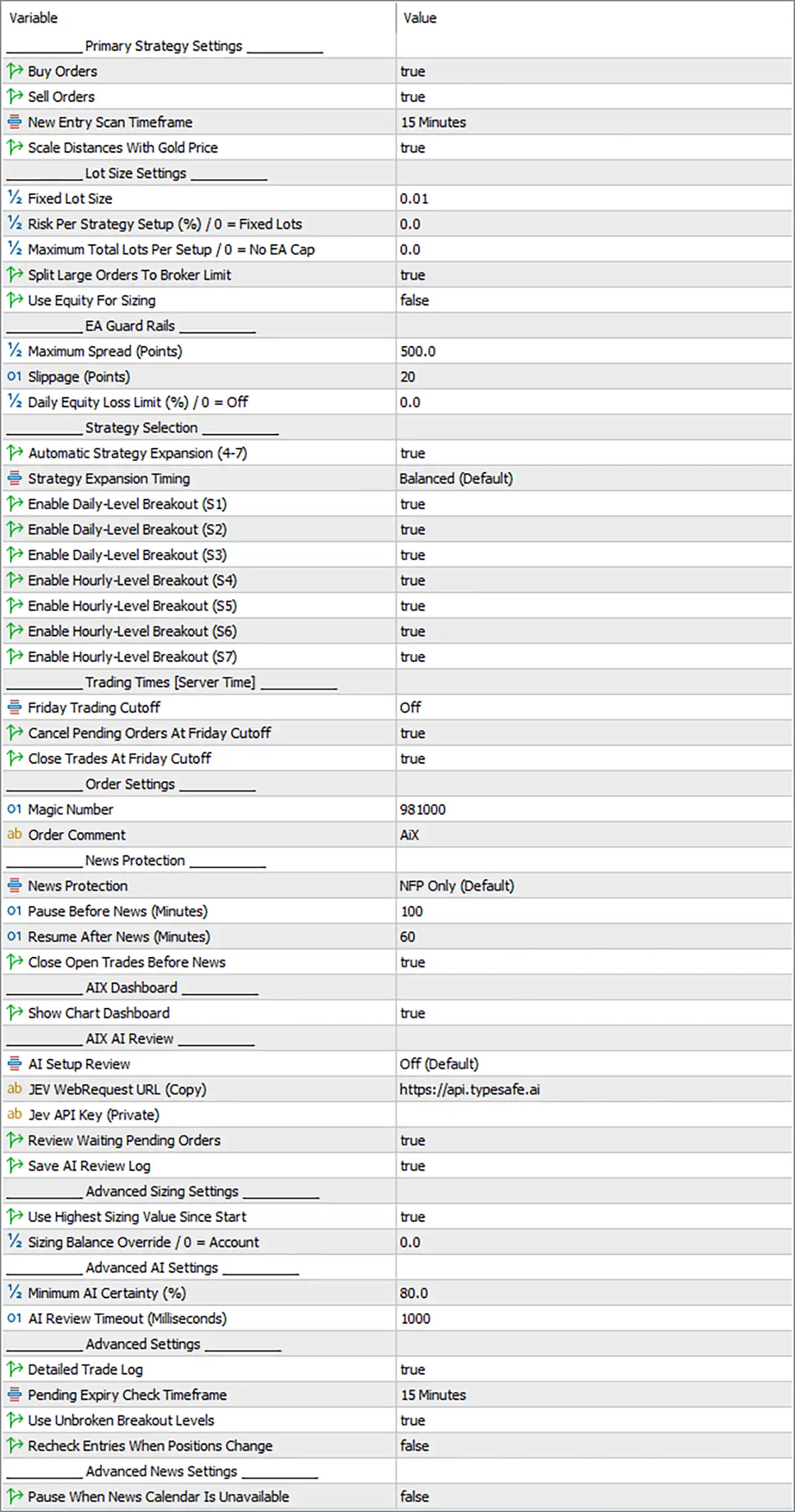
1. Primary Strategy Settings
🔹 Buy Orders: true – Enables the EA to open Buy positions when the configured bullish breakout conditions are satisfied.
🔹 Sell Orders: true – Allows the EA to execute Sell positions when bearish breakout conditions are detected.
🔹 New Entry Scan Timeframe: 15 Minutes – Defines the timeframe used by the EA to scan for new trading opportunities. The current configuration uses the M15 timeframe for entry analysis.
🔹 Scale Distances With Gold Price: true – Automatically adjusts strategy distances according to Gold price levels, helping maintain more consistent distance calculations as the XAUUSD market price changes.
2. Lot Size Settings
🔹 Fixed Lot Size: 0.01 – Defines the fixed trading volume for each position when fixed-lot sizing is used. The default configuration starts with 0.01 lots.
🔹 Risk Per Strategy Setup (%): 0.0 – Determines the percentage of account capital allocated to each individual strategy setup. A value of 0.0 means the EA uses fixed-lot sizing instead of percentage-based risk allocation.
🔹 Maximum Total Lots Per Setup: 0.0 – Sets the maximum combined trading volume allowed for each strategy setup. A value of 0.0 means there is no EA-defined maximum lot cap.
🔹 Split Large Orders To Broker Limit: true – Allows the EA to divide large trading orders into smaller orders when necessary to comply with the broker’s maximum permitted order volume.
🔹 Use Equity For Sizing: false – Determines whether position sizing calculations use account equity instead of account balance. The current false setting means equity-based sizing is disabled.
3. EA Guard Rails – Trading Protection
🔹 Maximum Spread (Points): 500.0 – Defines the maximum permitted market spread in points before the EA blocks new trading entries. This setting helps avoid opening positions under unfavorable spread conditions.
🔹 Slippage (Points): 20 – Sets the maximum permitted execution deviation to 20 points, helping control the difference between the requested execution price and the actual fill price.
🔹 Daily Equity Loss Limit (%): 0.0 – Defines the maximum daily equity loss allowed before the EA activates its daily loss restriction. A value of 0.0 means this particular protection is disabled.
4. Strategy Selection
🔹 Automatic Strategy Expansion (4–7): true – Allows the EA to automatically expand its available trading strategies to include the additional strategies S4, S5, S6, and S7.
🔹 Strategy Expansion Timing: Balanced (Default) – Selects the Balanced timing profile for introducing additional strategies, providing the EA with its default expansion behavior.
🔹 Enable Daily-Level Breakout (S1): true – Activates Strategy S1, which uses daily-level breakout conditions to identify potential trading opportunities.
🔹 Enable Daily-Level Breakout (S2): true – Enables Strategy S2, allowing the EA to identify additional breakout opportunities based on daily price levels.
🔹 Enable Daily-Level Breakout (S3): true – Activates Strategy S3, providing another daily-level breakout configuration within the AiX Gold trading system.
🔹 Enable Hourly-Level Breakout (S4): true – Enables Strategy S4, which focuses on breakout opportunities identified from hourly price levels.
🔹 Enable Hourly-Level Breakout (S5): true – Activates Strategy S5, allowing the EA to recognize additional hourly breakout trading conditions.
🔹 Enable Hourly-Level Breakout (S6): true – Enables Strategy S6, expanding the available hourly breakout configurations for identifying potential market entries.
🔹 Enable Hourly-Level Breakout (S7): true – Activates Strategy S7, completing the seven-strategy configuration with another hourly-level breakout approach.
5. Trading Times – Server Time
🔹 Friday Trading Cutoff: Off – Determines when the EA stops initiating new trades on Friday. The Off setting disables the manually configured Friday cutoff schedule.
🔹 Cancel Pending Orders at Friday Cutoff: true – Instructs the EA to cancel its pending orders when the Friday trading cutoff condition is reached.
🔹 Close Trades at Friday Cutoff: true – Allows the EA to close its managed open positions when the configured Friday cutoff condition is triggered.
6. Order Settings
🔹 Magic Number: 981000 – Assigns the unique identification number 981000 to AiX Gold MT5 orders, allowing the EA to distinguish and manage its own trading positions.
🔹 Order Comment: AIX – Adds the comment AIX to orders generated by the EA, making it easier to identify AiX Gold MT5 transactions in the trading terminal.
7. News Protection
🔹 News Protection: NFP Only (Default) – Selects the Non-Farm Payrolls (NFP) news protection mode, allowing the EA to restrict trading around this major US economic announcement.
🔹 Pause Before News (Minutes): 100 – Stops opening new trading positions 100 minutes before the scheduled NFP announcement to reduce exposure to unexpected volatility.
🔹 Resume After News (Minutes): 60 – Allows the EA to resume new trading activities 60 minutes after the NFP announcement, providing additional time for market conditions to stabilize.
🔹 Close Open Trades Before News: true – Instructs the EA to close its managed open positions before the protected news event, reducing exposure to potentially sharp market movements.
8. AiX Dashboard
🔹 Show Chart Dashboard: true – Displays the AiX Gold MT5 chart dashboard, allowing traders to monitor relevant EA information and trading activity directly from the MetaTrader 5 chart.
9. AiX AI Review
🔹 AI Setup Review: Off (Default) – Determines whether the optional AI-based trading setup review is activated. The current configuration disables AI review, meaning the EA operates without this additional AI evaluation feature.
🔹 JEV WebRequest URL (Copy): https://api.typesafe.ai – Specifies the API endpoint used by the AI review integration. This URL is intended to be copied into the MetaTrader 5 WebRequest allowed URL configuration when AI functionality is required.
🔹 JEV API Key (Private): Empty – Provides the private API key required to authenticate AI review requests. The field is currently blank, so traders must enter their own valid API key if the AI review service requires authentication.
🔹 Review Waiting Pending Orders: true – Allows the AI review system to evaluate pending orders that are waiting for execution, rather than reviewing only immediately available trading setups.
🔹 Save AI Review Log: true – Enables the EA to save AI review records for later reference, helping traders examine previous AI evaluations and review decisions.
10. Advanced Sizing Settings
🔹 Use Highest Sizing Value Since Start: true – Instructs the EA to use the highest recorded sizing value since the trading session or tracking period began, helping prevent position sizing from decreasing below previously reached sizing levels.
🔹 Sizing Balance Override: 0.0 – Allows traders to specify a custom account balance for position-sizing calculations. A value of 0.0 means the EA uses the actual account balance.
11. Advanced AI Settings
🔹 Minimum AI Certainty (%): 80.0 – Defines the minimum AI confidence threshold required for an AI-reviewed trading setup to qualify. The current configuration requires at least 80.0% certainty.
🔹 AI Review Timeout (Milliseconds): 1000 – Sets the maximum waiting time for an AI review request to receive a response. The configured timeout is 1000 milliseconds, equivalent to 1 second.
12. Advanced Settings
🔹 Detailed Trade Log: true – Enables detailed trading logs, allowing traders to inspect additional information about trade evaluations, order execution, and EA decision-making processes.
🔹 Pending Expiry Check Timeframe: 15 Minutes – Defines the timeframe used by the EA to check pending order expiration conditions. The current setting uses the M15 timeframe.
🔹 Use Unbroken Breakout Levels: true – Allows the EA to consider breakout levels that have not yet been broken when identifying potential trading opportunities, helping preserve the validity of established breakout reference levels.
🔹 Recheck Entries When Positions Change: false – Determines whether the EA reassesses trading entry conditions whenever existing positions change. The current false setting disables this additional entry-rechecking behavior.
13. Advanced News Settings
🔹 Pause When News Calendar Is Unavailable: false – Determines whether the EA automatically pauses new trading activities when economic calendar information cannot be retrieved. The current false setting allows the EA to continue operating even when the news calendar is unavailable.
Conclusion
AiX Gold MT5 provides a multi-strategy breakout trading system specifically designed for the Gold market, combining daily-level and hourly-level breakout strategies with configurable execution and risk-management controls.
The displayed configuration enables all seven strategies (S1–S7), uses the M15 entry scanning timeframe, and sets the default fixed trading volume to 0.01 lots. It also includes spread protection at 500.0 points, slippage control at 20 points, and NFP news protection with a 100-minute pre-release pause and a 60-minute post-release waiting period.
One important consideration is that the Daily Equity Loss Limit is currently disabled at 0.0%, while AI Setup Review is also set to Off. Traders should review these settings and configure additional account protection according to their trading capital and risk tolerance.
Overall, AiX Gold MT5 offers flexible breakout strategy selection, automated order management, and optional AI-assisted trade evaluation, making it a configurable solution for traders seeking automated XAUUSD trading on MetaTrader 5.