Scraper Gold EA is a configurable automated trading system featuring four trading components: Scrap A, Scrap B, Scrap C, and Scrap D. The displayed configuration allows each component to use its own Magic Number and money-management settings, while a shared entry mode combines all four components. Additional controls cover web requests, risk-based position sizing, high-impact USD news filtering, and the PRO Gold chart panel.
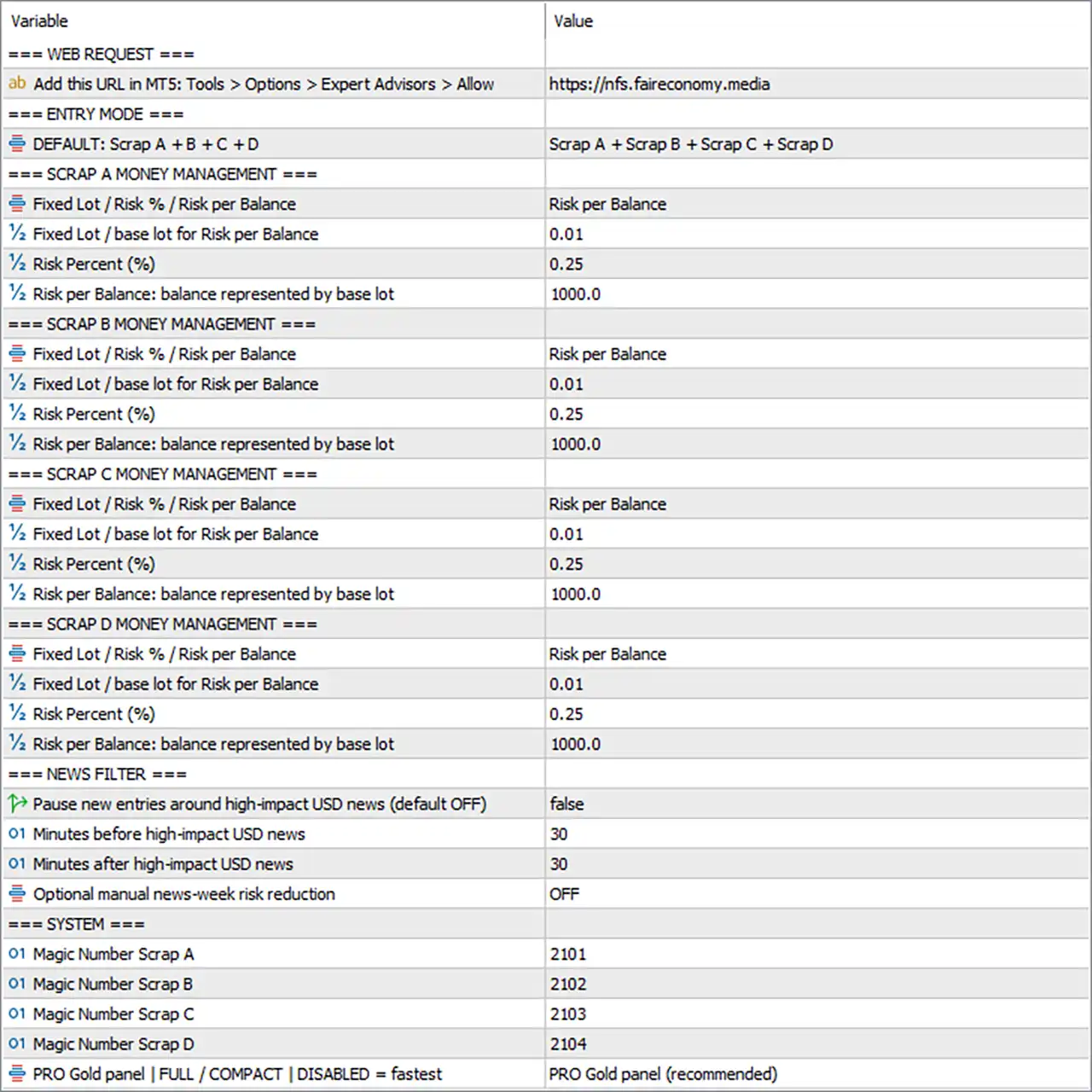
The Inputs panel provides separate risk controls for each SCRAP component, allowing the fixed lot or risk-per-balance method to be configured independently. It also includes settings for the MT5 WebRequest permission, news-related entry pauses, and trade identification.
Web Request Settings
🔹 Add this URL in MT5: Tools > Options > Expert Advisors > Allow = https://nfs.faireconomy.media — Specifies the URL to add to the MT5 WebRequest allowlist, enabling the EA to request data from the configured address when required.
Entry Mode
🔹 DEFAULT: Scrap A + B + C + D = Scrap A + Scrap B + Scrap C + Scrap D — Selects the combined entry mode, allowing all four components—Scrap A, Scrap B, Scrap C, and Scrap D—to participate in the configured trading strategy.
Scrap A Money Management
🔹 Fixed Lot / Risk % / Risk per Balance = Risk per Balance — Selects Risk per Balance as the position-sizing method for Scrap A, with trade volume calculated according to the configured balance-to-lot relationship.
🔹 Fixed Lot / base lot for Risk per Balance = 0.01 — Sets the base lot size to 0.01 for Scrap A when the Risk per Balance method is selected.
🔹 Risk Percent (%) = 0.25 — Sets Scrap A’s risk percentage parameter to 0.25 for the applicable risk-based position-sizing calculation.
🔹 Risk per Balance: balance represented by base lot = 1000.0 — Defines the reference balance of 1000.0 associated with the configured base lot for Scrap A.
Scrap B Money Management
🔹 Fixed Lot / Risk % / Risk per Balance = Risk per Balance — Selects Risk per Balance as the position-sizing method for Scrap B.
🔹 Fixed Lot / base lot for Risk per Balance = 0.01 — Sets the base lot size to 0.01 for Scrap B when Risk per Balance is selected.
🔹 Risk Percent (%) = 0.25 — Sets Scrap B’s risk percentage parameter to 0.25.
🔹 Risk per Balance: balance represented by base lot = 1000.0 — Sets the reference balance to 1000.0 for the base-lot calculation used by Scrap B.
Scrap C Money Management
🔹 Fixed Lot / Risk % / Risk per Balance = Risk per Balance — Selects Risk per Balance as the position-sizing method for Scrap C.
🔹 Fixed Lot / base lot for Risk per Balance = 0.01 — Sets the base lot size to 0.01 for Scrap C when the selected sizing method uses the base-lot relationship.
🔹 Risk Percent (%) = 0.25 — Sets Scrap C’s risk percentage parameter to 0.25.
🔹 Risk per Balance: balance represented by base lot = 1000.0 — Defines the reference balance of 1000.0 for Scrap C’s base-lot calculation.
Scrap D Money Management
🔹 Fixed Lot / Risk % / Risk per Balance = Risk per Balance — Selects Risk per Balance as the position-sizing method for Scrap D.
🔹 Fixed Lot / base lot for Risk per Balance = 0.01 — Sets the base lot size to 0.01 for Scrap D.
🔹 Risk Percent (%) = 0.25 — Sets Scrap D’s risk percentage parameter to 0.25.
🔹 Risk per Balance: balance represented by base lot = 1000.0 — Sets the reference balance to 1000.0 for Scrap D’s base-lot calculation.
News Filter
🔹 Pause new entries around high-impact USD news (default OFF) = false — Disables the high-impact USD news entry-pause feature in the current configuration.
🔹 Minutes before high-impact USD news = 30 — Sets the pre-news pause window to 30 minutes when the news filter is enabled.
🔹 Minutes after high-impact USD news = 30 — Sets the post-news pause window to 30 minutes when the news filter is enabled.
🔹 Optional manual news-week risk reduction = OFF — Disables the optional manual risk-reduction mode for news-heavy weeks.
System Settings
🔹 Magic Number Scrap A = 2101 — Assigns Magic Number 2101 to Scrap A, allowing its trades to be identified separately from the other components.
🔹 Magic Number Scrap B = 2102 — Assigns Magic Number 2102 to Scrap B for independent trade identification.
🔹 Magic Number Scrap C = 2103 — Assigns Magic Number 2103 to Scrap C for independent trade identification.
🔹 Magic Number Scrap D = 2104 — Assigns Magic Number 2104 to Scrap D for independent trade identification.
🔹 PRO Gold panel | FULL / COMPACT | DISABLED = fastest = PRO Gold panel (recommended) — Selects the recommended PRO Gold panel display mode, providing the configured chart interface for monitoring the EA.
How the Scraper Gold EA MT5 Settings Work Together
The current configuration selects Scrap A + Scrap B + Scrap C + Scrap D as the combined entry mode. Each component uses Risk per Balance, with a base lot of 0.01, a risk percentage value of 0.25, and a reference balance of 1000.0. Although the numerical risk settings are identical, each component has a separate Magic Number: 2101, 2102, 2103, and 2104.
The news filter is currently disabled, as Pause new entries around high-impact USD news = false and Optional manual news-week risk reduction = OFF. The 30-minute pre-news and post-news settings remain configured for use if the relevant news filter is activated.
The WebRequest URL is specified as https://nfs.faireconomy.media, and the recommended PRO Gold panel is selected for the chart interface.
Conclusion
Scraper Gold EA MT5 offers a modular configuration built around four trading components with independent money-management settings. The selected entry mode combines Scrap A, Scrap B, Scrap C, and Scrap D, while each component uses Risk per Balance, a 0.01 base lot, a 0.25 risk percentage, and a 1000.0 reference balance.
The configuration also assigns separate Magic Numbers—2101, 2102, 2103, and 2104—to help distinguish the four components’ trades. High-impact USD news pausing and manual news-week risk reduction are both disabled in the displayed setup. The recommended PRO Gold panel is selected, and the WebRequest URL is provided for MT5 configuration.
Before live trading, the position-sizing formula should be verified against the EA’s actual implementation, particularly how Risk Percent (%) = 0.25 interacts with Risk per Balance. The combined four-component mode may also produce more simultaneous exposure than a single component, depending on the EA’s entry logic and account conditions.