
AT Ai Bot EA MT5
AT Ai Bot MT5AT Ai Bot EA ResultsAT Ai Bot MT5 ReviewsAT Ai Bot MT5 ReviewAT Ai Bot MT5 Overview
MT5XAUUSD (Gold) · M30 (30 minute chart)Updated 18 Sept 2026

AT Ai Bot MT5 (Latest version) - Unlimited

AT Ai Bot is a robot built for trading XAUUSD (Gold). Real trading profit performance has been verified by real accounts.

Buy now — $599Add to cart
Download link right after paymentUnlimited accounts, no licence lockInstall guide includedFree updates to new versions
Pay with Visa · MastercardUSDT · BTC · ETHBinance Pay
Not sure it fits your broker or account?Ask a question
Check before you buy

Will it work for me?

Trading platform
Minimum / Recommended deposit
$100
Minimum / Recommended leverage
1:30+
Time frames
M30 (30 minute chart)
Currency pairs
XAUUSD (Gold)
Product type
Original version
Additional services
Recommended brokers
What you get

In the download

FILEAT Ai Bot
Optimize Settings

Recommended settings for AT Ai Bot MT5

🔢 AT Ai Bot MT5 Settings Guide

AT Ai Bot MT5 is an automated trading Expert Advisor designed around AI-assisted market analysis, configurable risk management, fixed or risk-based position sizing, ATR-based trailing-stop functionality, trading-hour controls and economic-news filtering.

The configuration shown provides detailed controls for trade volume, risk exposure, trading sessions, high-impact news protection, chart information, API connectivity, and AI model selection.
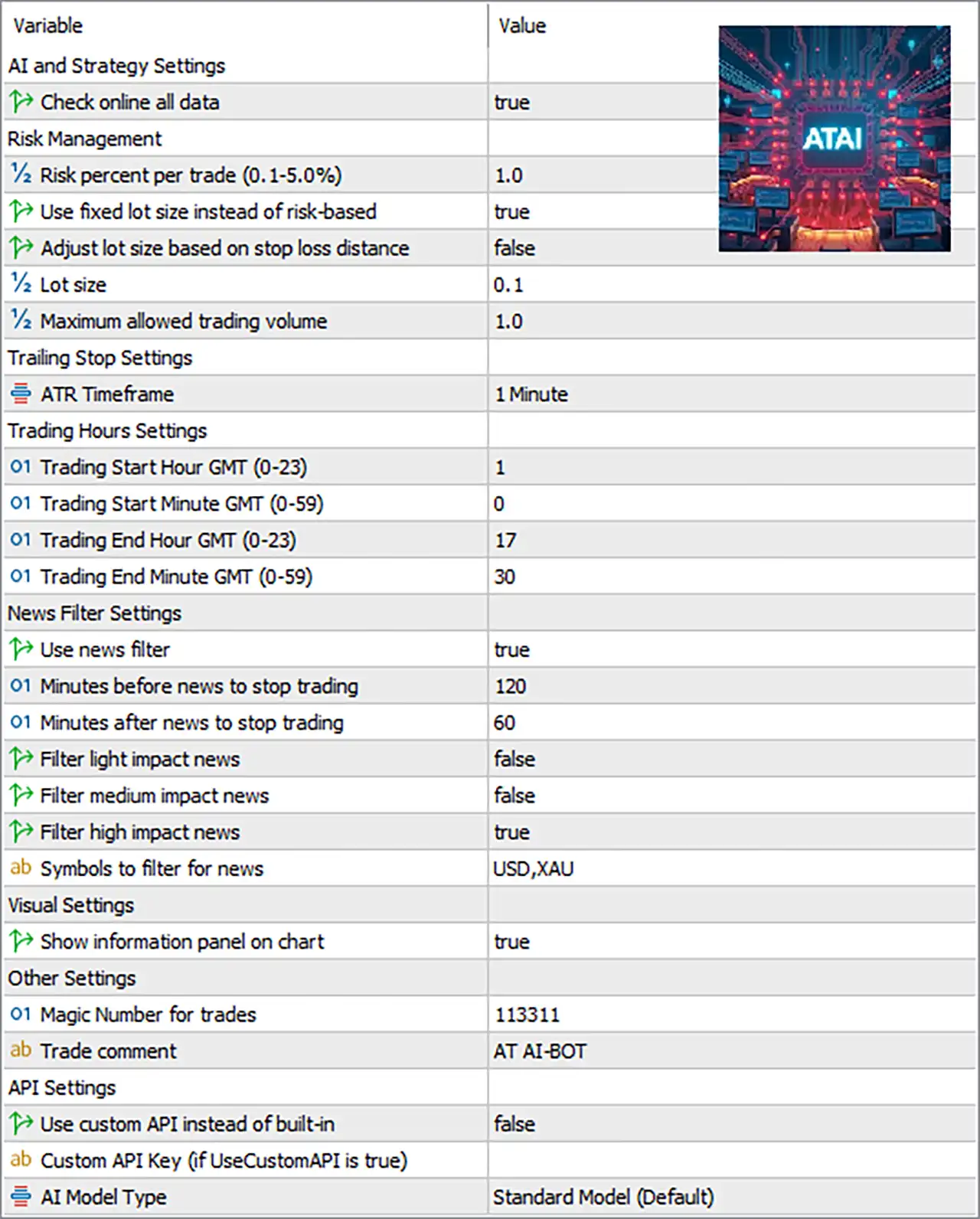
AT Ai Bot MT5 Settings Panel

🔶 AI and Strategy Settings

🔹 Check online all data: true — Enables the EA to check online data as part of its AI and strategy analysis process.

🔶 Risk Management

🔹 Risk percent per trade (0.1-5.0%): 1.0 — Sets the configured risk level to 1.0% per trade when risk-based position sizing is used.

🔹 Use fixed lot size instead of risk-based: true — Enables fixed-lot trading instead of calculating position size from the risk percentage.

🔹 Adjust lot size based on stop loss distance: false — Disables automatic lot adjustment according to the Stop Loss distance.

🔹 Lot size: 0.1 — Sets the fixed trading volume to 0.1 lots.

🔹 Maximum allowed trading volume: 1.0 — Limits the maximum permitted trading volume to 1.0 lot.

🔶 Trailing Stop Settings

🔹 ATR Timeframe: 1 Minute — Sets the ATR calculation timeframe to 1 Minute, which is used for ATR-related trailing-stop calculations.

🔶 Trading Hours Settings

🔹 Trading Start Hour GMT (0-23): 1 — Sets the trading start hour to 01:00 GMT.

🔹 Trading Start Minute GMT (0-59): 0 — Sets the trading start minute to 00, making the configured start time 01:00 GMT.

🔹 Trading End Hour GMT (0-23): 17 — Sets the trading end hour to 17:00 GMT.

🔹 Trading End Minute GMT (0-59): 30 — Sets the trading end minute to 30, making the configured end time 17:30 GMT.

🔹 Trading Window: 01:00-17:30 GMT — Based on the four time parameters, the configured trading session runs from 01:00 to 17:30 GMT.

🔶 News Filter Settings

🔹 Use news filter: true — Enables the economic-news protection system.

🔹 Minutes before news to stop trading: 120 — Stops new trading 120 minutes before a qualifying news event.

🔹 Minutes after news to stop trading: 60 — Keeps the trading pause active for 60 minutes after a qualifying news event.

🔹 Filter light impact news: false — Disables filtering of low/light-impact economic events.

🔹 Filter medium impact news: false — Disables filtering of medium-impact economic events.

🔹 Filter high impact news: true — Enables protection against high-impact economic news events.

🔹 Symbols to filter for news: USD,XAU — Applies the news filter to events associated with USD and XAU.

🔶 Visual Settings

🔹 Show information panel on chart: true — Displays the EA's information panel directly on the trading chart.

🔶 Other Settings

🔹 Magic Number for trades: 113311 — Uses 113311 as the unique identifier for trades opened and managed by the EA.

🔹 Trade comment: AT AI-BOT — Adds AT AI-BOT as the comment associated with EA-generated trades.

🔶 API Settings

🔹 Use custom API instead of built-in: false — Keeps the custom API disabled and therefore uses the EA's built-in API configuration.

🔹 Custom API Key (if UseCustomAPI is true): Not provided — No API key is visible in the supplied configuration; this field becomes relevant when Use custom API instead of built-in is set to true.

🔹 AI Model Type: Standard Model (Default) — Selects the Standard Model (Default) as the AI model configuration.

🔢 Key Settings Summary

🔹 Online Data: true — Online data checking is enabled.

🔹 Risk Percentage: 1.0% — The configured risk percentage is 1.0% per trade, although fixed-lot mode currently takes priority.

🔹 Fixed Lot Mode: true — The EA is configured to use a fixed lot size rather than risk-based sizing.

🔹 Lot Size: 0.1 — The configured fixed volume is 0.1 lots.

🔹 Maximum Trading Volume: 1.0 — The maximum allowed volume is 1.0 lot.

🔹 Stop-Loss-Based Lot Adjustment: false — Lot size is not automatically adjusted according to Stop Loss distance.

🔹 ATR Timeframe: 1 Minute — ATR calculations use the 1 Minute timeframe.

🔹 Trading Start: 01:00 GMT — The EA begins its configured trading window at 01:00 GMT.

🔹 Trading End: 17:30 GMT — The EA ends its configured trading window at 17:30 GMT.

🔹 News Filter: true — Economic-news protection is enabled.

🔹 High-Impact News Filter: true — High-impact events are filtered.

🔹 Medium-Impact News Filter: false — Medium-impact events are not filtered.

🔹 Light-Impact News Filter: false — Light-impact events are not filtered.

🔹 News Symbols: USD,XAU — News filtering focuses on USD and XAU.

🔹 Pre-News Protection: 120 minutes — Trading is stopped up to 120 minutes before qualifying news.

🔹 Post-News Protection: 60 minutes — Trading remains paused for 60 minutes after qualifying news.

🔹 Chart Information Panel: true — The EA's information panel is displayed.

🔹 Magic Number: 113311 — EA trades are identified using Magic Number 113311.

🔹 Trade Comment: AT AI-BOT — EA orders use the comment AT AI-BOT.

🔹 Custom API: false — The custom API option is disabled.

🔹 AI Model: Standard Model (Default) — The Standard Model is selected.

🔢 Practical Configuration Notes

🔹 Fixed-lot priority: Because Use fixed lot size instead of risk-based = true, the 0.1 fixed lot setting is the primary position-sizing configuration rather than the 1.0% risk setting.

🔹 Maximum volume protection: The Maximum allowed trading volume = 1.0 provides an upper limit for the configured trading volume.

🔹 News protection: With the news filter enabled and high-impact filtering active, the EA is configured to avoid qualifying USD/XAU high-impact events from 120 minutes before until 60 minutes after the event.

🔹 Trading schedule: The configured trading window is 01:00-17:30 GMT, which should be checked against the broker's server time and the intended market session.

🔹 AI connectivity: Check online all data = true while Use custom API instead of built-in = false, indicating that the configuration is intended to use online data through the EA's built-in API setup rather than a user-supplied custom API.

🔢 Conclusion

AT Ai Bot MT5 offers a relatively straightforward but flexible configuration structure. The supplied setup combines online data analysis, fixed-lot execution, ATR-based calculations, scheduled trading, high-impact news protection, and a default AI model.

The current configuration uses 0.1 fixed lots, with a maximum allowed volume of 1.0, trades between 01:00 and 17:30 GMT, and applies a 120-minute pre-news / 60-minute post-news protection window for USD and XAU high-impact events.

For traders evaluating this configuration, particular attention should be given to the 0.1 fixed lot size, because fixed-lot mode is enabled even though the risk percentage is set to 1.0%. Position sizing should therefore be evaluated against the account balance, symbol contract specifications, and expected Stop Loss exposure before live deployment.

🔢 FAQs

❓ What lot size is AT Ai Bot MT5 currently configured to use?
The EA is configured for fixed-lot trading with a lot size of 0.1, while the maximum allowed trading volume is 1.0 lot.

❓ Does AT Ai Bot MT5 use risk-based position sizing?
The configuration contains a 1.0% risk-per-trade setting, but Use fixed lot size instead of risk-based = true, so the fixed 0.1-lot setting is currently the active sizing method.

❓ What are the AT Ai Bot MT5 trading hours?
The configured trading period is 01:00 to 17:30 GMT.

❓ Does the EA avoid high-impact news?
Yes. Use news filter = true and Filter high impact news = true. The configured protection is 120 minutes before and 60 minutes after qualifying news.

❓ Which AI model is selected in AT Ai Bot MT5?
The configuration uses Standard Model (Default), while the custom API option is disabled with Use custom API instead of built-in = false.

Full review

What is AT Ai Bot?

AT Ai Bot MT5 is an advanced Expert Advisor (EA) designed for automated gold trading with AI-powered market analysis, adaptive indicators and intelligent risk management. The EA combines real-time AI signal generation, volatility-based trade management, and dynamic position control to deliver stability, adaptability, and consistent trading performance in volatile market conditions.

⭐ Vendor Website: View here

About the Author

This product is compiled by Zaha Feiz. This United Arab Emirates author has more than +4 years of experience working on MQL5 with many famous products such as AT Ai Bot MT5, AT Ai Bot MT4, Autorithm AI MT5, GoldenHour EA MT5 and and other products. Among them, AT Ai Bot is his best performing products.

⭐ Join Our Channel Telegram

⭐ Delivery time 24h-48h after payment.

⭐ Refund if not delivered.

⭐ You will receive the current version without any limitations (ID+Time).

AT Ai Bot MT5 Overview

Key Features of AT Ai Bot for MT5

🔹 AI-Powered Trade Signals: Uses advanced AI analysis to identify high-quality trading opportunities.
🔹 Advanced Risk Management: Integrates dynamic lot sizing and controlled exposure mechanisms.
🔹 ATR-Based Trade Protection: Applies volatility-sensitive trailing stops for position management.
🔹 Flexible Trading Sessions: Supports customizable trading hours for strategic market participation.
🔹 Real-Time Market Dashboard: Displays trading status, signals and operational information live.

What is the AT Ai Bot MT5 Trading Strategy?

🔹 AI Market Analysis: Evaluates price action, volatility, and indicators to generate trade signals.
🔹 Adaptive Entry Logic: Executes trades based on changing market conditions and AI evaluation.
🔹 Volatility-Aware Management: Uses ATR calculations to optimize Stop Loss (SL) adjustments.
🔹 Controlled Position Handling: Limits active trades through predefined exposure parameters.
🔹 Dynamic Risk Allocation: Adjusts position sizing according to account and market conditions.

AT Ai Bot MT5 Review

Expert Advisors (EAs) closely monitor the market, looking for price patterns, technical signals, and price volatility. If the market shows certain signs, the EA sends this information to a powerful AI called Groq. After Groq analyzes the data, the EA decides to buy or sell and sets limits on when to stop losing money or take profits.

When a trade is open, the EA uses a method called ATR to adjust the stop loss as the price fluctuates. The EA has rules to prevent overtrading and adjusts the trade size based on the market situation.

AT Ai Bot MT5 Reviews

AT Ai Bot MT5 Reviews
AT Ai Bot EA Results

AT Ai Bot EA Results

Why Choose AT Ai Bot MT5?

🔹 Stable Automated Trading: Designed to combine AI intelligence with disciplined execution logic.
🔹 Controlled Risk Exposure: Prioritizes capital preservation through structured risk management.
🔹 Adaptive Market Response: Reacts efficiently to changing volatility and market environments.
🔹 User-Friendly Automation: Offers flexible settings and simple deployment for daily operation.
🔹 Marketplace-Ready Solution: Suitable for traders seeking scalable and professional automation.

Is AT Ai Bot MT5 safe?

AT Ai Bot shows significant potential in providing stable and reliable profits, making it a reliable tool in the forex market. The advisor is highly appreciated by the MQL5 community in many aspects and has won the trust of users.

⭐⭐⭐⭐⭐ Arman2873 (2024.11.18)

"Im really satisfied with the performers of the software. The first day that I tried him I manage to make 250 euro for like 1 hour. From what I saw the software is really good and profitable. He is doing really good and I highly recommend him."

⭐⭐⭐⭐⭐ MrR1 Yellow (2024.10.17)

"High winning rate, high stability, good development in the future."

⭐⭐⭐⭐⭐ Ferran Lopez Navarro (2024.10.22)

"The EA is working very well, the author has been providing support and updating for some minor problems that are already solved. Now the EA works like a Swiss watch."

⭐⭐⭐⭐⭐ Oymail (2024.10.15)

"AT AIBot serves as a shining robot that combines stability with consistent gains."

AT Ai Bot MT5 Review

AT Ai Bot MT5 Review

Product Download Package?

The download package of the product suite includes:

✅ Experts: AT Ai Bot.ex5

➡️ Reviewed by David Easton

Conclusion

In short, AT Ai Bot MT5 is an innovative AI-powered trading solution designed specifically for GOLD and gold-related currency pairs. By combining Groq AI analysis, technical indicators, ATR-based trade management, and dynamic risk controls, the EA provides a modern approach to automated trading. AT Ai Bot helps traders improve decision-making, optimize execution, and adapt to changing market conditions through intelligent automation.

Questions about AT Ai Bot MT5 (Latest version) - Unlimited

❓ What makes AT Ai Bot MT5 different from traditional trading EAs?

AT Ai Bot MT5 combines technical analysis with Groq AI-powered signal generation, helping traders make data-driven decisions in dynamic gold markets.

❓ Which trading instruments are supported by AT Ai Bot MT5?

AT Ai Bot MT5 is optimized for GOLD and gold-related currency pairs, delivering AI-assisted analysis tailored to precious metal trading.

❓ Does AT Ai Bot MT5 require an internet connection?

Yes, AT Ai Bot MT5 needs a stable internet connection because it communicates with an AI server to receive real-time trading signals.

❓ Why are backtest results not reliable for AT Ai Bot MT5?

AT Ai Bot MT5 relies on live AI communication, which cannot be replicated during historical backtesting, making results less representative.

❓ How does risk management work in AT Ai Bot MT5?

AT Ai Bot MT5 includes dynamic lot sizing, maximum trade limits, and ATR-based trailing stops to help control risk and protect capital.

❓ Can I control trading hours with AT Ai Bot MT5?

Yes, AT Ai Bot MT5 allows traders to define custom start and end trading times, helping align execution with preferred market sessions.

❓ What is the ATR trailing stop feature in AT Ai Bot MT5?

AT Ai Bot MT5 uses an ATR-based trailing stop that automatically adapts to market volatility and helps secure profits as trends develop.

❓ Is AT Ai Bot MT5 suitable for beginners?

AT Ai Bot MT5 offers a user-friendly interface, visual dashboard, and automated execution, making it accessible for both new and experienced traders.

❓ How many trades can AT Ai Bot MT5 open simultaneously?

AT Ai Bot MT5 allows configurable limits per symbol and account, helping traders maintain disciplined exposure and portfolio control.

❓ Can AT Ai Bot MT5 be paused without removing it from the chart?

Yes, AT Ai Bot MT5 includes a Stop Trading button that lets users temporarily pause trading activity while keeping the EA active.

Other products traders compare

$599
Instant download
Buy now