

Introduction
Bandwagon EA MT4 is an automated trading Expert Advisor (EA) designed for the MetaTrader 4 platform. Its configuration includes risk management controls, drawdown protection, multi-currency pair management, and compatibility settings for trading alongside other Expert Advisors.
The EA also provides customizable Magic Numbers, margin safety controls, and visual display options. Understanding the Bandwagon EA MT4 settings helps traders manage trading risks, configure account protection, and customize the EA's behavior according to their trading preferences.
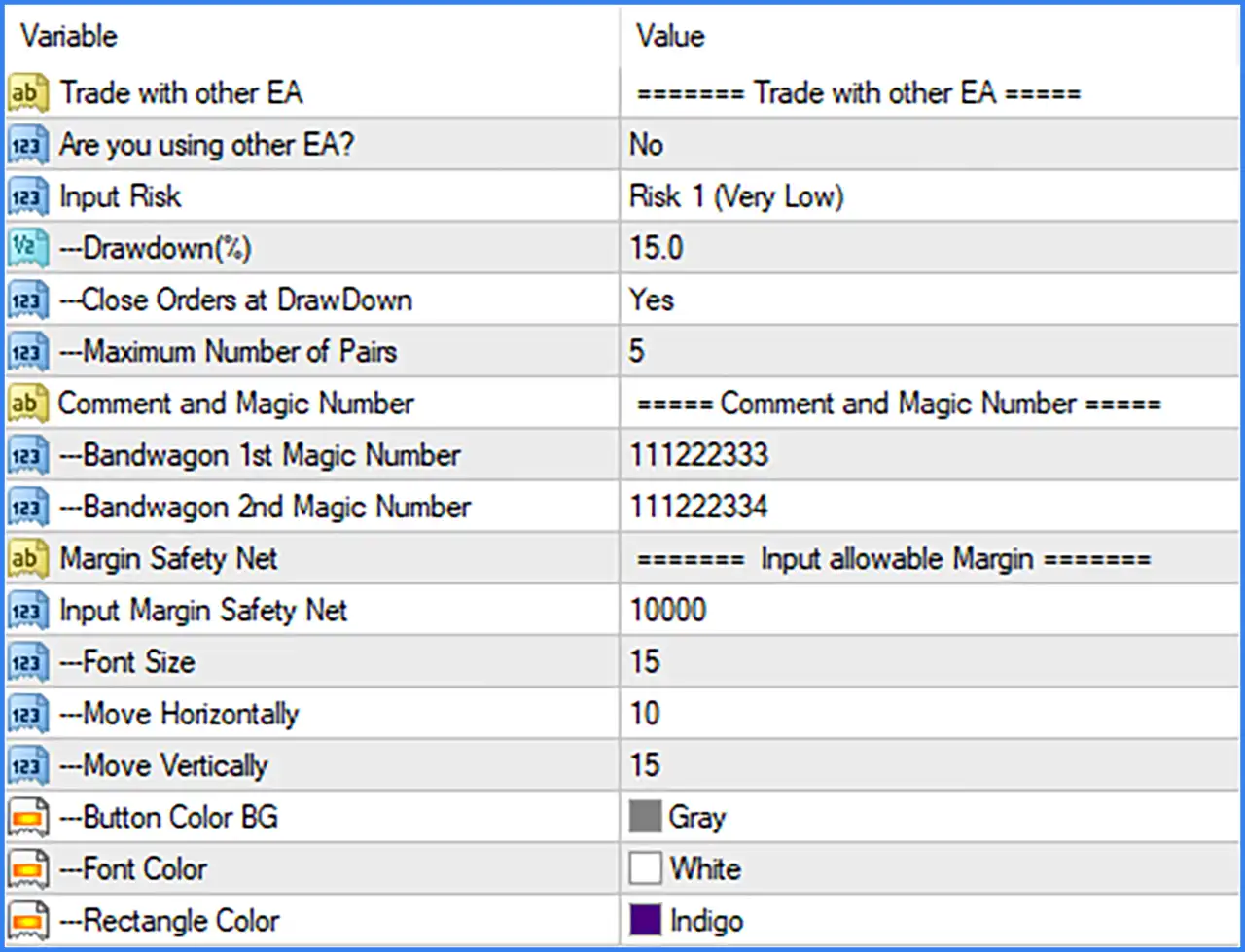
Trade with Other EA Settings
🔹 Are you using other EA? = No: Specifies whether other Expert Advisors are running on the same trading account. The default setting is No, indicating that Bandwagon EA MT4 is configured to operate without coordinating with other EAs.
🔹 Input Risk = Risk 1 (Very Low): Selects the risk level for the EA's trading operations. Risk 1 (Very Low) represents the lowest risk category available in the displayed configuration, prioritizing a more conservative trading approach.
🔹 Drawdown(%) = 15.0: Sets the drawdown threshold to 15.0%. This parameter defines the configured account drawdown level used by the EA's risk management system to monitor potential losses.
🔹 Close Orders at DrawDown = Yes: Enables automatic order closure when the configured drawdown threshold is reached. This feature is designed to help limit further exposure when account drawdown reaches the specified level.
🔹 Maximum Number of Pairs = 5: Sets the maximum number of currency pairs managed by the EA to 5, allowing traders to control the number of instruments involved in its trading operations.
Comment and Magic Number Settings
🔹 Bandwagon 1st Magic Number = 111222333: Assigns the Magic Number 111222333 to the first Bandwagon trading component. This identifier helps the EA distinguish and manage its associated trading positions.
🔹 Bandwagon 2nd Magic Number = 111222334: Assigns the Magic Number 111222334 to the second Bandwagon trading component, allowing the EA to identify another group of its trading positions separately.
Margin Safety Net Settings
🔹 Input Margin Safety Net = 10000: Sets the margin safety threshold to 10000. This parameter is associated with the EA's margin protection mechanism and defines the configured allowable margin value used for monitoring account margin conditions. The exact unit and triggering logic depend on the EA's internal implementation.
Display and Interface Settings
🔹 Font Size = 15: Sets the font size of the EA's information display to 15, making the on-chart text and trading information more visible.
🔹 Move Horizontally = 10: Adjusts the horizontal position of the EA's information panel by 10 units, allowing traders to customize its placement on the MetaTrader 4 chart.
🔹 Move Vertically = 15: Adjusts the vertical position of the EA's information panel by 15 units, helping users position the display according to their chart layout.
🔹 Button Color BG = Gray: Sets the background color of the EA's interface buttons to Gray, providing a neutral appearance for the on-chart control panel.
🔹 Font Color = White: Sets the text color of the EA's information panel and interface elements to White, improving contrast against darker backgrounds.
🔹 Rectangle Color = Indigo: Sets the rectangle or panel background color to Indigo, allowing traders to customize the visual appearance of the EA's information display.
Conclusion
Bandwagon EA MT4 provides configurable risk management, drawdown protection, multi-pair management, margin safety monitoring, and customizable interface settings.
The default configuration uses Risk 1 (Very Low), a 15.0% drawdown threshold, automatic order closure when the drawdown limit is reached, and a maximum of 5 currency pairs. It also uses two Magic Numbers, 111222333 and 111222334, to identify its trading components.
For safer operation, traders should carefully review the 15.0% drawdown setting, verify how the Margin Safety Net value of 10000 is calculated, and understand how the EA manages multiple currency pairs and other Expert Advisors. Demo testing is recommended before deploying Bandwagon EA MT4 on a live trading account.