

Introduction
Black Panther Ultimate EA is an automated trading Expert Advisor (EA) designed for the MetaTrader 4 platform. Version 1.2 provides configurable signal strategies, moving average analysis, support and resistance confirmation, automated lot management, BUY and SELL trading systems, and advanced trailing stop functionality.

The EA includes separate settings for BUY and SELL positions, allowing traders to customize Magic Numbers, Take Profit targets, lot multipliers, order limits, and trailing-stop parameters independently. It also provides daily and weekly trading schedules, Friday trading restrictions, margin-related settings, and a customizable chart information panel.
Understanding the Black Panther Ultimate EA MT4 settings helps traders configure automated entries, manage multiple positions, control trading exposure, and adjust the EA according to their trading preferences.
General Strategy Settings
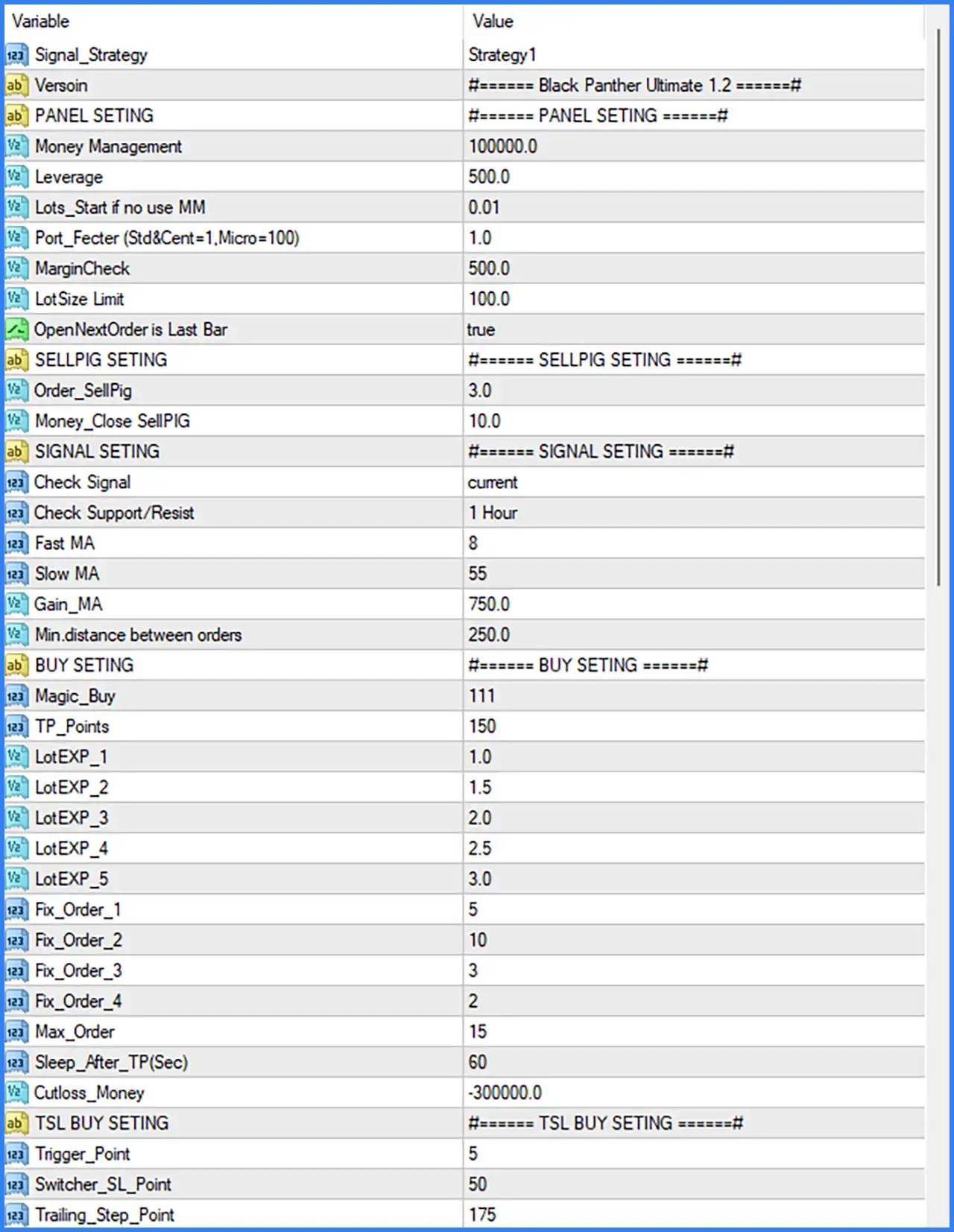
🔹 Signal_Strategy = Strategy1: Selects Strategy1 as the active trading strategy, determining which predefined signal logic the EA uses for its trading decisions.
🔹 Versoin = Black Panther Ultimate 1.2: Identifies the EA version as Black Panther Ultimate 1.2, indicating the software version associated with the displayed configuration.
Panel and Money Management Settings
🔹 Money Management = 100000.0: Sets the Money Management reference value to 100000.0, which is used by the EA's internal position-sizing or money management calculations.
🔹 Leverage = 500.0: Sets the leverage reference to 500.0, representing the configured leverage value used by the EA's money management calculations.
🔹 Lots_Start if no use MM = 0.01: Sets the initial trading volume to 0.01 lots when the Money Management function is not being used.
🔹 Port_Fecter (Std&Cent=1,Micro=100) = 1.0: Sets the account-type adjustment factor to 1.0. The parameter description references standard, cent, and micro accounts, with the displayed reference values of 1 and 100.
🔹 MarginCheck = 500.0: Sets the margin-check parameter to 500.0, providing a configured reference value for the EA's margin-related trading controls.
🔹 LotSize Limit = 100.0: Defines the lot-size limit parameter at 100.0, establishing the configured upper boundary used by the EA's lot management logic.
🔹 OpenNextOrder is Last Bar = true: Enables the option to open the next order based on the last completed or current bar condition, according to the EA's internal entry logic.
SellPIG Settings
🔹 Order_SellPig = 3.0: Sets the SellPIG order parameter to 3.0, defining the configured value used by this specific SELL-related trading function.
🔹 Money_Close SellPIG = 10.0: Sets the monetary closing target for the SellPIG function to 10.0, providing a specified account-currency profit threshold for the corresponding closing mechanism.
Signal Settings
🔹 Check Signal = current: Sets the signal-checking timeframe to current, meaning the EA uses the current chart timeframe for evaluating its trading signals.
🔹 Check Support/Resist = 1 Hour: Sets the Support and Resistance analysis timeframe to 1 Hour, allowing the EA to evaluate important price levels using the H1 timeframe.
🔹 Fast MA = 8: Sets the Fast Moving Average period to 8, allowing the EA to use a shorter moving average for identifying faster market movements and potential trading signals.
🔹 Slow MA = 55: Sets the Slow Moving Average period to 55, providing a longer-term moving average reference for evaluating market direction and trend conditions.
🔹 Gain_MA = 750.0: Sets the Gain_MA parameter to 750.0, defining a numerical value used by the EA's moving-average-related calculation or signal conditions.
🔹 Min.distance between orders = 250.0: Sets the minimum distance between orders to 250.0 points, helping control how close successive positions can be opened.
BUY Trading Settings
🔹 Magic_Buy = 111: Assigns Magic Number 111 to BUY positions, allowing the EA to identify and manage its BUY orders separately from other trading positions.
🔹 TP_Points = 150: Sets the BUY Take Profit target to 150 points, defining the price movement required to reach the configured profit target.
🔹 LotEXP_1 = 1.0: Sets the first BUY lot multiplier to 1.0, defining the position-size multiplier for the first configured trading stage.
🔹 LotEXP_2 = 1.5: Sets the second BUY lot multiplier to 1.5, allowing the EA to apply a 1.5 multiplier to the corresponding trading stage.
🔹 LotEXP_3 = 2.0: Sets the third BUY lot multiplier to 2.0, defining the configured position-size multiplier for the third stage.
🔹 LotEXP_4 = 2.5: Sets the fourth BUY lot multiplier to 2.5, allowing the EA to increase the corresponding position volume according to this multiplier.
🔹 LotEXP_5 = 3.0: Sets the fifth BUY lot multiplier to 3.0, defining the position-size multiplier for the fifth configured trading stage.
🔹 Fix_Order_1 = 5: Sets the first BUY fixed-order parameter to 5, defining the configured order-count value for the first trading stage.
🔹 Fix_Order_2 = 10: Sets the second BUY fixed-order parameter to 10, establishing the order-count value for the second trading stage.
🔹 Fix_Order_3 = 3: Sets the third BUY fixed-order parameter to 3, defining the configured order-count value for the third trading stage.
🔹 Fix_Order_4 = 2: Sets the fourth BUY fixed-order parameter to 2, defining the configured order-count value for the fourth trading stage.
🔹 Max_Order = 15: Limits the maximum number of BUY orders to 15, helping control the total number of positions opened by the BUY trading system.
🔹 Sleep_After_TP(Sec) = 60: Sets a waiting period of 60 seconds after reaching Take Profit before the EA resumes the corresponding BUY trading activity.
🔹 Cutloss_Money = -300000.0: Sets the BUY monetary cut-loss parameter to -300000.0, defining the configured loss threshold for the BUY position-management system.
BUY Trailing Stop Loss (TSL) Settings
🔹 Trigger_Point = 5: Sets the BUY trailing-stop activation trigger to 5 points, defining the price movement required to activate the corresponding trailing-stop mechanism.
🔹 Switcher_SL_Point = 50: Sets the BUY Stop Loss switching threshold to 50 points, defining the configured point level for the EA's Stop Loss adjustment logic.
🔹 Trailing_Step_Point = 175: Sets the BUY trailing-stop step to 175 points, determining the configured price interval used when adjusting the trailing Stop Loss.
SELL Trading Settings
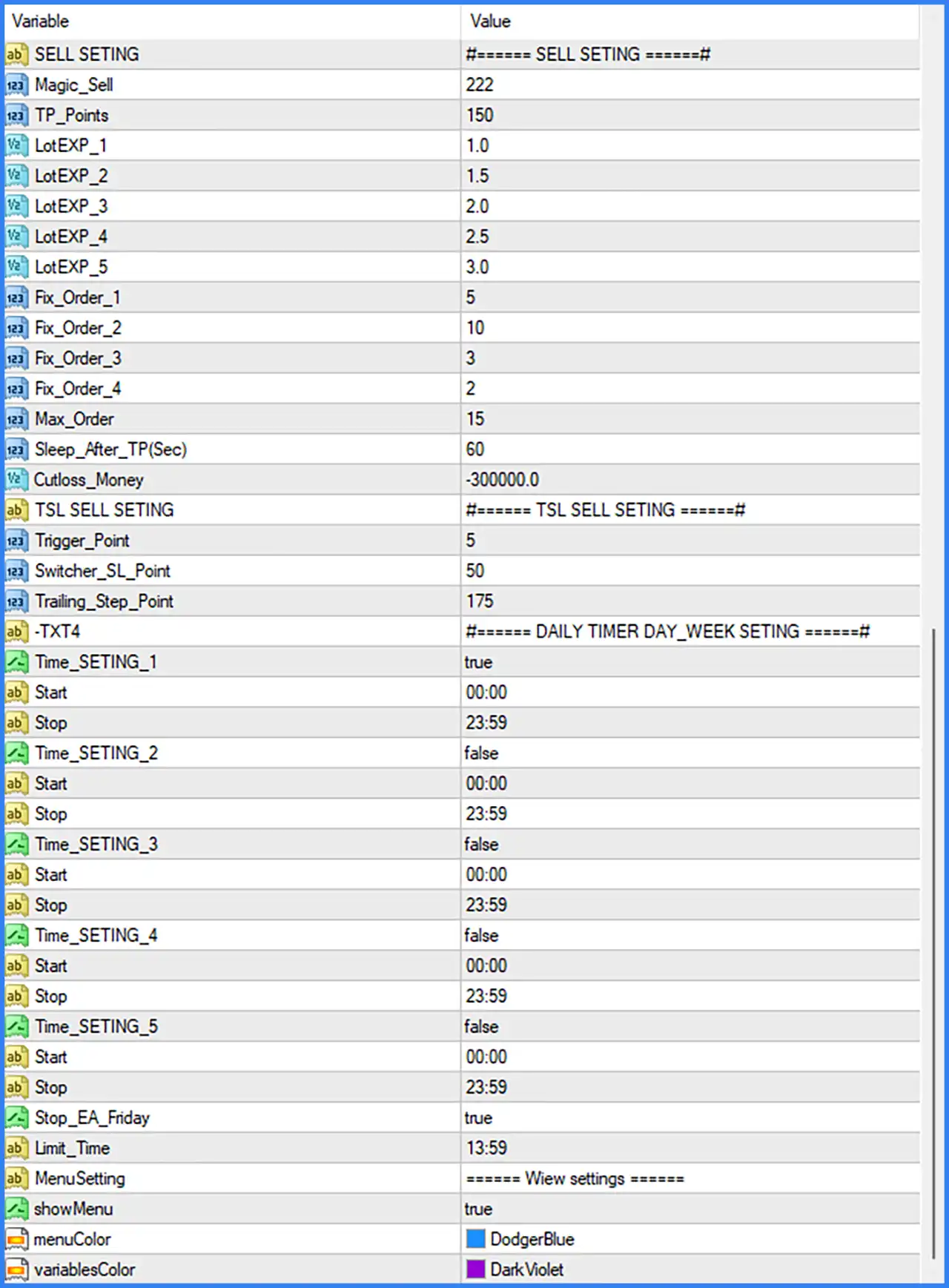
🔹 Magic_Sell = 222: Assigns Magic Number 222 to SELL positions, allowing the EA to identify and manage SELL orders independently from BUY positions.
🔹 TP_Points = 150: Sets the SELL Take Profit target to 150 points, defining the price movement required to reach the configured profit target for SELL positions.
🔹 LotEXP_1 = 1.0: Sets the first SELL lot multiplier to 1.0, defining the position-size multiplier for the first configured SELL trading stage.
🔹 LotEXP_2 = 1.5: Sets the second SELL lot multiplier to 1.5, allowing the EA to apply the corresponding volume multiplier to the second trading stage.
🔹 LotEXP_3 = 2.0: Sets the third SELL lot multiplier to 2.0, defining the position-size multiplier for the third SELL trading stage.
🔹 LotEXP_4 = 2.5: Sets the fourth SELL lot multiplier to 2.5, establishing the configured volume multiplier for the fourth trading stage.
🔹 LotEXP_5 = 3.0: Sets the fifth SELL lot multiplier to 3.0, defining the position-size multiplier for the fifth SELL trading stage.
🔹 Fix_Order_1 = 5: Sets the first SELL fixed-order parameter to 5, defining the configured order-count value for the first trading stage.
🔹 Fix_Order_2 = 10: Sets the second SELL fixed-order parameter to 10, establishing the order-count value for the second trading stage.
🔹 Fix_Order_3 = 3: Sets the third SELL fixed-order parameter to 3, defining the configured order-count value for the third trading stage.
🔹 Fix_Order_4 = 2: Sets the fourth SELL fixed-order parameter to 2, defining the configured order-count value for the fourth trading stage.
🔹 Max_Order = 15: Limits the maximum number of SELL orders to 15, helping control the total number of positions managed by the SELL trading system.
🔹 Sleep_After_TP(Sec) = 60: Configures a waiting period of 60 seconds after reaching Take Profit before the EA resumes the corresponding SELL trading activity.
🔹 Cutloss_Money = -300000.0: Sets the SELL monetary cut-loss parameter to -300000.0, defining the configured loss threshold for the SELL position-management system.
SELL Trailing Stop Loss (TSL) Settings
🔹 Trigger_Point = 5: Sets the SELL trailing-stop activation trigger to 5 points, defining the price movement required to activate the SELL trailing-stop mechanism.
🔹 Switcher_SL_Point = 50: Sets the SELL Stop Loss switching threshold to 50 points, determining the configured point level for the EA's SELL Stop Loss adjustment logic.
🔹 Trailing_Step_Point = 175: Sets the SELL trailing-stop step to 175 points, determining the price interval used when adjusting the protective Stop Loss for SELL positions.
Daily Timer and Weekly Trading Settings
🔹 Time_SETTING_1 = true: Enables the first trading-time schedule, allowing the EA to operate according to its configured Start and Stop times.
🔹 Start (Time_SETTING_1) = 00:00: Sets the first trading session to begin at 00:00, marking the starting time for the enabled schedule.
🔹 Stop (Time_SETTING_1) = 23:59: Sets the first trading session to end at 23:59, allowing the EA to operate throughout almost the entire day under this schedule.
🔹 Time_SETTING_2 = false: Disables the second trading-time schedule.
🔹 Start (Time_SETTING_2) = 00:00: Sets the starting time of the second schedule to 00:00, although this schedule is currently disabled.
🔹 Stop (Time_SETTING_2) = 23:59: Sets the ending time of the second schedule to 23:59, although this schedule is currently disabled.
🔹 Time_SETTING_3 = false: Disables the third trading-time schedule.
🔹 Start (Time_SETTING_3) = 00:00: Sets the starting time of the third schedule to 00:00, with no active trading restriction from this disabled schedule.
🔹 Stop (Time_SETTING_3) = 23:59: Sets the ending time of the third schedule to 23:59, with the third schedule remaining disabled.
🔹 Time_SETTING_4 = false: Disables the fourth trading-time schedule, preventing this additional time window from controlling trading activity.
🔹 Start (Time_SETTING_4) = 00:00: Sets the starting time of the fourth schedule to 00:00.
🔹 Stop (Time_SETTING_4) = 23:59: Sets the ending time of the fourth schedule to 23:59.
🔹 Time_SETTING_5 = false: Disables the fifth trading-time schedule, leaving this additional trading window inactive.
🔹 Start (Time_SETTING_5) = 00:00: Sets the starting time of the fifth schedule to 00:00.
🔹 Stop (Time_SETTING_5) = 23:59: Sets the ending time of the fifth schedule to 23:59.
🔹 Stop_EA_Friday = true: Enables the Friday trading-stop function, allowing the EA to stop its trading activity according to the configured Friday time limit.
🔹 Limit_Time = 13:59: Sets the Friday trading cutoff time to 13:59, defining when the EA should stop trading under the enabled Friday restriction.
Chart Menu and Visual Settings
🔹 MenuSetting = View settings: Section heading for configuring the appearance of the EA's on-chart menu and visual interface.
🔹 showMenu = true: Enables the EA's chart menu, allowing traders to view the available interface elements directly on the MetaTrader 4 chart.
🔹 menuColor = DodgerBlue: Sets the menu background or primary menu color to DodgerBlue, customizing the visual appearance of the EA interface.
🔹 variablesColor = DarkViolet: Sets the variable display color to DarkViolet, helping distinguish parameter information within the on-chart interface.