

Introduction
FrankoScalp EA is an automated scalping Expert Advisor (EA) for the MetaTrader 4 platform, featuring multiple trading strategies, flexible money management, GMT-based trading schedules, news filtering, and advanced trade management controls.

Its configuration provides six predefined trading strategies and an additional flexible strategy with adjustable analysis parameters. It also includes regenerative money management, optional Grid functionality, spread protection, virtual Stop Loss (SL) and Take Profit (TP), virtual trailing stops, and protection against market gaps.
Understanding the FrankoScalp EA settings is important for configuring trading strategies, controlling position sizes, managing execution conditions, and adapting automated trading operations to different market environments.
GMT and DST Settings
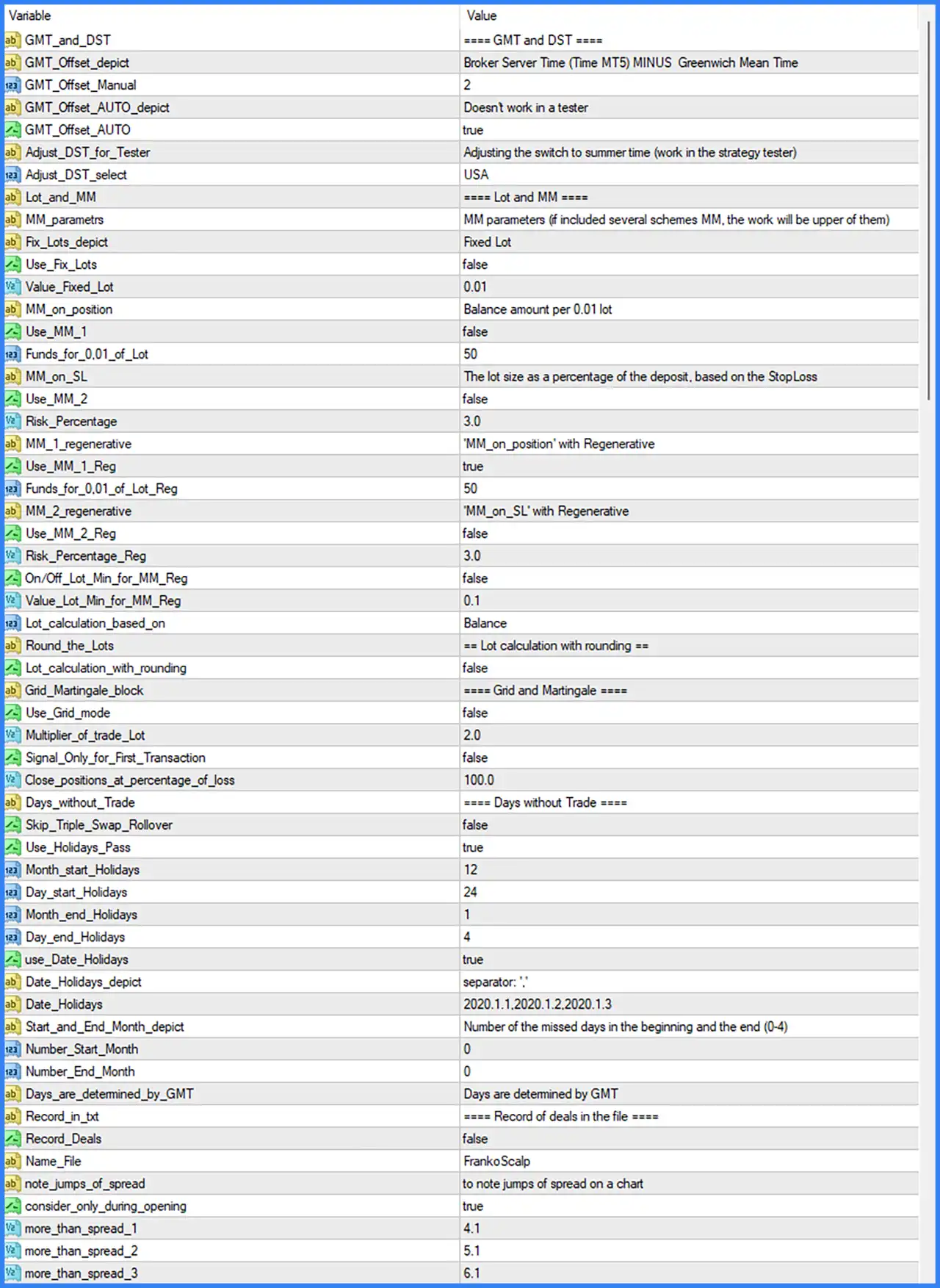
🔹 GMT_and_DST = GMT and DST: Section heading for the GMT offset and Daylight Saving Time configuration.
🔹 GMT_Offset_depict = Broker Server Time (Time MT5) MINUS Greenwich Mean Time: Describes the GMT offset calculation based on the difference between broker server time and Greenwich Mean Time.
🔹 GMT_Offset_Manual = 2: Sets the manual GMT offset to 2 hours, providing a reference for synchronizing the EA with broker server time.
🔹 GMT_Offset_AUTO_depict = Doesnt work in a tester: Indicates that automatic GMT offset detection does not work in the strategy tester.
🔹 GMT_Offset_AUTO = true: Enables automatic GMT offset detection, allowing the EA to determine the time difference without relying exclusively on the manual setting.
🔹 Adjust_DST_for_Tester = Adjusting the switch to summer time (work in the strategy tester): Describes the Daylight Saving Time adjustment function used when testing trading strategies.
🔹 Adjust_DST_select = USA: Selects USA as the regional reference for Daylight Saving Time adjustments.
Lot and Money Management Settings
🔹 Lot_and_MM = Lot and MM: Section heading for lot sizing and money management configuration.
🔹 MM_parametrs = MM parameters (if included several schemes MM, the work will be upper of them): Explains that multiple money management schemes may be available, with the applicable scheme taking priority according to the EA's internal logic.
🔹 Fix_Lots_depict = Fixed Lot: Identifies the fixed-lot money management method.
🔹 Use_Fix_Lots = false: Disables fixed-lot trading, allowing the EA to use another enabled money management method.
🔹 Value_Fixed_Lot = 0.01: Sets the fixed trading volume to 0.01 lots when fixed-lot mode is enabled.
🔹 MM_on_position = Balance amount per 0.01 lot: Describes a money management method that calculates trading volume according to the account balance allocated for every 0.01 lot.
🔹 Use_MM_1 = false: Disables the first money management scheme based on account balance per 0.01 lot.
🔹 Funds_for_0.01_of_Lot = 50: Sets the account funds reference to 50 for every 0.01 lot under the first money management scheme.
🔹 MM_on_SL = The lot size as a percentage of the deposit, based on the StopLoss: Describes a position-sizing method that calculates lot size according to a percentage of the deposit and the Stop Loss distance.
🔹 Use_MM_2 = false: Disables the second money management scheme based on Stop Loss distance and deposit percentage.
🔹 Risk_Percentage = 3.0: Sets the risk percentage to 3.0 for the Stop Loss-based money management calculation.
🔹 MM_1_regenerative = 'MM_on_position' with Regenerative: Identifies the regenerative version of the first money management method, which uses account balance per 0.01 lot.
🔹 Use_MM_1_Reg = true: Enables regenerative money management based on the first scheme.
🔹 Funds_for_0.01_of_Lot_Reg = 50: Sets the regenerative account funds reference to 50 for every 0.01 lot.
🔹 MM_2_regenerative = 'MM_on_SL' with Regenerative: Identifies the regenerative version of the Stop Loss-based money management method.
🔹 Use_MM_2_Reg = false: Disables the regenerative version of the second money management scheme.
🔹 Risk_Percentage_Reg = 3.0: Sets the regenerative Stop Loss-based risk calculation percentage to 3.0.
🔹 On/Off_Lot_Min_for_MM_Reg = false: Disables the minimum lot restriction for regenerative money management.
🔹 Value_Lot_Min_for_MM_Reg = 0.1: Sets the minimum lot value to 0.1 when the corresponding minimum-lot restriction is enabled.
🔹 Lot_calculation_based_on = Balance: Uses account Balance as the reference for calculating trading volume rather than another account equity measurement.
Lot Calculation and Rounding Settings
🔹 Round_the_Lots = Lot calculation with rounding: Section heading for the lot calculation rounding configuration.
🔹 Lot_calculation_with_rounding = false: Disables lot-size rounding, allowing the EA to use its calculated trading volume without applying this additional rounding function.
Grid and Martingale Settings
🔹 Gnd_Martingale_block = Grid and Martingale: Section heading for Grid and Martingale-related configuration.
🔹 Use_Grid_mode = false: Disables Grid trading mode, preventing the EA from using this specific Grid functionality under the current configuration.
🔹 Multiplier_of_trade_Lot = 2.0: Sets the trading lot multiplier to 2.0, defining the volume multiplication factor when the corresponding progressive lot-sizing mechanism is used.
🔹 Signal_Only_for_First_Transaction = false: Disables the option to use the trading signal only for the first transaction, allowing the EA's internal logic to determine subsequent transactions.
🔹 Close_positions_at_percentage_of_loss = 100.0: Sets the percentage-of-loss threshold for closing positions to 100.0, according to the EA's internal loss-management calculation.
Days Without Trade and Holiday Settings
🔹 Days_without_Trade = Days without Trade: Section heading for configuring periods when the EA should avoid trading.
🔹 Skip_Triple_Swap_Rollover = false: Disables the option to skip trading around triple-swap rollover periods.
🔹 Use_Holidays_Pass = true: Enables the holiday-period trading restriction, allowing the EA to observe the configured holiday date range.
🔹 Month_start_Holidays = 12: Sets the starting holiday month to December (month 12).
🔹 Day_start_Holidays = 24: Sets December 24 as the beginning of the configured holiday period.
🔹 Month_end_Holidays = 1: Sets the ending holiday month to January (month 1).
🔹 Day_end_Holidays = 4: Sets January 4 as the ending date of the configured holiday period.
🔹 use_Date_Holidays = true: Enables the additional date-based holiday restriction, allowing specific calendar dates to be entered manually.
🔹 Date_Holidays_depict = separator: '.': Indicates the separator format used for entering individual holiday dates.
🔹 Date_Holidays = 2020.1.1,2020.1.2,2020.1.3: Defines three specific holiday dates: January 1, 2020; January 2, 2020; and January 3, 2020.
🔹 Start_and_End_Month_depict = Number of the missed days in the beginning and the end (0-4): Describes the option for adjusting the number of excluded days at the beginning and end of a month, with an allowed range from 0 to 4.
🔹 Number_Start_Month = 0: Sets the number of excluded days at the beginning of the month to 0.
🔹 Number_End_Month = 0: Sets the number of excluded days at the end of the month to 0.
🔹 Days_are_determined_by_GMT = Days are determined by GMT: Indicates that the EA determines calendar days using GMT as its time reference.
Trade Recording and Spread Monitoring Settings
🔹 Record_in_txt = Record of deals in the file: Section heading for recording trading transactions in a text file.
🔹 Record_Deals = false: Disables trade recording in the external text file.
🔹 Name_File = FrankoScalp: Sets the name of the file used for trade recording to FrankoScalp.
🔹 note_jumps_of_spread = to note jumps of spread on a chart: Describes the function for marking spread jumps directly on the trading chart.
🔹 consider_only_dunng_opening = true: Enables spread-jump consideration only during the opening of trading positions.
🔹 more_than_spread_1 = 4.1: Sets the first spread threshold to 4.1 for monitoring spread jumps.
🔹 more_than_spread_2 = 5.1: Sets the second spread threshold to 5.1 for identifying larger spread movements.
🔹 more_than_spread_3 = 6.1: Sets the third spread threshold to 6.1 for monitoring higher spread conditions.
News Filter Settings
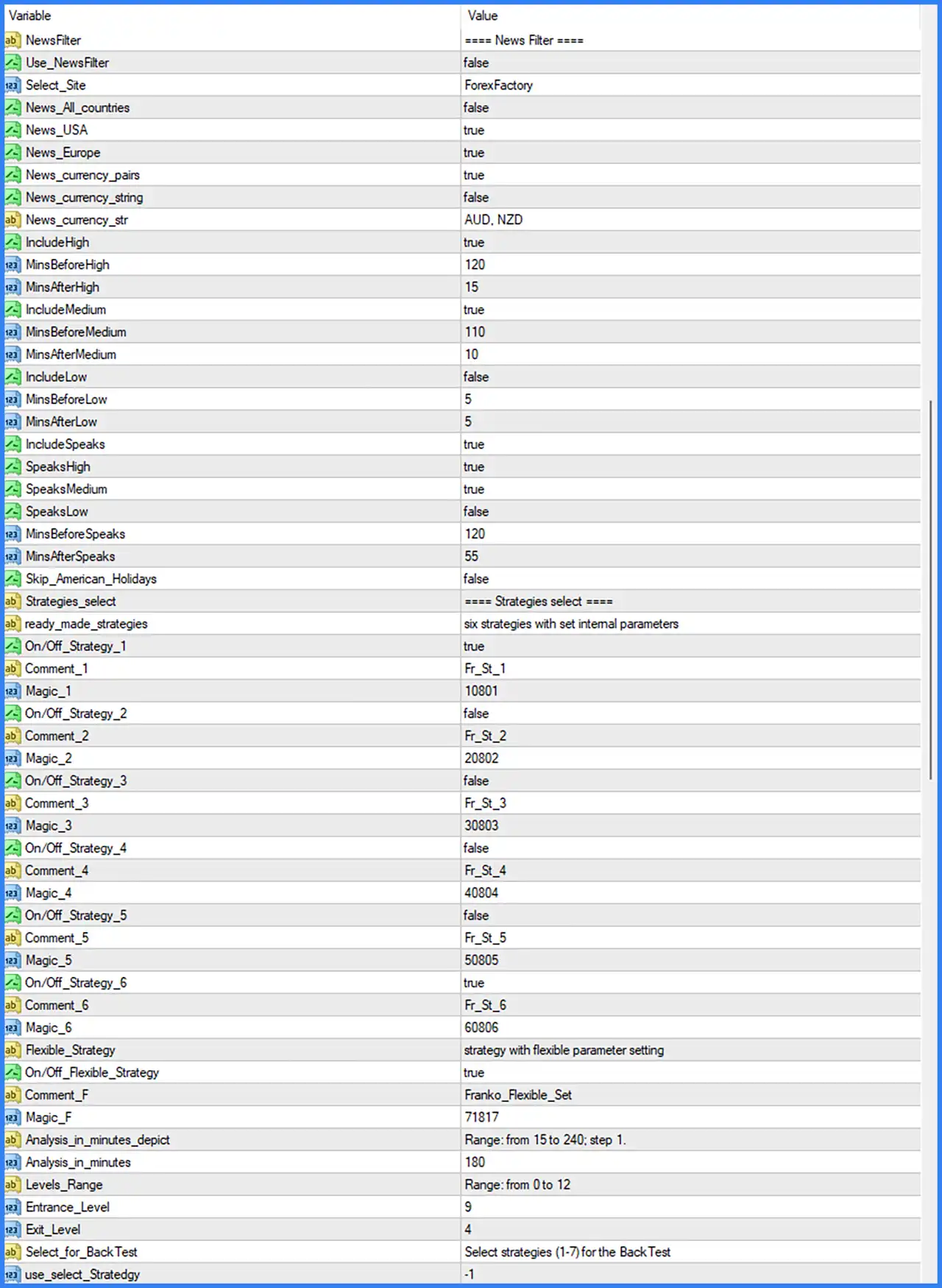
🔹 NewsFilter = News Filter: Section heading for the economic news filtering configuration.
🔹 Use_NewsFilter = false: Disables the news filter, meaning the EA does not apply the configured economic news restrictions to its trading operations.
🔹 Select_Site = Forex Factory: Selects Forex Factory as the designated economic calendar information source.
🔹 News_All_countries = false: Disables filtering for news events from all countries, allowing the EA to use the individually selected country settings.
🔹 News_USA = true: Enables news filtering for economic events associated with the United States.
🔹 News_Europe = true: Enables news filtering for economic events associated with Europe.
🔹 News_currency_pairs = true: Enables currency-pair-based news filtering, allowing the EA to consider news events relevant to the currencies involved in trading instruments.
🔹 News_currency_string = false: Disables the custom currency-string filtering option.
🔹 News_currency_str = AUD, NZD: Specifies AUD and NZD as the currencies for the custom currency filter when that option is enabled.
🔹 IncludeHigh = true: Enables consideration of high-impact economic news events in the news filter.
🔹 MinsBeforeHigh = 120: Sets the high-impact news restriction period to 120 minutes before an event.
🔹 MinsAfterHigh = 15: Sets the high-impact news restriction period to 15 minutes after an event.
🔹 IncludeMedium = true: Enables consideration of medium-impact economic news events.
🔹 MinsBeforeMedium = 110: Sets the medium-impact news restriction period to 110 minutes before an event.
🔹 MinsAfterMedium = 10: Sets the medium-impact news restriction period to 10 minutes after an event.
🔹 IncludeLow = false: Disables filtering for low-impact economic news events.
🔹 MinsBeforeLow = 5: Sets the low-impact news restriction period to 5 minutes before an event if low-impact filtering is enabled.
🔹 MinsAfterLow = 5: Sets the low-impact news restriction period to 5 minutes after an event if low-impact filtering is enabled.
🔹 IncludeSpeaks = true: Enables filtering for scheduled speeches and speaking events from relevant economic figures.
🔹 SpeaksHigh = true: Enables filtering for high-importance speeches.
🔹 SpeaksMedium = true: Enables filtering for medium-importance speeches.
🔹 SpeaksLow = false: Disables filtering for low-importance speeches.
🔹 MinsBeforeSpeaks = 120: Sets the news restriction period to 120 minutes before a scheduled speech.
🔹 MinsAfterSpeaks = 55: Sets the news restriction period to 55 minutes after a scheduled speech.
🔹 Skip_American_Holidays = false: Disables the option to skip trading specifically during American holidays.
Ready-Made Trading Strategy Settings
🔹 Strategies_select = Strategies select: Section heading for selecting and configuring the predefined trading strategies.
🔹 ready_made_strategies = six strategies with set internal parameters: Indicates that the EA provides six predefined strategies with their own internal parameter configurations.
Strategy 1
🔹 On/Off_Strategy_1 = true: Enables the first predefined trading strategy.
🔹 Comment_1 = Fr_St_1: Assigns the trading comment Fr_St_1 to positions associated with Strategy 1.
🔹 Magic_1 = 10801: Assigns Magic Number 10801 to Strategy 1 for identifying and managing its trades.
Strategy 2
🔹 On/Off_Strategy_2 = false: Disables the second predefined trading strategy.
🔹 Comment_2 = Fr_St_2: Assigns the trading comment Fr_St_2 to positions associated with Strategy 2.
🔹 Magic_2 = 20802: Assigns Magic Number 20802 to Strategy 2.
Strategy 3
🔹 On/Off_Strategy_3 = false: Disables the third predefined trading strategy.
🔹 Comment_3 = Fr_St_3: Assigns the trading comment Fr_St_3 to positions associated with Strategy 3.
🔹 Magic_3 = 30803: Assigns Magic Number 30803 to Strategy 3.
Strategy 4
🔹 On/Off_Strategy_4 = false: Disables the fourth predefined trading strategy.
🔹 Comment_4 = Fr_St_4: Assigns the trading comment Fr_St_4 to positions associated with Strategy 4.
🔹 Magic_4 = 40804: Assigns Magic Number 40804 to Strategy 4.
Strategy 5
🔹 On/Off_Strategy_5 = false: Disables the fifth predefined trading strategy.
🔹 Comment_5 = Fr_St_5: Assigns the trading comment Fr_St_5 to positions associated with Strategy 5.
🔹 Magic_5 = 50805: Assigns Magic Number 50805 to Strategy 5.
Strategy 6
🔹 On/Off_Strategy_6 = true: Enables the sixth predefined trading strategy.
🔹 Comment_6 = Fr_St_6: Assigns the trading comment Fr_St_6 to positions associated with Strategy 6.
🔹 Magic_6 = 60806: Assigns Magic Number 60806 to Strategy 6.
Flexible Strategy Settings
🔹 Flexible_Strategy = strategy with flexible parameter setting: Section heading describing the strategy that allows users to customize its internal parameters.
🔹 On/Off_Flexible_Strategy = true: Enables the flexible trading strategy, allowing the EA to use the separately configured analysis and trading-level parameters.
🔹 Comment_F = Franko_Flexible_Set: Assigns the trading comment Franko_Flexible_Set to positions opened by the flexible strategy.
🔹 Magic_F = 71817: Assigns Magic Number 71817 to trades generated by the flexible strategy.
🔹 Analysis_in_minutes_depict = Range: from 15 to 240; step 1: Defines the permitted analysis-period range from 15 to 240 minutes, with an adjustment step of 1 minute.
🔹 Analysis_in_minutes = 180: Sets the strategy analysis period to 180 minutes, determining the configured timeframe used by the flexible strategy's internal analysis.
🔹 Levels_Range = Range: from 0 to 12: Defines the permitted range for the strategy's level settings, from 0 to 12.
🔹 Entrance_Level = 9: Sets the entry level to 9, defining the configured threshold used by the flexible strategy when evaluating trading entries.
🔹 Exit_Level = 4: Sets the exit level to 4, defining the configured threshold used by the flexible strategy when evaluating trading exits.
🔹 Select_for_BackTest = Select strategies (1-7) for the BackTest: Describes the strategy-selection option for backtesting, allowing strategies numbered 1 through 7 to be selected.
🔹 use_select_Strategy = -1: Sets the backtesting strategy selection value to -1, representing the displayed default selection setting.
Additional Filters for All Strategies
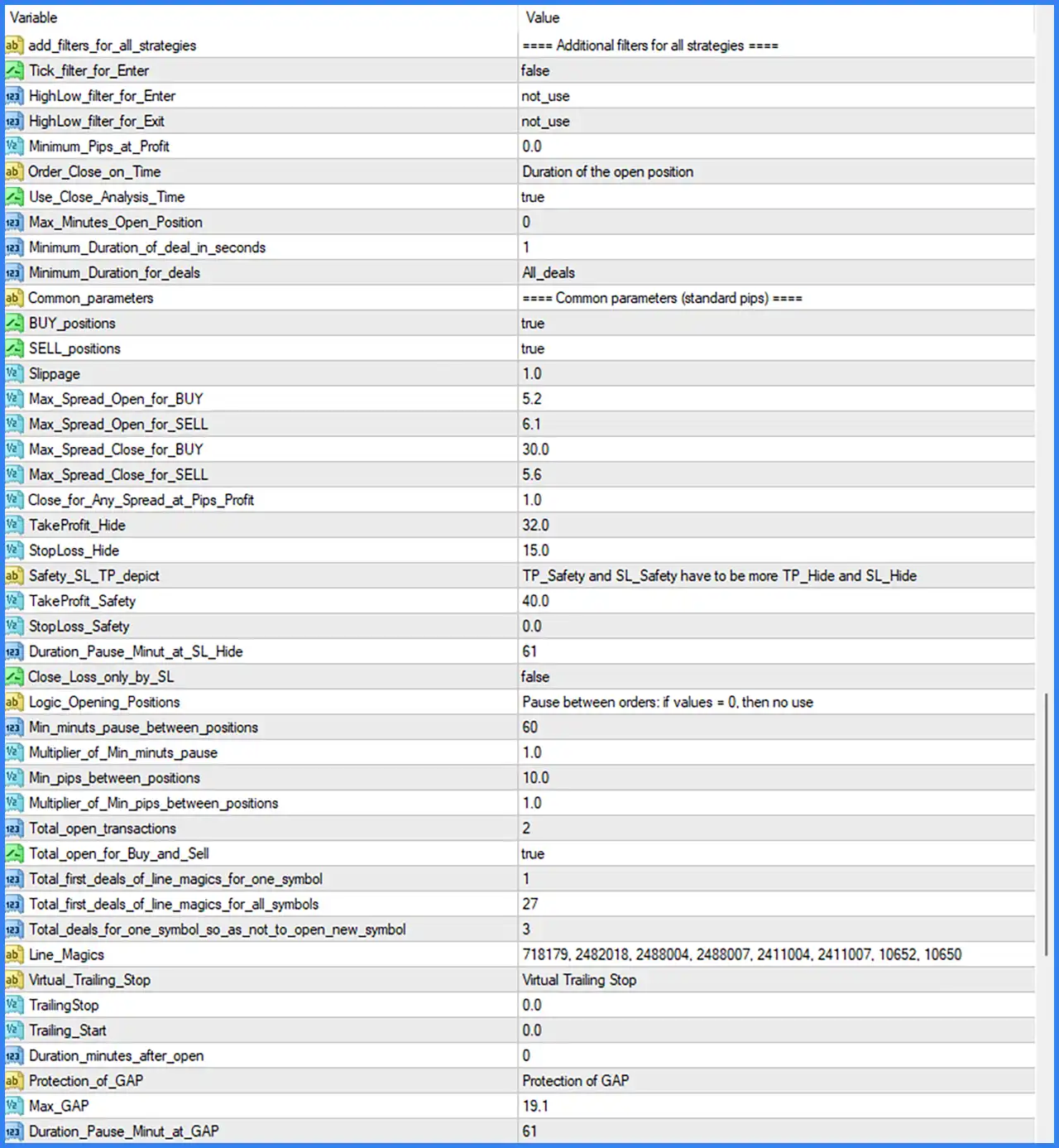
🔹 add_filters_for_all_strategies = Additional filters for all strategies: Section heading for additional trading filters that can be applied across the EA's strategies.
🔹 Tick_filter_for_Enter = false: Disables the tick-based filter for new trading entries.
🔹 HighLow_filter_for_Enter = not_use: Disables the High/Low filter for entry conditions.
🔹 HighLow_filter_for_Exit = not_use: Disables the High/Low filter for exit conditions.
🔹 Minimum_Pips_at_Profit = 0.0: Sets the minimum profit requirement to 0.0 pips for the corresponding additional trading filter.
🔹 Order_Close_on_Time = Duration of the open position: Describes the time-based order-closing configuration, which considers the duration of an open position.
🔹 Use_Close_Analysis_Time = true: Enables the close-analysis-time function for evaluating open positions according to the configured time conditions.
🔹 Max_Minutes_Open_Position = 0: Sets the maximum open-position duration to 0 minutes. The exact meaning of this value, including whether it disables the time limit, depends on the EA's internal logic.
🔹 Minimum_Duration_of_deal_in_seconds = 1: Sets the minimum deal duration to 1 second.
🔹 Minimum_Duration_for_deals = All_deals: Applies the minimum deal-duration condition to all deals.
Common Trading Parameters
🔹 Common_parameters = Common parameters (standard pips): Section heading for shared trading and execution settings, with distances expressed in standard pips.
🔹 BUY_positions = true: Enables BUY positions, allowing the EA to open long trades when its strategy conditions are satisfied.
🔹 SELL_positions = true: Enables SELL positions, allowing the EA to open short trades when its strategy conditions are satisfied.
🔹 Slippage = 1.0: Sets the permitted slippage value to 1.0 for trade execution.
🔹 Max_Spread_Open_for_BUY = 5.2: Sets the maximum permitted spread for opening BUY positions to 5.2 pips.
🔹 Max_Spread_Open_for_SELL = 6.1: Sets the maximum permitted spread for opening SELL positions to 6.1 pips.
🔹 Max_Spread_Close_for_BUY = 30.0: Sets the maximum spread threshold for closing BUY positions to 30.0 pips.
🔹 Max_Spread_Close_for_SELL = 5.6: Sets the maximum spread threshold for closing SELL positions to 5.6 pips.
🔹 Close_for_Any_Spread_at_Pips_Profit = 1.0: Sets a profit threshold of 1.0 pip for the corresponding position-closing function, allowing the EA to close positions under the specified spread conditions.
Hidden Take Profit and Stop Loss Settings
🔹 TakeProfit_Hide = 32.0: Sets the hidden Take Profit distance to 32.0 pips. This parameter is used for internal profit-target management rather than necessarily displaying the target as a conventional broker-side TP order.
🔹 StopLoss_Hide = 15.0: Sets the hidden Stop Loss distance to 15.0 pips for the EA's internal position-management logic.
🔹 Safety_SL_TP_depict = TP_Safety and SL_Safety have to be more TP_Hide and SL_Hide: Indicates that the safety Take Profit and Stop Loss values should be greater than their corresponding hidden TP and SL settings.
🔹 TakeProfit_Safety = 40.0: Sets the safety Take Profit distance to 40.0 pips, which is greater than the hidden Take Profit value of 32.0.
🔹 StopLoss_Safety = 0.0: Sets the safety Stop Loss value to 0.0 pips. This is a special configuration that should be checked against the EA's internal handling of zero values.
🔹 Duration_Pause_Min_at_SL_Hide = 61: Sets a pause duration of 61 minutes for the corresponding hidden Stop Loss management condition.
🔹 Close_Loss_only_by_SL = false: Disables the option to close losing positions exclusively through the Stop Loss mechanism.
Position Opening Logic Settings
🔹 Logic_Opening_Positions = Pause between orders: if values = 0, then no use: Section heading describing the time and distance restrictions between successive trading orders. A value of 0 disables the corresponding pause condition.
🔹 Min_minutes_pause_between_positions = 60: Sets the minimum waiting period between positions to 60 minutes.
🔹 Multiplier_of_Min_minutes_pause = 1.0: Sets the multiplier for the minimum time interval between positions to 1.0.
🔹 Min_pips_between_positions = 10.0: Requires a minimum price distance of 10.0 pips between positions according to the EA's position-opening logic.
🔹 Multiplier_of_Min_pips_between_positions = 1.0: Sets the multiplier for the minimum pip distance between positions to 1.0.
🔹 Total_open_transactions = 2: Limits the total number of simultaneously open transactions to 2 according to the configured position-management logic.
🔹 Total_open_for_Buy_and_Sell = true: Enables the combined BUY and SELL transaction-counting option when managing the total number of open positions.
🔹 Total_first_deals_of_line_magics_for_one_symbol = 1: Limits the number of first deals associated with the configured line Magic Numbers for one trading symbol to 1.
🔹 Total_first_deals_of_line_magics_for_all_symbols = 27: Sets the maximum number of first deals associated with the configured line Magic Numbers across all symbols to 27.
🔹 Total_deals_for_one_symbol_so_as_not_to_open_new_symbol = 3: Sets the deal-count threshold for one symbol to 3, which is used when determining whether the EA should open positions on another symbol.
🔹 Line_Magics = 718179, 2482018, 2488004, 2488007, 2411004, 2411007, 10652, 10650: Specifies eight Magic Numbers used by the EA's line-based position-management logic to identify the relevant trading orders.
Virtual Trailing Stop Settings
🔹 Virtual_Trailing_Stop = Virtual Trailing Stop: Section heading for the EA's virtual trailing-stop management system.
🔹 TrailingStop = 0.0: Sets the virtual trailing-stop distance to 0.0 pips, which may indicate that the trailing-stop distance is disabled in the default configuration.
🔹 Trailing_Start = 0.0: Sets the trailing-stop activation threshold to 0.0 pips.
🔹 Duration_minutes_after_open = 0: Sets the waiting duration after opening a position to 0 minutes for the corresponding trailing-stop function.
Gap Protection Settings
🔹 Protection_of_GAP = Protection of GAP: Section heading for protection against sudden price gaps and abnormal market movements.
🔹 Max_GAP = 19.1: Sets the maximum permitted gap threshold to 19.1 pips, defining the configured price-gap condition monitored by the EA.
🔹 Duration_Pause_Min_at_GAP = 61: Sets the trading pause duration to 61 minutes when the corresponding gap-protection condition is triggered.
GMT Trading Time Settings
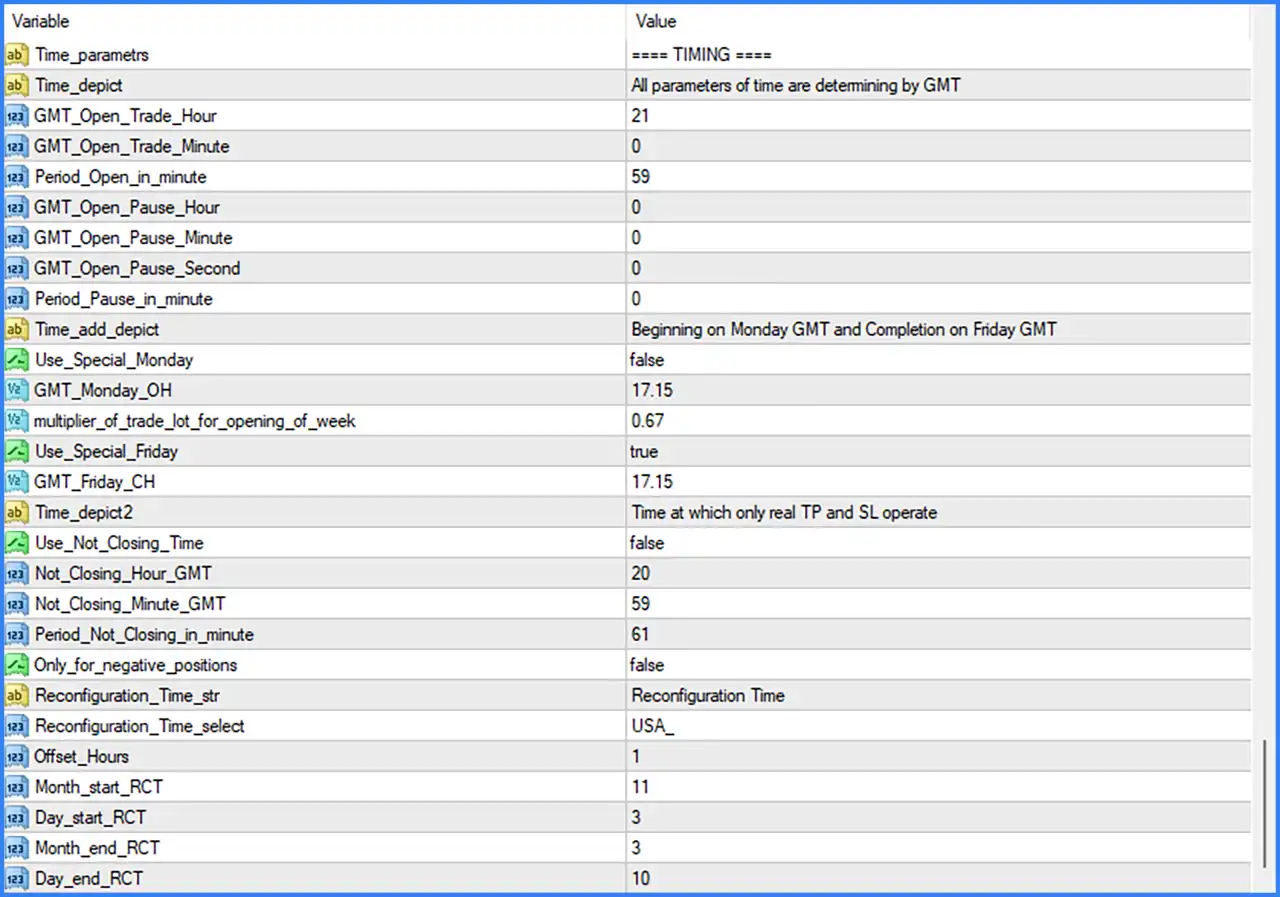
🔹 Time_parametrs = TIMING: Section heading for the EA's trading schedule and time-management configuration.
🔹 Time_depict = All parameters of time are determining by GMT: Indicates that all time-related parameters are calculated using GMT as the reference time.
🔹 GMT_Open_Trade_Hour = 21: Sets the scheduled trading start hour to 21:00 GMT.
🔹 GMT_Open_Trade_Minute = 0: Sets the trading start minute to 00, meaning the scheduled opening time is 21:00 GMT.
🔹 Period_Open_in_minute = 59: Sets the trading opening period to 59 minutes, defining the configured duration of the trading window.
🔹 GMT_Open_Pause_Hour = 0: Sets the scheduled trading pause hour to 00 GMT.
🔹 GMT_Open_Pause_Minute = 0: Sets the scheduled trading pause minute to 00.
🔹 GMT_Open_Pause_Second = 0: Sets the scheduled trading pause second to 0.
🔹 Period_Pause_in_minute = 0: Sets the trading pause duration to 0 minutes, indicating that no additional pause period is configured through this parameter.
Special Monday and Friday Trading Settings
🔹 Time_add_depict = Beginning on Monday GMT and Completion on Friday GMT: Describes the additional weekly trading schedule, covering the beginning of the trading week on Monday and its completion on Friday according to GMT.
🔹 Use_Special_Monday = false: Disables the special Monday trading configuration.
🔹 GMT_Monday_OH = 17.15: Sets the Monday opening-time parameter to 17.15, representing the configured GMT time value for the special Monday schedule.
🔹 multiplier_of_trade_lot_for_opening_of_week = 0.67: Sets the lot-size multiplier for opening positions at the beginning of the trading week to 0.67, allowing the EA to adjust position volume according to its weekly opening logic.
🔹 Use_Special_Friday = true: Enables the special Friday trading configuration, allowing the EA to apply specific trading conditions before the weekend.
🔹 GMT_Friday_CH = 17.15: Sets the Friday closing-time parameter to 17.15 GMT for the special Friday trading schedule.
Real Take Profit and Stop Loss Timing Settings
🔹 Time_depict2 = Time at which only real TP and SL operate: Describes the time-management function during which only the actual broker-side Take Profit and Stop Loss mechanisms operate.
🔹 Use_Not_Closing_Time = false: Disables the special non-closing-time restriction.
🔹 Not_Closing_Hour_GMT = 20: Sets the configured non-closing hour to 20 GMT.
🔹 Not_Closing_Minute_GMT = 59: Sets the configured non-closing minute to 59, representing 20:59 GMT.
🔹 Period_Not_Closing_in_minute = 61: Sets the duration of the non-closing period to 61 minutes.
🔹 Only_for_negative_positions = false: Disables the restriction that would apply this non-closing-time function exclusively to losing positions.
Reconfiguration Time Settings
🔹 Reconfiguration_Time_str = Reconfiguration Time: Section heading for configuring the EA's seasonal time adjustment period.
🔹 Reconfiguration_Time_select = USA_: Selects USA as the regional reference for the reconfiguration-time schedule.
🔹 Offset_Hours = 1: Sets the time adjustment offset to 1 hour for the reconfiguration schedule.
🔹 Month_start_RCT = 11: Sets November (month 11) as the starting month of the reconfiguration period.
🔹 Day_start_RCT = 3: Sets November 3 as the starting date of the reconfiguration period.
🔹 Month_end_RCT = 3: Sets March (month 3) as the ending month of the reconfiguration period.
🔹 Day_end_RCT = 10: Sets March 10 as the ending date of the reconfiguration period.