
BioBot EA is an automated trading Expert Advisor (EA) designed for the MetaTrader 4 platform. It provides configurable trading parameters for risk management, lot sizing, order execution, spread control, take profit, stop loss, trailing stop, and volatility filtering. These settings allow traders to customize the EA’s trading behavior according to their account size, broker conditions, and preferred risk level.
Understanding each input parameter is important for configuring BioBot EA correctly and managing its trading operations effectively.
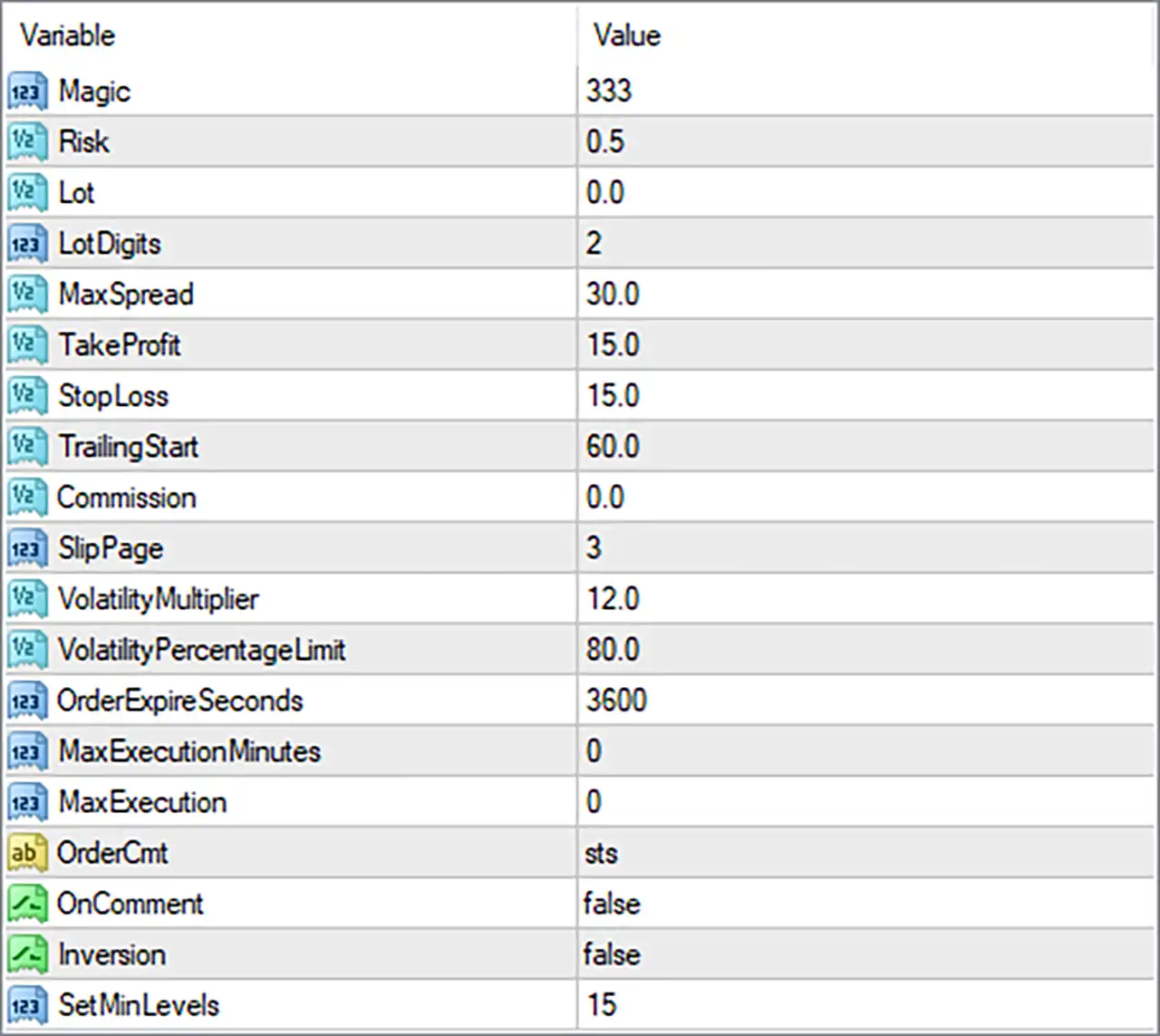
1. Trading Identification and Risk Management
🔹 Magic = 333 – Sets the unique Magic Number used by BioBot EA MT4 to identify and manage its own trading orders. This helps distinguish the EA’s trades from manually opened positions or trades placed by other Expert Advisors.
🔹 Risk = 0.5 – Defines the risk level used by the EA when calculating trading volume. The value is set to 0.5, which may represent a 0.5% risk allocation depending on the EA’s internal lot calculation method.
🔹 Lot = 0.0 – Specifies the fixed trading lot size. A value of 0.0 may indicate that the EA uses automatic lot calculation based on the Risk parameter rather than a manually specified lot size.
🔹 LotDigits = 2 – Determines the number of decimal places used when calculating or normalizing trading lot sizes. A value of 2 allows lot volumes to be represented with two decimal places, such as 0.01 or 0.10 lots.
2. Trading Conditions and Order Management
🔹 MaxSpread = 30.0 – Sets the maximum permitted spread for opening new trades. When the broker’s spread exceeds 30.0, the EA may prevent new order entries to avoid trading under unfavorable spread conditions.
🔹 TakeProfit = 15.0 – Defines the Take Profit distance for each trade. When the market reaches the specified profit target, the EA closes the position automatically. The actual distance unit depends on the EA’s internal calculation and broker symbol specifications.
🔹 StopLoss = 15.0 – Sets the Stop Loss distance for each trading position. This parameter helps limit potential losses by automatically closing a trade when the market moves against the position by the configured distance.
🔹 TrailingStart = 60.0 – Specifies the profit distance at which the trailing stop mechanism begins operating. Once a position reaches the required profit level, the EA can start adjusting its stop-loss level to protect accumulated gains.
🔹 Commission = 0.0 – Defines the commission value used by the EA in its trading calculations or cost-related conditions. The default value of 0.0 indicates that no additional commission adjustment is specified through this input.
🔹 SlipPage = 3 – Sets the maximum acceptable slippage during order execution. The value of 3 controls the permitted difference between the requested execution price and the actual broker execution price, subject to the EA’s implementation.
3. Volatility Management
🔹 VolatilityMultiplier = 12.0 – Controls the multiplier applied to the EA’s volatility-related calculations. This parameter may influence how the system evaluates market movement and adjusts its trading conditions according to volatility.
🔹 VolatilityPercentageLimit = 80.0 – Sets the percentage threshold used by the EA’s volatility filtering mechanism. The default value of 80.0 defines the configured limit for evaluating market volatility before allowing trading activity.
4. Order Execution and Expiration Settings
🔹 OrderExpireSeconds = 3600 – Determines how long an order remains valid before expiration, with the default value set to 3,600 seconds (60 minutes). This setting is relevant to the EA’s order expiration management, particularly when working with pending or time-limited orders.
🔹 MaxExecutionMinutes = 0 – Specifies the maximum execution time in minutes for the EA’s execution-related control. A value of 0 may disable this time-based restriction, depending on the EA’s internal programming.
🔹 MaxExecution = 0 – Defines the maximum execution limit used by the EA. The default value of 0 may indicate that no additional execution limit is enforced through this parameter.
🔹 OrderCmt = sts – Sets the custom comment attached to orders generated by BioBot EA MT4. The default text is sts, which can help identify the EA’s trades in the MT4 trading terminal and account history.
5. Advanced Trading Options
🔹 OnComment = false – Enables or disables the comment-related trading option. With the default value set to false, the EA’s additional comment-based functionality is disabled.
🔹 Inversion = false – Controls the trade inversion option. When enabled, this setting may reverse the EA’s normal trading direction, while the default value of false keeps the standard trading direction unchanged.
🔹 SetMinLevels = 15 – Defines the minimum level threshold used by the EA’s internal trading logic. The configured value of 15 establishes the minimum level required by this parameter when evaluating its trading conditions.
Conclusion
BioBot EA MT4 provides a range of configurable inputs covering trading risk, automatic lot sizing, spread protection, Take Profit, Stop Loss, trailing stop activation, volatility filtering, and order execution management.
The default configuration includes Risk = 0.5, MaxSpread = 30.0, TakeProfit = 15.0, StopLoss = 15.0, and TrailingStart = 60.0. These parameters are important when configuring the EA’s trading behavior and managing exposure.
Before using BioBot EA MT4 on a live account, traders should verify the actual calculation units, test the configuration on a demo account, and evaluate its performance under different market conditions. Remember that appropriate risk management and broker execution conditions are essential for automated Forex trading.