
The The Invincible EA is an automated trading system designed for MetaTrader 5, featuring configurable trade management, automated lot calculation, trading session controls, and built-in risk management options. Its settings allow traders to customize position sizing, maximum open trades, execution conditions, Stop Loss, Take Profit, and Trailing Stop functionality.
The EA also includes automatic GMT adjustment, scheduled position closing, chart information display, and an optional news filter. Understanding each input parameter helps traders configure The Invincible EA according to their trading preferences, account balance, and risk tolerance.
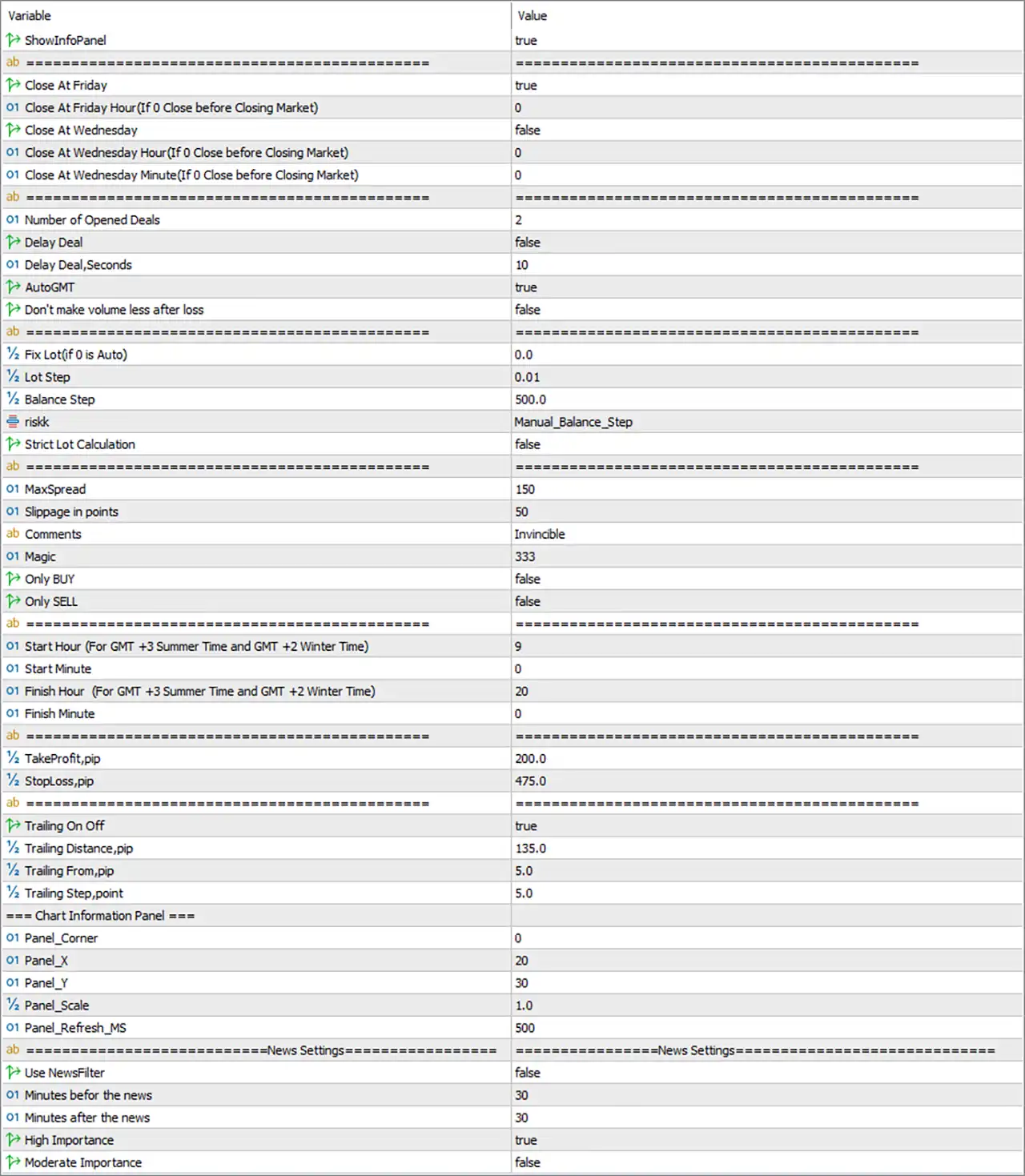
Display and Panel Settings
🔹 ShowInfoPanel = true – Enables the information panel on the trading chart, allowing traders to view relevant EA information and trading statistics directly from the MT5 interface.
Scheduled Trade Closing Settings
These settings allow The Invincible EA MT5 to automatically close open positions on selected weekdays, helping traders manage exposure around market closures and specific trading periods.
🔹 Close At Friday = true – Enables automatic closing of open trades on Friday to reduce exposure over the weekend and avoid unexpected price gaps when the market reopens.
🔹 Close At Friday Hour (If 0 Close before Closing Market) = 0 – Defines the Friday closing hour. A value of 0 activates the special behavior of closing positions before the market closes.
🔹 Close At Wednesday = false – Disables automatic position closing on Wednesday. When enabled, the EA can close open trades according to the specified Wednesday schedule.
🔹 Close At Wednesday Hour (If 0 Close before Closing Market) = 0 – Specifies the Wednesday closing hour when the Wednesday closing function is enabled. A value of 0 indicates closing before the market closes.
🔹 Close At Wednesday Minute (If 0 Close before Closing Market) = 0 – Sets the exact minute for the scheduled Wednesday closing operation, allowing more precise control over the closing time.
Trade Execution and Position Management
This section controls the number of active positions, execution delays, automatic time adjustment, and lot behavior following losing trades.
🔹 Number of Opened Deals = 2 – Sets the maximum number of simultaneously opened deals allowed by the EA, limiting the number of active trading positions according to the configured value.
🔹 Delay Deal = false – Disables the additional execution delay between trading operations. When enabled, the EA uses the specified delay duration before processing a new deal.
🔹 Delay Deal,Seconds = 10 – Defines the execution delay in seconds when the Delay Deal function is activated, with a default waiting period of 10 seconds.
🔹 AutoGMT = true – Enables automatic GMT time adjustment so the EA can synchronize its trading schedule with the broker’s server time configuration.
🔹 Don’t make volume less after loss = false – Disables the option that prevents trading volume from being reduced after a losing trade. When this option is enabled, the EA is instructed not to decrease volume following a loss.
Lot Size and Risk Management Settings
These parameters determine how the EA calculates trading volume and adjusts position sizes based on account balance and the selected risk calculation method.
🔹 Fix Lot (if 0 is Auto) = 0.0 – Sets a fixed trading lot size. A value of 0.0 activates automatic lot calculation instead of using a manually specified fixed volume.
🔹 Lot Step = 0.01 – Defines the lot adjustment increment used by the EA when calculating or modifying trading volume, with each adjustment step representing 0.01 lots.
🔹 Balance Step = 500.0 – Sets the account balance increment used by the balance-based lot calculation method. The configured step is 500.0 account currency units.
🔹 riskk = Manual_Balance_Step – Selects the risk and lot calculation mode. The current Manual_Balance_Step setting indicates that position sizing uses the manually configured balance-step approach.
🔹 Strict Lot Calculation = false – Disables strict lot calculation. When enabled, the EA may apply stricter volume calculation rules to ensure the resulting lot size follows its internal calculation requirements.
Order Execution and Trading Identification
These settings control order execution conditions, trade identification, and directional trading restrictions.
🔹 MaxSpread = 150 – Sets the maximum spread threshold accepted by the EA before opening a trade. Trading opportunities may be rejected when the spread exceeds 150 points.
🔹 Slippage in points = 50 – Defines the maximum permitted price deviation during order execution, with a configured slippage tolerance of 50 points.
🔹 Comments = Invincible – Sets the comment displayed alongside trades opened by the EA, making it easier to identify The Invincible EA MT5 positions in the MT5 trading terminal.
🔹 Magic = 333 – Assigns the Magic Number 333 to identify and distinguish trades opened by this EA from manual positions or trades generated by other automated systems.
🔹 Only BUY = false – Disables BUY-only trading mode, allowing the EA to consider both BUY and SELL trading opportunities according to its internal strategy.
🔹 Only SELL = false – Disables SELL-only trading mode, allowing the EA to trade in either direction rather than restricting all entries to SELL positions.
Trading Session Settings
The trading session parameters define when The Invincible EA MT5 is permitted to execute trades. The configured schedule uses GMT+3 during summer time and GMT+2 during winter time.
🔹 Start Hour (For GMT +3 Summer Time and GMT +2 Winter Time) = 9 – Sets the starting hour of the trading session to 09:00 according to the specified GMT+3 summer and GMT+2 winter time reference.
🔹 Start Minute = 0 – Defines the starting minute of the trading session, with a default value of 0, meaning trading begins exactly at 09:00.
🔹 Finish Hour (For GMT +3 Summer Time and GMT +2 Winter Time) = 20 – Sets the ending hour of the trading session to 20:00, establishing the daily trading cutoff time.
🔹 Finish Minute = 0 – Defines the final minute of the trading session, with a value of 0 meaning the configured session ends exactly at 20:00.
Take Profit and Stop Loss Settings
These parameters establish the default profit target and protective stop distance for positions opened by the EA.
🔹 TakeProfit,pip = 200.0 – Sets the Take Profit distance to 200.0 pips, defining the intended profit-taking target for each trade according to the EA’s pip calculation.
🔹 StopLoss,pip = 475.0 – Sets the Stop Loss distance to 475.0 pips, establishing the configured protective exit level to help limit losses when the market moves against an open position.
Trailing Stop Settings
The Invincible EA MT5 includes a configurable Trailing Stop mechanism designed to adjust protective stop levels as a position moves into profit.
🔹 Trailing On Off = true – Activates the Trailing Stop function, allowing the EA to dynamically manage Stop Loss levels as the market moves favorably.
🔹 Trailing Distance,pip = 135.0 – Defines the trailing distance of 135.0 pips between the current market price and the trailing Stop Loss level.
🔹 Trailing From,pip = 5.0 – Sets the profit threshold at which the Trailing Stop mechanism begins operating, starting from 5.0 pips of favorable movement.
🔹 Trailing Step,point = 5.0 – Defines the minimum price movement required for the EA to update the trailing Stop Loss, using a trailing adjustment step of 5.0 points.
Chart Information Panel Settings
These parameters control the position, scale, and refresh frequency of the EA’s chart information panel.
🔹 Panel_Corner = 0 – Selects the chart corner used as the reference point for positioning the information panel. The value 0 represents the upper-left corner in the standard MT5 corner indexing.
🔹 Panel_X = 20 – Sets the horizontal distance of the information panel from the selected chart corner, using an offset of 20 pixels.
🔹 Panel_Y = 30 – Sets the vertical distance of the information panel from the selected chart corner, using an offset of 30 pixels.
🔹 Panel_Scale = 1.0 – Controls the scaling factor of the information panel, with 1.0 representing its standard display size.
🔹 Panel_Refresh_MS = 500 – Sets the panel refresh interval to 500 milliseconds, allowing the displayed information to update approximately twice per second.
News Filter Settings
The news filter section provides configurable controls for managing trading activity around scheduled economic announcements.
🔹 Use NewsFilter = false – Disables the economic news filter. When enabled, the EA can use the selected news importance levels and time restrictions to manage trading around economic events.
🔹 Minutes before the news = 30 – Defines the number of minutes before a scheduled economic announcement during which the news filter can restrict trading activity.
🔹 Minutes after the news = 30 – Defines the number of minutes after an economic announcement during which the news filter can continue restricting trading activity.
🔹 High Importance = true – Enables high-importance economic news events as a category considered by the news filter when the filter is activated.
🔹 Moderate Importance = false – Disables moderate-importance economic news events as a category considered by the news filter.
Conclusion
The The Invincible EA MT5 settings provide comprehensive control over trade execution, lot sizing, trading sessions, position management, and automated risk protection.
The default configuration includes a maximum of 2 opened deals, automatic lot calculation through Fix Lot = 0.0, a 200.0-pip Take Profit, and a 475.0-pip Stop Loss. The Trailing Stop is enabled with a 135.0-pip trailing distance, a 5.0-pip activation threshold, and a 5.0-point trailing step.
Additionally, the EA is configured to trade between 09:00 and 20:00, automatically adjust GMT, and close open positions on Friday. The economic news filter remains disabled by default.