
For FTSE100 EA is an automated trading Expert Advisor (EA) designed for the MetaTrader 4 platform, focusing on trading the FTSE 100 stock market index. Its input parameters provide control over risk exposure, trade identification, order execution, slippage tolerance, and trailing stop management.
Purchase the UNLIMITED version of For FTSE100 EA MT4 here
Understanding the settings of For FTSE100 EA helps traders customize the EA according to their trading strategies, account conditions, and risk management preferences.
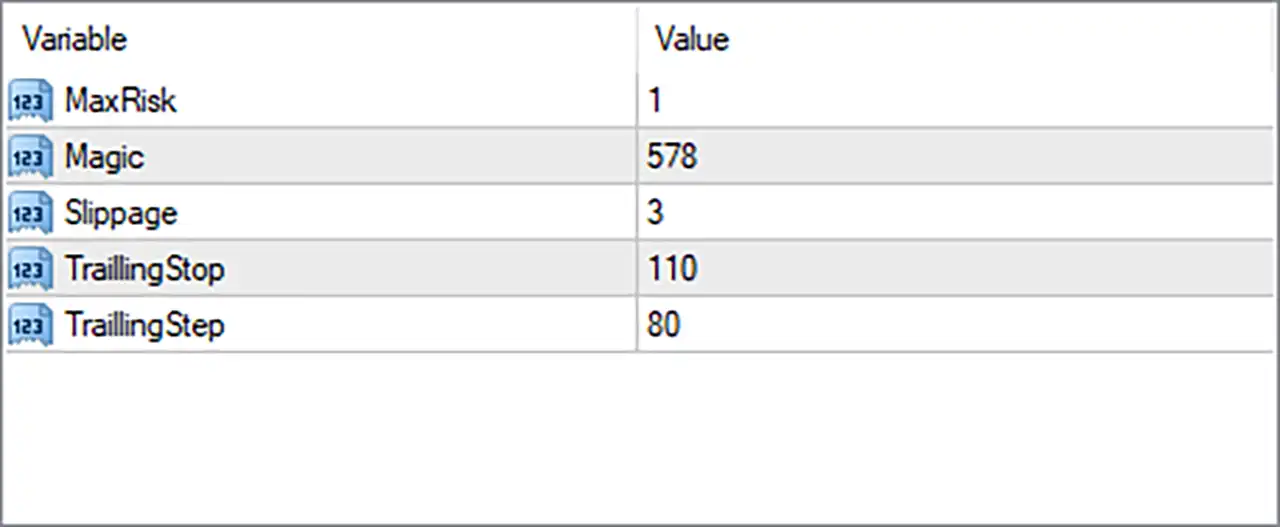
1. Risk Management and Trade Identification
🔹 MaxRisk = 1 – Sets the maximum risk level used by the EA when managing trading exposure. The default value of 1 defines the configured risk limit. Whether this represents a percentage or another internal risk unit depends on the EA’s programming.
🔹 Magic = 578 – Specifies the unique Magic Number used to identify trades opened by For FTSE100 EA MT4. This allows the EA to distinguish and manage its own positions separately from manual trades or orders placed by other Expert Advisors.
2. Order Execution Settings
🔹 Slippage = 3 – Defines the maximum permitted slippage during trade execution. The default value of 3 allows a certain price deviation between the requested entry price and the actual execution price, depending on the broker and the EA’s implementation.
3. Trailing Stop Management
🔹 TrailingStop = 110 – Sets the trailing stop distance to 110 points. This parameter controls how far the Stop Loss follows the market price after a position moves into profit, helping protect accumulated gains while allowing trades room to develop.
🔹 TrailingStep = 80 – Defines the trailing stop adjustment step at 80 points. The EA uses this value to determine the minimum price movement required before updating the trailing Stop Loss, helping control how frequently the protective level is modified.
Conclusion
For FTSE100 EA MT4 features a straightforward configuration with five essential parameters covering maximum risk, trade identification, execution slippage, and trailing stop management.
The default settings are MaxRisk = 1, Magic = 578, Slippage = 3, TrailingStop = 110, and TrailingStep = 80.
The combination of TrailingStop = 110 and TrailingStep = 80 provides the configured trailing stop distance and adjustment interval. Traders should evaluate these values against FTSE100 market volatility, broker execution conditions, and their preferred risk tolerance.
Before deploying For FTSE100 EA on a live account, it is recommended to test the settings on a demo account and verify the EA’s risk calculation method. Proper configuration and ongoing monitoring are important for managing automated index trading risks.