🔶 What is Blue Orbit EA?
Blue Orbit EA is an automated trading robot designed for MetaTrader 5, optimized mainly for trading Gold (XAUUSD). The Expert Advisor (EA) focuses on controlled risk exposure, simple trade management, and broker-execution protection features. It integrates drawdown protection, spread filtering, and profit-target logic while maintaining a conservative money management approach.
🔶 Trading Schedule Settings
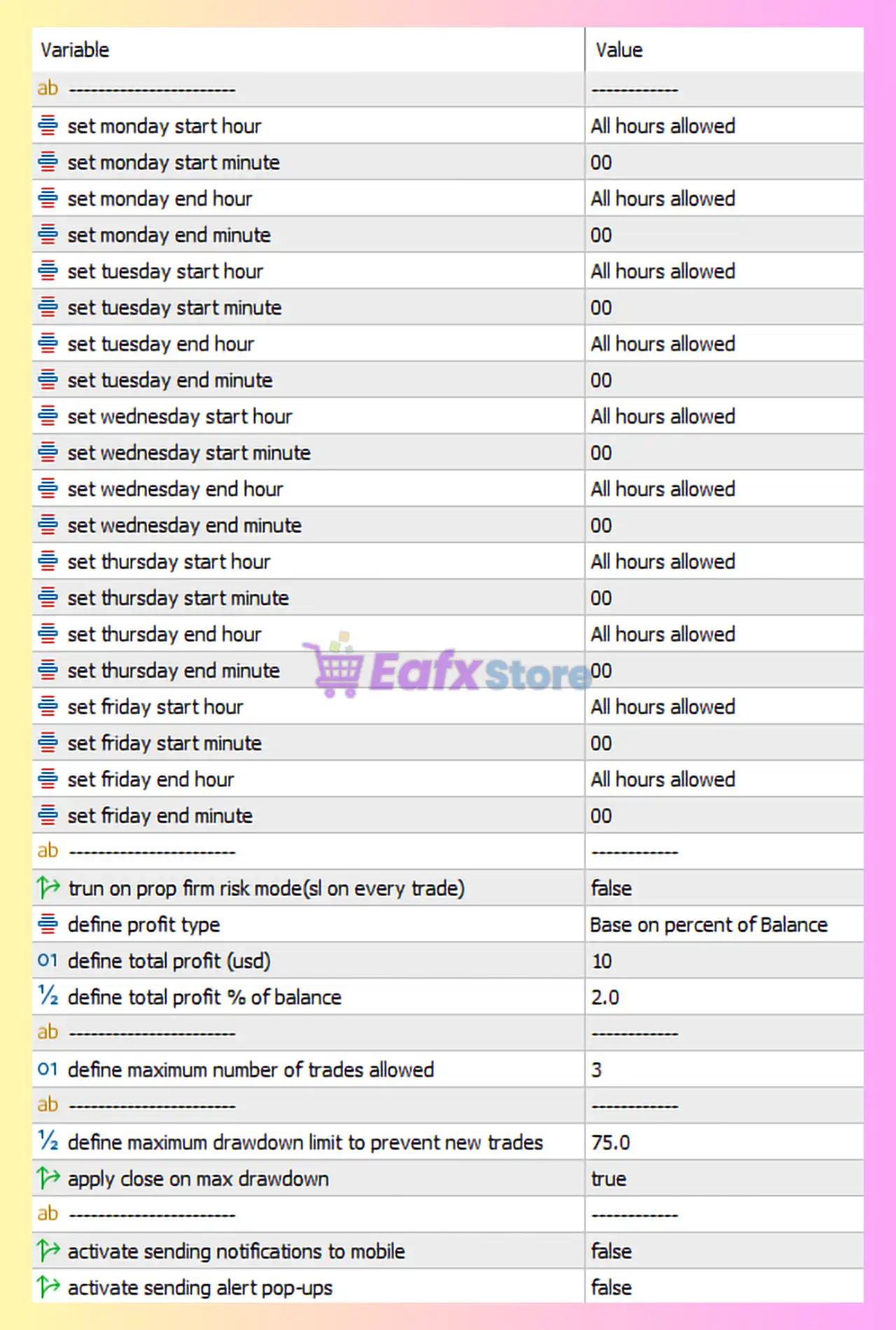
Blue Orbit EA allows traders to define trading hours for each weekday. In the current configuration, trading is allowed 24 hours per day from Monday to Friday.
| Parameter | Value | Explanation |
|---|---|---|
| Monday–Friday Start Hour | All hours allowed | EA can begin trading at any time during the day. |
| Monday–Friday End Hour | All hours allowed | Trading remains active throughout the day. |
| Start Minute / End Minute | 00 | Specifies minute precision for trading schedule. |
➡️ Purpose of Time Filters
This feature allows traders to restrict trading during specific sessions such as the London or New York session. In this configuration, the EA trades continuously across all sessions.
🔶 Profit Target Configuration
| Parameter | Value | Explanation |
|---|---|---|
| Run on Prop Firm Risk Mode | false | Prop-firm risk management mode disabled. |
| Profit Type | Percent of Balance | Profit targets calculated based on account balance percentage. |
| Total Profit (USD) | 10 | Fixed profit closure threshold in USD. |
| Total Profit (%) | 2.0 | EA closes positions once profit reaches 2% of account balance. |
These parameters allow flexible profit-taking based on either fixed currency value or percentage gain.
🔶 Trade Limitation & Drawdown Control
| Parameter | Value | Explanation |
|---|---|---|
| Maximum Number of Trades | 3 | Limits the number of simultaneously open trades. |
| Maximum Drawdown Limit | 75% | Prevents new trades when drawdown exceeds this level. |
| Apply Close on Max Drawdown | true | Automatically closes positions if drawdown limit is reached. |
This structure ensures the EA maintains strict capital protection during adverse market conditions.
🔶 Notifications & Alerts
| Parameter | Value | Explanation |
|---|---|---|
| Mobile Notifications | false | Push notifications to mobile devices are disabled. |
| Alert Pop-Ups | false | No pop-up alerts will appear in the trading terminal. |
These options are mainly used for monitoring automated trading activity.
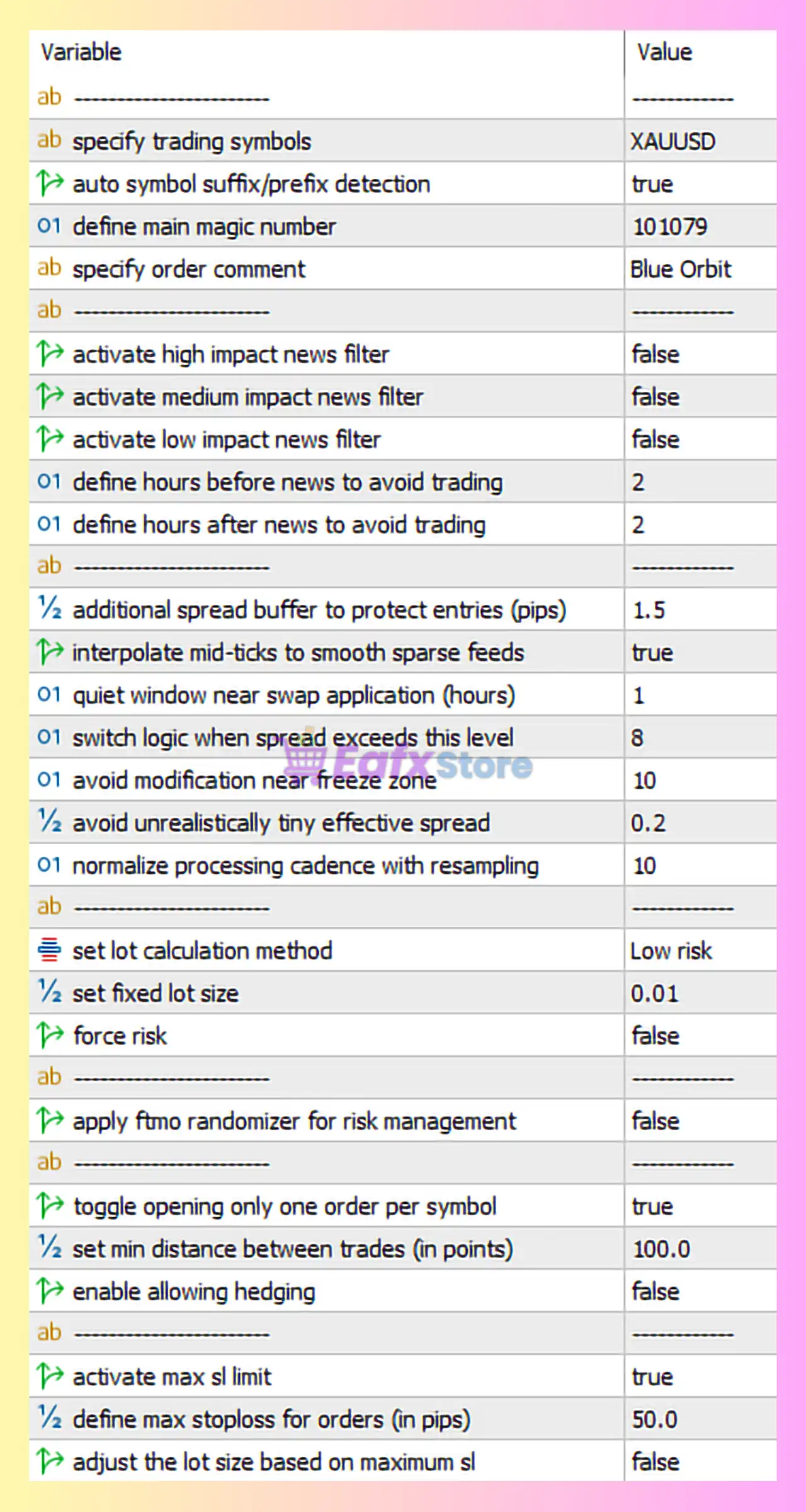
🔶 Symbol Configuration
| Parameter | Value | Explanation |
|---|---|---|
| Trading Symbol | XAUUSD | The EA is configured to trade Gold only. |
| Auto Symbol Suffix Detection | true | Automatically detects broker suffixes such as XAUUSDm or XAUUSD.pro. |
| Magic Number | 101079 | Unique identifier for EA trades. |
| Order Comment | Blue Orbit | Custom label used to track trades in account history. |
🔶 News Filter Settings
| Parameter | Value | Explanation |
|---|---|---|
| High Impact News Filter | false | EA does not stop trading during major economic events. |
| Medium Impact News Filter | false | Medium impact events are ignored. |
| Low Impact News Filter | false | Low impact events are also ignored. |
| Hours Before News | 2 | Optional pause window before news release. |
| Hours After News | 2 | Optional pause after news events. |
Although filters are disabled, the system can be easily configured to avoid trading around economic news.
🔶 Execution Protection & Spread Filters
| Parameter | Value | Explanation |
|---|---|---|
| Additional Spread Buffer | 1.5 pips | Adds safety margin to spread conditions before opening trades. |
| Interpolate Mid-Ticks | true | Smooths sparse price feeds for better signal accuracy. |
| Quiet Window Near Swap | 1 hour | Avoids trading during swap rollover periods. |
| Spread Logic Threshold | 8 | Adjusts trade logic when spreads become unusually large. |
| Avoid Freeze Zone | 10 points | Prevents order modification near broker freeze levels. |
| Avoid Unrealistic Tiny Spread | 0.2 | Ignores abnormal spreads caused by feed glitches. |
| Normalize Processing Cadence | 10 | Synchronizes signal calculation intervals. |
These parameters protect the EA from poor execution environments and unstable broker feeds.
🔶 Money Management Settings
| Parameter | Value | Explanation |
|---|---|---|
| Lot Calculation Method | Low Risk | Uses conservative lot sizing logic. |
| Fixed Lot Size | 0.01 | Defines the base trading volume. |
| Force Risk | false | Allows adaptive risk behavior instead of forced risk scaling. |
This configuration indicates the EA is set up for conservative trading with minimal account exposure.
🔶 Trade Entry Restrictions
| Parameter | Value | Explanation |
|---|---|---|
| FTMO Randomizer | false | Randomization feature for prop-firm compliance disabled. |
| One Trade Per Symbol | true | Ensures only one trade per instrument at a time. |
| Minimum Distance Between Trades | 100 points | Prevents opening trades too close to each other. |
| Allow Hedging | false | Opposite positions on the same symbol are not allowed. |
These restrictions help maintain structured trade management and reduce overtrading.
🔶 Stop Loss Protection
| Parameter | Value | Explanation |
|---|---|---|
| Activate Max SL Limit | true | Enables maximum stop loss protection. |
| Maximum Stop Loss | 50 pips | Restricts SL distance to avoid excessive risk. |
| Adjust Lot Based on SL | false | Lot size remains fixed regardless of SL size. |
This feature ensures trades cannot exceed predefined risk thresholds.
🔶 Strategy Overview
Blue Orbit EA MT5 appears to use a single-trade strategy with conservative risk controls. The system emphasizes stability by limiting the number of trades, enforcing minimum distance between entries, and applying strict stop loss limits.
Execution filters such as spread buffers, freeze-zone avoidance, and swap-time protection ensure the EA performs reliably across different broker environments.
🔶 Key Risk Control Features
The EA incorporates several important safety mechanisms:
- Maximum drawdown protection with forced closure
- Maximum trade limit per symbol
- Spread and execution environment filters
- Conservative lot sizing
- Stop loss distance limitation
These features help maintain long-term account stability.
🔶 Conclusion
Blue Orbit EA MT5 is a risk-focused automated trading system designed primarily for Gold trading. With strict exposure limits, execution filters, and conservative lot sizing, the EA prioritizes stability over aggressive growth.
For optimal performance, traders should use a low-spread broker for XAUUSD, monitor drawdown settings, and adjust profit targets according to account size. Proper risk management and regular monitoring remain essential to maintain consistent results when using automated trading systems in MetaTrader 5.