
What is Capybara EA?
Capybara EA is an automated trading system that uses a Martingale and Grid-based approach for continuous 24/7 trading. It aims to maximize profits by gradually increasing lot sizes to recover from drawdowns. With a 150-pip Take Profit (TP) and a disabled Stop Loss (SL), the EA relies on its dynamic grid and recovery mechanisms to manage trades. This strategy is highly adaptable, supporting both long and short positions as well as hedging.
➡️ Vendor Wedsite: View here
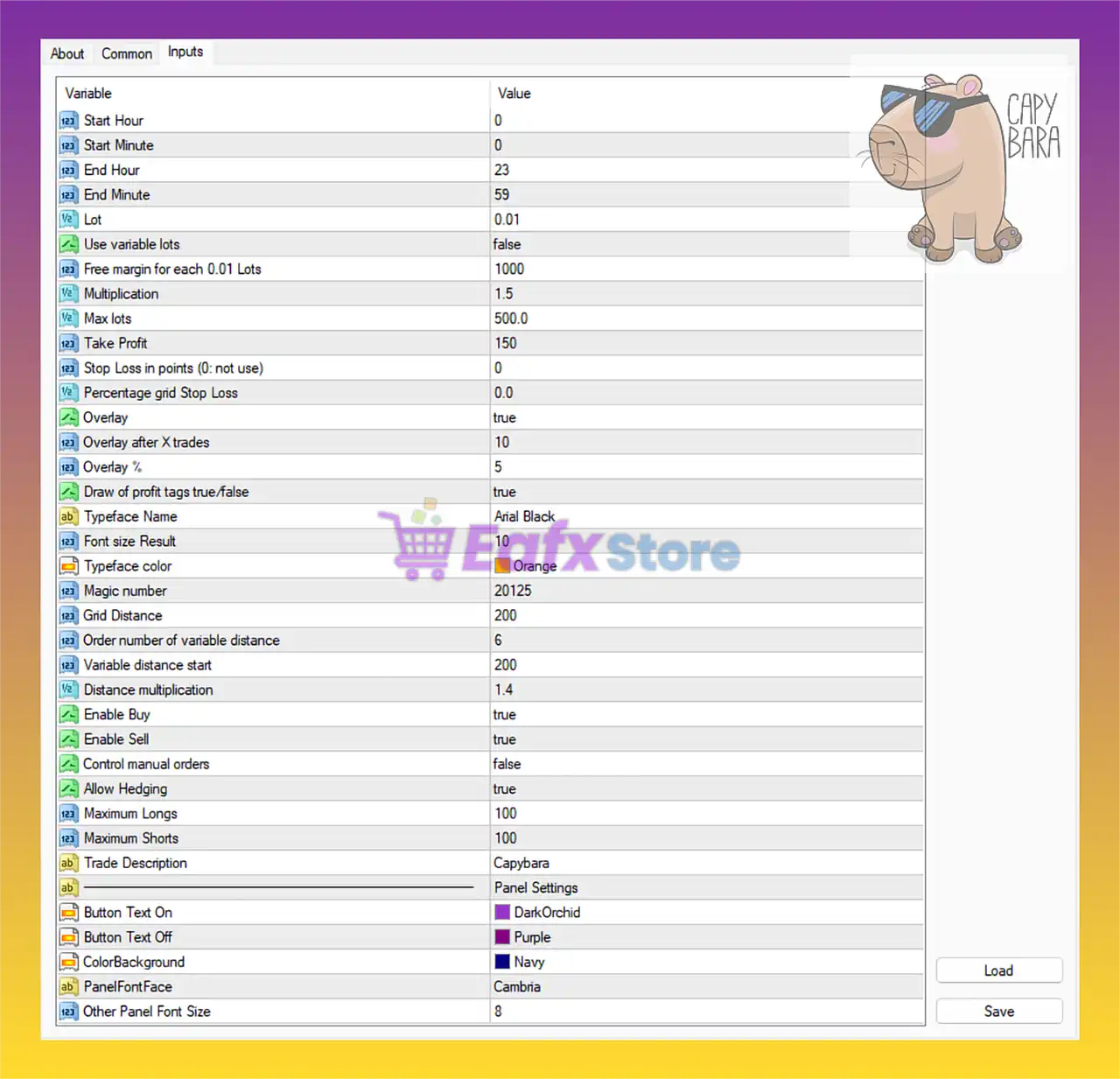
Trading Time Settings
- Start Hour/Minute: 0:00
- End Hour/Minute: 23:59
➡️ The EA is allowed to trade 24 hours a day, 7 days a week, without time restrictions.
Lot & Risk Management
- Lot: 0.01 (fixed lot size per trade)
- Use variable lots: False (lot size does not scale with balance/equity)
- Free margin for each 0.01 lots: 1000
➡️ This setting ensures conservative entry sizing, suitable for accounts starting with lower balances.
Martingale & Position Sizing
- Multiplication: 1.5 (lot size increases by 1.5x in subsequent trades when grid or recovery is triggered)
- Max lots: 500.0 (maximum cap for total lot size)
➡️ The EA uses a martingale/grid-based approach, gradually increasing trade size to recover from drawdowns.
Take Profit & Stop Loss
- Take Profit: 150 pips
- Stop Loss: 0 (disabled; EA relies on grid and recovery instead of hard stop-loss)
- Percentage Grid Stop Loss: 0 (disabled)
➡️ The system focuses on grid averaging strategies, aiming to exit in profit rather than using strict stop-loss levels.
Overlay & Trade Filtering
- Overlay: True (activated)
- Overlay after X trades: 10
- Overlay %: 5
➡️ Overlay acts as a protective mechanism, reducing risk after multiple trades are open. It helps prevent overexposure during volatile markets.
Magic Number & Order Handling
- Magic Number: 20125 (unique identifier for Capybara EA orders)
- Control manual orders: False (EA does not interfere with manual trades)
➡️ Ensures separation between automated and manual trading.
Grid Strategy Parameters
- Grid Distance: 200 pips (distance between grid levels)
- Variable distance start: 200
- Distance multiplication: 1.4 (grid spacing widens as more trades open, reducing risk of clustering too many trades close together)
➡️ This adaptive grid system helps balance profit capture and risk control.
Trade Direction
- Enable Buy: True
- Enable Sell: True
➡️ The EA can trade both long and short positions, adapting to different market conditions.
Hedging & Limits
- Allow Hedging: True (can hold buy and sell positions simultaneously)
- Maximum Longs: 100
- Maximum Shorts: 100
➡️ Supports hedging strategies, which adds flexibility in volatile conditions.
Visual & Panel Settings
- Typeface Name: Arial Black
- Font Size: 10
- Typeface Color: Orange
- Panel Settings: Customizable (DarkOrchid, Purple, Navy, Cambria font, size 8)
➡️ User-friendly interface with clear visual customization for better trade monitoring.
Conclusion
The Capybara EA settings reveal a Grid and Martingale-based trading system designed for continuous 24/7 trading on both buy and sell sides. By using a 1.5x lot multiplier, adaptive grid distance, and hedging capability, the EA aims to maximize profits while managing risk dynamically.
With Take Profit set at 150 pips and no fixed stop-loss, Capybara EA relies on grid recovery mechanisms instead of traditional risk control, making it highly effective for trending and ranging markets. The overlay function adds an extra layer of protection by limiting exposure after multiple trades.