🔶 What is Core Grid X EA?
Core Grid X EA is an automated grid trading Expert Advisor (EA) designed for the MetaTrader 5 platform. The EA focuses on structured grid order placement, basket profit management, and recovery mechanisms to optimize trade cycles. With adjustable lot sizing, spread protection, and news filtering, Core Grid X aims to provide stable automated trading while controlling drawdown risk in volatile markets.
🔶 General Information
| Parameter | Value | Explanation |
|---|---|---|
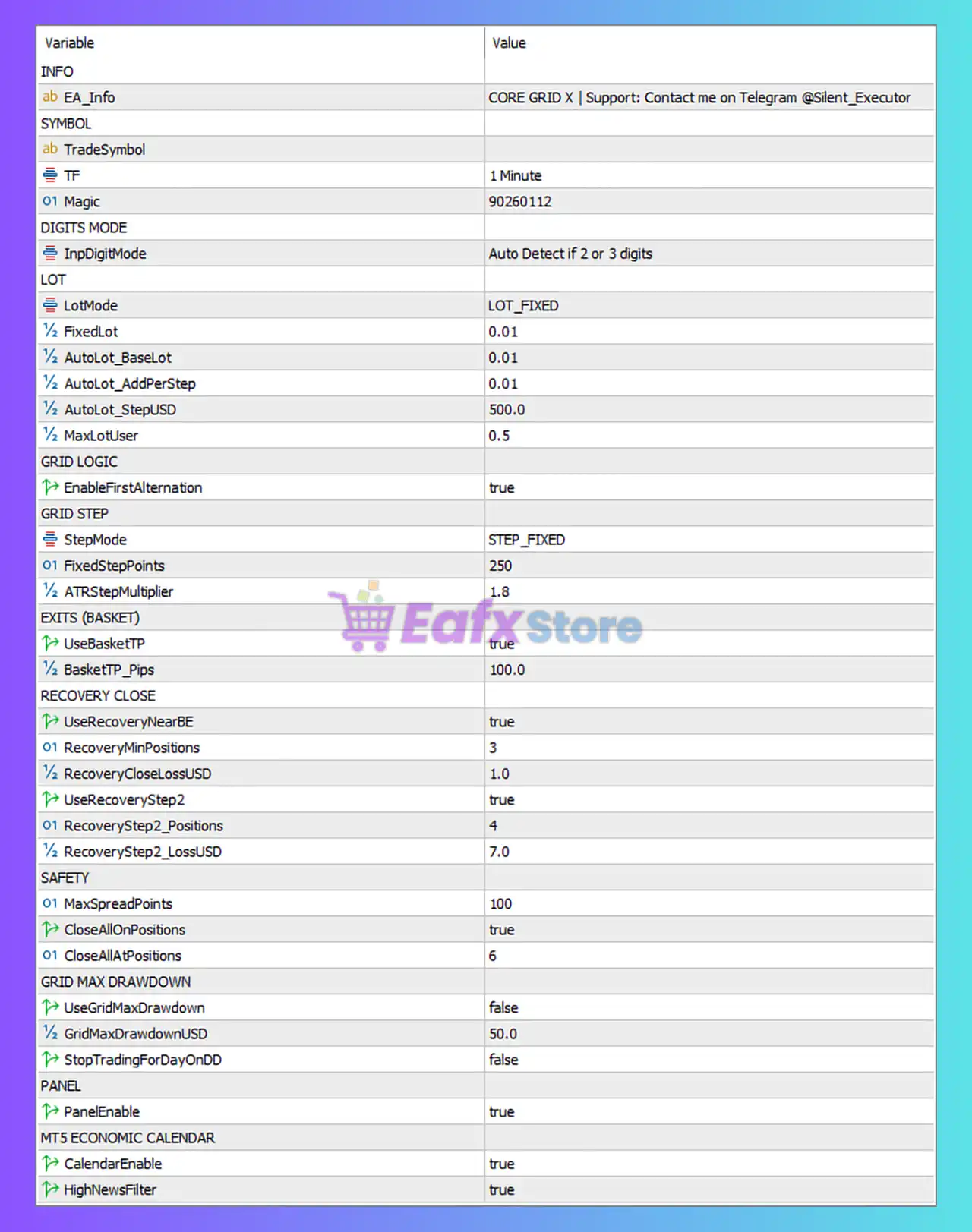
| EA Info | CORE GRID X | Provides the EA name and developer contact information for support. |
| Trade Symbol | Not specified (user-defined) | Defines the trading instrument. The EA can be applied to different pairs depending on user configuration. |
| Timeframe (TF) | 1 Minute | The EA operates on the M1 timeframe for rapid market response. |
| Magic Number | 90260112 | Unique identifier used by the EA to manage its own trades. |
These parameters establish the EA’s identity and operating environment.
🔶 Digit Detection Mode
| Parameter | Value | Explanation |
|---|---|---|
| Input Digit Mode | Auto Detect if 2 or 3 digits | Automatically detects broker price precision to ensure correct pip calculations. |
This ensures compatibility across different broker price formats.
🔶 Lot Size Configuration
| Parameter | Value | Explanation |
|---|---|---|
| Lot Mode | LOT_FIXED | Uses a fixed lot size instead of dynamic lot scaling. |
| Fixed Lot | 0.01 | Base trading volume used for each initial position. |
| AutoLot Base Lot | 0.01 | Base lot used if auto lot calculation is enabled. |
| AutoLot Add Per Step | 0.01 | Additional lot size added for each new step when using auto lot. |
| AutoLot Step USD | 500 | Lot size increases when account balance grows by $500 increments. |
| Max Lot User | 0.5 | Maximum allowed lot size for safety. |
This configuration suggests conservative lot sizing suitable for small accounts.
🔶 Grid Trading Logic
| Parameter | Value | Explanation |
|---|---|---|
| Enable First Alternation | true | Alternates the first trade direction to balance exposure. |
This helps reduce directional bias in grid trading strategies.
🔶 Grid Step Configuration
| Parameter | Value | Explanation |
|---|---|---|
| Step Mode | STEP_FIXED | Grid spacing uses a fixed pip distance. |
| Fixed Step Points | 250 | Distance between grid orders measured in points. |
| ATR Step Multiplier | 1.8 | Adjusts grid distance based on market volatility using ATR calculations. |
Grid spacing ensures the EA opens trades progressively as price moves.
🔶 Basket Exit Strategy
| Parameter | Value | Explanation |
|---|---|---|
| Use Basket TP | true | Closes all open trades once the total basket profit target is reached. |
| Basket TP (Pips) | 100 | Profit target for the entire basket of grid trades. |
Basket profit management is commonly used in grid strategies to exit multiple positions simultaneously.
🔶 Recovery Close System
| Parameter | Value | Explanation |
|---|---|---|
| Use Recovery Near BE | true | Activates recovery logic when positions approach break-even. |
| Recovery Minimum Positions | 3 | Recovery mechanism activates when at least three trades are open. |
| Recovery Close Loss USD | 1.0 | Allows closing small losses once recovery conditions are met. |
| Use Recovery Step 2 | true | Enables a second stage of recovery management. |
| Recovery Step 2 Positions | 4 | Second recovery stage activates after four positions. |
| Recovery Step 2 Loss USD | 7.0 | Maximum acceptable loss during recovery stage two. |
This system helps reduce floating drawdown during grid expansion.
🔶 Safety Controls
| Parameter | Value | Explanation |
|---|---|---|
| Max Spread Points | 100 | Prevents opening trades if spread exceeds this threshold. |
| Close All On Positions | true | Enables automatic closure logic for safety. |
| Close All At Positions | 6 | Closes all positions once six grid trades are open. |
These parameters protect the account from excessive exposure.
🔶 Grid Drawdown Protection
| Parameter | Value | Explanation |
|---|---|---|
| Use Grid Max Drawdown | false | Grid-specific drawdown limit is currently disabled. |
| Grid Max Drawdown USD | 50 | Maximum floating loss allowed if enabled. |
| Stop Trading for Day On DD | false | EA will continue trading even after reaching drawdown threshold. |
These settings can be activated for stronger capital protection.
🔶 Panel Display
| Parameter | Value | Explanation |
|---|---|---|
| Panel Enable | true | Displays the EA dashboard on the chart with trading statistics. |
The dashboard helps traders monitor EA activity in real time.
🔶 Economic News Filter
| Parameter | Value | Explanation |
|---|---|---|
| Calendar Enable | true | Enables the built-in MT5 economic calendar integration. |
| High News Filter | true | Prevents trading during high-impact news events. |
This feature reduces risk during periods of extreme volatility.
🔶 Strategy Overview
Core Grid X EA MT5 follows a classic grid trading structure with basket profit management and recovery logic. The EA opens multiple positions at predefined price intervals and aims to close them collectively once the basket reaches the desired profit level.
The inclusion of ATR-based step adjustment, recovery stages, and spread protection enhances the strategy’s ability to adapt to changing market conditions.
🔶 Risk Management Perspective
Key protective features include:
- Spread filtering before opening trades
- Maximum position limit for grid cycles
- Basket-based profit exit
- Multi-stage recovery logic
- Economic news filter integration
These safeguards help reduce risk while maintaining consistent trade execution.
🔶 Conclusion
Core Grid X EA MT5 is a structured grid trading robot designed for high-frequency execution on the M1 timeframe. With fixed lot sizing, basket profit management, and recovery mechanisms, the EA aims to capture price fluctuations while controlling floating drawdown.
To achieve optimal performance, traders should run the EA on low-spread brokers and carefully monitor grid exposure during volatile market conditions. Proper account sizing and risk management remain essential for maintaining long-term profitability when using automated grid strategies in MetaTrader 5.