Introduction to CryonX EA MT5
CryonX EA MT5 is an automated trading Expert Advisor (EA) designed for MetaTrader 5, featuring an integrated risk management engine, configurable lot sizing, market execution safeguards, and automated trade management. Its settings are organized into dedicated modules, including Risk Engine, Prop-Firm Guard, News Sentinel, Market Safety and Trade Exits.
The EA provides flexible position sizing through automatic lot calculation or fixed lot settings. It also includes spread protection, Friday trading controls, optional prop-firm drawdown protection, and a trailing stop mechanism to help manage open positions. These configurable features allow traders to adjust the trading environment according to their account size and risk preferences.
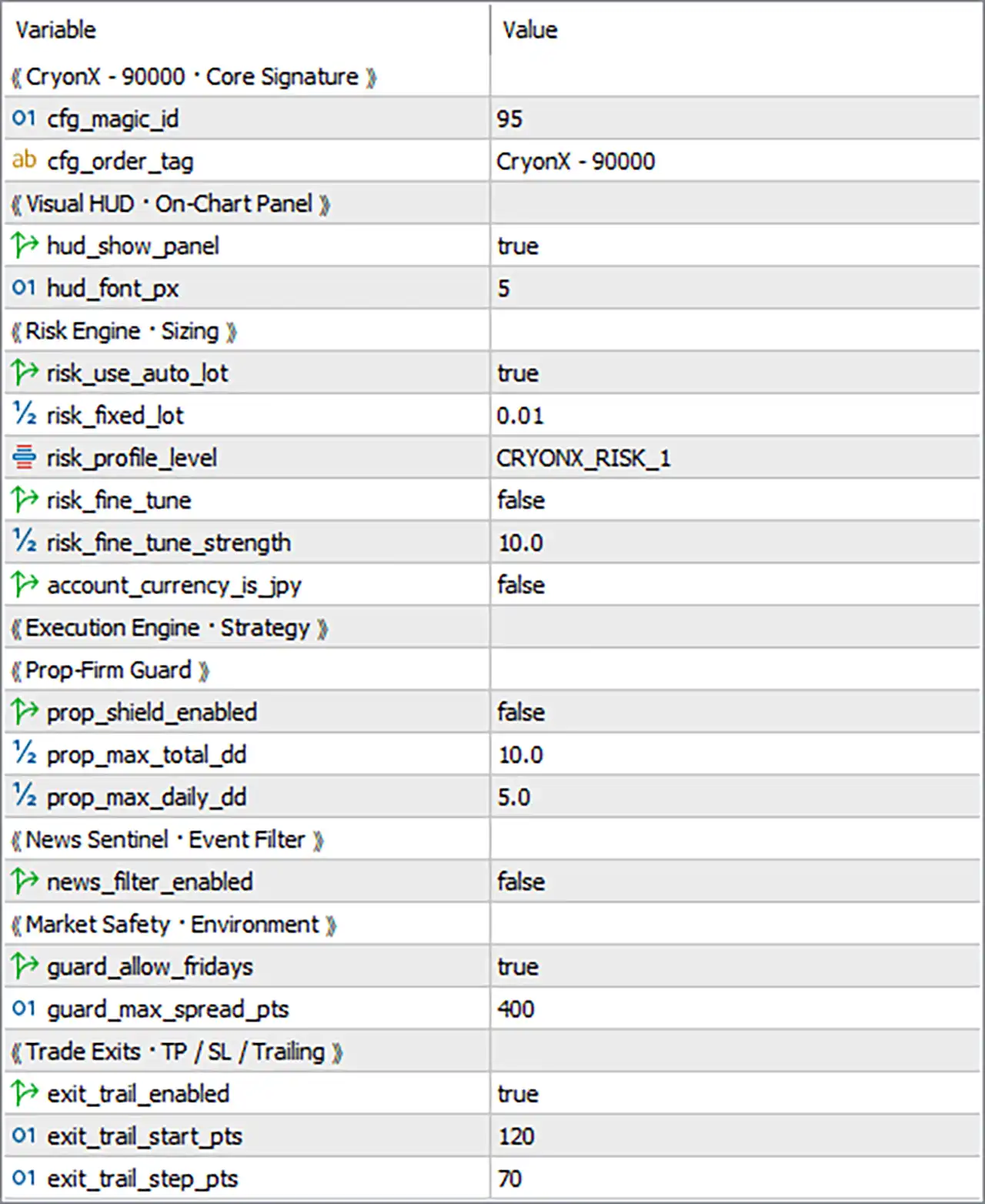
CryonX – 90000 – Core Signature
This section contains the EA’s core identification and order management settings.
🔹 cfg_magic_id = 95 – Sets the Magic Number used by CryonX EA MT5 to identify its own trades. This helps distinguish the EA’s positions from manual trades and orders opened by other Expert Advisors.
🔹 cfg_order_tag = CryonX – 90000 – Defines the custom order comment attached to trades opened by the EA. This tag helps traders identify CryonX positions in the MT5 Terminal and review their trading history.
Visual HUD – On-Chart Panel
This section controls the visibility and appearance of the EA’s information panel directly on the trading chart.
🔹 hud_show_panel = true – Enables the on-chart information panel, allowing traders to monitor the EA’s displayed trading information and available status indicators directly from the MT5 chart.
🔹 hud_font_px = 5 – Sets the font size of the on-chart HUD panel to 5 pixels. This parameter controls the text display size and helps determine how the information is presented on the chart.
Risk Engine – Sizing
This section manages position sizing and risk configuration, allowing traders to choose automatic or fixed lot allocation.
🔹 risk_use_auto_lot = true – Enables automatic lot sizing, allowing CryonX EA MT5 to calculate the trading volume according to its internal risk management logic and selected risk profile.
🔹 risk_fixed_lot = 0.01 – Sets the fixed trading volume to 0.01 lots. This value is available when automatic lot sizing is disabled, providing a predefined position size for each applicable trade.
🔹 risk_profile_level = CRYONX_RISK_1 – Selects the CRYONX_RISK_1 risk profile. This setting determines the predefined risk configuration used by the EA when calculating trading positions.
🔹 risk_fine_tune = false – Disables the additional risk fine-tuning function. When enabled, this option may allow more detailed adjustments to the EA’s internal position sizing behavior.
🔹 risk_fine_tune_strength = 10.0 – Sets the fine-tuning strength to 10.0. This parameter defines the adjustment level used by the additional risk customization feature when it is enabled.
🔹 account_currency_is_jpy = false – Indicates that the trading account does not use JPY as its deposit currency. Enable this option if the account’s base currency is Japanese Yen, where applicable to the EA’s risk calculations.
Execution Engine – Strategy
This is a section heading for the EA’s execution and strategy configuration. No individual input parameters are displayed under this heading in the supplied settings screenshot.
Prop-Firm Guard
This module provides optional drawdown protection settings designed for traders operating under proprietary trading firm risk restrictions.
🔹 prop_shield_enabled = false – Disables the Prop-Firm Guard protection module. When enabled, the EA can use the configured maximum total drawdown and daily drawdown thresholds as part of its protective trading controls.
🔹 prop_max_total_dd = 10.0 – Sets the maximum total drawdown threshold to 10.0%. This parameter defines the configured overall drawdown limit for the Prop-Firm Guard module.
🔹 prop_max_daily_dd = 5.0 – Sets the maximum daily drawdown threshold to 5.0%. This value defines the configured daily loss limit that the protection module can use when enabled.
News Sentinel – Event Filter
This module controls whether the EA’s news-event filtering functionality is active.
🔹 news_filter_enabled = false – Disables the News Sentinel event filter. When enabled, the EA can apply its supported news-filtering logic to manage trading activity around economic events and potentially reduce exposure during important market announcements.
Market Safety – Environment
This section contains environmental trading restrictions designed to control trading conditions and spread exposure.
🔹 guard_allow_fridays = true – Allows CryonX EA MT5 to trade on Fridays. Disabling this option restricts the EA from opening trades on Friday, which may help traders avoid potential weekend market exposure.
🔹 guard_max_spread_pts = 400 – Sets the maximum permitted spread to 400 points. This parameter establishes a spread threshold for trade execution, helping prevent the EA from entering positions when trading costs become excessively high.
Trade Exits – TP / SL / Trailing
This module manages the trailing stop functionality, including its activation threshold and adjustment interval.
🔹 exit_trail_enabled = true – Enables the trailing stop feature. When active, the EA can automatically adjust the stop-loss level as a trade moves into profit, helping protect accumulated gains while allowing the position to continue running.
🔹 exit_trail_start_pts = 120 – Sets the trailing stop activation threshold to 120 points. The trailing mechanism begins operating when the trade reaches the configured profit distance, according to the EA’s internal calculation.
🔹 exit_trail_step_pts = 70 – Sets the trailing stop adjustment step to 70 points. This determines the configured interval at which the trailing stop level can be updated as the market moves favorably.
Conclusion
CryonX EA MT5 offers a structured collection of trading configuration options covering position sizing, risk profiles, prop-firm protection, news filtering, spread control, and automated trade management.
The supplied configuration uses automatic lot sizing with the CRYONX_RISK_1 profile, enables Friday trading, sets the maximum spread to 400 points, and activates trailing stop management with a 120-point starting threshold and 70-point adjustment step.
However, the Prop-Firm Guard and News Sentinel modules are currently disabled. Traders should review these settings carefully and verify the EA’s actual behavior through backtesting and demo trading before deploying it on a live account.