BING DayTrading Pro Expert Advisor MT4 Settings Guide – Complete Inputs Explanation

Introduction to BING DayTrading Pro Expert Advisor
BING DayTrading Pro Expert Advisor MT4 is an automated trading system designed for the MetaTrader 4 platform, optimized to operate on the M15 (15-minute) timeframe. The EA provides configurable trading activation, experimental strategy testing, dynamic lot sizing, trading-hour management, and account-level risk protection.
One of its notable features is the Dynamic Lots system, which allows traders to adjust position sizing according to their selected risk level. The EA also includes Prop Firm protection options, such as equity-based trade closing, daily loss limits, and customizable alerts through MT4 notifications, push notifications, and email.
The following guide explains all the available inputs, including their default values and functions, to help traders configure BING DayTrading Pro Expert Advisor according to their trading objectives.
General Settings and EA Activation
This section contains the main activation parameter and an important timeframe recommendation.
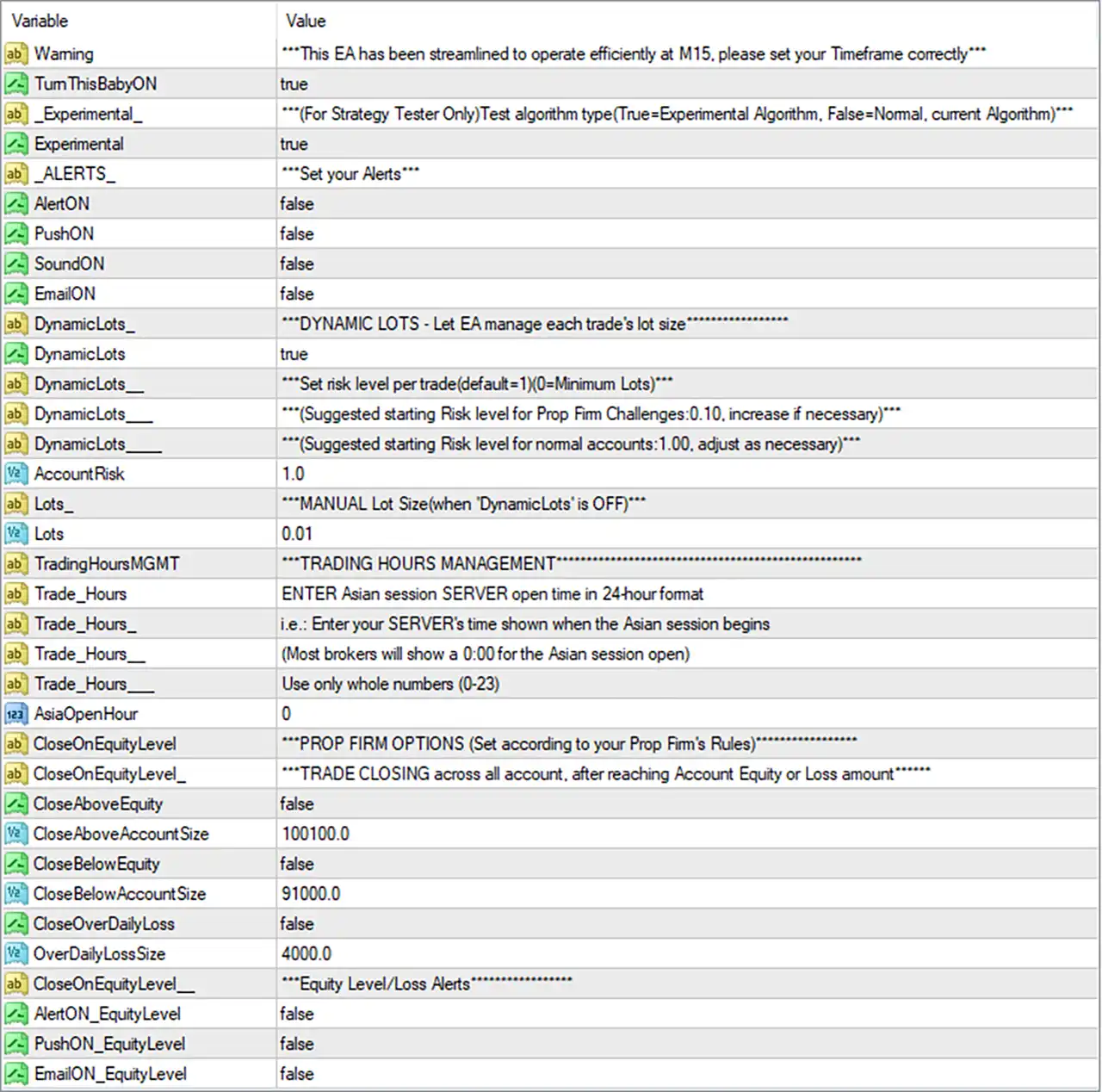
🔹 Warning = This EA has been streamlined to operate efficiently at M15, please set your Timeframe correctly – Displays an important operating instruction recommending the M15 (15-minute) timeframe. Traders should attach the EA to an M15 chart to follow its intended operating configuration.
🔹 TurnThisBabyON = true – Activates the EA’s main operating switch. When set to true, the EA is enabled to execute its programmed trading functions, subject to other settings and trading conditions.
Experimental Strategy Settings
This section provides an experimental algorithm option intended specifically for Strategy Tester use.
🔹 Experimental = For Strategy Tester Only – Test algorithm type (True = Experimental Algorithm, False = Normal, current Algorithm) – An informational setting description explaining the purpose of the experimental algorithm selection.
🔹 Experimental = true – Enables the experimental trading algorithm. According to the input description, setting this parameter to true selects the experimental algorithm, while false selects the normal, currently used algorithm. This option is specifically intended for Strategy Tester experiments.
Alerts and Notifications Settings
This section controls the EA’s general notification system, allowing traders to select how they receive trading alerts.
🔹 ALERTS = Set your Alerts – An informational heading introducing the notification configuration options.
🔹 AlertON = false – Disables standard MT4 pop-up alerts. Enable this option if you want the EA to display notifications through the platform’s alert system.
🔹 PushON = false – Disables push notifications to the MetaTrader mobile application. When enabled and properly configured in MT4, the EA can send notifications to a connected mobile device.
🔹 SoundON = false – Disables sound notifications. Enabling this option allows the EA to use sound alerts to notify traders of supported trading events.
🔹 EmailON = false – Disables email notifications. When enabled and configured correctly in the MT4 platform, the EA can send supported trading alerts through email.
Dynamic Lots – Automatic Risk Management
This section controls automatic position sizing and risk allocation. Dynamic Lots allows the EA to manage trading volume according to the selected account risk level.
🔹 DynamicLots_ = DYNAMIC LOTS – Let EA manage each trade’s lot size – An informational heading explaining that the Dynamic Lots feature allows the EA to calculate and manage the lot size for individual trades automatically.
🔹 DynamicLots = true – Enables automatic lot sizing. When active, BING DayTrading Pro Expert Advisor MT4 manages each trade’s volume using the configured AccountRisk parameter instead of relying solely on the manual Lots setting.
🔹 DynamicLots__ = Set risk level per trade (default = 1) (0 = Minimum Lots) – An informational description explaining how the AccountRisk parameter controls the risk level used by the Dynamic Lots system. A value of 0 corresponds to minimum lots, while the default risk level is 1.
🔹 DynamicLots___ = Suggested starting Risk level for Prop Firm Challenges: 0.10, increase if necessary – Provides a recommended starting risk level of 0.10 for traders participating in proprietary trading firm challenges. This is a suggested configuration rather than a guaranteed risk limit.
🔹 DynamicLots____ = Suggested starting Risk level for normal accounts: 1.00, adjust as necessary – Recommends an initial risk level of 1.00 for standard trading accounts. Traders can adjust this value according to their account balance, risk tolerance, and trading objectives.
🔹 AccountRisk = 1.0 – Sets the automatic risk level to 1.0. This parameter determines the configured risk setting used by the Dynamic Lots system. For Prop Firm challenges, the input notes suggest starting at 0.10, while 1.00 is suggested for normal accounts.
Manual Lot Size Settings
This section provides an alternative position-sizing method when automatic lot management is disabled.
🔹 Lots_ = MANUAL Lot Size (when ‘DynamicLots’ is OFF) – An informational heading explaining that the Lots parameter controls the manual trading volume when DynamicLots is disabled.
🔹 Lots = 0.01 – Sets the manual trading lot size to 0.01 lots. This value is used when DynamicLots is set to false, allowing traders to specify a fixed position size instead of using automatic lot calculation.
Trading Hours Management
This section controls the trading session reference time, with a specific focus on the Asian market opening hour.
🔹 TradingHoursMGMT = TRADING HOURS MANAGEMENT – An informational heading introducing the EA’s trading-hour configuration.
🔹 Trade_Hours = ENTER Asian session SERVER open time in 24hour format – Provides instructions to enter the Asian trading session’s opening time according to the broker’s server clock using the 24-hour time format.
🔹 Trade_Hours_ = Enter your SERVER’s time shown when the Asian session begins – Explains that traders should use the time displayed on their broker’s MT4 server when the Asian session opens, rather than automatically using their local computer time.
🔹 Trade_Hours__ = Most brokers will show a 0:00 for the Asian session open – Provides an example indicating that many brokers display 0:00 as the Asian session opening time. The actual server time should always be verified with the broker.
🔹 Trade_Hours___ = Use only whole numbers (0–23) – Specifies that the trading-hour input must use whole numbers ranging from 0 to 23, representing the valid hours in a 24-hour clock.
🔹 AsiaOpenHour = 0 – Sets the Asian session opening hour to 0, corresponding to 00:00 server time. This parameter provides the EA with the configured reference hour for its Asian session trading-hour management.
Prop Firm Options – Account Equity Protection
This section contains account-level protection settings designed to help traders configure automatic trade closing based on equity targets and loss thresholds.
🔹 CloseOnEquityLevel_ = PROP FIRM OPTIONS (Set according to your Prop Firm’s Rules) – An informational heading introducing the proprietary trading firm protection settings. Traders should configure these parameters according to their firm’s specific equity and drawdown requirements.
🔹 CloseOnEquityLevel__ = TRADE CLOSING across all account, after reaching Account Equity or Loss amount – Explains that the equity protection system is designed to close trades across the account after reaching a specified account equity or loss threshold, depending on the enabled protection conditions.
Equity Target Protection
🔹 CloseAboveEquity = false – Disables the upper equity protection function. When enabled, the EA can use the configured CloseAboveAccountSize value as an account equity threshold for triggering the corresponding closing mechanism.
🔹 CloseAboveAccountSize = 100100.0 – Sets the upper account equity threshold to 100100.0. If CloseAboveEquity is enabled, this value serves as the configured equity target at which the EA’s corresponding account-wide trade-closing protection can be triggered.
Minimum Equity Protection
🔹 CloseBelowEquity = false – Disables the lower equity protection function. When enabled, the EA can monitor account equity against the CloseBelowAccountSize threshold and activate its corresponding trade-closing mechanism when the configured condition is reached.
🔹 CloseBelowAccountSize = 91000.0 – Sets the lower account equity threshold to 91000.0. This value defines the configured minimum equity level for the lower equity protection feature when CloseBelowEquity is enabled.
Daily Loss Protection
🔹 CloseOverDailyLoss = false – Disables the daily loss protection mechanism. When enabled, the EA can monitor the configured daily loss threshold and trigger its corresponding account-wide trade-closing function when the limit is reached.
🔹 OverDailyLossSize = 4000.0 – Sets the daily loss threshold to 4000.0. This parameter defines the configured loss amount used by the daily loss protection system when CloseOverDailyLoss is enabled.
Equity Level and Loss Alerts
This section controls notifications related to account equity and loss thresholds. Traders can configure different notification channels independently.
🔹 CloseOnEquityLevel___ = Equity Level/Loss Alerts – An informational heading introducing the equity and loss notification settings. These options allow traders to configure alerts associated with the account protection system.
🔹 AlertON_EquityLevel = false – Disables MT4 pop-up alerts for equity-level and loss-related events. Enable this option to receive supported notifications directly through the platform’s alert system.
🔹 PushON_EquityLevel = false – Disables mobile push notifications for equity-level and loss events. When enabled and MT4 push notifications are configured correctly, the EA can send supported account protection alerts to a connected mobile device.
🔹 EmailON_EquityLevel = false – Disables email notifications for equity-level and loss-related events. Enabling this option allows the EA to send supported account protection alerts through the configured MT4 email service.
Conclusion
BING DayTrading Pro Expert Advisor MT4 provides a comprehensive collection of configuration options for automated day trading, featuring dynamic position sizing, trading-hour management, experimental strategy testing, and account-level protection.
The supplied settings use the recommended M15 timeframe, enable the EA through TurnThisBabyON, and activate the experimental algorithm. Dynamic Lots is enabled with AccountRisk set to 1.0, while the manual lot size is configured at 0.01 lots for use when automatic lot sizing is disabled.
For account protection, the EA includes an upper equity threshold of 100100.0, a lower equity threshold of 91000.0, and a daily loss threshold of 4000.0. However, all three automatic closing protection switches are currently disabled.