Drifter EA MT5 is an automated trading Expert Advisor (EA) designed for gold trading, with configurable position sizing, trade identification, drawdown protection, and high-impact news filtering.
Its settings allow traders to select a lot-sizing method, monitor daily drawdown limits, and control when new trades are paused around major economic events.
Understanding each parameter helps ensure that the EA’s configuration matches the intended trading and risk-management approach.
General Settings
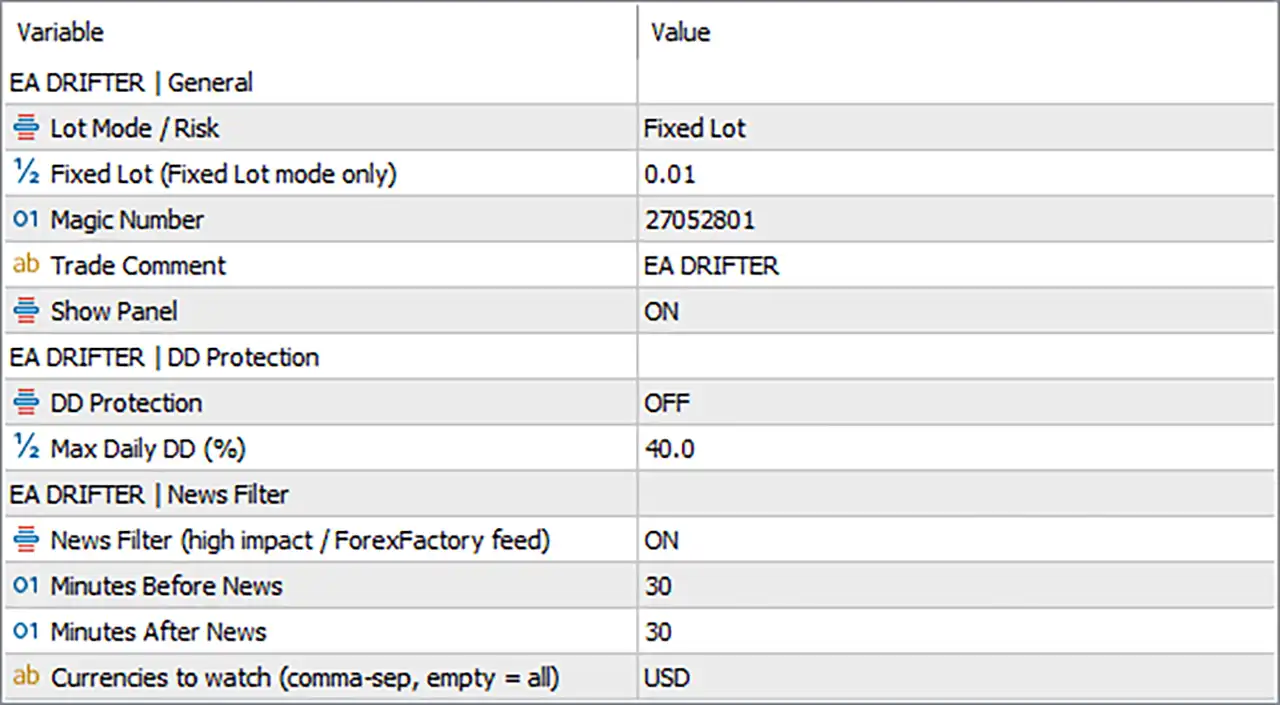
🔹 Lot Mode / Risk = Fixed Lot: Selects the fixed-lot trading mode, meaning the EA uses the manually specified lot size instead of calculating position volume through an automatic risk mode.
🔹 Fixed Lot (Fixed Lot mode only) = 0.01: Sets the fixed trade volume to 0.01 lots when Lot Mode / Risk is set to Fixed Lot.
🔹 Magic Number = 27052801: Assigns the unique trade identifier 27052801, allowing the EA to distinguish its positions from trades managed by other Expert Advisors or manual trading.
🔹 Trade Comment = EA DRIFTER: Sets EA DRIFTER as the comment associated with the EA’s trades, helping identify them in the trading terminal and account history.
🔹 Show Panel = ON: Enables the EA’s on-chart information panel, allowing supported trading and account information to be displayed directly on the chart.
Drawdown Protection Settings
🔹 DD Protection = OFF: Disables the EA’s daily drawdown protection. With this setting off, the configured daily drawdown threshold is not enforced by this protection feature.
🔹 Max Daily DD (%) = 40.0: Sets the maximum daily drawdown threshold to 40.0%. This value becomes relevant when DD Protection is enabled; it defines the configured threshold rather than guaranteeing that losses will stop exactly at that percentage.
News Filter Settings
🔹 News Filter (high impact / ForexFactory feed) = ON: Enables the high-impact economic news filter, which uses the configured external news feed to help prevent new trades during specified news windows.
🔹 Minutes Before News = 30: Sets the news-filter window to begin 30 minutes before a qualifying economic event, restricting new entries during the configured pre-news period.
🔹 Minutes After News = 30: Sets the news-filter window to continue for 30 minutes after a qualifying economic event, helping avoid new entries immediately after the announcement.
🔹 Currencies to watch (comma-sep, empty = all) = USD: Restricts the news filter to events associated with USD. The parameter supports comma-separated currency codes, while an empty value means all supported currencies are considered.
Conclusion
Drifter EA MT5 provides six main functional areas through its displayed settings: lot sizing, trade identification, panel visibility, daily drawdown protection, and economic news filtering. The current configuration uses a fixed lot of 0.01, Magic Number 27052801, the trade comment EA DRIFTER, an enabled panel, disabled drawdown protection with a threshold of 40.0%, and an enabled USD news filter with 30 minutes before and 30 minutes after each qualifying event.
An important distinction is that the 40.0% daily drawdown threshold does not provide active protection while DD Protection is OFF. Enabling the protection and confirming that the external news feed is accessible are important configuration checks. Since automated trading and grid-based position management can expose an account to substantial losses, testing the settings in a demo environment is recommended before live deployment.