
Dynamic Introduction
Angels Eye EA is a highly configurable MetaTrader 5 Expert Advisor (EA) built around a modular multi-strategy framework. Its settings provide detailed control over Strategy 1 through Strategy 8, multi-timeframe execution, Magic Numbers, trade comments, money management, news protection, trailing stop loss, pending-order management, trading schedules, daily rollover protection and drawdown controls.
The configuration shown in the supplied screenshots reveals a particularly flexible architecture: individual strategies can be activated across D1, H4, and H1, each with its own Magic Number and trade comment. Traders can also control position sizing, economic-news filters, weekend protection, trading windows and basket-level trailing protection.
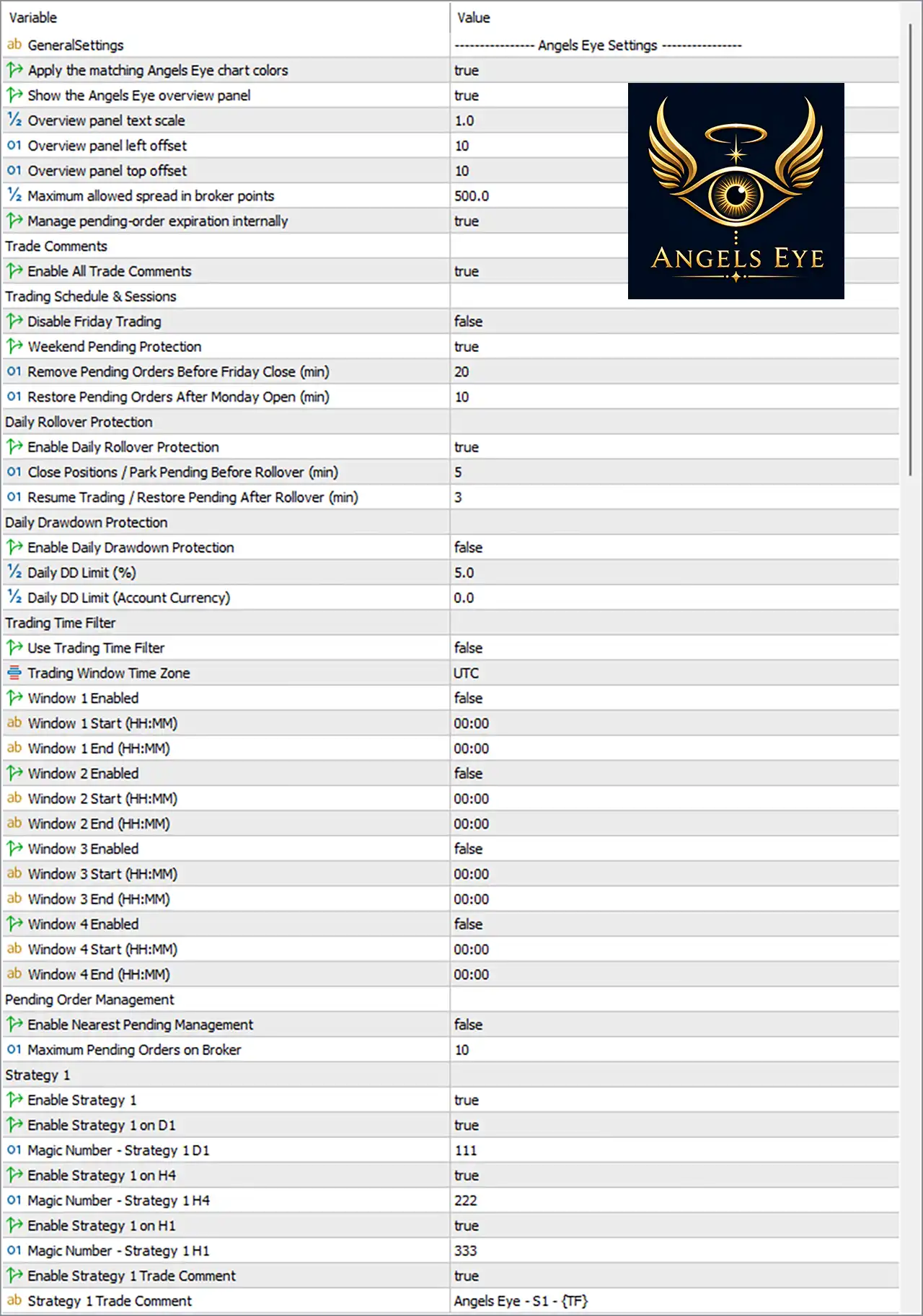
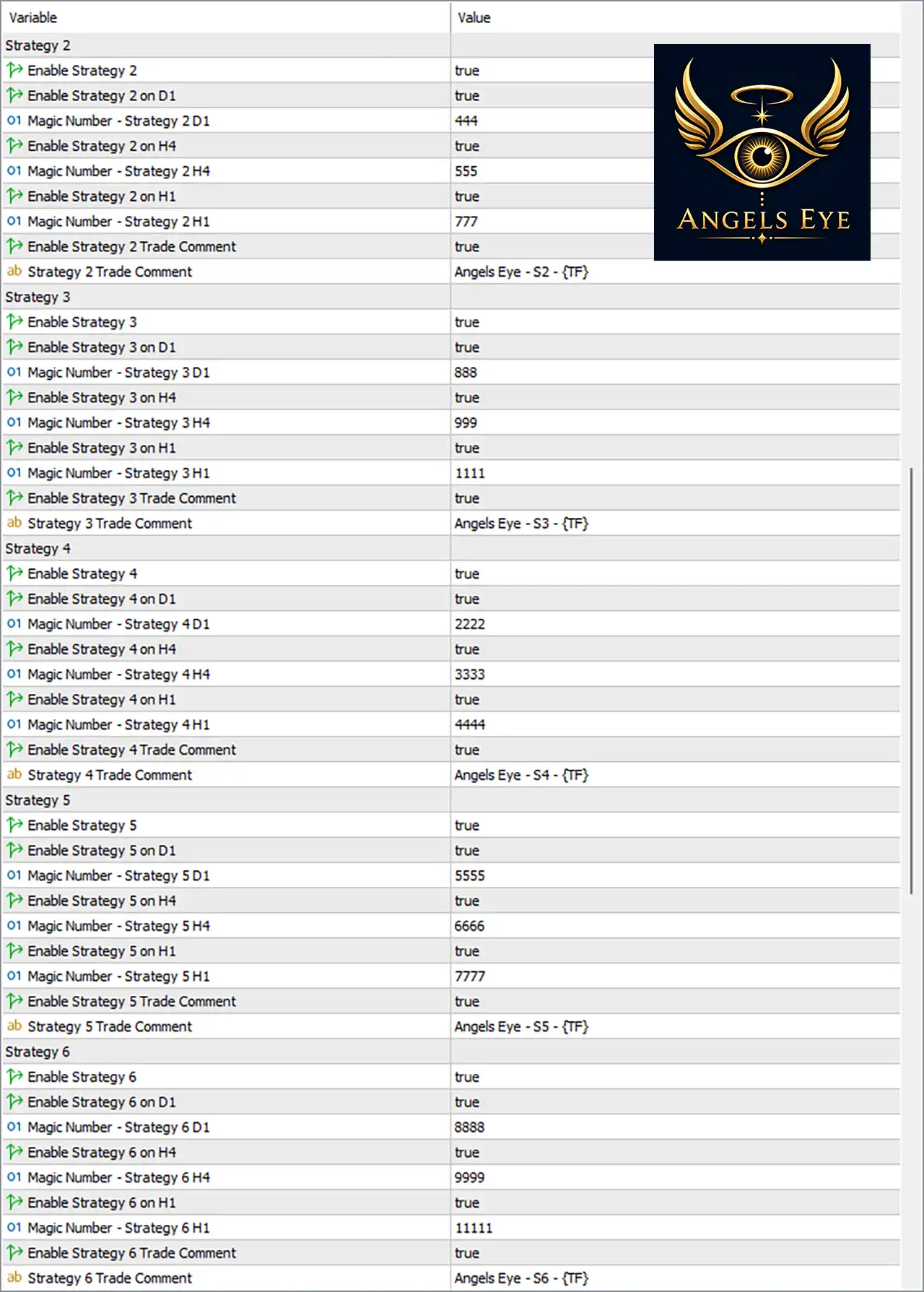
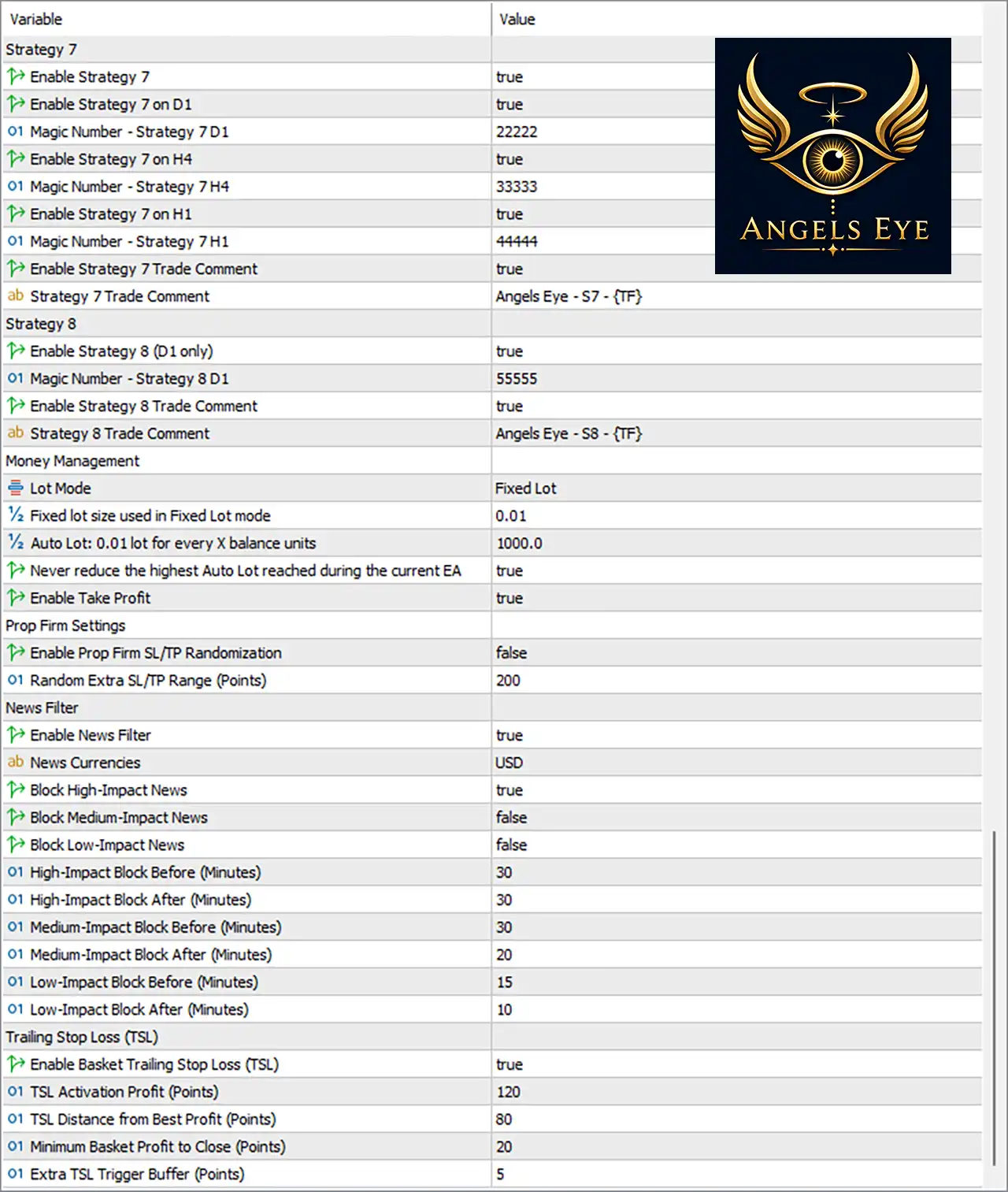
Note: The explanations below describe what each parameter appears to control based on its name and configured value. They do not imply that the EA will necessarily behave in a particular way beyond what the parameter labels indicate.
1. Angels Eye Settings
🔹 GeneralSettings = Angels Eye Settings — Section header for the main Angels Eye configuration.
🔹 Apply the matching Angels Eye chart colors = true — Applies the EA's matching chart color scheme.
🔹 Show the Angels Eye overview panel = true — Displays the Angels Eye overview panel on the chart.
🔹 Overview panel text scale = 1.0 — Sets the overview panel text scaling factor to 1.0.
🔹 Overview panel left offset = 10 — Positions the overview panel 10 units from the left-side reference position.
🔹 Overview panel top offset = 10 — Positions the overview panel 10 units from the top reference position.
🔹 Maximum allowed spread in broker points = 500.0 — Prevents trading when the broker spread exceeds 500.0 points.
🔹 Manage pending-order expiration internally = true — Enables internal management of pending-order expiration.
2. Trade Comments
🔹 Enable All Trade Comments = true — Enables the EA's configured trade comments for identifying strategy-generated orders.
3. Trading Schedule & Sessions
🔹 Disable Friday Trading = false — Friday trading is not disabled by this setting.
🔹 Weekend Pending Protection = true — Enables protection for pending orders around the weekend transition.
🔹 Remove Pending Orders Before Friday Close (min) = 20 — Removes applicable pending orders 20 minutes before Friday close.
🔹 Restore Pending Orders After Monday Open (min) = 10 — Restores applicable pending orders 10 minutes after Monday opens.
4. Daily Rollover Protection
🔹 Enable Daily Rollover Protection = true — Enables daily rollover protection.
🔹 Close Positions / Park Pending Before Rollover (min) = 5 — Closes positions or parks pending orders 5 minutes before rollover.
🔹 Resume Trading / Restore Pending After Rollover (min) = 3 — Resumes trading or restores pending orders 3 minutes after rollover.
5. Daily Drawdown Protection
🔹 Enable Daily Drawdown Protection = false — Disables the EA's daily drawdown protection.
🔹 Daily DD Limit (%) = 5.0 — Defines a daily drawdown threshold of 5.0% when daily drawdown protection is active.
🔹 Daily DD Limit (Account Currency) = 0.0 — Sets the account-currency daily drawdown limit to 0.0, effectively leaving the monetary threshold inactive according to the displayed setting.
6. Trading Time Filter
🔹 Use Trading Time Filter = false — Disables the custom trading-time-window filter.
🔹 Trading Window Time Zone = UTC — Defines UTC as the time zone for the trading windows.
🔹 Window 1 Enabled = false — Disables Trading Window 1.
🔹 Window 1 Start (HH:MM) = 00:00 — Sets Window 1 start time to 00:00.
🔹 Window 1 End (HH:MM) = 00:00 — Sets Window 1 end time to 00:00.
🔹 Window 2 Enabled = false — Disables Trading Window 2.
🔹 Window 2 Start (HH:MM) = 00:00 — Sets Window 2 start time to 00:00.
🔹 Window 2 End (HH:MM) = 00:00 — Sets Window 2 end time to 00:00.
🔹 Window 3 Enabled = false — Disables Trading Window 3.
🔹 Window 3 Start (HH:MM) = 00:00 — Sets Window 3 start time to 00:00.
🔹 Window 3 End (HH:MM) = 00:00 — Sets Window 3 end time to 00:00.
🔹 Window 4 Enabled = false — Disables Trading Window 4.
🔹 Window 4 Start (HH:MM) = 00:00 — Sets Window 4 start time to 00:00.
🔹 Window 4 End (HH:MM) = 00:00 — Sets Window 4 end time to 00:00.
7. Pending Order Management
🔹 Enable Nearest Pending Management = false — Disables the nearest-pending-order management function.
🔹 Maximum Pending Orders on Broker = 10 — Allows up to 10 pending orders on the broker under this management setting.
8. Strategy 1
🔹 Enable Strategy 1 = true — Activates Strategy 1.
🔹 Enable Strategy 1 on D1 = true — Enables Strategy 1 on the D1 timeframe.
🔹 Magic Number - Strategy 1 D1 = 111 — Assigns Magic Number 111 to Strategy 1 D1 trades.
🔹 Enable Strategy 1 on H4 = true — Enables Strategy 1 on the H4 timeframe.
🔹 Magic Number - Strategy 1 H4 = 222 — Assigns Magic Number 222 to Strategy 1 H4 trades.
🔹 Enable Strategy 1 on H1 = true — Enables Strategy 1 on the H1 timeframe.
🔹 Magic Number - Strategy 1 H1 = 333 — Assigns Magic Number 333 to Strategy 1 H1 trades.
🔹 Enable Strategy 1 Trade Comment = true — Enables the Strategy 1 trade comment.
🔹 Strategy 1 Trade Comment = Angels Eye - S1 - {TF} — Uses Angels Eye - S1 - {TF} as the Strategy 1 trade comment, with {TF} representing the applicable timeframe.
9. Strategy 2
🔹 Enable Strategy 2 = true — Activates Strategy 2.
🔹 Enable Strategy 2 on D1 = true — Enables Strategy 2 on the D1 timeframe.
🔹 Magic Number - Strategy 2 D1 = 444 — Assigns Magic Number 444 to Strategy 2 D1 trades.
🔹 Enable Strategy 2 on H4 = true — Enables Strategy 2 on the H4 timeframe.
🔹 Magic Number - Strategy 2 H4 = 555 — Assigns Magic Number 555 to Strategy 2 H4 trades.
🔹 Enable Strategy 2 on H1 = true — Enables Strategy 2 on the H1 timeframe.
🔹 Magic Number - Strategy 2 H1 = 777 — Assigns Magic Number 777 to Strategy 2 H1 trades.
🔹 Enable Strategy 2 Trade Comment = true — Enables the Strategy 2 trade comment.
🔹 Strategy 2 Trade Comment = Angels Eye - S2 - {TF} — Uses Angels Eye - S2 - {TF} as the Strategy 2 trade comment.
10. Strategy 3
🔹 Enable Strategy 3 = true — Activates Strategy 3.
🔹 Enable Strategy 3 on D1 = true — Enables Strategy 3 on the D1 timeframe.
🔹 Magic Number - Strategy 3 D1 = 888 — Assigns Magic Number 888 to Strategy 3 D1 trades.
🔹 Enable Strategy 3 on H4 = true — Enables Strategy 3 on the H4 timeframe.
🔹 Magic Number - Strategy 3 H4 = 999 — Assigns Magic Number 999 to Strategy 3 H4 trades.
🔹 Enable Strategy 3 on H1 = true — Enables Strategy 3 on the H1 timeframe.
🔹 Magic Number - Strategy 3 H1 = 1111 — Assigns Magic Number 1111 to Strategy 3 H1 trades.
🔹 Enable Strategy 3 Trade Comment = true — Enables the Strategy 3 trade comment.
🔹 Strategy 3 Trade Comment = Angels Eye - S3 - {TF} — Uses Angels Eye - S3 - {TF} as the Strategy 3 trade comment.
11. Strategy 4
🔹 Enable Strategy 4 = true — Activates Strategy 4.
🔹 Enable Strategy 4 on D1 = true — Enables Strategy 4 on the D1 timeframe.
🔹 Magic Number - Strategy 4 D1 = 2222 — Assigns Magic Number 2222 to Strategy 4 D1 trades.
🔹 Enable Strategy 4 on H4 = true — Enables Strategy 4 on the H4 timeframe.
🔹 Magic Number - Strategy 4 H4 = 3333 — Assigns Magic Number 3333 to Strategy 4 H4 trades.
🔹 Enable Strategy 4 on H1 = true — Enables Strategy 4 on the H1 timeframe.
🔹 Magic Number - Strategy 4 H1 = 4444 — Assigns Magic Number 4444 to Strategy 4 H1 trades.
🔹 Enable Strategy 4 Trade Comment = true — Enables the Strategy 4 trade comment.
🔹 Strategy 4 Trade Comment = Angels Eye - S4 - {TF} — Uses Angels Eye - S4 - {TF} as the Strategy 4 trade comment.
12. Strategy 5
🔹 Enable Strategy 5 = true — Activates Strategy 5.
🔹 Enable Strategy 5 on D1 = true — Enables Strategy 5 on the D1 timeframe.
🔹 Magic Number - Strategy 5 D1 = 5555 — Assigns Magic Number 5555 to Strategy 5 D1 trades.
🔹 Enable Strategy 5 on H4 = true — Enables Strategy 5 on the H4 timeframe.
🔹 Magic Number - Strategy 5 H4 = 6666 — Assigns Magic Number 6666 to Strategy 5 H4 trades.
🔹 Enable Strategy 5 on H1 = true — Enables Strategy 5 on the H1 timeframe.
🔹 Magic Number - Strategy 5 H1 = 7777 — Assigns Magic Number 7777 to Strategy 5 H1 trades.
🔹 Enable Strategy 5 Trade Comment = true — Enables the Strategy 5 trade comment.
🔹 Strategy 5 Trade Comment = Angels Eye - S5 - {TF} — Uses Angels Eye - S5 - {TF} as the Strategy 5 trade comment.
13. Strategy 6
🔹 Enable Strategy 6 = true — Activates Strategy 6.
🔹 Enable Strategy 6 on D1 = true — Enables Strategy 6 on the D1 timeframe.
🔹 Magic Number - Strategy 6 D1 = 8888 — Assigns Magic Number 8888 to Strategy 6 D1 trades.
🔹 Enable Strategy 6 on H4 = true — Enables Strategy 6 on the H4 timeframe.
🔹 Magic Number - Strategy 6 H4 = 9999 — Assigns Magic Number 9999 to Strategy 6 H4 trades.
🔹 Enable Strategy 6 on H1 = true — Enables Strategy 6 on the H1 timeframe.
🔹 Magic Number - Strategy 6 H1 = 11111 — Assigns Magic Number 11111 to Strategy 6 H1 trades.
🔹 Enable Strategy 6 Trade Comment = true — Enables the Strategy 6 trade comment.
🔹 Strategy 6 Trade Comment = Angels Eye - S6 - {TF} — Uses Angels Eye - S6 - {TF} as the Strategy 6 trade comment.
14. Strategy 7
🔹 Enable Strategy 7 = true — Activates Strategy 7.
🔹 Enable Strategy 7 on D1 = true — Enables Strategy 7 on the D1 timeframe.
🔹 Magic Number - Strategy 7 D1 = 22222 — Assigns Magic Number 22222 to Strategy 7 D1 trades.
🔹 Enable Strategy 7 on H4 = true — Enables Strategy 7 on the H4 timeframe.
🔹 Magic Number - Strategy 7 H4 = 33333 — Assigns Magic Number 33333 to Strategy 7 H4 trades.
🔹 Enable Strategy 7 on H1 = true — Enables Strategy 7 on the H1 timeframe.
🔹 Magic Number - Strategy 7 H1 = 44444 — Assigns Magic Number 44444 to Strategy 7 H1 trades.
🔹 Enable Strategy 7 Trade Comment = true — Enables the Strategy 7 trade comment.
🔹 Strategy 7 Trade Comment = Angels Eye - S7 - {TF} — Uses Angels Eye - S7 - {TF} as the Strategy 7 trade comment.
15. Strategy 8
🔹 Enable Strategy 8 (D1 only) = true — Activates Strategy 8, which is configured for D1 only.
🔹 Magic Number - Strategy 8 D1 = 55555 — Assigns Magic Number 55555 to Strategy 8 D1 trades.
🔹 Enable Strategy 8 Trade Comment = true — Enables the Strategy 8 trade comment.
🔹 Strategy 8 Trade Comment = Angels Eye - S8 - {TF} — Uses Angels Eye - S8 - {TF} as the Strategy 8 trade comment.
16. Money Management
🔹 Lot Mode = Fixed Lot — Configures the EA to use the Fixed Lot position-sizing mode.
🔹 Fixed lot size used in Fixed Lot mode = 0.01 — Sets the fixed trading volume to 0.01 lot.
🔹 Auto Lot: 0.01 lot for every X balance units = 1000.0 — Defines an automatic-lot scaling reference of 0.01 lot for every 1000.0 balance units when Auto Lot functionality is applicable.
🔹 Never reduce the highest Auto Lot reached during the current EA = true — Prevents the EA from reducing the highest automatically calculated lot size reached during the current EA session/state.
🔹 Enable Take Profit = true — Enables the Take Profit functionality.
17. Prop Firm Settings
🔹 Enable Prop Firm SL/TP Randomization = false — Disables randomized Stop Loss/Take Profit adjustments designed for prop-firm-style execution.
🔹 Random Extra SL/TP Range (Points) = 200 — Sets the potential random additional SL/TP range to 200 points, although randomization is currently disabled.
18. News Filter
🔹 Enable News Filter = true — Activates the economic-news protection system.
🔹 News Currencies = USD — Configures USD as the news currency to monitor.
🔹 Block High-Impact News = true — Blocks trading around high-impact economic news.
🔹 Block Medium-Impact News = false — Does not block trading around medium-impact news.
🔹 Block Low-Impact News = false — Does not block trading around low-impact news.
🔹 High-Impact Block Before (Minutes) = 30 — Blocks new trading 30 minutes before high-impact news.
🔹 High-Impact Block After (Minutes) = 30 — Maintains the high-impact-news restriction for 30 minutes after the event.
🔹 Medium-Impact Block Before (Minutes) = 30 — Defines 30 minutes before as the medium-impact blocking window, although medium-impact blocking is currently disabled.
🔹 Medium-Impact Block After (Minutes) = 20 — Defines 20 minutes after as the medium-impact blocking window, although medium-impact blocking is currently disabled.
🔹 Low-Impact Block Before (Minutes) = 15 — Defines 15 minutes before as the low-impact blocking window, although low-impact blocking is currently disabled.
🔹 Low-Impact Block After (Minutes) = 10 — Defines 10 minutes after as the low-impact blocking window, although low-impact blocking is currently disabled.
19. Trailing Stop Loss (TSL)
🔹 Enable Basket Trailing Stop Loss (TSL) = true — Enables basket-level trailing Stop Loss management.
🔹 TSL Activation Profit (Points) = 120 — Activates basket trailing once the configured profit reaches 120 points.
🔹 TSL Distance from Best Profit (Points) = 80 — Maintains an 80-point distance from the best recorded basket profit when trailing.
🔹 Minimum Basket Profit to Close (Points) = 20 — Requires at least 20 points of basket profit before the basket can be closed by the corresponding trailing mechanism.
🔹 Extra TSL Trigger Buffer (Points) = 5 — Adds an additional 5-point trigger buffer to the trailing-stop mechanism.
Conclusion
Angels Eye EA MT5 offers an extensive configuration framework centered on multi-strategy and multi-timeframe automated trading. The supplied configuration has all 8 strategies enabled, with Strategies 1–7 operating across D1, H4, and H1, while Strategy 8 operates on D1 only.
The system uses Fixed Lot mode with 0.01 lot, while the Auto Lot reference remains configured at 0.01 lot per 1000.0 balance units. Take Profit is enabled, while Prop Firm SL/TP randomization remains disabled.
For market-event protection, the News Filter = true and News Currencies = USD, with high-impact news blocked for 30 minutes before and 30 minutes after. Medium- and low-impact news filters are disabled.
The configuration also enables Basket Trailing Stop Loss, beginning at 120 points of profit, maintaining an 80-point distance from the best profit, requiring 20 points minimum basket profit, and using a 5-point additional trigger buffer.
From an operational perspective, Weekend Pending Protection = true and Daily Rollover Protection = true, with pending orders removed 20 minutes before Friday close, restored 10 minutes after Monday open, and rollover protection operating 5 minutes before and 3 minutes after rollover.
Overall, the settings provide substantial flexibility for traders who want to run multiple strategy modules while maintaining separate trade identification, execution controls, news protection, and basket-level profit management. Before using the EA on a live account, traders should thoroughly backtest and forward-test the exact configuration on their broker, particularly because spread conditions, execution, contract specifications, and server time can affect EA behavior.
FAQs
❓ How many strategies does Angels Eye EA MT5 support in this configuration?
The supplied settings show 8 strategy modules, from Strategy 1 through Strategy 8.
❓ Which timeframes are available for the Angels Eye strategies?
Strategies 1–7 are enabled on D1, H4, and H1. Strategy 8 is configured for D1 only.
❓ What lot size is currently configured?
The selected Lot Mode is Fixed Lot, with a Fixed lot size of 0.01.
❓ Does Angels Eye EA MT5 have a news filter?
Yes. Enable News Filter = true, News Currencies = USD, and Block High-Impact News = true. The configured high-impact protection is 30 minutes before and 30 minutes after news.
❓ Is basket trailing stop loss enabled?
Yes. Enable Basket Trailing Stop Loss (TSL) = true, with 120 points activation profit, 80 points distance from best profit, 20 points minimum basket profit, and a 5-point extra trigger buffer.