
Introduction
Duelist MT5 is a dual-module Forex Expert Advisor designed specifically for EURUSD and AUDCAD, allowing both currency pairs to be managed from a single EA instance attached to an EURUSD chart. Each module operates independently with its own trading logic, Magic Number, direction control, lot-sizing configuration, trading schedule, spread protection, and risk-management settings. Duelist uses a managed basket and grid approach, while its optional Hedge Mode allows BUY and SELL baskets to operate independently.
The recommended operating environment is an EURUSD M15 chart using an MT5 Hedging account. When both modules are enabled, the developer recommends a minimum deposit of $1,000 or equivalent, together with low spreads, stable execution, and a reliable VPS.
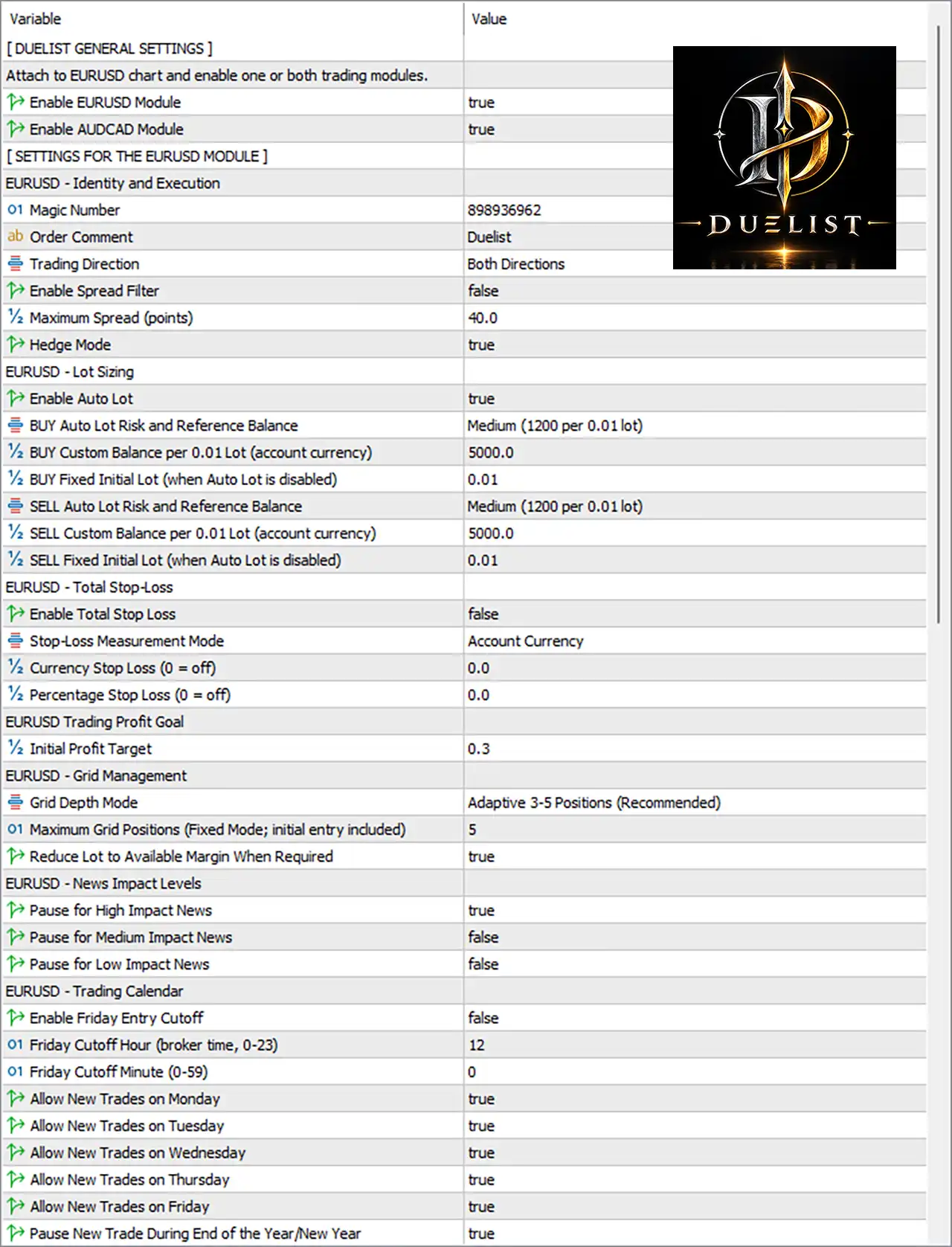
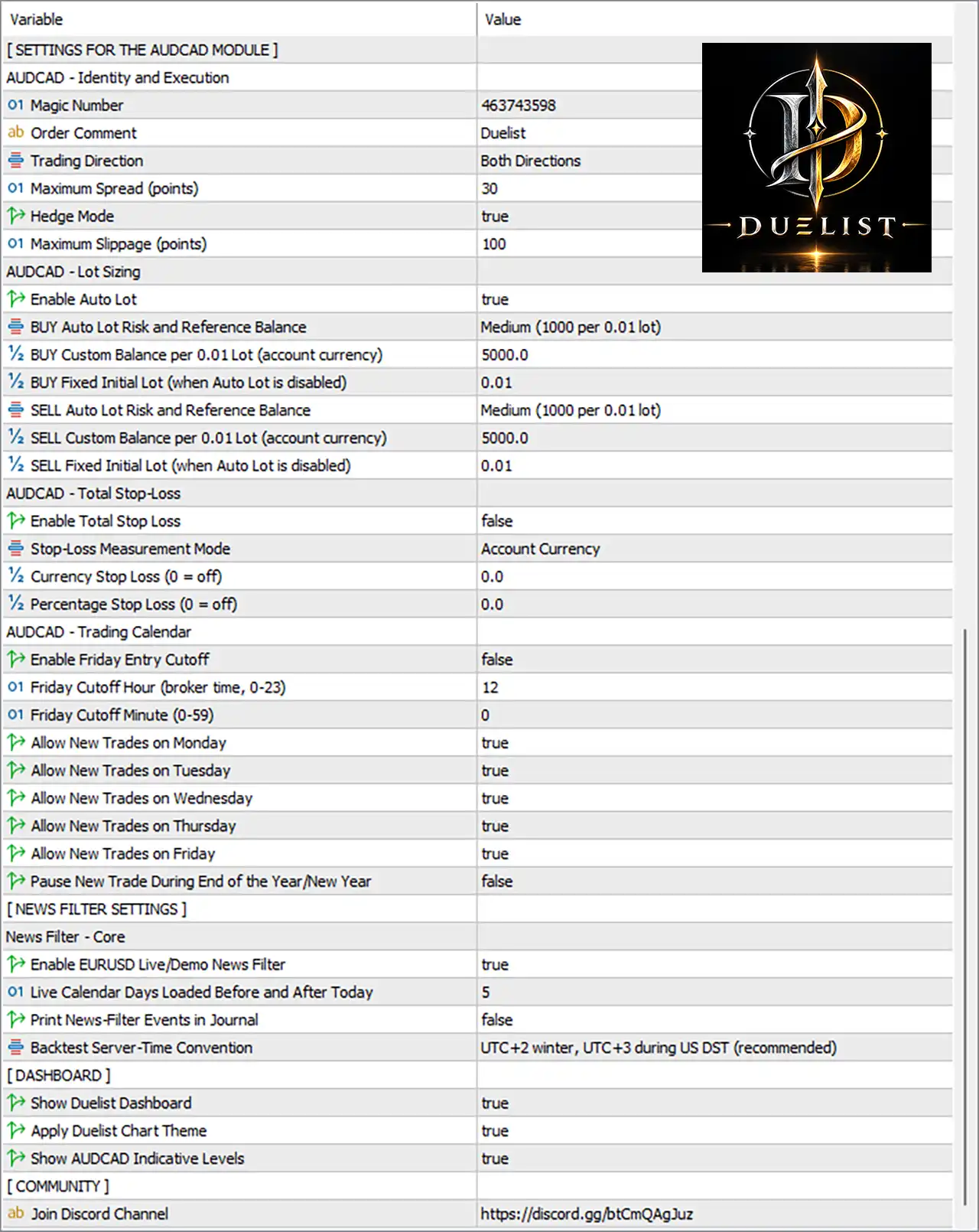
Duelist MT5 Inputs and Settings
General Module Configuration
🔹 EURUSD Module — Controls whether the EURUSD trading module is enabled. The EA can operate the EURUSD module independently or together with the AUDCAD module.
🔹 AUDCAD Module — Controls whether the AUDCAD trading module is enabled. The integrated AUDCAD module can automatically detect common broker symbol prefixes and suffixes.
🔹 Hedge Mode — Determines whether BUY and SELL baskets can operate simultaneously. When enabled, opposite-direction baskets can run independently; when disabled, a new opposite basket is prevented while an existing directional basket remains active.
Magic Number Settings
🔹 EURUSD Magic Number — Identifies positions belonging to the EURUSD module so Duelist can distinguish and manage them independently from other trades.
🔹 AUDCAD Magic Number — Identifies positions belonging to the AUDCAD module and allows the EA to recognize and manage the correct AUDCAD basket.
Trading Direction
🔹 EURUSD Trading Direction — Controls the permitted trading direction for the EURUSD module, allowing the module's directional behavior to be configured independently.
🔹 AUDCAD Trading Direction — Controls the permitted trading direction for the AUDCAD module, allowing BUY, SELL, or the configured directional mode according to the available setting.
Lot and Money Management
🔹 EURUSD Lot Mode — Determines how the initial EURUSD trading volume is calculated, with the system supporting fixed initial lots or automatic balance-based lot sizing.
🔹 EURUSD Initial Lot — Defines the starting lot size when fixed-lot operation is selected. This is the initial volume, not necessarily the total exposure of the complete basket.
🔹 AUDCAD Lot Mode — Determines how the initial AUDCAD trading volume is calculated using the available fixed-lot or automatic balance-based sizing configuration.
🔹 AUDCAD Initial Lot — Defines the starting AUDCAD position volume when fixed-lot operation is selected.
🔹 Automatic Lot Sizing — Allows the EA to calculate the starting position volume according to account balance and the selected sizing preset.
🔹 Lot Sizing Preset — Selects the predefined automatic position-sizing level used by the module when Auto Lot is enabled.
⚠️ Important: Duelist's Auto Lot and Fixed Lot settings determine the starting volume, not the maximum exposure. Because the EA uses basket/grid management, additional positions may be opened during an active sequence and total exposure can increase.
Basket and Grid Management
🔹 Grid Management — Controls the basket/grid behavior used when the strategy conditions require additional positions. Multiple positions can belong to the same directional basket.
🔹 Basket Management — Manages positions belonging to the same trading direction as a combined basket rather than treating every position completely independently.
🔹 Maximum Basket Exposure — Where provided in the module settings, this type of parameter controls how much additional exposure the module can accumulate during an active basket sequence.
🔹 Grid Distance — Where provided in the Inputs, this determines the price distance used before another position can be added to an active basket.
Trading Schedule
🔹 EURUSD Trading Schedule — Controls when the EURUSD module is permitted to initiate new trades.
🔹 AUDCAD Trading Schedule — Controls when the AUDCAD module is permitted to initiate new trades.
🔹 Trading Start Time — Defines the beginning of the permitted trading window for the applicable module.
🔹 Trading End Time — Defines the end of the permitted trading window for the applicable module.
🔹 Trading Calendar Protection — Controls calendar-based restrictions that can temporarily prevent new basket entries during selected periods.
An important feature is that temporarily pausing new entries does not necessarily stop management of an already active basket. Existing baskets can continue to be managed under normal management rules.
Spread Protection
🔹 EURUSD Maximum Spread — Defines the maximum acceptable spread condition for the EURUSD module before new entries are restricted.
🔹 AUDCAD Maximum Spread — Defines the maximum acceptable spread condition for AUDCAD before new entries are restricted.
🔹 Spread Filter — Helps prevent new positions from being opened when broker spread conditions are outside the configured limits.
Total Stop Loss
🔹 EURUSD Total Stop Loss — Provides module-level protection that can stop the EURUSD basket when the configured total-loss threshold is reached.
🔹 AUDCAD Total Stop Loss — Provides independent total-loss protection for the AUDCAD module.
🔹 Total Stop Loss Mode — The product documentation confirms that Total Stop Loss can be measured either in account currency or as a percentage of balance.
🔹 Total Stop Loss Amount — Defines the account-currency loss threshold used when the currency-based protection mode is selected.
🔹 Total Stop Loss Percentage — Defines the percentage-of-balance loss threshold used when percentage-based protection is selected.
Margin Protection
🔹 Margin Safety Protection — Duelist includes internal margin-safety controls designed to help manage exposure as basket positions accumulate.
🔹 Free Margin Protection — Helps prevent trading behavior from becoming excessively aggressive when available account margin becomes insufficient for the configured exposure.
🔹 Exposure Management — Allows each module to be configured independently according to account size and the preferred level of exposure.
News and Economic Calendar Protection
🔹 News Filter — Provides automatic economic-news filtering to restrict new entries around relevant scheduled market events.
🔹 Economic Calendar Protection — Works with the EA's calendar-related protection logic to control when new basket positions can be initiated.
🔹 Existing Basket Management During News Protection — When new entries are paused, existing baskets can remain under their normal management logic rather than being automatically abandoned.
Position Recognition and Recovery
🔹 Position Recognition — Duelist checks open positions using the configured symbol and Magic Number to determine whether they belong to the relevant module.
🔹 Restart Recognition — The EA is designed to recognize existing positions after a terminal restart or EA reattachment.
🔹 VPS Migration Recognition — Position recognition is also designed to support situations such as changing or restarting a VPS, provided the relevant symbol and Magic Number configuration remains consistent.
🔹 Management Path Status — Duelist reports whether existing positions were recognized and whether their expected management path is active.
Recommended Duelist MT5 Configuration
🔹 Trading Symbol — Attach the EA to your broker's EURUSD symbol.
🔹 Recommended Timeframe — M15.
🔹 Account Type — MT5 Hedging account.
🔹 Recommended Minimum Deposit — $1,000 or equivalent when both EURUSD and AUDCAD modules are used.
🔹 Broker Conditions — Low spreads and stable execution are recommended.
🔹 VPS — A stable VPS is strongly recommended for uninterrupted automated operation.
🔹 External Indicators — No external indicators are required according to the developer's documentation.
How Duelist MT5 Manages Risk
Duelist MT5 should be understood as a basket-based Forex system, rather than a simple one-position-at-a-time EA. The initial lot setting establishes the starting volume, while subsequent grid positions can increase total exposure. For this reason, the starting lot alone should not be interpreted as the maximum account risk.
The system provides several layers of configurable protection, including independent module settings, spread controls, trading schedules, economic-news filtering, Total Stop Loss options, and internal margin-safety controls. The EURUSD and AUDCAD modules can therefore be configured independently according to the account size and desired exposure.
Conclusion
Duelist MT5 is structured around two independent Forex trading modules for EURUSD and AUDCAD, managed through a single EURUSD chart. Its configuration framework focuses on independent module control, starting-lot management, basket/grid execution, trading schedules, spread protection, news filtering, Magic Number separation, and total-loss protection.
The most important point when configuring Duelist is that Fixed Lot or Auto Lot represents the starting position size rather than the maximum basket exposure. Because additional positions may be opened during a grid sequence, traders should consider total potential exposure, available free margin, spread conditions, execution quality, and the selected protection settings before using the EA on a live account.
FAQs
❓ What currency pairs does Duelist MT5 trade?
Duelist MT5 is designed specifically for EURUSD and AUDCAD, with both modules managed from a single EA instance attached to an EURUSD chart.
❓ What timeframe should I use for Duelist MT5?
The developer recommends attaching Duelist to an EURUSD M15 chart.
❓ Does Duelist MT5 use a grid strategy?
Yes. Duelist uses a managed basket and grid approach, meaning an active directional basket can contain multiple positions.
❓ Does Duelist MT5 support hedging?
Yes. With Hedge Mode enabled, BUY and SELL baskets can operate independently at the same time. When Hedge Mode is disabled, the EA prevents a new opposite basket from opening while an existing directional basket remains active.
❓ Is $1,000 enough to run Duelist MT5?
The developer lists $1,000 or equivalent as the minimum recommended deposit when using both modules, but actual capital requirements depend on lot sizing, basket depth, market conditions, spreads, execution, and total exposure.