Introduction to EA Legendary Multi Strategy MT5
EA Legendary Multi Strategy MT5 is a powerful multi-strategy automated trading Expert Advisor (EA) developed for the MetaTrader 5 platform. The EA combines martingale recovery logic, trailing stop management, news filtering, AI-assisted strategy analysis, and multiple timeframe signal detection into a single advanced trading system.
With support for 12 configurable strategies and flexible risk management controls, EA Legendary Multi Strategy MT5 is designed for traders seeking diversified and adaptive forex automation.
Full Parameters
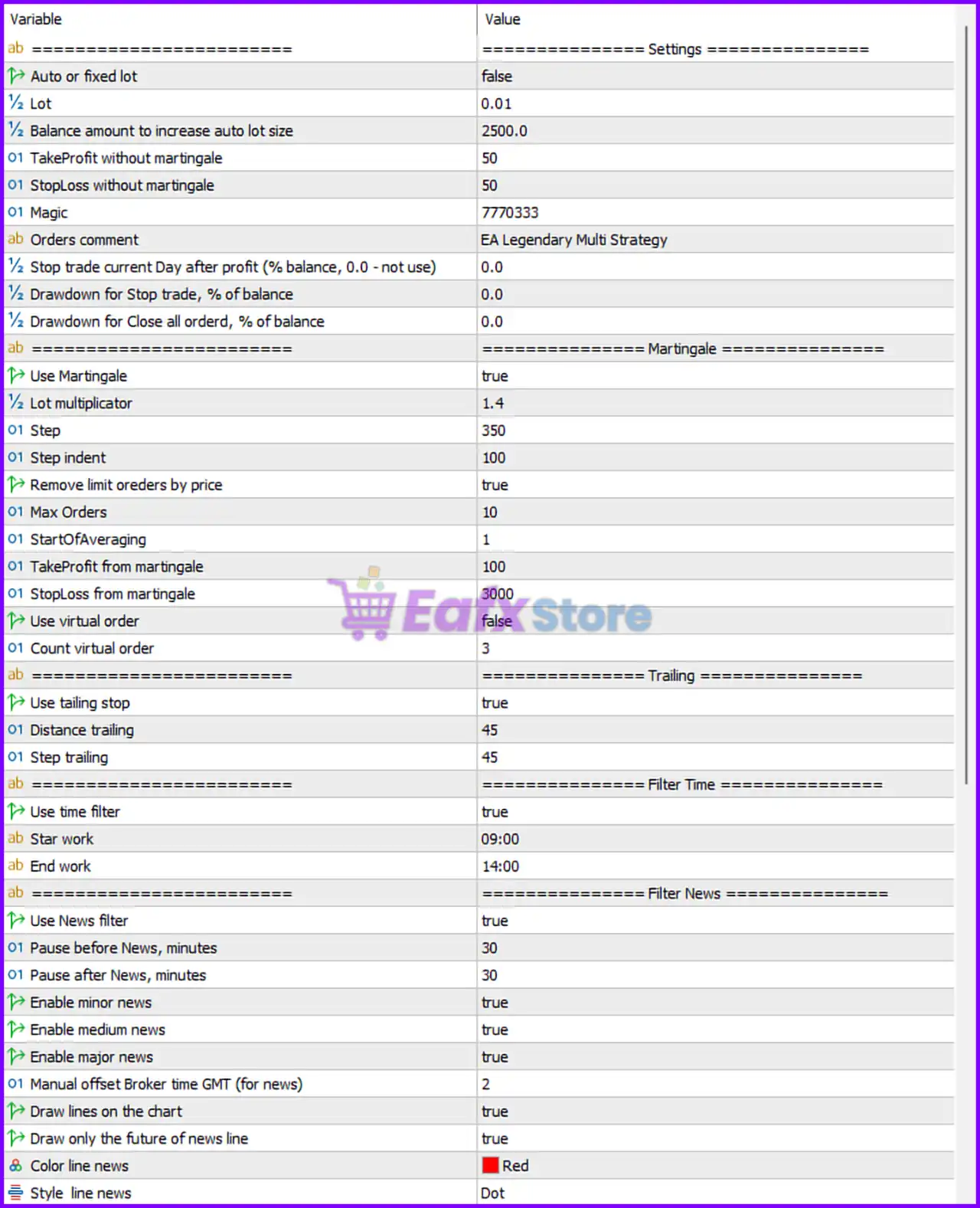
==================== Settings ====================
- Auto or fixed lot = false: Disables automatic lot sizing and uses fixed lot mode.
- Lot = 0.01: Sets the default fixed trading lot size to 0.01 lots.
- Balance amount to increase auto lot size = 2500.0: Auto lot size would increase for every 2500.0 account balance units if auto lot mode were enabled.
- TakeProfit without martingale = 50: Sets Take Profit target to 50 points/pips for non-martingale trades.
- StopLoss without martingale = 50: Defines Stop Loss level at 50 points/pips for non-martingale trades.
- Magic = 7770333: Unique identifier (7770333) used to manage EA trades independently.
- Orders comment = EA Legendary Multi Strategy: Adds “EA Legendary Multi Strategy” as the trade comment for positions.
- Stop trade current Day after profit (% balance, 0.0 – not use) = 0.0: Daily profit stop feature disabled because value is 0.0.
- Drawdown for Stop trade, % of balance = 0.0: Drawdown-based trading stop disabled because value is 0.0.
- Drawdown for Close all order, % of balance = 0.0: Global drawdown-based order closure disabled because value is 0.0.
==================== Martingale ====================
- Use Martingale = true: Enables martingale recovery trading logic.
- Lot multiplicator = 1.4: Multiplies lot size by 1.4 for each martingale recovery order.
- Step = 350: Sets the martingale order spacing distance to 350 points/pips.
- Step indent = 100: Defines additional spacing adjustment for martingale entries at 100 points/pips.
- Remove limit orders by price = true: Automatically removes limit orders when price conditions change.
- Max Orders = 10: Limits the maximum number of martingale orders to 10.
- StartOfAveraging = 1: Martingale averaging begins from order number 1.
- TakeProfit from martingale = 100: Sets Take Profit target for martingale trades to 100 points/pips.
- StopLoss from martingale = 3000: Defines Stop Loss level for martingale trades at 3000 points/pips.
- Use virtual order = false: Disables virtual order management.
- Count virtual order = 3: Virtual order count parameter set to 3; inactive because virtual orders are disabled.
==================== Trailing ====================
- Use tailing stop = true: Enables trailing stop functionality.
- Distance trailing = 45: Sets trailing stop distance to 45 points/pips.
- Step trailing = 45: Sets trailing stop adjustment step to 45 points/pips.
==================== Filter Time ====================
- Use time filter = true: Activates trading session time filtering.
- Star work = 09:00: Trading begins at 09:00 server time.
- End work = 14:00: Trading stops at 14:00 server time.
==================== Filter News ====================
- Use News filter = true: Enables economic news filtering.
- Pause before News, minutes = 30: Pauses trading 30 minutes before news events.
- Pause after News, minutes = 30: Resumes trading 30 minutes after news events.
- Enable minor news = true: Filters low-impact news events.
- Enable medium news = true: Filters medium-impact news events.
- Enable major news = true: Filters high-impact news events.
- Manual offset Broker time GMT (for news) = 2: Broker GMT offset manually set to GMT+2.
- Draw lines on the chart = true: Displays news event lines on the chart.
- Draw only the future of news line = true: Shows only future news event lines.
- Color line news = Red: Displays news lines in Red color.
- Style line news = Dot: Uses dotted style for news event lines.
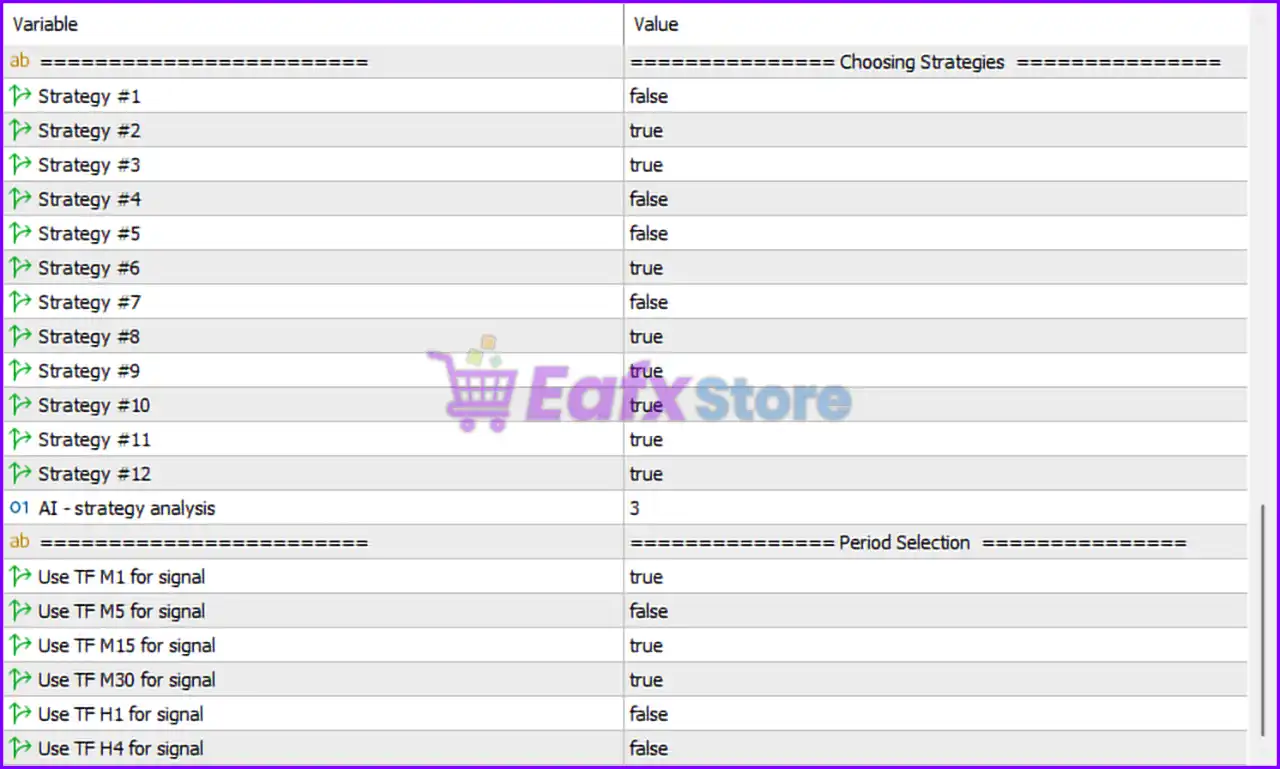
==================== Choosing Strategies ====================
- Strategy #1 = false: Disables Strategy 1.
- Strategy #2 = true: Enables Strategy 2.
- Strategy #3 = true: Enables Strategy 3.
- Strategy #4 = false: Disables Strategy 4.
- Strategy #5 = false: Disables Strategy 5.
- Strategy #6 = true: Enables Strategy 6.
- Strategy #7 = false: Disables Strategy 7.
- Strategy #8 = true: Enables Strategy 8.
- Strategy #9 = true: Enables Strategy 9.
- Strategy #10 = true: Enables Strategy 10.
- Strategy #11 = true: Enables Strategy 11.
- Strategy #12 = true: Enables Strategy 12.
- AI – strategy analysis = 3: AI-based strategy analysis mode configured at level 3.
==================== Period Selection ====================
- Use TF M1 for signal = true: Enables M1 timeframe for signal generation.
- Use TF M5 for signal = false: Disables M5 timeframe signal generation.
- Use TF M15 for signal = true: Enables M15 timeframe for signal generation.
- Use TF M30 for signal = true: Enables M30 timeframe for signal generation.
- Use TF H1 for signal = false: Disables H1 timeframe signal generation.
- Use TF H4 for signal = false: Disables H4 timeframe signal generation.
Conclusion
The EA Legendary Multi Strategy MT5 settings provide a highly flexible and diversified automated trading framework with integrated martingale recovery, trailing stops, news filtering and AI-assisted strategy analysis.
By supporting multiple trading strategies and timeframe combinations, the EA allows traders to adapt to different market conditions while maintaining customizable risk management. Understanding these parameters helps optimize execution, improve consistency and enhance overall portfolio diversification.
FAQs
❓ What does Use Martingale = true do?
It enables martingale recovery trading with increasing lot sizes after losses.
❓ Why is Use News filter = true important?
It prevents trading during potentially volatile economic news events.
❓ What is the purpose of AI – strategy analysis = 3?
It configures the EA’s AI-assisted strategy evaluation mode at level 3.
❓ Why are multiple strategies enabled simultaneously?
The EA is designed to diversify trading opportunities across different market conditions.
❓ What does Use TF M1 for signal = true mean?
It allows the EA to generate trading signals using the M1 (1-minute) timeframe.