

Introduction to Gold Pip Miner EA MT5
Gold Pip Miner EA is an automated trading Expert Advisor (EA) designed for MetaTrader 5, featuring a combination of opening straddle execution, fixed-lot position sizing, recovery lattice logic, and market profile analysis.

The EA includes several configurable components designed to manage trading activity under different market conditions. Its settings cover initial trading parameters, recovery calculations, trade identification, trading sessions, daily profit protection, economic news filtering, Market Profile Point of Control (POC) bias, and market environment quality.
Gold Pip Miner EA also features configurable animation and pulse controls, providing additional customization for its operational display.
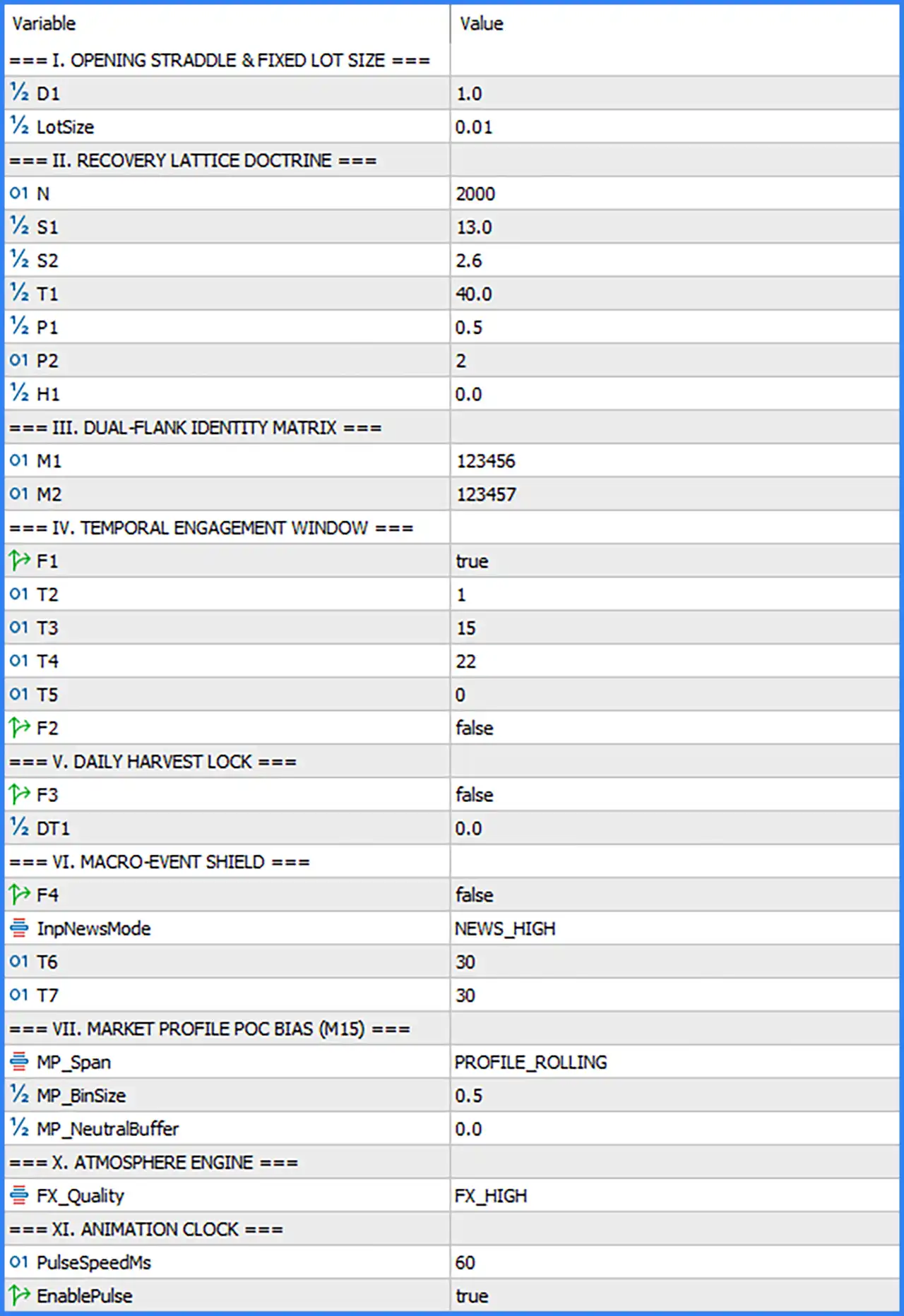
Opening Straddle & Fixed Lot Size
This section controls the initial trading configuration, including the opening straddle distance and fixed trading volume.
🔹 D1 = 1.0: Sets the D1 parameter to 1.0, defining the configured distance or scaling value associated with the opening straddle mechanism.
🔹 LotSize = 0.01: Sets the fixed trading volume to 0.01 lots, determining the default position size used by the EA when opening trades.
Recovery Lattice Doctrine
This section contains numerical parameters associated with the EA's recovery lattice mechanism. These settings configure internal values used by its recovery and trading calculations.
🔹 N = 2000: Sets the N parameter to 2000, providing a numerical configuration value for the recovery lattice calculation.
🔹 S1 = 13.0: Sets the first S parameter to 13.0, defining an internal scaling or sensitivity value used by the recovery lattice mechanism.
🔹 S2 = 2.6: Sets the second S parameter to 2.6, providing an additional numerical coefficient for the recovery calculation.
🔹 T1 = 40.0: Sets the first T parameter to 40.0, defining an internal threshold or timing-related value within the recovery configuration.
🔹 P1 = 0.5: Sets the first P parameter to 0.5, providing a numerical coefficient for the EA's internal recovery calculations.
🔹 P2 = 2: Sets the second P parameter to 2, defining another numerical input used by the recovery lattice logic.
🔹 H1 = 0.0: Sets the H1 parameter to 0.0, establishing the default numerical value for this internal recovery setting.
Dual-Flank Identity Matrix
This section provides separate identification numbers for the EA's two trading flanks, helping distinguish the corresponding trading operations.
🔹 M1 = 123456: Assigns the identification number 123456 to the first trading flank, allowing the EA to distinguish its corresponding trading operations.
🔹 M2 = 123457: Assigns the identification number 123457 to the second trading flank, providing a separate identifier for the other side of the trading configuration.
Temporal Engagement Window
The Temporal Engagement Window section controls time-related trading functionality and its associated activation options.
🔹 F1 = true: Enables the F1 option, activating the corresponding temporal engagement feature within the EA.
🔹 T2 = 1: Sets the T2 parameter to 1, defining the first numerical time-related configuration value in this section.
🔹 T3 = 15: Sets the T3 parameter to 15, providing an additional time-related configuration value for the temporal engagement mechanism.
🔹 T4 = 22: Sets the T4 parameter to 22, defining another numerical time-related setting within the EA's engagement window.
🔹 T5 = 0: Sets the T5 parameter to 0, establishing the default value for the final time-related parameter in this section.
🔹 F2 = false: Disables the F2 option, keeping its associated temporal engagement functionality inactive by default.
Daily Harvest Lock
This section provides a configurable daily profit-lock mechanism, allowing the EA to activate its corresponding daily trading protection feature.
🔹 F3 = false: Disables the Daily Harvest Lock functionality, meaning the corresponding daily profit-lock feature is inactive in the supplied default configuration.
🔹 DT1 = 0.0: Sets the DT1 parameter to 0.0, defining the default numerical threshold associated with the Daily Harvest Lock configuration.
Macro-Event Shield
The Macro-Event Shield section contains economic news protection settings designed to configure how the EA responds to high-impact market announcements.
🔹 F4 = false: Disables the Macro-Event Shield feature, meaning the corresponding macroeconomic event protection functionality is inactive by default.
🔹 InpNewsMode = NEWS_HIGH: Selects NEWS_HIGH as the news filtering mode, specifying the high-impact news category for the EA's news-related configuration.
🔹 T6 = 30: Sets the T6 parameter to 30, defining the configured time interval associated with the macro-event protection mechanism.
🔹 T7 = 30: Sets the T7 parameter to 30, providing the second time interval used by the Macro-Event Shield configuration.
Market Profile POC Bias (M15)
This section configures the Market Profile Point of Control (POC) bias using the M15 timeframe. These parameters control the market profile calculation range, price bin size, and neutral buffer.
🔹 MP_Span = PROFILE_ROLLING: Selects the PROFILE_ROLLING mode, allowing the Market Profile calculation to use a rolling profile range rather than a fixed profile configuration.
🔹 MP_BinSize = 0.5: Sets the Market Profile bin size to 0.5, defining the configured price interval used to organize market profile data into individual bins.
🔹 MP_NeutralBuffer = 0.0: Sets the neutral buffer to 0.0, meaning no additional neutral-zone buffer is applied through this parameter.
Atmosphere Engine
The Atmosphere Engine section provides a configurable market environment quality setting.
🔹 FX_Quality = FX_HIGH: Selects FX_HIGH as the market quality configuration, defining the preferred quality classification used by the EA's Atmosphere Engine.
Animation Clock
This section controls the EA's pulse animation functionality and its update speed.
🔹 PulseSpeedMs = 60: Sets the pulse speed to 60 milliseconds, defining the configured interval between pulse animation updates.
🔹 EnablePulse = true: Enables the pulse animation feature, allowing the EA to activate its corresponding visual pulse effect.
Conclusion
Gold Pip Miner EA MT5 provides a structured collection of trading and configuration parameters, combining opening straddle settings, recovery lattice calculations, dual-flank identification, temporal engagement controls, and Market Profile analysis.
Its default configuration uses a fixed lot size of 0.01, with separate identification numbers of 123456 and 123457 for the two trading flanks. The Recovery Lattice Doctrine includes several adjustable numerical parameters, while the Market Profile POC Bias operates with PROFILE_ROLLING mode, a bin size of 0.5, and a neutral buffer of 0.0.
The EA also includes optional Daily Harvest Lock and Macro-Event Shield functionality, both disabled by default. Its news mode is set to NEWS_HIGH, with T6 and T7 both configured to 30.
Overall, Gold Pip Miner EA MT5 offers multiple configurable components for traders who want to customize automated trading behavior, recovery calculations, market profile analysis, and operational settings.