

Introduction to Big Gold Crown EA MT5
Big Gold Crown EA is an automated trading Expert Advisor (EA) designed for MetaTrader 5, with a multi-module trading architecture for Gold (XAUUSD). Its configuration includes five independent trading modules, each with adjustable Buy and Sell strategies, timeframe selection, pending-order management, pivot detection, entry offsets, Stop Loss, Take Profit, and Trailing stop parameters.

The EA also provides configurable risk management, percentage-based or fixed-lot sizing, profit-lock functionality, swing trailing, custom exit profiles, and economic news filtering. Each module can operate with different trading parameters, allowing traders to configure multiple entry strategies and timeframes within one EA.
The supplied settings show five modules with different configurations: Modules 1, 3, 4, and 5 use the M15 timeframe, while Module 2 uses M5. The main settings header identifies the default configuration as XAUUSD / GOLD H1.
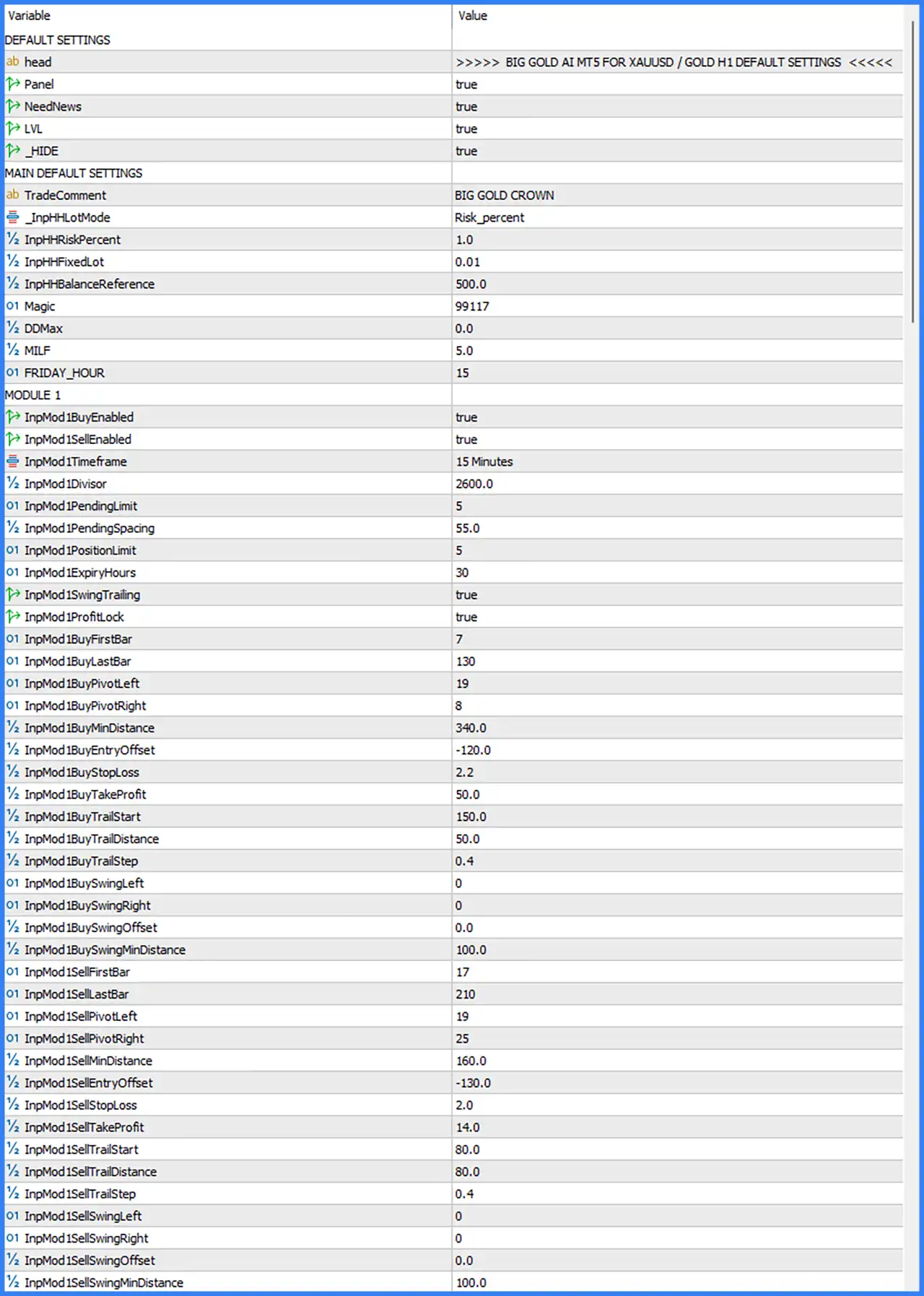
1. Default Settings
This section contains the EA's general display options and default operating configuration.
🔹 head = BIG GOLD AI MT5 FOR XAUUSD / GOLD H1 DEFAULT SETTINGS: Displays the configuration heading identifying the intended instrument as XAUUSD / GOLD and the default reference timeframe as H1.
🔹 Panel = true: Enables the EA's information panel on the trading chart, allowing traders to monitor the EA's displayed information.
🔹 NeedNews = true: Enables the news-related functionality, allowing the EA to use its configured economic news filtering features.
🔹 LVL = true: Enables the LVL option, which appears to control a level-related feature or display within the EA.
🔹 _HIDE = true: Enables the HIDE option, controlling an internal display or visibility feature. Its exact behavior is not specified in the screenshot.
2. Main Default Settings and Risk Management
This section controls the general trading configuration, position sizing, account balance reference, and trade identification.
🔹 TradeComment = BIG GOLD CROWN: Sets the order comment to BIG GOLD CROWN, allowing traders to identify positions opened by this EA in the MetaTrader 5 terminal.
🔹 InpHHLotMode = Risk_percent: Selects percentage-based risk sizing, allowing the EA to calculate trading volume according to the configured risk percentage rather than relying exclusively on a fixed lot size.
🔹 InpHHRiskPercent = 1.0: Sets the risk percentage to 1.0, defining the configured percentage used by the EA's risk-based position-sizing calculation.
🔹 InpHHFixedLot = 0.01: Sets the alternative fixed lot size to 0.01 lots, which can be used when the fixed-lot sizing mode is selected.
🔹 InpHHBalanceReference = 500.0: Sets the balance reference amount to 500.0, providing a monetary reference for the EA's position-sizing or risk calculations.
🔹 Magic = 99117: Assigns the Magic Number 99117 to the EA's main trading operations, helping MetaTrader 5 identify its managed positions.
🔹 DDMax = 0.0: Sets the DDMax parameter to 0.0. The screenshot does not specify whether this disables a drawdown restriction or represents another internal drawdown calculation.
🔹 MILF = 5.0: Sets the MILF parameter to 5.0, providing an internal numerical configuration value. Its precise calculation and trading function are not identified in the Inputs panel.
🔹 FRIDAY_HOUR = 15: Sets the Friday hour parameter to 15, defining a Friday-specific time reference that may control trading restrictions or position management near the end of the trading week.
3. Module 1 Settings
Module 1 provides independent Buy and Sell configurations on the 15-minute timeframe. It includes pending-order limits, pivot detection, entry distances, profit targets, and trailing stop management.
3.1. General Module 1 Settings
🔹 InpMod1BuyEnabled = true: Enables the Buy strategy in Module 1, allowing the EA to execute buy-side trading operations.
🔹 InpMod1SellEnabled = true: Enables the Sell strategy in Module 1, allowing the EA to execute sell-side trading operations.
🔹 InpMod1Timeframe = 15 Minutes: Sets Module 1 to the M15 timeframe for its trading calculations and signal analysis.
🔹 InpMod1Divisor = 2600.0: Sets the Module 1 divisor to 2600.0, providing an internal numerical scaling parameter used by the module's calculations.
🔹 InpMod1PendingLimit = 5: Limits Module 1 to 5 pending orders, controlling the maximum number of pending entries managed by this module.
🔹 InpMod1PendingSpacing = 55.0: Sets the pending-order spacing parameter to 55.0, defining the configured distance between pending entries.
🔹 InpMod1PositionLimit = 5: Sets the maximum position limit for Module 1 to 5, restricting the number of positions managed by this module.
🔹 InpMod1ExpiryHours = 30: Sets the pending-order expiration period to 30 hours, defining how long an eligible order can remain active before expiration.
🔹 InpMod1SwingTrailing = true: Enables swing-based trailing stop management in Module 1, allowing the EA to use swing-related calculations when adjusting protective stop levels.
🔹 InpMod1ProfitLock = true: Enables the profit-lock feature, allowing Module 1 to apply its configured profit-protection mechanism to open positions.
3.2. Module 1 Buy Settings
🔹 InpMod1BuyFirstBar = 7: Sets the first bar reference to 7, defining the starting historical candle used in the Buy strategy's bar-based calculations.
🔹 InpMod1BuyLastBar = 130: Sets the last bar reference to 130, defining the final historical candle included in the Buy strategy's configured analysis range.
🔹 InpMod1BuyPivotLeft = 19: Sets the left pivot confirmation parameter to 19, defining the number of bars considered on the left side when identifying potential swing points.
🔹 InpMod1BuyPivotRight = 8: Sets the right pivot confirmation parameter to 8, defining the number of bars considered on the right side when identifying potential swing points.
🔹 InpMod1BuyMinDistance = 340.0: Sets the minimum Buy entry distance to 340.0, providing a distance threshold for evaluating potential buy opportunities.
🔹 InpMod1BuyEntryOffset = -120.0: Sets the Buy entry offset to -120.0, applying a negative adjustment to the calculated entry level according to the EA's internal entry-placement logic.
🔹 InpMod1BuyStopLoss = 2.2: Sets the Buy Stop Loss parameter to 2.2, defining the configured protective stop-loss value for Module 1 Buy positions.
🔹 InpMod1BuyTakeProfit = 50.0: Sets the Buy Take Profit parameter to 50.0, establishing the configured profit target for Module 1 Buy positions.
🔹 InpMod1BuyTrailStart = 150.0: Sets the Buy trailing activation threshold to 150.0, defining the profit movement required before the trailing mechanism starts operating.
🔹 InpMod1BuyTrailDistance = 50.0: Sets the Buy trailing distance to 50.0, defining the configured distance used when adjusting the stop-loss behind favorable price movements.
🔹 InpMod1BuyTrailStep = 0.4: Sets the Buy trailing step to 0.4, controlling the incremental adjustment used by the trailing mechanism.
🔹 InpMod1BuySwingLeft = 0: Sets the Buy swing-left parameter to 0, indicating that no additional left-side swing-bar setting is specified through this parameter.
🔹 InpMod1BuySwingRight = 0: Sets the Buy swing-right parameter to 0, indicating that no additional right-side swing-bar setting is specified through this parameter.
🔹 InpMod1BuySwingOffset = 0.0: Sets the Buy swing offset to 0.0, applying no additional numerical offset to the swing-based calculation.
🔹 InpMod1BuySwingMinDistance = 100.0: Sets the minimum Buy swing distance to 100.0, defining the minimum separation threshold used by the swing-based Buy logic.
3.3. Module 1 Sell Settings
🔹 InpMod1SellFirstBar = 17: Sets the first bar reference to 17, defining the starting historical candle used in the Sell strategy's bar-based calculations.
🔹 InpMod1SellLastBar = 210: Sets the last bar reference to 210, defining the final historical candle included in the Sell strategy's configured analysis range.
🔹 InpMod1SellPivotLeft = 19: Sets the left pivot confirmation parameter to 19, defining the number of bars considered on the left side when identifying potential swing points for Sell entries.
🔹 InpMod1SellPivotRight = 25: Sets the right pivot confirmation parameter to 25, defining the number of bars considered on the right side when confirming potential Sell strategy pivots.
🔹 InpMod1SellMinDistance = 160.0: Sets the minimum Sell entry distance to 160.0, providing a distance threshold for evaluating potential sell opportunities.
🔹 InpMod1SellEntryOffset = -130.0: Sets the Sell entry offset to -130.0, applying a negative adjustment to the calculated Sell entry level according to the EA's internal logic.
🔹 InpMod1SellStopLoss = 2.0: Sets the Sell Stop Loss parameter to 2.0, defining the configured protective stop-loss value for Module 1 Sell positions.
🔹 InpMod1SellTakeProfit = 14.0: Sets the Sell Take Profit parameter to 14.0, establishing the configured profit target for Module 1 Sell positions.
🔹 InpMod1SellTrailStart = 80.0: Sets the Sell trailing activation threshold to 80.0, defining when the trailing mechanism can begin managing profitable Sell positions.
🔹 InpMod1SellTrailDistance = 80.0: Sets the Sell trailing distance to 80.0, determining the configured distance between the market price and the adjusted protective stop.
🔹 InpMod1SellTrailStep = 0.4: Sets the Sell trailing step to 0.4, controlling the incremental stop-loss adjustment used by Module 1.
🔹 InpMod1SellSwingLeft = 0: Sets the Sell swing-left parameter to 0, indicating that no additional left-side swing-bar setting is specified.
🔹 InpMod1SellSwingRight = 0: Sets the Sell swing-right parameter to 0, indicating that no additional right-side swing-bar setting is specified.
🔹 InpMod1SellSwingOffset = 0.0: Sets the Sell swing offset to 0.0, applying no additional numerical adjustment to the swing-based Sell calculation.
🔹 InpMod1SellSwingMinDistance = 100.0: Sets the minimum Sell swing distance to 100.0, defining the minimum separation threshold used by the swing-based Sell logic.
4. Module 2 Settings
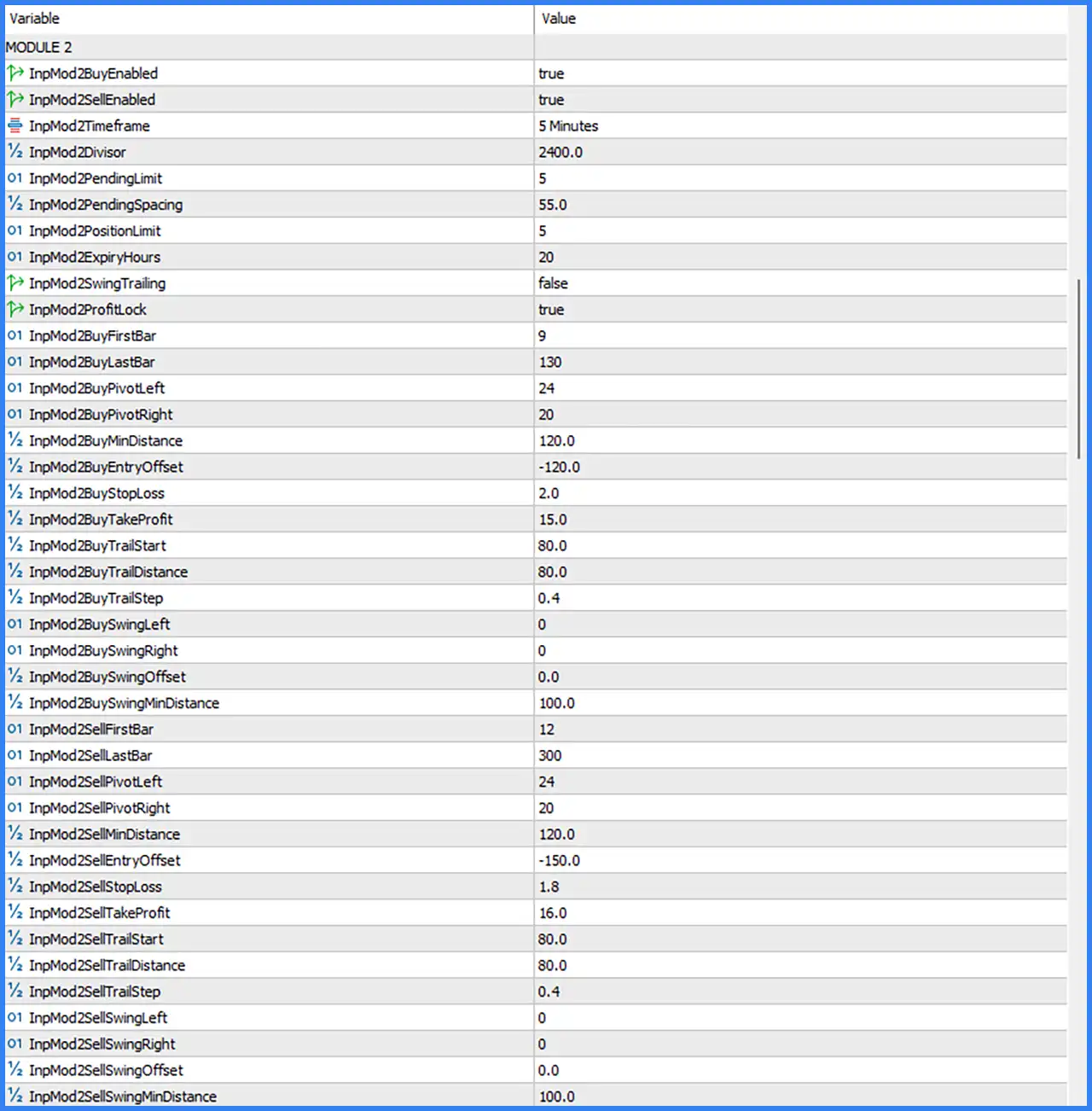
Module 2 operates on the M5 timeframe and has independent Buy and Sell configurations. Its default settings include a divisor of 2400.0, pending-order spacing of 55.0, and a maximum of 5 positions.
4.1. General Module 2 Settings
🔹 InpMod2BuyEnabled = true: Enables Buy trading in Module 2, allowing the module to generate and manage buy-side trading operations.
🔹 InpMod2SellEnabled = true: Enables Sell trading in Module 2, allowing the module to generate and manage sell-side trading operations.
🔹 InpMod2Timeframe = 5 Minutes: Sets Module 2 to the M5 timeframe, using 5-minute chart data for its trading calculations.
🔹 InpMod2Divisor = 2400.0: Sets the Module 2 divisor to 2400.0, providing an internal scaling value for the module's calculations.
🔹 InpMod2PendingLimit = 5: Limits the number of pending orders managed by Module 2 to 5.
🔹 InpMod2PendingSpacing = 55.0: Sets the pending-order spacing parameter to 55.0, defining the configured distance between pending entries.
🔹 InpMod2PositionLimit = 5: Sets the maximum number of positions managed by Module 2 to 5.
🔹 InpMod2ExpiryHours = 20: Sets the pending-order expiration period to 20 hours, defining the configured validity period for eligible pending orders.
🔹 InpMod2SwingTrailing = false: Disables swing-based trailing stop management in Module 2, meaning this particular trailing feature is inactive by default.
🔹 InpMod2ProfitLock = true: Enables profit-lock functionality in Module 2, allowing the EA to apply its configured mechanism for protecting accumulated profits.
4.2. Module 2 Buy Settings
🔹 InpMod2BuyFirstBar = 9: Sets the first historical bar reference for Module 2 Buy calculations to 9.
🔹 InpMod2BuyLastBar = 130: Sets the last historical bar reference for Module 2 Buy calculations to 130.
🔹 InpMod2BuyPivotLeft = 24: Sets the left pivot confirmation period for Module 2 Buy to 24 bars.
🔹 InpMod2BuyPivotRight = 20: Sets the right pivot confirmation period for Module 2 Buy to 20 bars.
🔹 InpMod2BuyMinDistance = 120.0: Sets the minimum Buy entry distance to 120.0, defining the configured distance threshold for potential Buy entries.
🔹 InpMod2BuyEntryOffset = -120.0: Sets the Buy entry offset to -120.0, applying a negative adjustment to the calculated entry level.
🔹 InpMod2BuyStopLoss = 2.0: Sets the Buy Stop Loss parameter to 2.0, defining the protective stop-loss value for Module 2 Buy positions.
🔹 InpMod2BuyTakeProfit = 15.0: Sets the Buy Take Profit parameter to 15.0, establishing the configured profit target for Module 2 Buy positions.
🔹 InpMod2BuyTrailStart = 80.0: Sets the Buy trailing activation threshold to 80.0, determining when trailing stop management can begin.
🔹 InpMod2BuyTrailDistance = 80.0: Sets the Buy trailing distance to 80.0, defining the configured distance used when adjusting the protective stop.
🔹 InpMod2BuyTrailStep = 0.4: Sets the Buy trailing step to 0.4, controlling the incremental adjustment of the trailing stop.
🔹 InpMod2BuySwingLeft = 0: Sets the Buy swing-left parameter to 0, indicating no additional left-side swing-bar setting.
🔹 InpMod2BuySwingRight = 0: Sets the Buy swing-right parameter to 0, indicating no additional right-side swing-bar setting.
🔹 InpMod2BuySwingOffset = 0.0: Sets the Buy swing offset to 0.0, applying no additional swing-based numerical adjustment.
🔹 InpMod2BuySwingMinDistance = 100.0: Sets the minimum Buy swing distance to 100.0, defining the minimum separation threshold for the swing-based Buy calculation.
4.3. Module 2 Sell Settings
🔹 InpMod2SellFirstBar = 12: Sets the first historical bar reference for Module 2 Sell calculations to 12.
🔹 InpMod2SellLastBar = 300: Sets the last historical bar reference for Module 2 Sell calculations to 300.
🔹 InpMod2SellPivotLeft = 24: Sets the left pivot confirmation period for Module 2 Sell to 24 bars.
🔹 InpMod2SellPivotRight = 20: Sets the right pivot confirmation period for Module 2 Sell to 20 bars.
🔹 InpMod2SellMinDistance = 120.0: Sets the minimum Sell entry distance to 120.0, defining the configured distance threshold for potential Sell entries.
🔹 InpMod2SellEntryOffset = -150.0: Sets the Sell entry offset to -150.0, applying a negative adjustment to the calculated Sell entry level.
🔹 InpMod2SellStopLoss = 1.8: Sets the Sell Stop Loss parameter to 1.8, defining the protective stop-loss value for Module 2 Sell positions.
🔹 InpMod2SellTakeProfit = 16.0: Sets the Sell Take Profit parameter to 16.0, establishing the configured profit target for Module 2 Sell positions.
🔹 InpMod2SellTrailStart = 80.0: Sets the Sell trailing activation threshold to 80.0, determining when trailing stop management can begin for profitable Sell positions.
🔹 InpMod2SellTrailDistance = 80.0: Sets the Sell trailing distance to 80.0, defining the configured distance used when adjusting the Sell protective stop.
🔹 InpMod2SellTrailStep = 0.4: Sets the Sell trailing step to 0.4, controlling the incremental adjustment of the trailing stop.
🔹 InpMod2SellSwingLeft = 0: Sets the Sell swing-left parameter to 0, indicating no additional left-side swing-bar setting.
🔹 InpMod2SellSwingRight = 0: Sets the Sell swing-right parameter to 0, indicating no additional right-side swing-bar setting.
🔹 InpMod2SellSwingOffset = 0.0: Sets the Sell swing offset to 0.0, applying no additional swing-based numerical adjustment.
🔹 InpMod2SellSwingMinDistance = 100.0: Sets the minimum Sell swing distance to 100.0, defining the minimum separation threshold for the swing-based Sell calculation.
5. Module 3 Settings
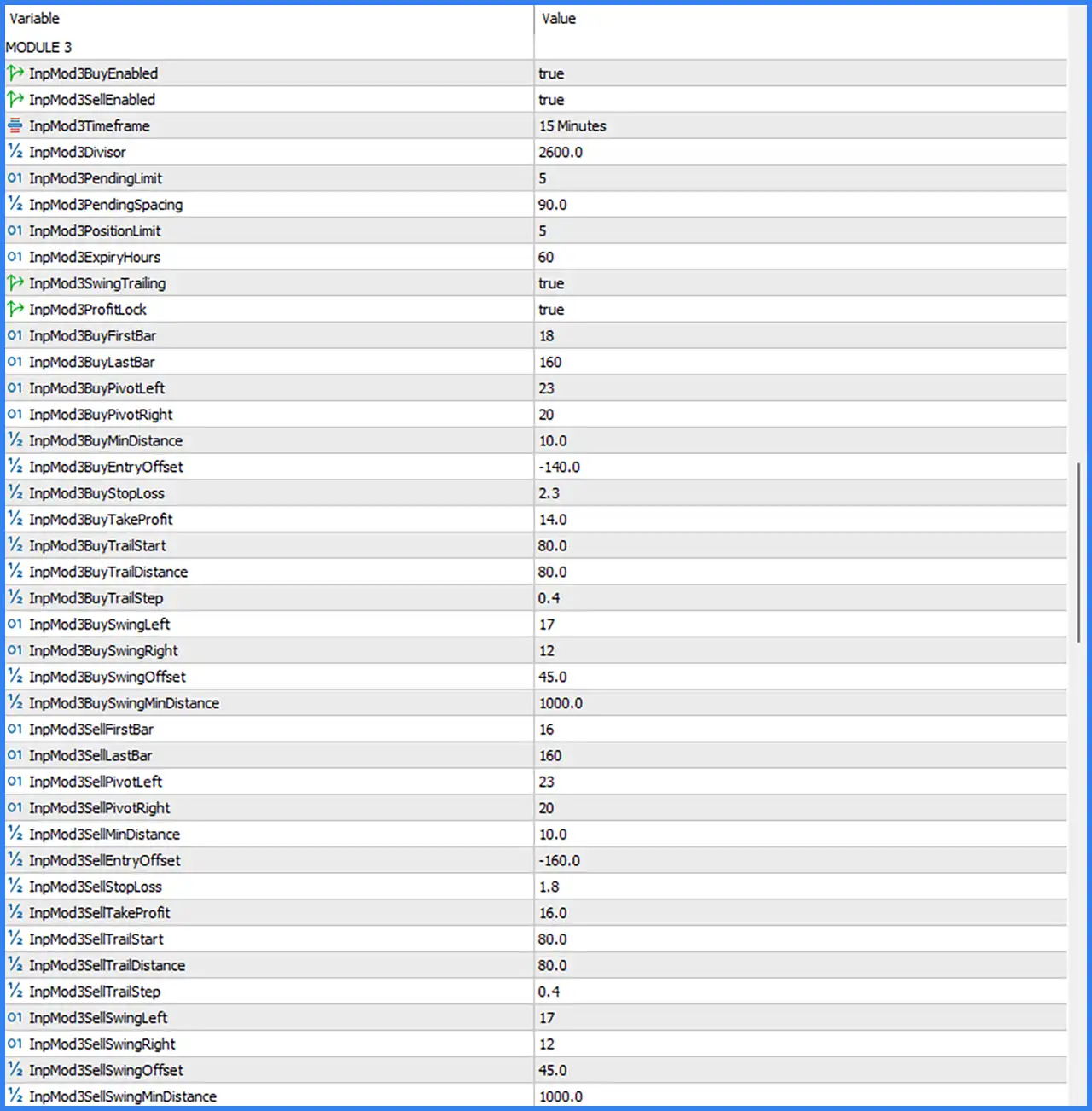
Module 3 operates on the M15 timeframe and provides separate Buy and Sell configurations. Its default setup uses a divisor of 2600.0, pending spacing of 90.0, and swing-based entry parameters.
5.1. General Module 3 Settings
🔹 InpMod3BuyEnabled = true: Enables Buy trading in Module 3, allowing the module to execute buy-side trading operations.
🔹 InpMod3SellEnabled = true: Enables Sell trading in Module 3, allowing the module to execute sell-side trading operations.
🔹 InpMod3Timeframe = 15 Minutes: Sets Module 3 to the M15 timeframe for its market analysis and trading calculations.
🔹 InpMod3Divisor = 2600.0: Sets the internal divisor to 2600.0, providing a numerical scaling parameter for Module 3 calculations.
🔹 InpMod3PendingLimit = 5: Limits the number of pending orders managed by Module 3 to 5.
🔹 InpMod3PendingSpacing = 90.0: Sets the pending-order spacing parameter to 90.0, defining the configured distance between pending entries.
🔹 InpMod3PositionLimit = 5: Sets the maximum number of positions managed by Module 3 to 5.
🔹 InpMod3ExpiryHours = 60: Sets the pending-order expiration period to 60 hours, defining the configured validity period for eligible pending orders.
🔹 InpMod3SwingTrailing = true: Enables swing-based trailing stop management, allowing Module 3 to use its swing-related settings when managing protective stops.
🔹 InpMod3ProfitLock = true: Enables profit-lock functionality, allowing the module to apply its configured profit-protection mechanism.
5.2. Module 3 Buy Settings
🔹 InpMod3BuyFirstBar = 18: Sets the first historical bar reference for Module 3 Buy calculations to 18.
🔹 InpMod3BuyLastBar = 160: Sets the last historical bar reference for Module 3 Buy calculations to 160.
🔹 InpMod3BuyPivotLeft = 23: Sets the left pivot confirmation period for Module 3 Buy to 23 bars.
🔹 InpMod3BuyPivotRight = 20: Sets the right pivot confirmation period for Module 3 Buy to 20 bars.
🔹 InpMod3BuyMinDistance = 10.0: Sets the minimum Buy entry distance to 10.0, defining the configured distance threshold for potential Buy entries.
🔹 InpMod3BuyEntryOffset = -140.0: Sets the Buy entry offset to -140.0, applying a negative adjustment to the calculated entry level.
🔹 InpMod3BuyStopLoss = 2.3: Sets the Buy Stop Loss parameter to 2.3, defining the configured protective stop-loss value for Module 3 Buy positions.
🔹 InpMod3BuyTakeProfit = 14.0: Sets the Buy Take Profit parameter to 14.0, establishing the configured profit target for Module 3 Buy positions.
🔹 InpMod3BuyTrailStart = 80.0: Sets the Buy trailing activation threshold to 80.0, determining when trailing stop management can begin.
🔹 InpMod3BuyTrailDistance = 80.0: Sets the Buy trailing distance to 80.0, defining the configured distance used when adjusting the protective stop.
🔹 InpMod3BuyTrailStep = 0.4: Sets the Buy trailing step to 0.4, controlling the incremental adjustment of the trailing stop.
🔹 InpMod3BuySwingLeft = 17: Sets the Buy swing-left parameter to 17, defining the left-side bar reference used in swing-based calculations.
🔹 InpMod3BuySwingRight = 12: Sets the Buy swing-right parameter to 12, defining the right-side bar reference used in swing-based calculations.
🔹 InpMod3BuySwingOffset = 45.0: Sets the Buy swing offset to 45.0, providing an additional numerical adjustment to the swing-based entry calculation.
🔹 InpMod3BuySwingMinDistance = 1000.0: Sets the minimum Buy swing distance to 1000.0, establishing the configured minimum separation threshold for swing-based Buy opportunities.
5.3. Module 3 Sell Settings
🔹 InpMod3SellFirstBar = 16: Sets the first historical bar reference for Module 3 Sell calculations to 16.
🔹 InpMod3SellLastBar = 160: Sets the last historical bar reference for Module 3 Sell calculations to 160.
🔹 InpMod3SellPivotLeft = 23: Sets the left pivot confirmation period for Module 3 Sell to 23 bars.
🔹 InpMod3SellPivotRight = 20: Sets the right pivot confirmation period for Module 3 Sell to 20 bars.
🔹 InpMod3SellMinDistance = 10.0: Sets the minimum Sell entry distance to 10.0, defining the configured distance threshold for potential Sell entries.
🔹 InpMod3SellEntryOffset = -160.0: Sets the Sell entry offset to -160.0, applying a negative adjustment to the calculated Sell entry level.
🔹 InpMod3SellStopLoss = 1.8: Sets the Sell Stop Loss parameter to 1.8, defining the configured protective stop-loss value for Module 3 Sell positions.
🔹 InpMod3SellTakeProfit = 16.0: Sets the Sell Take Profit parameter to 16.0, establishing the configured profit target for Module 3 Sell positions.
🔹 InpMod3SellTrailStart = 80.0: Sets the Sell trailing activation threshold to 80.0, determining when trailing stop management can begin.
🔹 InpMod3SellTrailDistance = 80.0: Sets the Sell trailing distance to 80.0, defining the configured distance used when adjusting the protective stop.
🔹 InpMod3SellTrailStep = 0.4: Sets the Sell trailing step to 0.4, controlling the incremental adjustment of the trailing stop.
🔹 InpMod3SellSwingLeft = 17: Sets the Sell swing-left parameter to 17, defining the left-side bar reference used in swing-based calculations.
🔹 InpMod3SellSwingRight = 12: Sets the Sell swing-right parameter to 12, defining the right-side bar reference used in swing-based calculations.
🔹 InpMod3SellSwingOffset = 45.0: Sets the Sell swing offset to 45.0, providing an additional numerical adjustment to the swing-based Sell calculation.
🔹 InpMod3SellSwingMinDistance = 1000.0: Sets the minimum Sell swing distance to 1000.0, establishing the configured minimum separation threshold for swing-based Sell opportunities.
6. Module 4 Settings
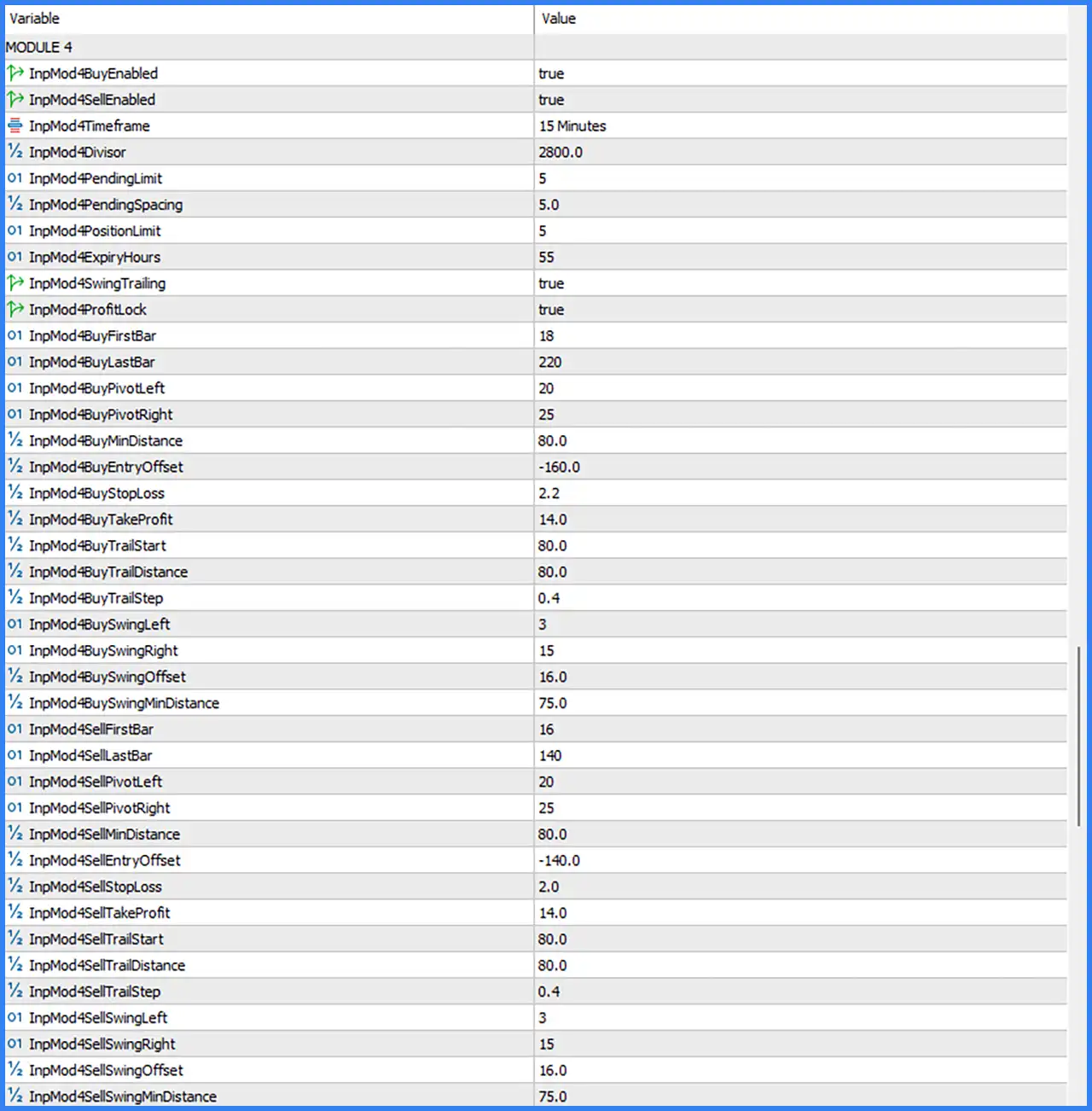
Module 4 operates on the M15 timeframe and uses a divisor of 2800.0. Its configuration includes separate Buy and Sell pivot parameters, entry offsets, swing distances, and position management settings.
6.1. General Module 4 Settings
🔹 InpMod4BuyEnabled = true: Enables Buy trading in Module 4, allowing the module to execute buy-side trading operations.
🔹 InpMod4SellEnabled = true: Enables Sell trading in Module 4, allowing the module to execute sell-side trading operations.
🔹 InpMod4Timeframe = 15 Minutes: Sets Module 4 to the M15 timeframe for its market analysis and trading calculations.
🔹 InpMod4Divisor = 2800.0: Sets the internal divisor to 2800.0, providing a numerical scaling parameter for Module 4 calculations.
🔹 InpMod4PendingLimit = 5: Limits the number of pending orders managed by Module 4 to 5.
🔹 InpMod4PendingSpacing = 5.0: Sets the pending-order spacing parameter to 5.0, defining the configured distance between pending entries.
🔹 InpMod4PositionLimit = 5: Sets the maximum number of positions managed by Module 4 to 5.
🔹 InpMod4ExpiryHours = 55: Sets the pending-order expiration period to 55 hours, defining the configured validity period for eligible pending orders.
🔹 InpMod4SwingTrailing = true: Enables swing-based trailing stop management, allowing Module 4 to use swing-related calculations when adjusting protective stops.
🔹 InpMod4ProfitLock = true: Enables the profit-lock feature, allowing the module to apply its configured profit-protection mechanism.
6.2. Module 4 Buy Settings
🔹 InpMod4BuyFirstBar = 18: Sets the first historical bar reference for Module 4 Buy calculations to 18.
🔹 InpMod4BuyLastBar = 220: Sets the last historical bar reference for Module 4 Buy calculations to 220.
🔹 InpMod4BuyPivotLeft = 20: Sets the left pivot confirmation period for Module 4 Buy to 20 bars.
🔹 InpMod4BuyPivotRight = 25: Sets the right pivot confirmation period for Module 4 Buy to 25 bars.
🔹 InpMod4BuyMinDistance = 80.0: Sets the minimum Buy entry distance to 80.0, defining the configured distance threshold for potential Buy entries.
🔹 InpMod4BuyEntryOffset = -160.0: Sets the Buy entry offset to -160.0, applying a negative adjustment to the calculated entry level.
🔹 InpMod4BuyStopLoss = 2.2: Sets the Buy Stop Loss parameter to 2.2, defining the configured protective stop-loss value for Module 4 Buy positions.
🔹 InpMod4BuyTakeProfit = 14.0: Sets the Buy Take Profit parameter to 14.0, establishing the configured profit target for Module 4 Buy positions.
🔹 InpMod4BuyTrailStart = 80.0: Sets the Buy trailing activation threshold to 80.0, determining when trailing stop management can begin.
🔹 InpMod4BuyTrailDistance = 80.0: Sets the Buy trailing distance to 80.0, defining the configured distance used when adjusting the protective stop.
🔹 InpMod4BuyTrailStep = 0.4: Sets the Buy trailing step to 0.4, controlling the incremental adjustment of the trailing stop.
🔹 InpMod4BuySwingLeft = 3: Sets the Buy swing-left parameter to 3, defining the left-side bar reference used in swing-based calculations.
🔹 InpMod4BuySwingRight = 15: Sets the Buy swing-right parameter to 15, defining the right-side bar reference used in swing-based calculations.
🔹 InpMod4BuySwingOffset = 16.0: Sets the Buy swing offset to 16.0, providing an additional numerical adjustment to the swing-based entry calculation.
🔹 InpMod4BuySwingMinDistance = 75.0: Sets the minimum Buy swing distance to 75.0, establishing the configured minimum separation threshold for swing-based Buy opportunities.
6.3. Module 4 Sell Settings
🔹 InpMod4SellFirstBar = 16: Sets the first historical bar reference for Module 4 Sell calculations to 16.
🔹 InpMod4SellLastBar = 140: Sets the last historical bar reference for Module 4 Sell calculations to 140.
🔹 InpMod4SellPivotLeft = 20: Sets the left pivot confirmation period for Module 4 Sell to 20 bars.
🔹 InpMod4SellPivotRight = 25: Sets the right pivot confirmation period for Module 4 Sell to 25 bars.
🔹 InpMod4SellMinDistance = 80.0: Sets the minimum Sell entry distance to 80.0, defining the configured distance threshold for potential Sell entries.
🔹 InpMod4SellEntryOffset = -140.0: Sets the Sell entry offset to -140.0, applying a negative adjustment to the calculated Sell entry level.
🔹 InpMod4SellStopLoss = 2.0: Sets the Sell Stop Loss parameter to 2.0, defining the configured protective stop-loss value for Module 4 Sell positions.
🔹 InpMod4SellTakeProfit = 14.0: Sets the Sell Take Profit parameter to 14.0, establishing the configured profit target for Module 4 Sell positions.
🔹 InpMod4SellTrailStart = 80.0: Sets the Sell trailing activation threshold to 80.0, determining when trailing stop management can begin.
🔹 InpMod4SellTrailDistance = 80.0: Sets the Sell trailing distance to 80.0, defining the configured distance used when adjusting the protective stop.
🔹 InpMod4SellTrailStep = 0.4: Sets the Sell trailing step to 0.4, controlling the incremental adjustment of the trailing stop.
🔹 InpMod4SellSwingLeft = 3: Sets the Sell swing-left parameter to 3, defining the left-side bar reference used in swing-based calculations.
🔹 InpMod4SellSwingRight = 15: Sets the Sell swing-right parameter to 15, defining the right-side bar reference used in swing-based calculations.
🔹 InpMod4SellSwingOffset = 16.0: Sets the Sell swing offset to 16.0, providing an additional numerical adjustment to the swing-based Sell calculation.
🔹 InpMod4SellSwingMinDistance = 75.0: Sets the minimum Sell swing distance to 75.0, establishing the configured minimum separation threshold for swing-based Sell opportunities.
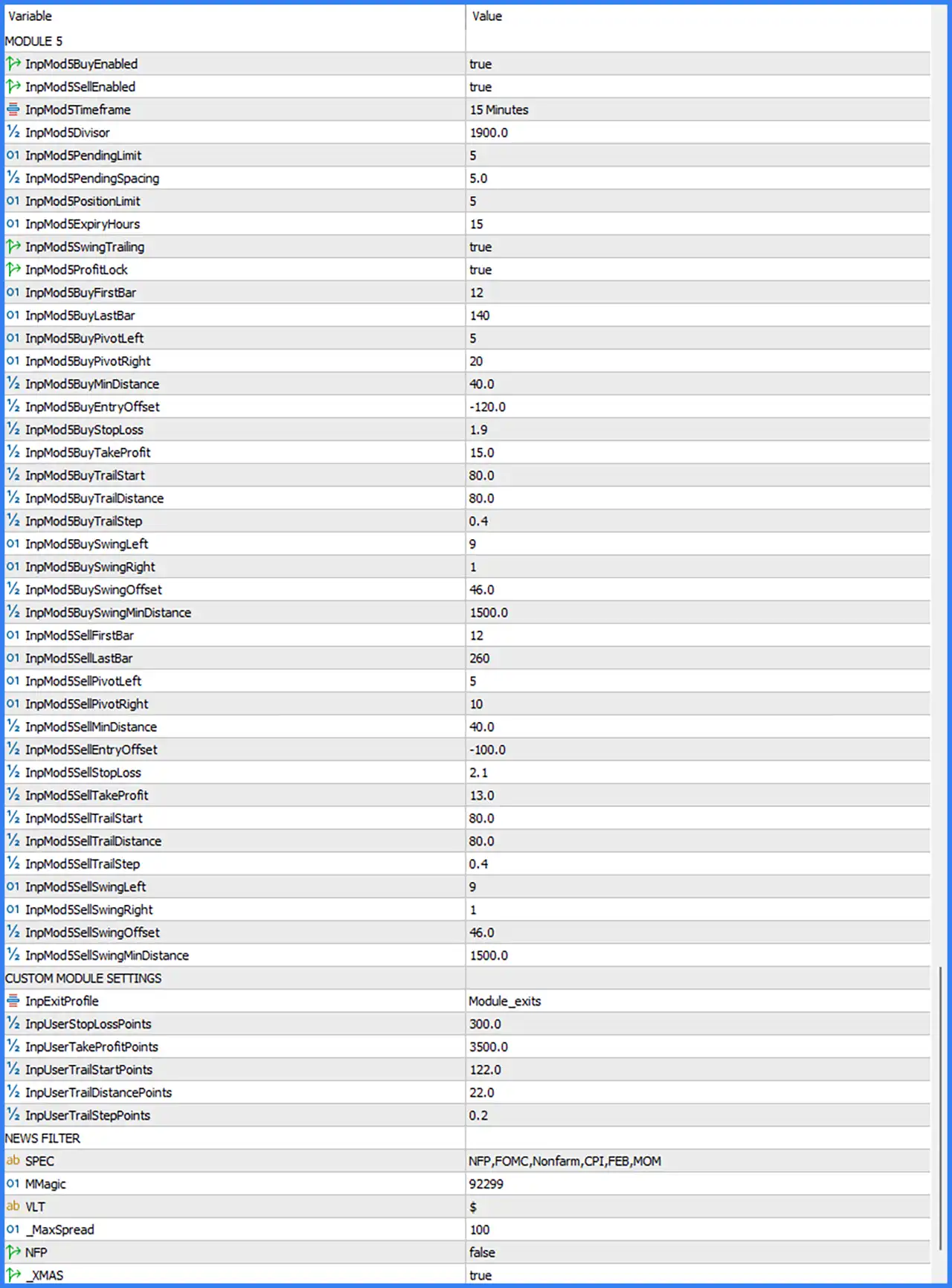
7. Module 5 Settings
Module 5 operates on the M15 timeframe and uses a divisor of 1900.0. Its configuration includes Buy and Sell trading controls, pivot detection, swing-based entry parameters, and independent trailing stop settings.
7.1. General Module 5 Settings
🔹 InpMod5BuyEnabled = true: Enables Buy trading in Module 5, allowing the module to execute buy-side trading operations.
🔹 InpMod5SellEnabled = true: Enables Sell trading in Module 5, allowing the module to execute sell-side trading operations.
🔹 InpMod5Timeframe = 15 Minutes: Sets Module 5 to the M15 timeframe for its market analysis and trading calculations.
🔹 InpMod5Divisor = 1900.0: Sets the internal divisor to 1900.0, providing a numerical scaling parameter for Module 5 calculations.
🔹 InpMod5PendingLimit = 5: Limits the number of pending orders managed by Module 5 to 5.
🔹 InpMod5PendingSpacing = 5.0: Sets the pending-order spacing parameter to 5.0, defining the configured distance between pending entries.
🔹 InpMod5PositionLimit = 5: Sets the maximum number of positions managed by Module 5 to 5.
🔹 InpMod5ExpiryHours = 15: Sets the pending-order expiration period to 15 hours, defining the configured validity period for eligible pending orders.
🔹 InpMod5SwingTrailing = true: Enables swing-based trailing stop management, allowing Module 5 to use swing-related calculations when adjusting protective stops.
🔹 InpMod5ProfitLock = true: Enables the profit-lock feature, allowing the module to apply its configured profit-protection mechanism.
7.2. Module 5 Buy Settings
🔹 InpMod5BuyFirstBar = 12: Sets the first historical bar reference for Module 5 Buy calculations to 12.
🔹 InpMod5BuyLastBar = 140: Sets the last historical bar reference for Module 5 Buy calculations to 140.
🔹 InpMod5BuyPivotLeft = 5: Sets the left pivot confirmation period for Module 5 Buy to 5 bars.
🔹 InpMod5BuyPivotRight = 20: Sets the right pivot confirmation period for Module 5 Buy to 20 bars.
🔹 InpMod5BuyMinDistance = 40.0: Sets the minimum Buy entry distance to 40.0, defining the configured distance threshold for potential Buy entries.
🔹 InpMod5BuyEntryOffset = -120.0: Sets the Buy entry offset to -120.0, applying a negative adjustment to the calculated entry level.
🔹 InpMod5BuyStopLoss = 1.9: Sets the Buy Stop Loss parameter to 1.9, defining the configured protective stop-loss value for Module 5 Buy positions.
🔹 InpMod5BuyTakeProfit = 15.0: Sets the Buy Take Profit parameter to 15.0, establishing the configured profit target for Module 5 Buy positions.
🔹 InpMod5BuyTrailStart = 80.0: Sets the Buy trailing activation threshold to 80.0, determining when trailing stop management can begin.
🔹 InpMod5BuyTrailDistance = 80.0: Sets the Buy trailing distance to 80.0, defining the configured distance used when adjusting the protective stop.
🔹 InpMod5BuyTrailStep = 0.4: Sets the Buy trailing step to 0.4, controlling the incremental adjustment of the trailing stop.
🔹 InpMod5BuySwingLeft = 9: Sets the Buy swing-left parameter to 9, defining the left-side bar reference used in swing-based calculations.
🔹 InpMod5BuySwingRight = 1: Sets the Buy swing-right parameter to 1, defining the right-side bar reference used in swing-based calculations.
🔹 InpMod5BuySwingOffset = 46.0: Sets the Buy swing offset to 46.0, providing an additional numerical adjustment to the swing-based entry calculation.
🔹 InpMod5BuySwingMinDistance = 1500.0: Sets the minimum Buy swing distance to 1500.0, establishing the configured minimum separation threshold for swing-based Buy opportunities.
7.3. Module 5 Sell Settings
🔹 InpMod5SellFirstBar = 12: Sets the first historical bar reference for Module 5 Sell calculations to 12.
🔹 InpMod5SellLastBar = 260: Sets the last historical bar reference for Module 5 Sell calculations to 260.
🔹 InpMod5SellPivotLeft = 5: Sets the left pivot confirmation period for Module 5 Sell to 5 bars.
🔹 InpMod5SellPivotRight = 10: Sets the right pivot confirmation period for Module 5 Sell to 10 bars.
🔹 InpMod5SellMinDistance = 40.0: Sets the minimum Sell entry distance to 40.0, defining the configured distance threshold for potential Sell entries.
🔹 InpMod5SellEntryOffset = -100.0: Sets the Sell entry offset to -100.0, applying a negative adjustment to the calculated Sell entry level.
🔹 InpMod5SellStopLoss = 2.1: Sets the Sell Stop Loss parameter to 2.1, defining the configured protective stop-loss value for Module 5 Sell positions.
🔹 InpMod5SellTakeProfit = 13.0: Sets the Sell Take Profit parameter to 13.0, establishing the configured profit target for Module 5 Sell positions.
🔹 InpMod5SellTrailStart = 80.0: Sets the Sell trailing activation threshold to 80.0, determining when trailing stop management can begin.
🔹 InpMod5SellTrailDistance = 80.0: Sets the Sell trailing distance to 80.0, defining the configured distance used when adjusting the protective stop.
🔹 InpMod5SellTrailStep = 0.4: Sets the Sell trailing step to 0.4, controlling the incremental adjustment of the trailing stop.
🔹 InpMod5SellSwingLeft = 9: Sets the Sell swing-left parameter to 9, defining the left-side bar reference used in swing-based calculations.
🔹 InpMod5SellSwingRight = 1: Sets the Sell swing-right parameter to 1, defining the right-side bar reference used in swing-based calculations.
🔹 InpMod5SellSwingOffset = 46.0: Sets the Sell swing offset to 46.0, providing an additional numerical adjustment to the swing-based Sell calculation.
🔹 InpMod5SellSwingMinDistance = 1500.0: Sets the minimum Sell swing distance to 1500.0, establishing the configured minimum separation threshold for swing-based Sell opportunities.
8. Custom Module Settings
The Custom Module Settings section provides a separate exit profile and user-defined trade management parameters. These settings allow traders to configure protective exits and trailing stop behavior independently of the individual module configurations.
🔹 InpExitProfile = Module_exits: Selects the Module_exits profile, indicating that the EA uses module-based exit management according to its internal configuration.
🔹 InpUserStopLossPoints = 300.0: Sets the user-defined Stop Loss distance to 300.0 points, providing a custom protective exit parameter.
🔹 InpUserTakeProfitPoints = 3500.0: Sets the user-defined Take Profit distance to 3500.0 points, establishing the custom profit target for the applicable exit configuration.
🔹 InpUserTrailStartPoints = 122.0: Sets the user-defined trailing activation threshold to 122.0 points, determining when the custom trailing stop mechanism can begin.
🔹 InpUserTrailDistancePoints = 22.0: Sets the user-defined trailing distance to 22.0 points, defining the distance maintained by the custom trailing stop.
🔹 InpUserTrailStepPoints = 0.2: Sets the user-defined trailing step to 0.2 points, controlling the incremental adjustment of the custom trailing stop.
9. News Filter Settings
The News Filter section provides configurable economic event identifiers and spread-related parameters. These settings allow the EA to apply additional trading restrictions around selected market events.
🔹 SPEC = NFP,FOMC,Nonfarm,CPI,FEB,MOM: Specifies the economic event identifiers used by the news-related configuration, including NFP, FOMC, Nonfarm, CPI, FEB, and MOM.
🔹 MMagic = 92299: Assigns the Magic Number 92299 to the corresponding news-related functionality, providing a separate identifier within the EA's configuration.
🔹 VLT = $: Sets the VLT parameter to the dollar symbol ($), representing the configured currency or symbol identifier used by this section.
🔹 _MaxSpread = 100: Sets the maximum spread threshold to 100, defining the configured spread limit for applicable trading operations.
🔹 NFP = false: Disables the individual NFP filter option by default, indicating that this specific news-filter setting is inactive.
🔹 _XMAS = true: Enables the Christmas-related filter option, allowing the EA to apply its corresponding seasonal trading restriction or condition.