

This guide walks through the inputs of GoldBaron XauUsd EA MT5 with the values recommended for live trading. The set files that come with the EA already contain these settings, so you can load them in one click and adjust only what your broker or account needs.
🔢 GoldBaron XauUsd EA MT5 – Complete Settings & Parameters Guide
GoldBaron XauUsd EA MT5 is an automated trading system designed specifically for XAUUSD (Gold) trading on MetaTrader 5. The EA combines multiple internal strategies, volatility filtering, AI-assisted market filters, and flexible money management options to identify trading opportunities while maintaining risk control.
With configurable strategy modules and trade filters, GoldBaron XauUsd EA MT5 allows traders to adapt the system to different market conditions and prop firm requirements.
🔢 GoldBaron XauUsd EA MT5 Settings Explained
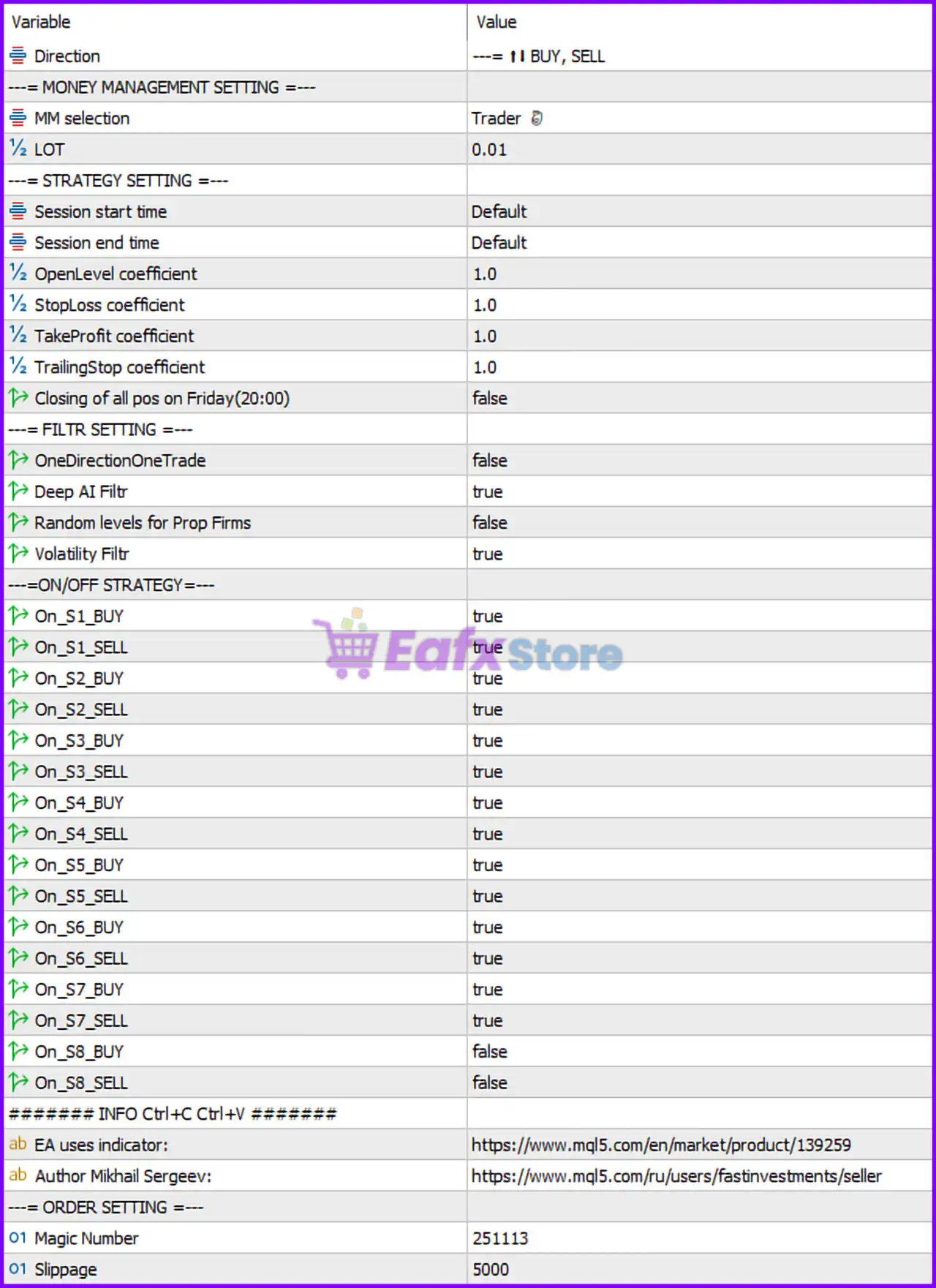
🔶 Trade Direction
🔹 Direction = BUY, SELL — Allows the EA to open both Buy and Sell positions depending on market conditions.
🔶 Money Management Settings
🔹 MM selection = Trader — Selects the "Trader" money management mode for position sizing and risk allocation.
🔹 LOT = 0.01 — Fixed trading lot size set to 0.01 lots.
🔶 Strategy Settings
🔹 Session start time = Default — Uses the EA's default trading session start time.
🔹 Session end time = Default — Uses the EA's default trading session end time.
🔹 OpenLevel coefficient = 1.0 — Multiplier used to determine trade entry levels.
🔹 StopLoss coefficient = 1.0 — Multiplier applied to Stop Loss calculations.
🔹 TakeProfit coefficient = 1.0 — Multiplier applied to Take Profit calculations.
🔹 TrailingStop coefficient = 1.0 — Multiplier applied to Trailing Stop calculations.
🔹 Closing of all positions on Friday (20:00) = false — The EA will not automatically close all positions at Friday 20:00.
🔶 Filter Settings
🔹 OneDirectionOneTrade = false — Allows multiple trades in the same direction instead of restricting to a single trade.
🔹 Deep AI Filtr = true — Enables the built-in Deep AI filter to improve trade selection quality.
🔹 Random levels for Prop Firms = false — Randomized trading levels for prop firm environments are disabled.
🔹 Volatility Filtr = true — Activates volatility filtering to avoid unfavorable market conditions.
🔢 Strategy Activation Settings
🔶 Strategy S1
🔹 On_S1_BUY = true — Enables Buy trades for Strategy S1.
🔹 On_S1_SELL = true — Enables Sell trades for Strategy S1.
🔶 Strategy S2
🔹 On_S2_BUY = true — Enables Buy trades for Strategy S2.
🔹 On_S2_SELL = true — Enables Sell trades for Strategy S2.
🔶 Strategy S3
🔹 On_S3_BUY = true — Enables Buy trades for Strategy S3.
🔹 On_S3_SELL = true — Enables Sell trades for Strategy S3.
🔶 Strategy S4
🔹 On_S4_BUY = true — Enables Buy trades for Strategy S4.
🔹 On_S4_SELL = true — Enables Sell trades for Strategy S4.
🔶 Strategy S5
🔹 On_S5_BUY = true — Enables Buy trades for Strategy S5.
🔹 On_S5_SELL = true — Enables Sell trades for Strategy S5.
🔶 Strategy S6
🔹 On_S6_BUY = true — Enables Buy trades for Strategy S6.
🔹 On_S6_SELL = true — Enables Sell trades for Strategy S6.
🔶 Strategy S7
🔹 On_S7_BUY = true — Enables Buy trades for Strategy S7.
🔹 On_S7_SELL = true — Enables Sell trades for Strategy S7.
🔶 Strategy S8
🔹 On_S8_BUY = false — Buy trades for Strategy S8 are disabled.
🔹 On_S8_SELL = false — Sell trades for Strategy S8 are disabled.
🔢 Order Settings
🔹 Magic Number = 251113 — Unique identifier used by the EA to manage and distinguish its trades.
🔹 Slippage = 5000 — Maximum acceptable slippage during order execution is set to 5000 points.
🔢 Conclusion
GoldBaron XauUsd EA MT5 is a gold-focused automated trading robot that combines multiple independent strategy modules, AI-enhanced filtering, volatility protection and configurable money management.
The ability to enable or disable individual strategy components (S1–S8) provides traders with extensive flexibility for optimization, while features such as Deep AI filtering and volatility control help improve trade quality and reduce exposure during unstable market conditions.
🔢 FAQs
❓ What symbol is GoldBaron XauUsd EA MT5 designed for?
GoldBaron XauUsd EA MT5 is specifically designed to trade XAUUSD (Gold) on the MetaTrader 5 platform.
❓ What does the Deep AI Filter do?
The Deep AI Filtr analyzes market conditions and filters out lower-quality trading signals to improve entry accuracy.
❓ Can I disable individual trading strategies?
Yes. Strategies S1 through S8 can be individually enabled or disabled for both Buy and Sell operations.
❓ What is the purpose of the Magic Number 251113?
The Magic Number uniquely identifies trades opened by GoldBaron XauUsd EA MT5, preventing interference with other EAs.
❓ Does GoldBaron XauUsd EA MT5 automatically close trades before the weekend?
No. The setting Closing of all positions on Friday (20:00) = false means weekend auto-closing is currently disabled.
Get GoldBaron XauUsd EA MT5
Download GoldBaron XauUsd EA MT5 with its set files, read the full product details and requirements here: GoldBaron XauUsd EA MT5 →