

This guide walks through the inputs of Institutional Aggressive XAUUSD EA MT5 with the values recommended for live trading. The set files that come with the EA already contain these settings, so you can load them in one click and adjust only what your broker or account needs.
🔢 Institutional Aggressive XAUUSD EA MT5 Settings & Inputs Guide
Institutional Aggressive XAUUSD EA is an automated trading system designed specifically for Gold (XAUUSD), with a strong focus on automated position sizing and selectable risk profiles. The EA provides a simple configuration structure that allows traders to choose between different Auto Lot Risk Levels, ranging from Very Low Risk to Extreme Risk.
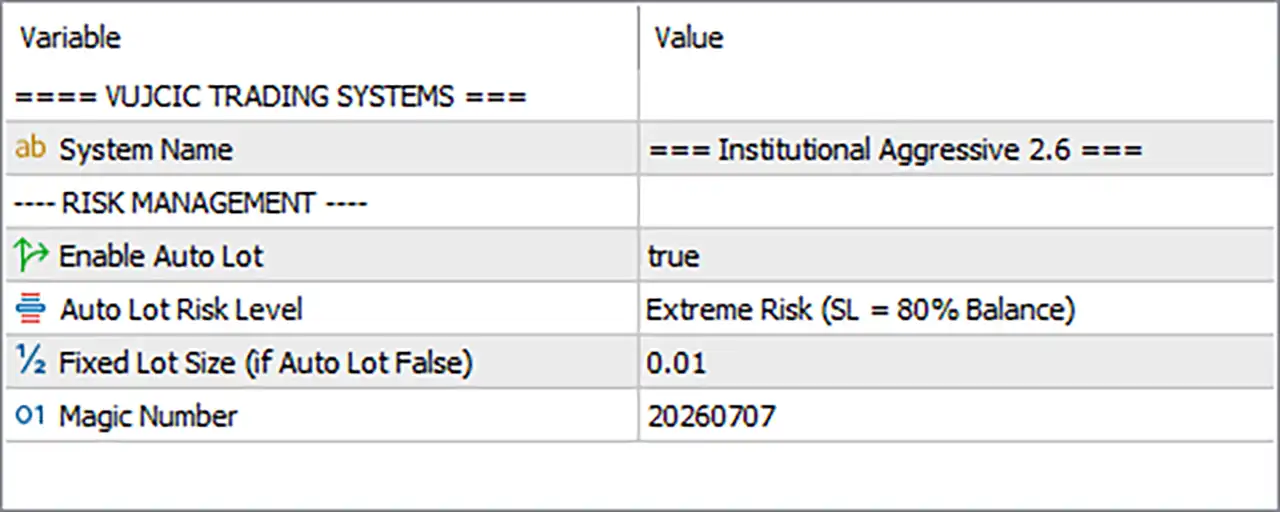
The current configuration is set to Institutional Aggressive 2.6, with Auto Lot enabled and the Extreme Risk (SL = 80% Balance) profile selected. Traders who prefer greater control can disable Auto Lot and use the predefined 0.01 Fixed Lot Size instead.
⚙️ General EA Settings
🔹 System Name = Institutional Aggressive 2.6 — Identifies the EA system and the configured version as Institutional Aggressive 2.6.
⚙️ Risk Management Settings
🔹 Enable Auto Lot = true — Activates automatic position sizing, allowing the EA to select trade volume according to the chosen Auto Lot Risk Level.
🔹 Auto Lot Risk Level = Extreme Risk (SL = 80% Balance) — Selects the highest available risk profile, with the configuration explicitly defined as SL = 80% Balance.
🔹 Fixed Lot Size (if Auto Lot False) = 0.01 — Sets the fallback trading volume to 0.01 lot when Enable Auto Lot is changed to false.
⚙️ Auto Lot Risk Level Options
The Auto Lot Risk Level parameter provides 6 selectable risk profiles. These profiles allow traders to adjust the EA's automated risk configuration without manually entering a lot size.
🔹 Extreme Risk (SL = 80% Balance) — The most aggressive available profile, with the associated stop-loss setting specified as 80% of Balance.
🔹 Very High Risk (SL = 60% Balance) — Provides a very high-risk configuration with the associated stop-loss setting specified as 60% of Balance.
🔹 High Risk (SL = 40% Balance) — Uses a high-risk configuration with the associated stop-loss setting specified as 40% of Balance.
🔹 Medium Risk (SL = 30% Balance) — Provides a more moderate risk configuration with the associated stop-loss setting specified as 30% of Balance.
🔹 Low Risk (SL = 10% Balance) — Uses a lower-risk profile with the associated stop-loss setting specified as 10% of Balance.
🔹 Very Low Risk (SL = 5% Balance) — Provides the most conservative profile available, with the associated stop-loss setting specified as 5% of Balance.
Important: The percentages above are the values displayed by the EA's risk-profile options. They should not automatically be interpreted as a guaranteed percentage of account loss. The exact relationship between the selected profile, lot calculation, and actual monetary risk depends on the EA's internal calculation and stop-loss implementation.
⚙️ Trade Identification
🔹 Magic Number = 20260707 — Assigns 20260707 as the unique Magic Number used to identify the EA's trades in the MT5 terminal.
🔢 How the Auto Lot System Works
🔹 Auto Lot is enabled by default in the shown setup: With Enable Auto Lot = true, the EA uses the selected risk profile instead of the fixed 0.01 lot setting.
🔹 The risk profile controls the automated configuration: Selecting one of the 6 Auto Lot Risk Levels changes the EA's predefined risk configuration.
🔹 Extreme Risk is currently selected: The displayed configuration uses Extreme Risk (SL = 80% Balance), representing the most aggressive option available in the Input list.
🔹 Traders can reduce the selected risk level: The available profiles range from Extreme Risk (80%) down to Very Low Risk (5%), giving traders multiple risk configurations.
🔹 Fixed Lot provides an alternative: When Enable Auto Lot = false, the EA uses Fixed Lot Size = 0.01 instead of calculating the lot automatically.
🔢 Choosing an Auto Lot Risk Profile
🔹 Extreme Risk — 80% Balance: Intended for the most aggressive configuration and carries the highest stated SL percentage.
🔹 Very High Risk — 60% Balance: Provides a step down from Extreme Risk while maintaining a highly aggressive profile.
🔹 High Risk — 40% Balance: Offers a high-risk configuration that is below the 60% and 80% profiles.
🔹 Medium Risk — 30% Balance: Provides a middle-ground configuration between aggressive and conservative settings.
🔹 Low Risk — 10% Balance: Offers substantially lower stated risk than the 30%, 40%, 60%, and 80% profiles.
🔹 Very Low Risk — 5% Balance: The lowest available Auto Lot risk profile, designed for traders seeking the most conservative configuration among the six choices.
🔢 Important Risk Considerations
🔹 Extreme Risk should be evaluated carefully: The current setting is Extreme Risk (SL = 80% Balance), so traders should understand the EA's internal risk calculation before using it on a live account.
🔹 Risk profiles are not guarantees: Choosing Very Low Risk (5%) or another profile does not guarantee that the account will only lose that exact percentage.
🔹 Gold can be highly volatile: XAUUSD may experience rapid price movements, spread expansion, and significant changes in execution conditions.
🔹 Auto Lot affects position sizing: Because Enable Auto Lot = true, the selected risk profile can directly influence the volume calculated for new trades.
🔹 The 0.01 Fixed Lot is a fallback: The 0.01 value becomes relevant when Auto Lot is disabled.
🔹 Backtesting is recommended: Each risk profile should be tested separately because changing the Auto Lot level can materially change position size, drawdown, margin usage, and overall trading behavior.
🔢 Complete Institutional Aggressive XAUUSD EA MT5 Settings
🔹 System Name: Institutional Aggressive 2.6
🔹 Enable Auto Lot: true
🔹 Auto Lot Risk Level: Extreme Risk (SL = 80% Balance)
🔹 Fixed Lot Size (if Auto Lot False): 0.01
🔹 Magic Number: 20260707
Available Auto Lot Risk Levels
🔹 Extreme Risk: SL = 80% Balance
🔹 Very High Risk: SL = 60% Balance
🔹 High Risk: SL = 40% Balance
🔹 Medium Risk: SL = 30% Balance
🔹 Low Risk: SL = 10% Balance
🔹 Very Low Risk: SL = 5% Balance
🔢 Conclusion
Institutional Aggressive XAUUSD EA MT5 provides a straightforward but flexible risk-management structure centered around Auto Lot position sizing. The EA offers 6 Auto Lot Risk Levels, ranging from Extreme Risk (SL = 80% Balance) to Very Low Risk (SL = 5% Balance).
The current configuration uses Institutional Aggressive 2.6, Enable Auto Lot = true, and Extreme Risk (SL = 80% Balance). Traders who want a less aggressive configuration can select Very High Risk (60%), High Risk (40%), Medium Risk (30%), Low Risk (10%), or Very Low Risk (5%). Alternatively, Auto Lot can be disabled to use the 0.01 Fixed Lot Size.
For live trading, the risk profile should be selected according to the trader's account size, margin requirements, acceptable drawdown, and trading objectives. Always validate the EA under realistic market conditions before moving from backtesting to a live account.
🔢 FAQs
❓ How many Auto Lot Risk Levels does Institutional Aggressive XAUUSD EA MT5 have?
The EA provides 6 Auto Lot Risk Levels: Extreme Risk, Very High Risk, High Risk, Medium Risk, Low Risk and Very Low Risk.
❓ What is the highest Auto Lot Risk Level?
The highest available profile is Extreme Risk (SL = 80% Balance).
❓ What is the lowest Auto Lot Risk Level?
The lowest available profile is Very Low Risk (SL = 5% Balance).
❓ What happens when Auto Lot is disabled?
When Enable Auto Lot = false, the EA uses the configured Fixed Lot Size of 0.01.
❓ What Auto Lot Risk Level is currently selected?
The current configuration uses Extreme Risk (SL = 80% Balance) with Enable Auto Lot = true.
Get Institutional Aggressive XAUUSD EA MT5
Download Institutional Aggressive XAUUSD EA MT5 with its set files, read the full product details and requirements here: Institutional Aggressive XAUUSD EA MT5 →