

Introduction
HFT Secret EA MT4 is an automated trading Expert Advisor (EA) for the MetaTrader 4 platform, featuring configurable risk management, Moving Average signal generation, spread controls, and daily account protection. Its input parameters allow traders to customize fixed or variable lot sizing, define trading limits, configure Stop Loss and Trailing Stop values, and manage daily profit and loss thresholds.
The EA also includes sending-time restrictions, allowing users to define specific operating hours. These settings provide flexibility for configuring trading signals, managing account exposure, and controlling trading activity under different market conditions.

HFT Secret EA MT4 Settings Explained
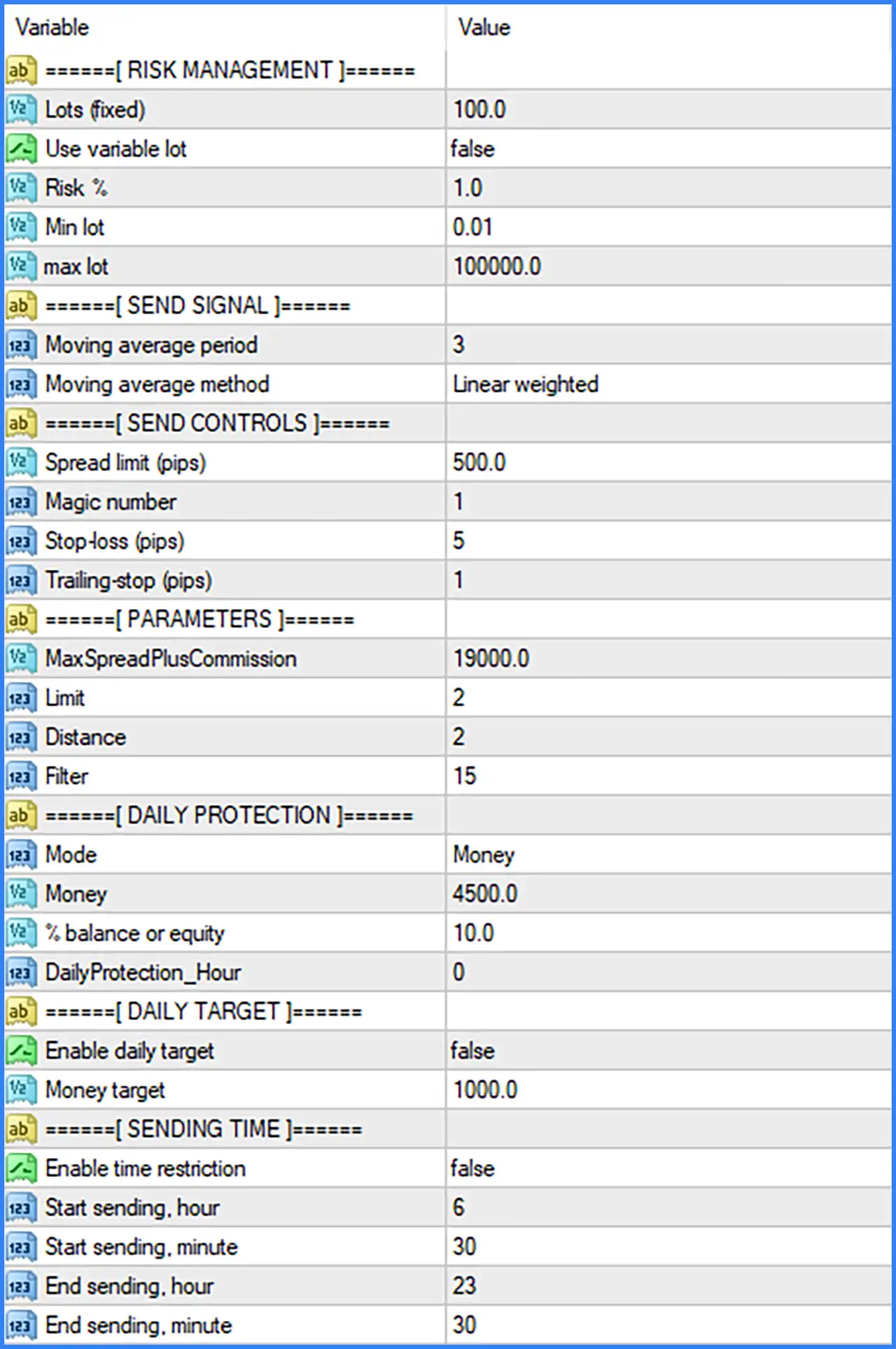
Risk Management Settings
🔹 Lots (fixed) = 100.0 – Defines the fixed lot-size parameter used by the EA when variable lot sizing is disabled. The default value is 100.0, and traders should verify the intended lot calculation and broker volume limits before using this setting.
🔹 Use variable lot = false – Enables or disables variable lot sizing. When set to false, the EA uses its fixed lot configuration rather than dynamically adjusting position volume according to the risk percentage.
🔹 Risk % = 1.0 – Defines the risk percentage used by the variable lot management system. The default value of 1.0 represents a configured risk reference of 1.0% when variable lot sizing is enabled.
🔹 Min lot = 0.01 – Sets the minimum permitted trading volume to 0.01 lots. This parameter establishes the lower boundary for position sizing when the EA calculates or adjusts trading volume.
🔹 max lot = 100000.0 – Defines the maximum lot-size parameter allowed by the EA's lot management configuration. The default value is 100000.0, which should be checked carefully against the broker's maximum volume restrictions.
Send Signal Settings
🔹 Moving average period = 3 – Sets the Moving Average calculation period to 3. This parameter determines the number of price periods used in the Moving Average calculation and influences how quickly the indicator responds to market movements.
🔹 Moving average method = Linear weighted – Selects the Linear Weighted Moving Average (LWMA) calculation method. This method assigns greater weight to more recent price data, allowing the indicator to respond more quickly to recent market movements than an equally weighted average.
Send Controls Settings
🔹 Spread limit (pips) = 500.0 – Defines the maximum spread threshold in the configured pip units. The default value is 500.0, establishing the spread condition used by the EA when determining whether trading signals can be sent.
🔹 Magic number = 1 – Assigns the Magic Number 1 to identify trades or trading operations associated with the EA. This identifier helps distinguish its trading activity from manually opened positions and other Expert Advisors.
🔹 Stop-loss (pips) = 5 – Sets the Stop Loss distance to 5 pips. This parameter defines the configured loss-protection distance for trading operations, helping limit potential losses when the market moves against a position.
🔹 Trailing-stop (pips) = 1 – Sets the Trailing Stop distance to 1 pip. This parameter determines the distance used by the EA's trailing protection logic to follow favorable price movements and help protect accumulated profits.
Additional Parameters
🔹 MaxSpreadPlusCommission = 19000.0 – Defines the maximum spread-plus-commission threshold used by the EA's internal trading conditions. The default value is 19000.0, and its precise calculation units should be verified in the EA documentation.
🔹 Limit = 2 – Sets the Limit parameter to 2. This value establishes a configurable limit used by the EA's internal signal or trading logic.
🔹 Distance = 2 – Defines the Distance parameter with a value of 2. It controls a distance-related condition within the EA's internal strategy or signal management system.
🔹 Filter = 15 – Sets the Filter parameter to 15. This value determines the configured filtering level used by the EA to evaluate or manage its signal conditions.
Daily Protection Settings
🔹 Mode = Money – Selects the daily protection calculation mode. The Money setting indicates that the monetary-based protection configuration is selected rather than relying exclusively on a percentage-based reference.
🔹 Money = 4500.0 – Defines the monetary threshold for daily account protection at 4500.0. This value is used by the EA's daily protection mechanism according to its internal calculation and triggering rules.
🔹 % balance or equity = 10.0 – Sets the percentage-based daily protection threshold to 10.0%. This parameter provides a percentage reference calculated from account balance or equity, depending on the EA's implementation.
🔹 DailyProtection_Hour = 0 – Defines the hour associated with the daily protection schedule. The default value of 0 represents the beginning of the day and can determine when the EA applies or resets its daily protection calculations.
Daily Target Settings
🔹 Enable daily target = false – Enables or disables the daily profit-target function. The default value of false means the EA's daily target feature is disabled in the supplied configuration.
🔹 Money target = 1000.0 – Defines the daily monetary profit target at 1000.0. This is the configured profit threshold that the EA can use when daily target functionality is enabled.
Sending Time Settings
🔹 Enable time restriction = false – Enables or disables the time-based restriction for sending trading signals. When set to false, the configured start and end times are not enforced through this restriction option.
🔹 Start sending, hour = 6 – Defines the starting hour for sending trading signals. The default value of 6 means the configured sending schedule begins at 06:00 when time restrictions are enabled.
🔹 Start sending, minute = 30 – Sets the starting minute to 30. Combined with the starting hour of 6, this establishes a signal-sending start time of 06:30.
🔹 End sending, hour = 23 – Defines the ending hour for sending trading signals. The default value of 23 establishes the hour component of the scheduled ending time.
🔹 End sending, minute = 30 – Sets the ending minute to 30. Combined with the ending hour of 23, this establishes a signal-sending end time of 23:30.
Conclusion
HFT Secret EA MT4 provides a comprehensive collection of configuration parameters covering risk management, Moving Average signal generation, trading controls, daily protection, profit targets, and operating schedules.
The default configuration uses a fixed lot parameter of 100.0, variable lot sizing disabled, a Risk % of 1.0, and a minimum lot of 0.01. Its signal configuration uses a Linear Weighted Moving Average with a period of 3, while the trading controls include a 5-pip Stop Loss and a 1-pip Trailing Stop.
The EA also provides daily protection with Mode = Money, a monetary threshold of 4500.0, and a percentage threshold of 10.0%. Both daily target functionality and time restrictions are disabled by default.
Before using HFT Secret EA MT4 on a live account, traders should carefully verify the unusually high lot-size values, spread thresholds, and monetary protection settings. Testing the configuration on a demo account is recommended to understand the EA's signal behavior and ensure that all risk parameters are appropriate for the available trading capital.