
Introduction to IndexPro EA MT4
IndexPro EA is an automated trading Expert Advisor (EA) designed for the MetaTrader 4 platform, featuring MACD-based signal generation, moving average trend analysis, automated trade management, and customizable trading-hour restrictions.
The EA combines MACD entry and exit levels with a moving average trend filter to configure its trading logic. It also provides adjustable Stop Loss, Take Profit, and Trailing Stop settings, alongside flexible money management options.
Another important feature is its trading-session control system, which allows traders to define GMT trading hours, adjust broker server time zones, and restrict trading near the end of Friday’s trading session.
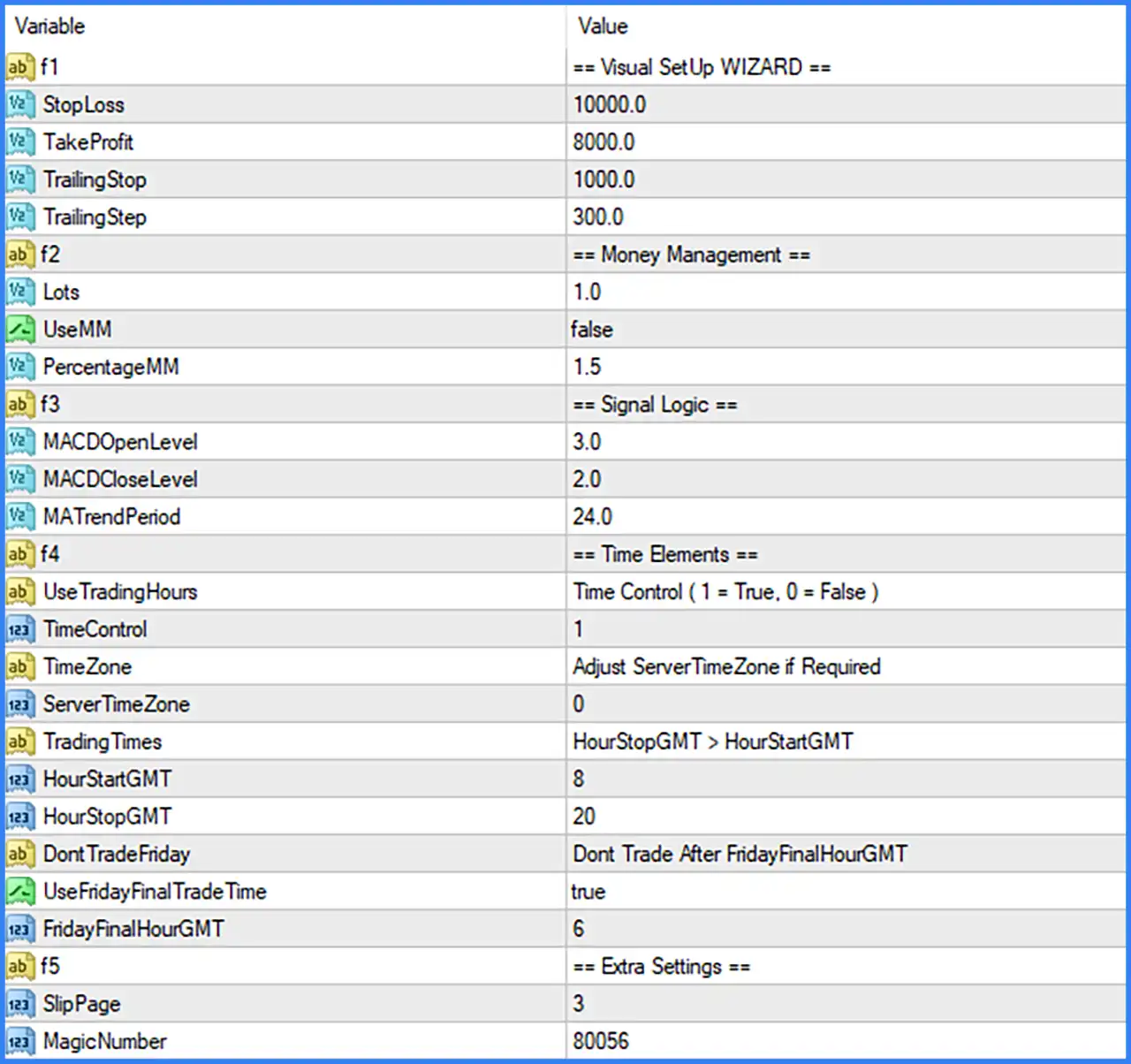
Visual Setup Wizard – Trade Management
This section contains the primary trade protection and exit management settings.
🔹 f1 = Visual SetUp WIZARD – An informational section heading introducing the main trade management configuration.
🔹 StopLoss = 10000.0 – Sets the Stop Loss distance to 10000.0 points. This parameter defines the configured maximum adverse price movement before the EA’s stop-loss protection closes a trading position.
🔹 TakeProfit = 8000.0 – Sets the Take Profit target to 8000.0 points. When the market reaches the configured profit distance, the EA can automatically close the position to secure the intended profit.
🔹 TrailingStop = 1000.0 – Sets the trailing stop distance to 1000.0 points. This parameter determines the distance maintained between the current market price and the trailing stop level as a trade moves favorably.
🔹 TrailingStep = 300.0 – Sets the trailing stop adjustment step to 300.0 points. This determines the configured price movement required before the EA updates its trailing stop level.
Money Management Settings
This section controls the trading lot size and optional percentage-based risk management.
🔹 f2 = Money Management – An informational section heading introducing the EA’s position-sizing configuration.
🔹 Lots = 1.0 – Sets the configured trading volume to 1.0 lot. This value represents the lot size used when the percentage-based Money Management function is disabled.
🔹 UseMM = false – Disables the automatic percentage-based Money Management function. With this option set to false, the EA uses the configured Lots value instead of calculating position size through the PercentageMM parameter.
🔹 PercentageMM = 1.5 – Sets the percentage-based money management parameter to 1.5. This represents the configured percentage input for automatic position sizing and becomes relevant when UseMM is enabled, according to the EA’s internal calculation.
Signal Logic – MACD and Trend Settings
This section configures the MACD signal levels and moving average trend filter used by IndexPro EA MT4.
🔹 f3 = Signal Logic – An informational section heading introducing the EA’s trading signal configuration.
🔹 MACDOpenLevel = 3.0 – Sets the MACD opening threshold to 3.0. This parameter defines the configured MACD level used by the EA’s entry logic to identify potential trading opportunities.
🔹 MACDCloseLevel = 2.0 – Sets the MACD closing threshold to 2.0. This parameter determines the configured MACD level used by the EA’s trade exit logic to manage open positions.
🔹 MATrendPeriod = 24.0 – Sets the Moving Average trend period to 24.0. This parameter determines the calculation period of the trend-filtering moving average, helping the EA evaluate the broader market direction before executing its programmed trading signals.
Time Elements – Trading Hours Management
This section controls when IndexPro EA MT4 is allowed to open trades. It includes GMT settings, broker server time adjustment, and Friday trading restrictions.
🔹 f4 = Time Elements – An informational section heading introducing the EA’s trading schedule configuration.
🔹 UseTradingHours = Time Control (1 = True, 0 = False) – Describes the trading-hour control option, where 1 enables time restrictions and 0 disables them. This is an explanatory input label rather than a separate numeric setting.
🔹 TimeControl = 1 – Enables the trading-hour control function. With this setting active, IndexPro EA MT4 follows the configured trading schedule rather than opening trades throughout the entire trading day.
🔹 TimeZone = Adjust ServerTimeZone if Required – An informational description explaining that traders should adjust the broker server time zone when necessary to align the EA’s trading schedule with GMT.
🔹 ServerTimeZone = 0 – Sets the broker server time zone adjustment to 0. This indicates that no additional time-zone offset is configured in this parameter.
🔹 TradingTimes = HourStopGMT > HourStartGMT – An informational description explaining that the configured GMT stopping hour must be greater than the starting hour for the intended trading-session calculation.
🔹 HourStartGMT = 8 – Sets the trading session starting time to 08:00 GMT. When trading-hour control is enabled, the EA uses this value as the configured beginning of its daily trading window.
🔹 HourStopGMT = 20 – Sets the trading session ending time to 20:00 GMT. This defines the configured end of the daily trading window, giving the EA a trading schedule from 08:00 to 20:00 GMT.
Friday Trading Restrictions
🔹 DontTradeFriday = Dont Trade After FridayFinalHourGMT – An informational description explaining that the EA can restrict trading after the configured Friday final trading hour.
🔹 UseFridayFinalTradeTime = true – Enables the Friday final trading-time restriction. This allows the EA to apply a specific cutoff time on Friday to avoid opening new trades late in the trading week.
🔹 FridayFinalHourGMT = 6 – Sets the Friday final trading hour to 06:00 GMT. With the Friday restriction enabled, this parameter defines the configured cutoff hour for the EA’s Friday trading activity.
Extra Settings – Order Execution and Identification
This section contains additional parameters for trade execution and order identification.
🔹 f5 = Extra Settings – An informational section heading introducing the additional EA configuration options.
🔹 SlipPage = 3 – Sets the maximum permitted slippage to 3 points. This parameter controls the acceptable difference between the requested order price and the actual execution price when the EA places trades.
🔹 MagicNumber = 80056 – Assigns the unique Magic Number 80056 to trades opened by IndexPro EA MT4. This identifier helps distinguish the EA’s positions from manual trades and orders opened by other Expert Advisors.