

Lot Size & Money Management
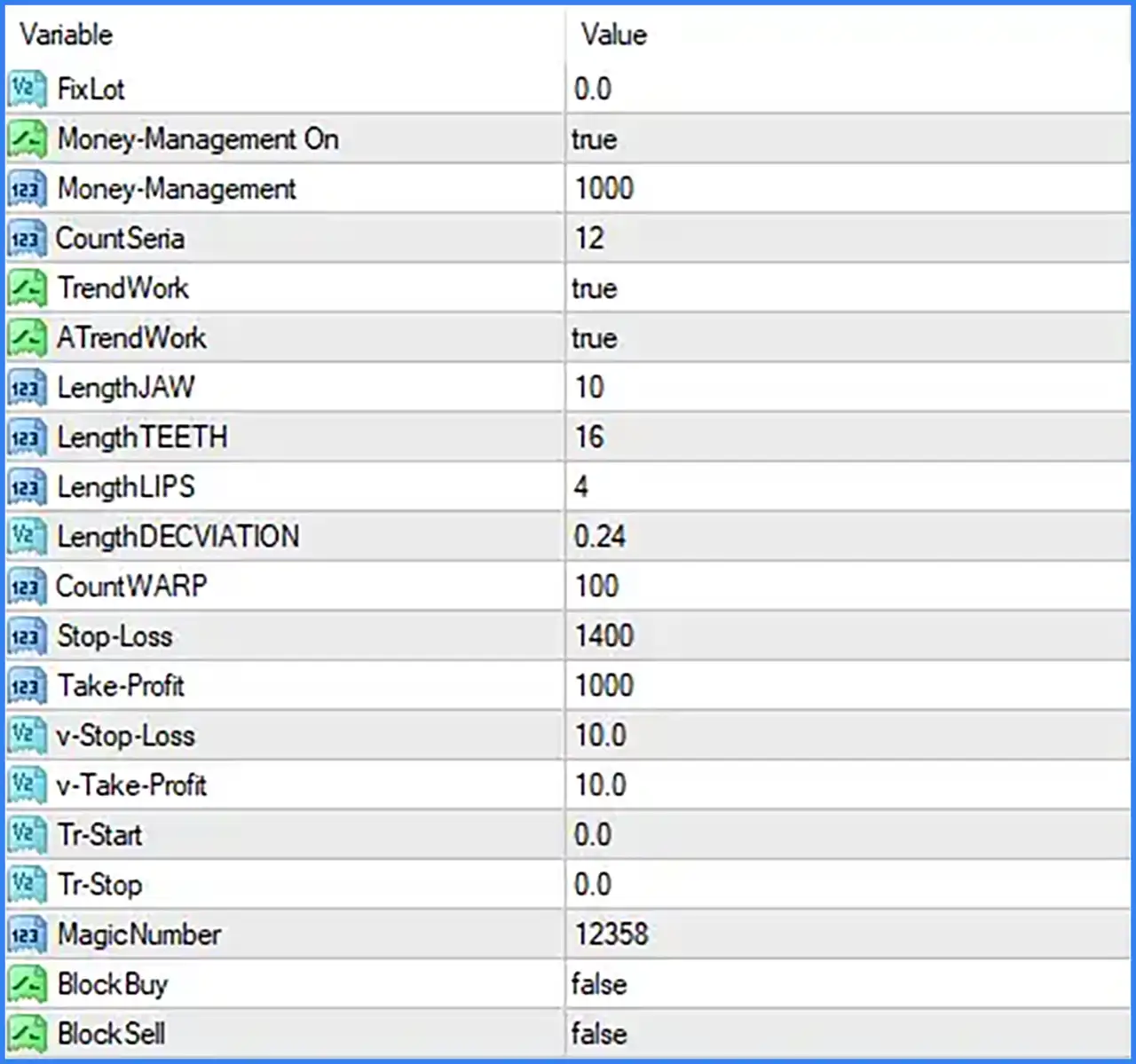
🔹 Fixed Lot [FixLot] — Default: 0.0 — Defines the fixed trading lot size. The value 0.0 indicates that a positive fixed lot has not been specified in this input. The actual lot-sizing behaviour should be checked together with the Money-Management settings.
🔹 Money Management On [Money-Management On] — Default: true — Enables the EA's money-management function. When enabled, position sizing is managed using the configured Money-Management value rather than relying solely on a fixed lot setting.
🔹 Money Management [Money-Management] — Default: 1000 — Sets the numerical value used by the money-management function. The screenshot does not specify whether this represents account balance, capital allocation, or another sizing reference, so its exact calculation should be confirmed from the EA documentation.
Trading Strategy & Trend Settings
🔹 CountSenia [CountSenia] — Default: 12 — Defines a numerical count parameter used by the EA. Its precise role in the signal or trading calculation is not explained in the supplied Inputs screenshot.
🔹 Trend Work [TrendWork] — Default: true — Enables the Trend Work function. This setting indicates that the corresponding trend-related component is active.
🔹 ATrend Work [ATrendWork] — Default: true — Enables the ATrend Work function. It controls another trend-related component of the EA, although its specific calculation is not provided in the screenshot.
Jaw, Teeth & Lips Parameters
🔹 Jaw Length [LengthJAW] — Default: 10 — Sets the length parameter for the Jaw component. It determines the configured period used by this component in the EA's calculation.
🔹 Teeth Length [LengthTEETH] — Default: 16 — Sets the length parameter for the Teeth component. This value defines its configured calculation period.
🔹 Lips Length [LengthLIPS] — Default: 4 — Sets the length parameter for the Lips component. It controls the configured period used by the Lips calculation.
🔹 Deviation Length [LengthDEVIATION] — Default: 0.24 — Defines the deviation parameter used by the EA. The screenshot does not specify the exact formula or whether this value represents a percentage, price deviation, or another internal measurement.
🔹 Warp Count [CountWARP] — Default: 100 — Sets the numerical count used by the WARP component. Its exact function and calculation are not described in the supplied Inputs panel.
Stop-Loss & Take-Profit Settings
🔹 Stop-Loss [Stop-Loss] — Default: 1400 — Sets the Stop-Loss parameter for the EA's trading system. The screenshot does not specify the unit or whether this value is applied as points, pips, or another distance measurement.
🔹 Take-Profit [Take-Profit] — Default: 1000 — Sets the Take-Profit parameter. It defines the configured profit-target value, but the exact unit and calculation method are not shown in the screenshot.
🔹 Virtual Stop-Loss [v-Stop-Loss] — Default: 10.0 — Sets the virtual Stop-Loss parameter. This is a separate input from the main Stop-Loss setting. Its exact activation conditions and measurement units are not specified in the available information.
🔹 Virtual Take-Profit [v-Take-Profit] — Default: 10.0 — Sets the virtual Take-Profit parameter. It provides a separate virtual profit-target value from the main Take-Profit setting. The screenshot does not explain its internal execution method.
Trailing Settings
🔹 Trailing Start [Tr-Start] — Default: 0.0 — Defines the starting parameter for the EA's trailing function. The screenshot does not specify the activation unit or the precise condition that starts trailing.
🔹 Trailing Stop [Tr-Stop] — Default: 0.0 — Defines the trailing-stop parameter used by the EA. Its exact distance, adjustment method, and activation behaviour are not described in the supplied Inputs panel.
Trade Identification & Direction Control
🔹 Magic Number [MagicNumber] — Default: 12358 — Assigns a unique identification number to trades opened by Bird MT4. This helps distinguish the EA's positions from trades opened manually or by other Expert Advisors.
🔹 Block Buy [BlockBuy] — Default: false — Controls whether BUY trading is blocked. With false, the BUY-blocking option is disabled. Set to true to activate the BUY restriction, subject to the EA's internal implementation.
🔹 Block Sell [BlockSell] — Default: false — Controls whether SELL trading is blocked. With false, the SELL-blocking option is disabled. Set to true to activate the SELL restriction, subject to the EA's internal implementation.
Recommended Starting Configuration
🔹 Money Management — The displayed defaults are Money-Management On = true and Money-Management = 1000. Confirm the EA's money-management calculation before using it on a live account.
🔹 Fixed Lot — The default FixLot = 0.0 should be reviewed together with the enabled money-management option to understand how the EA calculates position sizes.
🔹 Trend Settings — The default configuration enables both TrendWork = true and ATrendWork = true.
🔹 Jaw, Teeth & Lips — The initial settings are LengthJAW = 10, LengthTEETH = 16, and LengthLIPS = 4.
🔹 Deviation — Keep LengthDEVIATION = 0.24 for the initial configuration unless the EA documentation provides a reason to change it.
🔹 Stop-Loss & Take-Profit — The displayed values are Stop-Loss = 1400, Take-Profit = 1000, v-Stop-Loss = 10.0, and v-Take-Profit = 10.0. Confirm their units and execution rules before live trading.
🔹 Trailing Settings — Both Tr-Start = 0.0 and Tr-Stop = 0.0 are displayed by default. Verify how the EA interprets these values before enabling or modifying trailing behaviour.
🔹 Trade Identification — Keep MagicNumber = 12358 unless another EA or trading setup requires a different unique identifier.
🔹 BUY/SELL Restrictions — Both BlockBuy = false and BlockSell = false leave the two directional blocking options disabled.
Conclusion
Bird MT4 provides several configurable inputs for managing trade volume, trend-related calculations, stop-loss and take-profit levels, trailing parameters, and trading direction. Its Jaw, Teeth, Lips, Deviation, and WARP settings allow the EA's calculation parameters to be adjusted, while Money Management provides a separate position-sizing control.
Before using Bird MT4 on a live account, particular attention should be given to the relationship between FixLot and Money-Management, as well as the units and execution rules for the main and virtual Stop-Loss and Take-Profit settings. The screenshot does not provide the complete calculation logic for these parameters, so testing on a demo account and checking the EA's original documentation are recommended.