Introduction to GoldScalper EA MT4
GoldScalper EA is an automated trading Expert Advisor (EA) designed for the MetaTrader 4 platform, featuring moving average-based market analysis, advanced indicator configurations, automated profit management, and trailing stop functionality.
The EA combines multiple technical indicator settings to configure its trading signals, including a primary Smoothed Moving Average (SMA), a secondary Exponential Moving Average (EMA), and additional advanced indicator parameters. It also provides customizable Take Profit, trailing stop distance, and money management options.
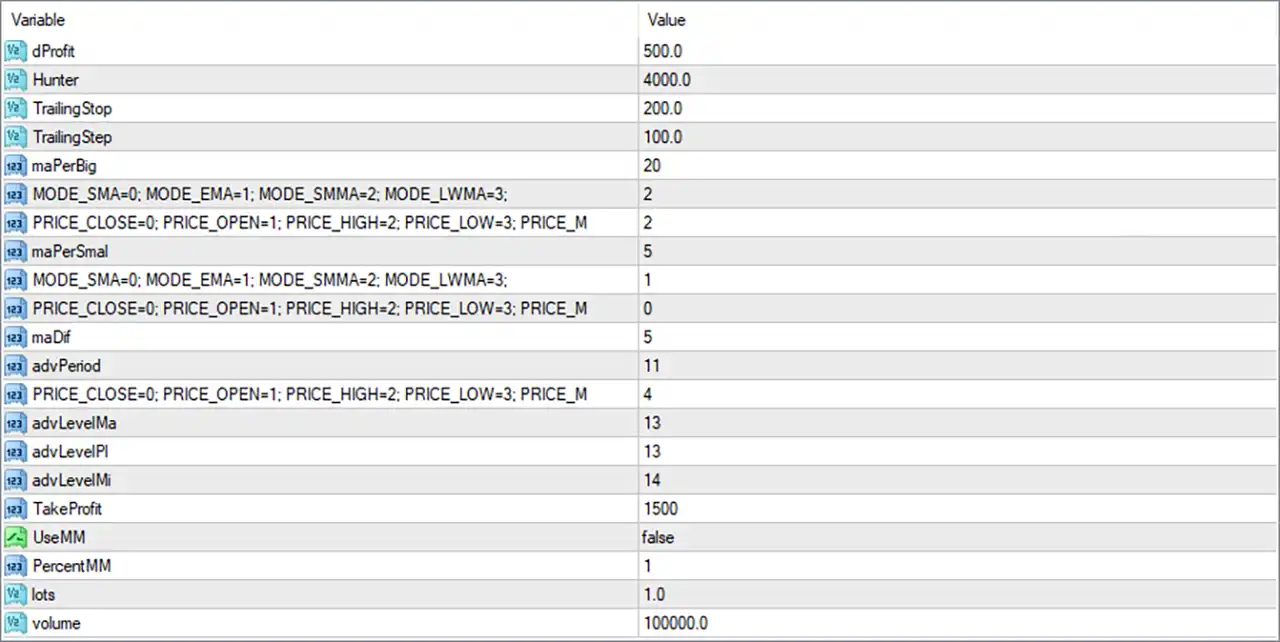
GoldScalper EA allows traders to adjust its indicator periods, applied price types, and position-sizing configurations according to their trading preferences. Below is a complete explanation of all 21 inputs displayed in the settings panel.
Profit and Trade Management Settings
This section contains the EA’s profit-related parameters and automated trailing stop configuration.
🔹 dProfit = 500.0 – Sets the dProfit parameter to 500.0. This is an internal profit-related setting used by the EA’s trading management logic. Its exact calculation and unit depend on the EA’s internal programming.
🔹 Hunter = 4000.0 – Sets the Hunter parameter to 4000.0. This is an EA-specific configuration value associated with its internal trading or management logic. Its precise function should be verified against the developer’s documentation.
🔹 TrailingStop = 200.0 – Sets the trailing stop distance to 200.0 points. This parameter defines the distance used by the EA when adjusting the stop-loss level as an open position moves into profit, helping protect accumulated gains.
🔹 TrailingStep = 100.0 – Sets the trailing stop adjustment step to 100.0 points. This determines the minimum configured price movement required for the EA to update its trailing stop level, according to its internal execution logic.
Main Moving Average – Trend Analysis
This section configures the primary moving average indicator used by GoldScalper EA MT4 for market analysis.
🔹 maPerBig = 20 – Sets the main Moving Average period to 20. This parameter determines the number of price periods used in the primary moving average calculation, providing a broader reference for identifying market direction.
🔹 MODE_SMA = 0; MODE_EMA = 1; MODE_SMMA = 2; MODE_LWMA = 3 = 2 – Selects the Smoothed Moving Average (SMMA) calculation method with value 2. The available methods are Simple Moving Average (SMA = 0), Exponential Moving Average (EMA = 1), Smoothed Moving Average (SMMA = 2), and Linear Weighted Moving Average (LWMA = 3).
🔹 PRICE_CLOSE = 0; PRICE_OPEN = 1; PRICE_HIGH = 2; PRICE_LOW = 3; PRICE_MEDIAN = 4 = 2 – Selects PRICE_HIGH with value 2. This means the primary moving average calculation uses the High price of each candle as its applied price.
Secondary Moving Average – Signal Analysis
This section configures the shorter moving average, which provides an additional reference for analyzing shorter-term price movements.
🔹 maPerSmal = 5 – Sets the secondary Moving Average period to 5. This shorter calculation period makes the indicator more responsive to recent market movements and can help the EA identify short-term trading signals.
🔹 MODE_SMA = 0; MODE_EMA = 1; MODE_SMMA = 2; MODE_LWMA = 3 = 1 – Selects the Exponential Moving Average (EMA) calculation method with value 1. EMA gives greater weighting to recent price data, allowing the secondary indicator to respond more quickly to changing market conditions.
🔹 PRICE_CLOSE = 0; PRICE_OPEN = 1; PRICE_HIGH = 2; PRICE_LOW = 3; PRICE_MEDIAN = 4 = 0 – Selects PRICE_CLOSE with value 0. The secondary moving average uses candle closing prices as its input data, providing a reference based on completed price movements.
Advanced Indicator Settings
This section contains additional indicator parameters used by the EA’s advanced signal-generation system.
🔹 maDif = 5 – Sets the maDif parameter to 5. This input is associated with the EA’s moving average difference configuration and may control the calculation or separation used by its internal indicator logic.
🔹 advPeriod = 11 – Sets the advanced indicator period to 11. This parameter defines the calculation period used by the EA’s advanced indicator component to evaluate market conditions and generate trading signals.
🔹 PRICE_CLOSE = 0; PRICE_OPEN = 1; PRICE_HIGH = 2; PRICE_LOW = 3; PRICE_MEDIAN = 4 = 4 – Selects PRICE_MEDIAN with value 4. Median Price is calculated using the average of each candle’s High and Low prices, providing an alternative price reference for the advanced indicator calculation.
🔹 advLevelMa = 13 – Sets the advanced moving average level parameter to 13. This value configures an additional MA-related threshold or level used by the EA’s advanced indicator calculations.
🔹 advLevelPl = 13 – Sets the advanced positive level parameter to 13. This setting defines the positive-side level used by the EA’s internal advanced signal or indicator logic.
🔹 advLevelMi = 14 – Sets the advanced negative level parameter to 14. This setting defines the negative-side level used by the EA’s advanced indicator calculations, helping configure its internal signal thresholds.
Take Profit and Money Management Settings
This section controls the profit target and position-sizing configuration.
🔹 TakeProfit = 1500 – Sets the Take Profit target to 1500 points. When the market reaches the configured profit distance, the EA can automatically close the corresponding position to secure the intended trading profit.
🔹 UseMM = false – Disables the built-in Money Management function. When this parameter is false, the EA uses its alternative lot-sizing configuration instead of activating percentage-based money management.
🔹 PercentMM = 1 – Sets the percentage-based money management parameter to 1. This value defines the configured percentage input for automatic position sizing and becomes relevant when UseMM is enabled, according to the EA’s internal calculation.
🔹 lots = 1.0 – Sets the configured trading volume to 1.0 lot. Since UseMM is currently disabled, this parameter is relevant to the EA’s alternative or fixed-lot position-sizing configuration.
🔹 volume = 100000.0 – Sets the volume parameter to 100000.0. This value may represent the contract or reference volume used in the EA’s internal position-sizing calculations. Its exact role depends on the EA’s implementation and the traded instrument.