

Introduction
Liquidity Finder Pro EA is an automated trading Expert Advisor (EA) designed to identify important liquidity levels and potential trading opportunities in the Forex market.
The EA focuses on liquidity detection techniques, including swing high and swing low analysis, equal highs and equal lows identification, and configurable liquidity level management.

Its trading configuration provides flexible execution controls, allowing traders to customize lot size, maximum simultaneous trades, Stop Loss buffer distance, and maximum spread requirements. Additionally, the EA supports both Buy and Sell trading, with independent execution permissions for each direction.
With its liquidity detection parameters and adjustable trade management settings, Liquidity Finder Pro EA offers a systematic approach to identifying potential market liquidity zones and automating trade execution.
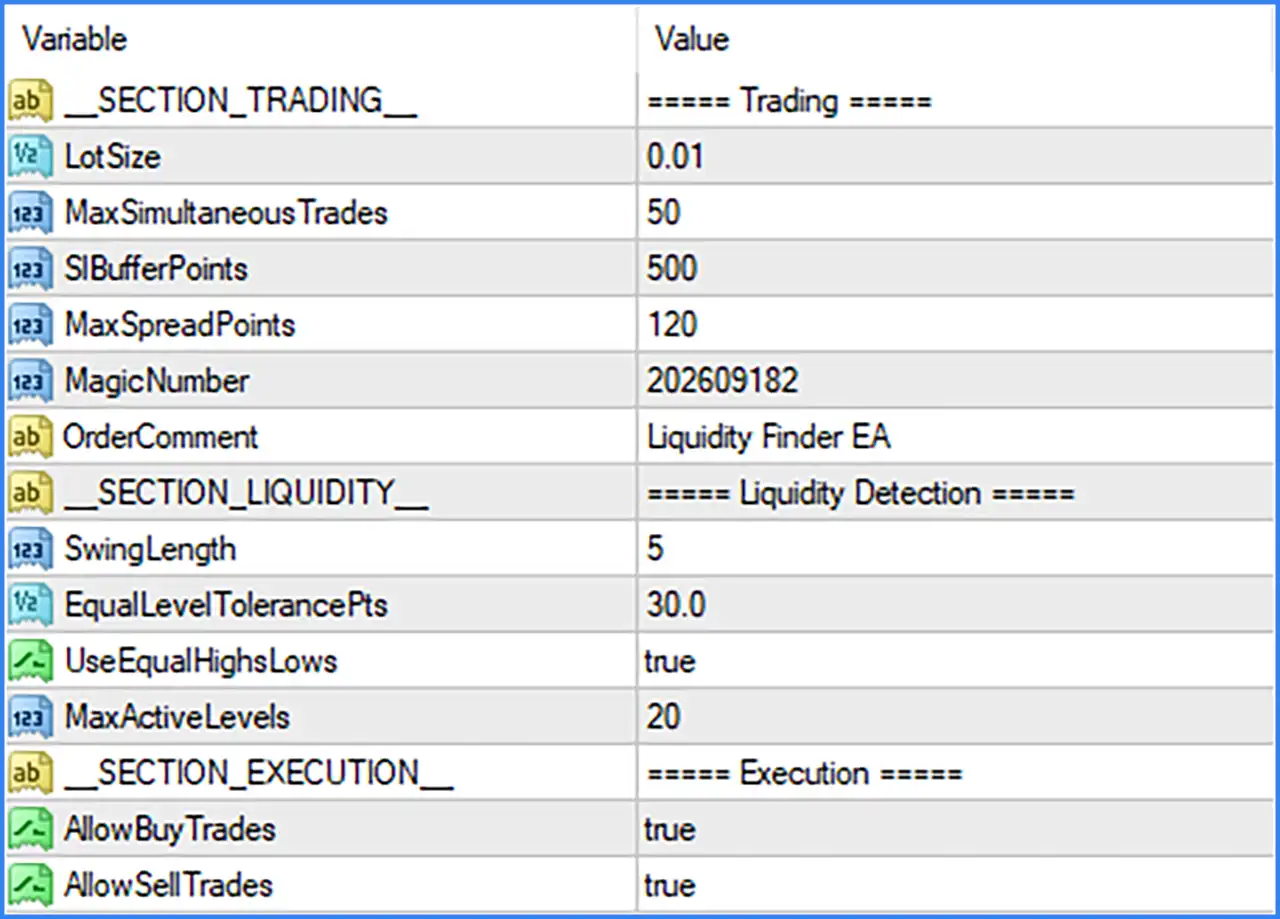
TRADING SETTINGS
This section controls the EA's primary trading parameters, including position sizing, maximum trade exposure, Stop Loss buffer, spread restrictions, and order identification.
🔹 LotSize: Set to 0.01. Defines the trading volume used when opening positions. The EA is configured to execute trades with a fixed lot size of 0.01 lots.
🔹 MaxSimultaneousTrades: Set to 50. Specifies the maximum number of trades that the EA can hold simultaneously, allowing up to 50 concurrent trading positions.
🔹 SlBufferPoints: Set to 500. Defines the Stop Loss buffer distance at 500 points. This parameter provides an additional price-distance buffer for Stop Loss placement associated with the EA's liquidity-based trading logic.
🔹 MaxSpreadPoints: Set to 120. Establishes the maximum permitted spread at 120 points. This setting helps prevent the EA from opening trades when the broker's spread exceeds the configured threshold.
🔹 MagicNumber: Set to 202609182. Assigns a unique identification number to orders opened by Liquidity Finder Pro EA MT4, allowing MetaTrader 4 to distinguish its positions from trades opened by other Expert Advisors.
🔹 OrderComment: Set to Liquidity Finder EA. Defines the comment attached to the EA's trading orders, making its positions easier to identify in the MT4 trading terminal.
LIQUIDITY DETECTION SETTINGS
The Liquidity Detection section controls how the EA identifies important market liquidity levels. It uses swing analysis and equal highs/lows detection to identify potential areas where liquidity may accumulate.
🔹 SwingLength: Set to 5. Defines the swing detection length using 5 candles. This parameter determines the sensitivity of swing high and swing low identification, helping the EA recognize relevant market turning points.
🔹 EqualLevelTolerancePts: Set to 30.0. Defines a tolerance of 30.0 points when comparing price levels to identify equal highs and equal lows. This allows the EA to recognize nearby price levels as potential liquidity zones rather than requiring perfectly identical prices.
🔹 UseEqualHighsLows: Set to true. Enables equal highs and equal lows detection. This feature allows the EA to identify areas where multiple swing highs or lows form around similar price levels, which may represent potential liquidity accumulation zones.
🔹 MaxActiveLevels: Set to 20. Limits the number of active liquidity levels maintained by the EA to a maximum of 20, helping control the number of market levels monitored during trading operations.
EXECUTION SETTINGS
The Execution section determines which trading directions are permitted. Traders can independently enable or disable Buy and Sell operations according to their preferred trading approach.
🔹 AllowBuyTrades: Set to true. Enables Buy order execution, allowing Liquidity Finder Pro EA MT4 to open Long positions when its internal trading conditions are satisfied.
🔹 AllowSellTrades: Set to true. Enables Sell order execution, allowing the EA to open Short positions when its internal trading conditions are satisfied.