

Introduction
MAKKAT EA is an automated trading Expert Advisor (EA) designed for the MetaTrader 4 platform. Its input configuration provides essential controls for trade identification, position sizing, risk management, and maximum order limits.
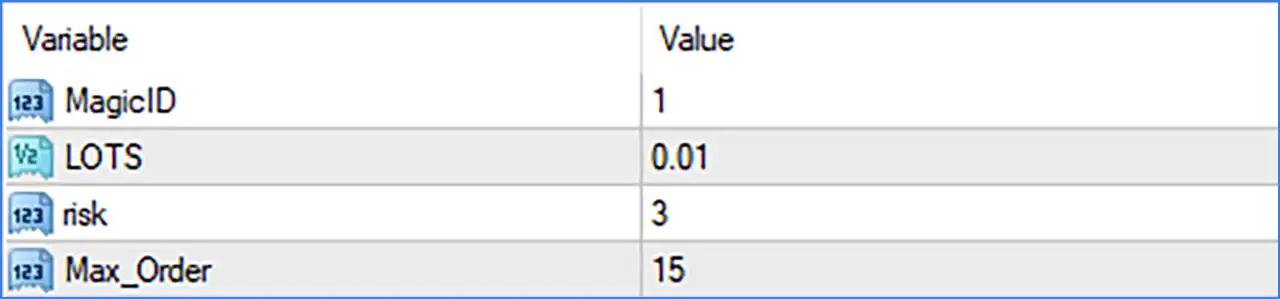
The EA features a straightforward configuration with four main parameters: Magic ID, lot size, risk, and maximum orders. These settings allow traders to define trading volume, organize automated positions, configure risk-related values, and control the number of orders managed by the trading system.
Understanding each parameter is important for configuring MAKKAT EA according to account size, trading objectives, and individual risk tolerance.

General Trading Settings
🔹 MagicID: 1 – Assigns the unique Magic Number 1 to trades opened by MAKKAT EA MT4. This identifier helps MetaTrader 4 distinguish the EA's positions from manual trades and positions opened by other Expert Advisors.
🔹 LOTS: 0.01 – Sets the trading volume to a fixed lot size of 0.01 lots. This determines the position size used by the EA when opening trades and provides a relatively small starting volume.
Risk Management Settings
🔹 risk: 3 – Sets the risk parameter to 3, controlling the EA's configured risk level or position management logic. The exact calculation method and whether this value represents a percentage, multiplier, or internal risk setting depend on the EA's programming.
Order Management Settings
🔹 Max_Order: 15 – Sets the maximum permitted order limit to 15. This parameter controls how many orders the EA can open or manage according to its internal trading logic, helping limit the number of simultaneous trading positions.
Conclusion
MAKKAT EA MT4 offers a simple configuration focused on essential automated trading controls. Its four input parameters allow traders to manage trade identification, fixed lot sizing, risk configuration, and maximum order limits.
The displayed settings use a Magic ID of 1, a fixed lot size of 0.01, a risk value of 3, and a maximum order limit of 15. These values provide a starting configuration for testing the EA's trading behavior.
Before using MAKKAT EA MT4 on a live trading account, traders should verify how the risk parameter is calculated and whether Max_Order applies to open positions or total orders. Testing on a demo account is recommended to understand the EA's execution behavior and potential account exposure.