

Introduction
Moroccan Scalper EA is an automated trading Expert Advisor (EA) designed for MetaTrader 4, featuring an averaging-based trading strategy, configurable position sizing, and integrated risk management. Its settings allow traders to control initial lot size, position multipliers, Take Profit, Stop Loss, trailing stop, and the maximum number of simultaneous trades.

The EA provides two strategy modes, allowing users to configure averaging functionality according to their trading preferences. It also includes adjustable money management options, trade restrictions, and automatic position-closing conditions to help manage trading exposure.
With flexible order management and customizable risk parameters, Moroccan Scalper EA offers a configurable environment for automated trading and position management.
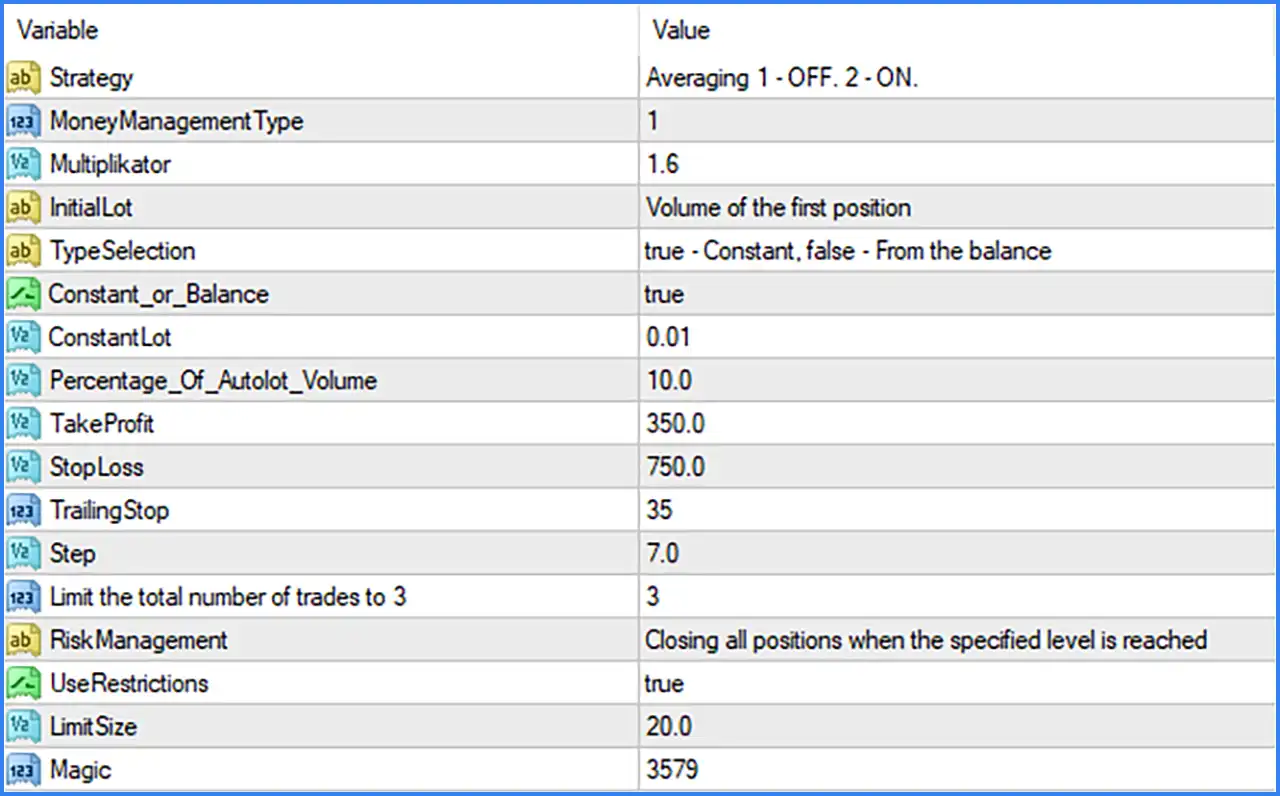
STRATEGY SETTINGS
This section determines the trading strategy mode used by Moroccan Scalper EA MT4.
🔹 Strategy: Set to Averaging 1 - OFF. 2 - ON.. Defines the available strategy modes, where option 1 disables averaging and option 2 enables averaging. The displayed value presents the strategy selection options rather than a specific numeric selection.
MONEY MANAGEMENT SETTINGS
This section controls how the EA calculates trading volume, including the money management method, lot multiplier, initial position size, and fixed or balance-based lot calculation.
🔹 MoneyManagementType: Set to 1. Defines the money management method using the EA's internal selection system. The screenshot does not provide the exact descriptions of the available numerical modes.
🔹 Multiplikator: Set to 1.6. Defines the position volume multiplier at 1.6, determining how subsequent trading volumes are calculated according to the EA's position progression logic.
🔹 InitialLot: Displays Volume of the first position. Defines the initial trading volume used when opening the first position in a trading sequence.
🔹 TypeSelection: Displays true - Constant, false - From the balance. Specifies the lot calculation selection, where true represents Constant lot sizing and false represents balance-based lot sizing.
🔹 Constant_or_Balance: Set to true. Selects the Constant lot calculation mode instead of calculating trading volume from account balance.
🔹 ConstantLot: Set to 0.01. Defines the fixed initial trading volume at 0.01 lots when Constant lot sizing is selected.
🔹 Percentage_Of_Autolot_Volume: Set to 10.0. Defines the percentage parameter of the automatic lot volume calculation, with the configured value set to 10.0.
TAKE PROFIT AND STOP LOSS SETTINGS
These parameters define the profit target and loss-protection levels for automated trading positions.
🔹 TakeProfit: Set to 350.0. Establishes the Take Profit target at 350.0 points according to the EA's configured distance calculation, allowing positions to close automatically when the target is reached.
🔹 StopLoss: Set to 750.0. Defines the Stop Loss distance at 750.0 points, specifying the configured loss-protection level for trading positions.
TRAILING STOP SETTINGS
The Trailing Stop section controls how the EA adjusts protective stop levels as positions move into profit.
🔹 TrailingStop: Set to 35. Defines the trailing stop distance at 35 points, allowing the EA to adjust the protective stop level according to its trailing management logic.
🔹 Step: Set to 7.0. Defines the minimum price movement step of 7.0 points used for trailing stop adjustments or position management according to the EA's internal logic.
TRADE LIMIT SETTINGS
This section controls the maximum number of open trades allowed by Moroccan Scalper EA MT4.
🔹 Limit the Total Number of Trades to 3: Set to 3. Restricts the EA to a maximum of 3 trading positions, helping control the number of simultaneously open trades.
RISK MANAGEMENT SETTINGS
The Risk Management section provides an automated position-closing mechanism and configurable restrictions to help control trading exposure.
🔹 RiskManagement: Displays Closing all positions when the specified level is reached. Defines the EA's risk management behavior, which is designed to close all open positions when the configured risk threshold is reached.
🔹 UseRestrictions: Set to true. Activates the EA's trading restriction mechanism, allowing the configured position or exposure limits to be applied.
🔹 LimitSize: Set to 20.0. Defines the restriction limit at 20.0 according to the EA's internal risk management calculation.
🔹 Magic: Set to 3579. Assigns the Magic Number 3579 to the EA's trading orders, allowing MetaTrader 4 to identify and distinguish its positions from trades opened by other Expert Advisors.