
Introduction
FX SCALPER 4X is an automated trading Expert Advisor (EA) designed for MetaTrader 4, featuring configurable scalping strategies, automatic lot sizing, recovery trading, and multiple technical indicator parameters. Its configuration combines Stochastic Oscillator analysis, Moving Average settings, ATR-based calculations, and divergence parameters to support automated trading decisions.

The EA provides different trading modes and risk profiles, including Mode A and Aggressive risk configuration. It also incorporates recovery functionality, adjustable order spacing, basket profit targets, and customizable Stop Loss (SL) and Take Profit (TP) parameters.
With its multiple indicator configurations and automated recovery management, FX SCALPER 4X offers traders flexibility in controlling trading frequency, position management, and profit-taking conditions.
GENERAL TRADING SETTINGS
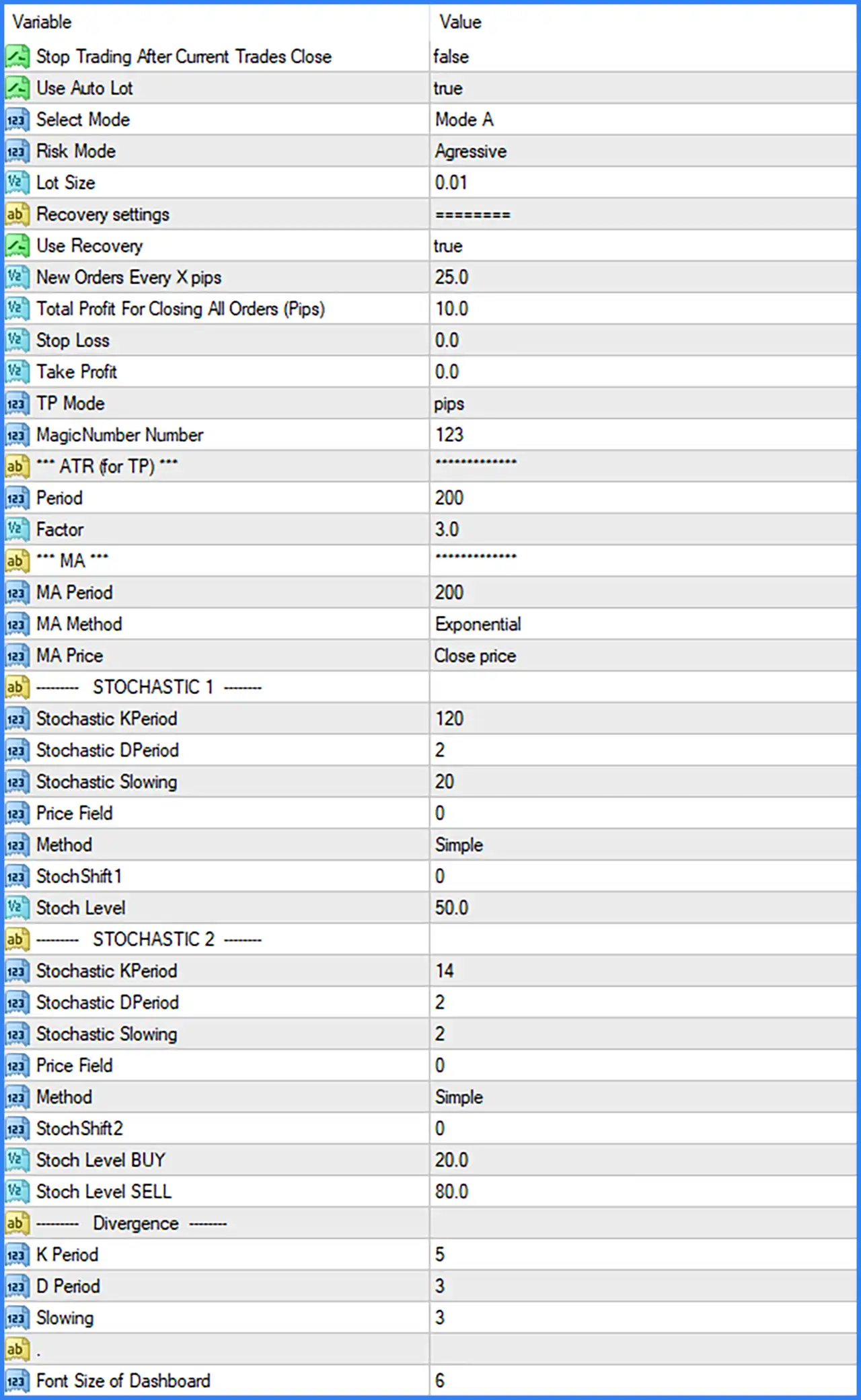
This section controls the EA's operating behavior, trading mode, risk profile, and initial position size.
🔹 Stop Trading After Current Trades Close: Set to false. Disables the option to stop trading automatically after all currently open trades have been closed, allowing the EA to continue operating according to its trading conditions.
🔹 Use Auto Lot: Set to true. Enables automatic lot sizing, allowing the EA to calculate trading volume through its internal money management mechanism.
🔹 Select Mode: Set to Mode A. Selects Mode A as the active trading configuration, determining the operating mode used by the EA's internal trading strategy.
🔹 Risk Mode: Set to Aggressive. Selects the Aggressive risk profile, configuring the EA to operate using its aggressive risk management settings.
🔹 Lot Size: Set to 0.01. Defines the configured lot size at 0.01 lots, serving as the displayed volume parameter within the EA's position-sizing configuration.
RECOVERY SETTINGS
The Recovery Settings section controls how FX SCALPER 4X MT4 manages additional orders and closes multiple positions based on predefined trading conditions.
🔹 Use Recovery: Set to true. Enables the recovery mechanism, allowing the EA to use its configured recovery trading logic when managing existing positions.
🔹 New Orders Every X Pips: Set to 25.0. Defines a distance of 25.0 pips between additional recovery orders, controlling the spacing of new entries during recovery operations.
🔹 Total Profit For Closing All Orders (Pips): Set to 10.0. Establishes a total profit target of 10.0 pips for closing all associated open orders when the configured basket profit condition is reached.
🔹 Stop Loss: Set to 0.0. Defines the Stop Loss parameter at 0.0. The screenshot does not specify whether this value disables individual Stop Loss protection or invokes another internal behavior.
🔹 Take Profit: Set to 0.0. Defines the individual Take Profit parameter at 0.0. The screenshot does not specify the exact behavior associated with this value.
🔹 TP Mode: Set to pips. Selects the pips-based Take Profit calculation mode, meaning the configured Take Profit method uses pip distances rather than an explicitly selected alternative mode.
🔹 MagicNumber Number: Set to 123. Assigns Magic Number 123 to the EA's trading orders, allowing MetaTrader 4 to identify and distinguish its positions from trades opened by other Expert Advisors.
ATR SETTINGS FOR TAKE PROFIT
The ATR section contains volatility-based calculation parameters that can be used by the EA's Take Profit functionality.
🔹 Period: Set to 200. Defines the Average True Range calculation period using 200 candles, providing the volatility reference period for the ATR-based configuration.
🔹 Factor: Set to 3.0. Defines the ATR multiplication factor at 3.0, determining the multiplier applied to the ATR calculation when the ATR-based Take Profit functionality is used.
MOVING AVERAGE (MA) SETTINGS
The Moving Average section defines the calculation method, price source, and period used by the EA's MA-related trading logic.
🔹 MA Period: Set to 200. Defines the Moving Average calculation period using 200 candles, providing a longer-term price reference for the EA's indicator configuration.
🔹 MA Method: Set to Exponential. Selects the Exponential Moving Average (EMA) calculation method, which gives greater weight to more recent price data compared with a Simple Moving Average.
🔹 MA Price: Set to Close price. Uses the candle closing price as the input for the Moving Average calculation.
STOCHASTIC OSCILLATOR 1 SETTINGS
The first Stochastic configuration provides momentum calculation parameters and a reference level for the EA's trading logic.
🔹 Stochastic KPeriod: Set to 120. Defines the Stochastic %K calculation period using 120 candles, determining the primary lookback period for momentum analysis.
🔹 Stochastic DPeriod: Set to 2. Defines the Stochastic %D smoothing period using 2 candles, controlling the smoothing applied to the %D signal line.
🔹 Stochastic Slowing: Set to 20. Specifies a slowing value of 20 for the Stochastic calculation, providing additional smoothing to the indicator's %K line.
🔹 Price Field: Set to 0. Defines the Stochastic price field using value 0, corresponding to the indicator's configured price-field enumeration.
🔹 Method: Set to Simple. Selects the Simple Moving Average method for smoothing the Stochastic indicator calculations.
🔹 StochShift 1: Set to 0. Defines the horizontal shift of the first Stochastic indicator at 0, keeping the calculation aligned with its standard chart position.
🔹 Stoch Level: Set to 50.0. Establishes the Stochastic reference level at 50.0, representing the midpoint of the indicator's conventional 0–100 range.
STOCHASTIC OSCILLATOR 2 SETTINGS
The second Stochastic configuration provides a separate momentum calculation with independent periods and Buy/Sell thresholds.
🔹 Stochastic KPeriod: Set to 14. Defines the second Stochastic %K calculation period using 14 candles, providing a shorter momentum reference than the first Stochastic configuration.
🔹 Stochastic DPeriod: Set to 2. Defines the second Stochastic %D smoothing period using 2 candles.
🔹 Stochastic Slowing: Set to 2. Specifies a slowing value of 2 for the second Stochastic calculation, controlling the smoothing of its %K line.
🔹 Price Field: Set to 0. Defines the price-field selection at 0 for the second Stochastic indicator.
🔹 Method: Set to Simple. Selects Simple Moving Average smoothing for the second Stochastic calculation.
🔹 StochShift 2: Set to 0. Defines the horizontal shift of the second Stochastic indicator at 0, maintaining its standard calculation alignment.
🔹 Stoch Level BUY: Set to 20.0. Establishes the Buy reference threshold at 20.0, commonly associated with oversold conditions in Stochastic analysis.
🔹 Stoch Level SELL: Set to 80.0. Establishes the Sell reference threshold at 80.0, commonly associated with overbought conditions in Stochastic analysis.
STOCHASTIC DIVERGENCE SETTINGS
The Divergence section contains the Stochastic calculation parameters used for divergence-related analysis.
🔹 K Period: Set to 5. Defines the %K calculation period at 5 candles for the divergence configuration.
🔹 D Period: Set to 3. Defines the %D smoothing period at 3 candles for the divergence calculation.
🔹 Slowing: Set to 3. Specifies a Stochastic slowing value of 3, controlling the smoothing applied to the divergence indicator calculation.
DASHBOARD SETTINGS
This section controls the visual text size of the EA's dashboard.
🔹 Font Size of Dashboard: Set to 6. Defines the dashboard font size at 6, controlling the size of the information displayed on the trading chart.