
Introduction
Vision Scalper AI EA is an automated Forex trading Expert Advisor (EA) designed for the MetaTrader 4 platform. It features an AI-oriented scalping configuration with automated lot management, adjustable take profit, trailing stop functionality, and multiple currency pair trading capabilities.

The EA provides several trading configurations, including Auto Lot sizing, Stable Mode, and highly accurate trade entry settings. It also incorporates a Martingale management system with an adjustable multiplier and a risk management mechanism designed to control additional order placement when specific currency exposure conditions are reached.
One of its notable features is multi-currency trading, supporting major and minor Forex pairs with individual trading permissions. This allows traders to control which currency pairs the EA can trade and configure the maximum number of active currency pairs.
This guide explains all available input parameters and their default values to help traders understand and configure Vision Scalper AI.
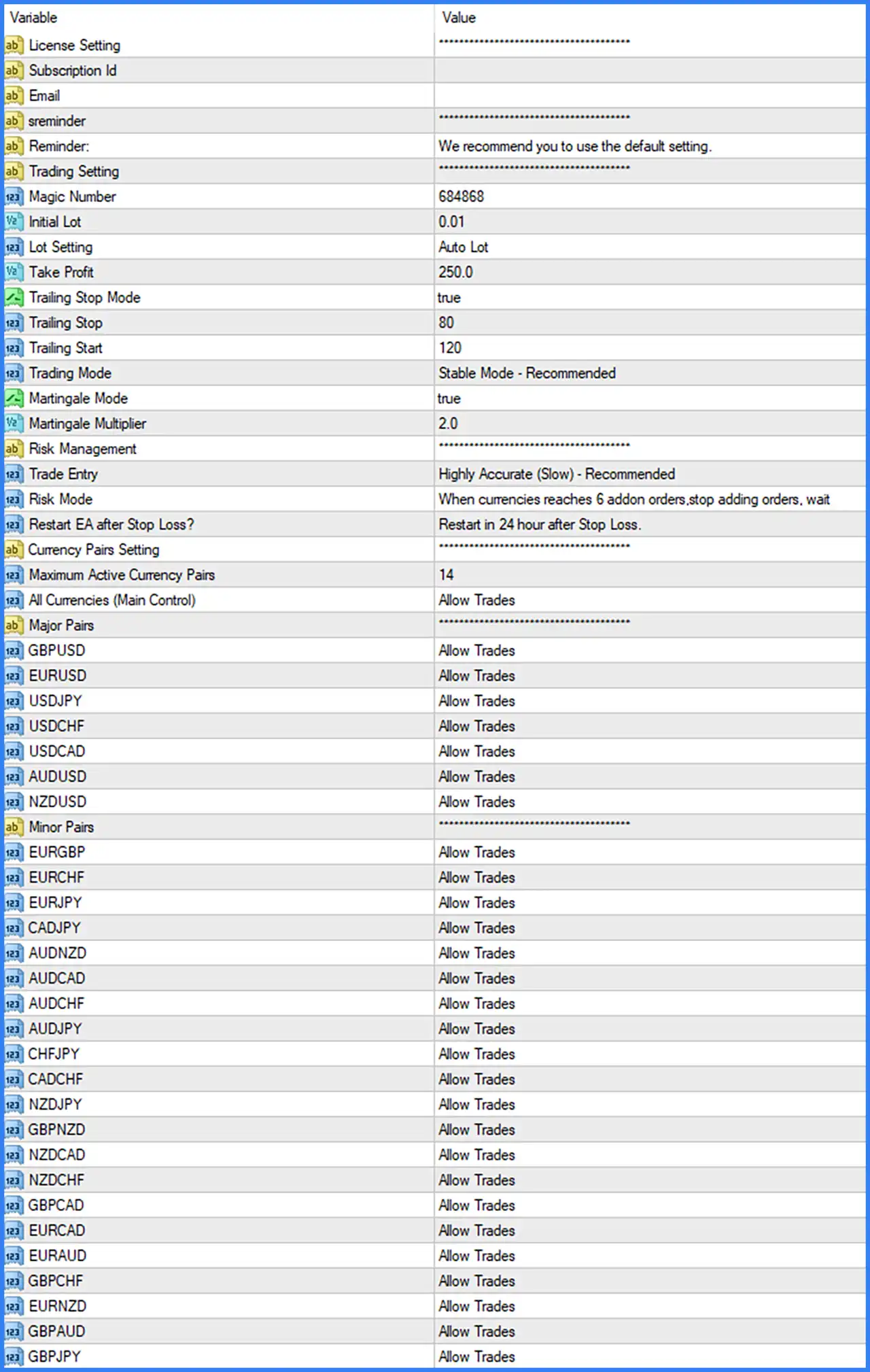
General Trading Settings
🔹 Trading Setting: ---------------- – Section heading for the EA's main trading configuration, including trade identification, lot sizing, and profit management.
🔹 Magic Number: 684868 – Assigns the unique Magic Number 684868 to trades opened by Vision Scalper AI EA MT4, allowing MetaTrader 4 to distinguish its positions from manual trades and other Expert Advisors.
🔹 Initial Lot: 0.01 – Sets the initial trading volume to 0.01 lots, defining the starting position size used by the EA's automated trading system.
🔹 Lot Setting: Auto Lot – Selects automatic lot sizing, allowing the EA to determine trading volume according to its internal money management calculations rather than relying exclusively on a manually fixed lot size.
🔹 Take Profit: 250.0 – Sets the main take profit parameter to 250.0, defining the configured profit target for trade management. The exact unit depends on the EA's internal calculation method.
🔹 Trailing Stop Mode: true – Enables trailing stop functionality, allowing the EA to adjust stop levels as positions move into profit according to the configured trailing parameters.
🔹 Trailing Stop: 80 – Sets the trailing stop distance parameter to 80, defining the configured distance used by the EA when managing protective stop levels.
🔹 Trailing Start: 120 – Sets the trailing stop activation threshold to 120, determining the configured profit distance at which trailing stop management can begin.
🔹 Trading Mode: Stable Mode - Recommended – Selects Stable Mode, which is identified by the developer as the recommended trading configuration for the EA.
Martingale and Risk Management Settings
🔹 Martingale Mode: true – Enables the Martingale functionality, allowing the EA to apply its configured lot adjustment mechanism when managing subsequent trading positions.
🔹 Martingale Multiplier: 2.0 – Sets the Martingale multiplication factor to 2.0, allowing the EA to multiply the previous lot size by a factor of 2.0 when its Martingale conditions are triggered.
🔹 Risk Management: ---------------- – Section heading for the EA's risk management configuration, including entry accuracy, risk control, and recovery-related parameters.
🔹 Trade Entry: Highly Accurate (Slow) - Recommended – Selects the Highly Accurate (Slow) entry mode, prioritizing the EA's more selective entry configuration according to the developer's recommended setting.
🔹 Risk Mode: When currencies reaches 6 addon orders, stop adding orders, wait – Configures the risk management rule to stop adding further orders when a currency reaches 6 additional orders, allowing the EA to wait instead of continuously increasing its position exposure.
🔹 Restart EA after Stop Loss?: Restart in 24 hour after Stop Loss. – Configures the EA to restart its trading activity 24 hours after a Stop Loss event, providing a recovery waiting period before automated trading resumes.
Currency Pairs Settings
🔹 Currency Pairs Setting: ---------------- – Section heading for the multi-currency trading configuration, where traders can control the maximum number of active currency pairs and individual pair permissions.
🔹 Maximum Active Currency Pairs: 14 – Sets the maximum number of active currency pairs to 14, limiting how many different Forex instruments the EA can manage simultaneously.
🔹 All Currencies (Main Control): Allow Trades – Enables the general currency trading permission, allowing the EA to trade currencies that are individually permitted under the pair-specific settings.
Major Currency Pairs Settings
🔹 Major Pairs: ---------------- – Section heading for the major Forex currency pair configuration.
🔹 GBPUSD: Allow Trades – Allows Vision Scalper AI EA MT4 to trade GBPUSD, the British Pound against the US Dollar.
🔹 EURUSD: Allow Trades – Enables automated trading on EURUSD, the Euro against the US Dollar.
🔹 USDJPY: Allow Trades – Enables trading on USDJPY, the US Dollar against the Japanese Yen.
🔹 USDCHF: Allow Trades – Allows the EA to trade USDCHF, the US Dollar against the Swiss Franc.
🔹 USDCAD: Allow Trades – Enables trading on USDCAD, the US Dollar against the Canadian Dollar.
🔹 AUDUSD: Allow Trades – Allows automated trading on AUDUSD, the Australian Dollar against the US Dollar.
🔹 NZDUSD: Allow Trades – Enables trading on NZDUSD, the New Zealand Dollar against the US Dollar.
Minor Currency Pairs Settings
🔹 Minor Pairs: ---------------- – Section heading for the minor Forex currency pair configuration, providing individual trading permissions for additional currency combinations.
🔹 EURGBP: Allow Trades – Enables automated trading on EURGBP, the Euro against the British Pound.
🔹 EURCHF: Allow Trades – Allows the EA to trade EURCHF, the Euro against the Swiss Franc.
🔹 EURJPY: Allow Trades – Enables trading on EURJPY, the Euro against the Japanese Yen.
🔹 CADJPY: Allow Trades – Allows automated trading on CADJPY, the Canadian Dollar against the Japanese Yen.
🔹 AUDNZD: Allow Trades – Enables trading on AUDNZD, the Australian Dollar against the New Zealand Dollar.
🔹 AUDCAD: Allow Trades – Allows the EA to trade AUDCAD, the Australian Dollar against the Canadian Dollar.
🔹 AUDCHF: Allow Trades – Enables trading on AUDCHF, the Australian Dollar against the Swiss Franc.
🔹 AUDJPY: Allow Trades – Allows automated trading on AUDJPY, the Australian Dollar against the Japanese Yen.
🔹 CHFJPY: Allow Trades – Enables trading on CHFJPY, the Swiss Franc against the Japanese Yen.
🔹 CADCHF: Allow Trades – Allows the EA to trade CADCHF, the Canadian Dollar against the Swiss Franc.
🔹 NZDJPY: Allow Trades – Enables automated trading on NZDJPY, the New Zealand Dollar against the Japanese Yen.
🔹 GBPNZD: Allow Trades – Allows trading on GBPNZD, the British Pound against the New Zealand Dollar.
🔹 NZDCAD: Allow Trades – Enables trading on NZDCAD, the New Zealand Dollar against the Canadian Dollar.
🔹 NZDCHF: Allow Trades – Allows automated trading on NZDCHF, the New Zealand Dollar against the Swiss Franc.
🔹 GBPCAD: Allow Trades – Enables trading on GBPCAD, the British Pound against the Canadian Dollar.
🔹 EURCAD: Allow Trades – Allows the EA to trade EURCAD, the Euro against the Canadian Dollar.
🔹 EURAUD: Allow Trades – Enables trading on EURAUD, the Euro against the Australian Dollar.
🔹 GBPCHF: Allow Trades – Allows automated trading on GBPCHF, the British Pound against the Swiss Franc.
🔹 EURNZD: Allow Trades – Enables trading on EURNZD, the Euro against the New Zealand Dollar.
🔹 GBPAUD: Allow Trades – Allows the EA to trade GBPAUD, the British Pound against the Australian Dollar.
🔹 GBPJPY: Allow Trades – Enables automated trading on GBPJPY, the British Pound against the Japanese Yen.
Conclusion
Vision Scalper AI EA MT4 offers a multi-currency automated trading configuration with flexible lot management, Martingale functionality, trailing stop protection, and configurable risk controls.
The displayed settings use Auto Lot sizing, an initial lot of 0.01, a Take Profit value of 250.0, and an enabled trailing stop with a distance of 80 and an activation threshold of 120. The EA also uses Stable Mode and the Highly Accurate (Slow) entry configuration, both identified as recommended settings.
Another important feature is its Martingale system, which is enabled with a multiplier of 2.0. Its risk management configuration instructs the EA to stop adding orders when a currency reaches 6 additional orders and wait. Additionally, the EA is configured to restart 24 hours after a Stop Loss event.