🔶 What is PZ Hedging EA MT5?
PZ Hedging EA MT5 is an automated trading Expert Advisor (EA) designed for the MetaTrader 5 platform. The EA specializes in hedging strategies, where multiple positions are opened in opposite directions to reduce market exposure and manage drawdown. With break-even control, recovery mechanisms, and session-based trading filters, PZ Hedging EA aims to provide structured risk management while taking advantage of price fluctuations.
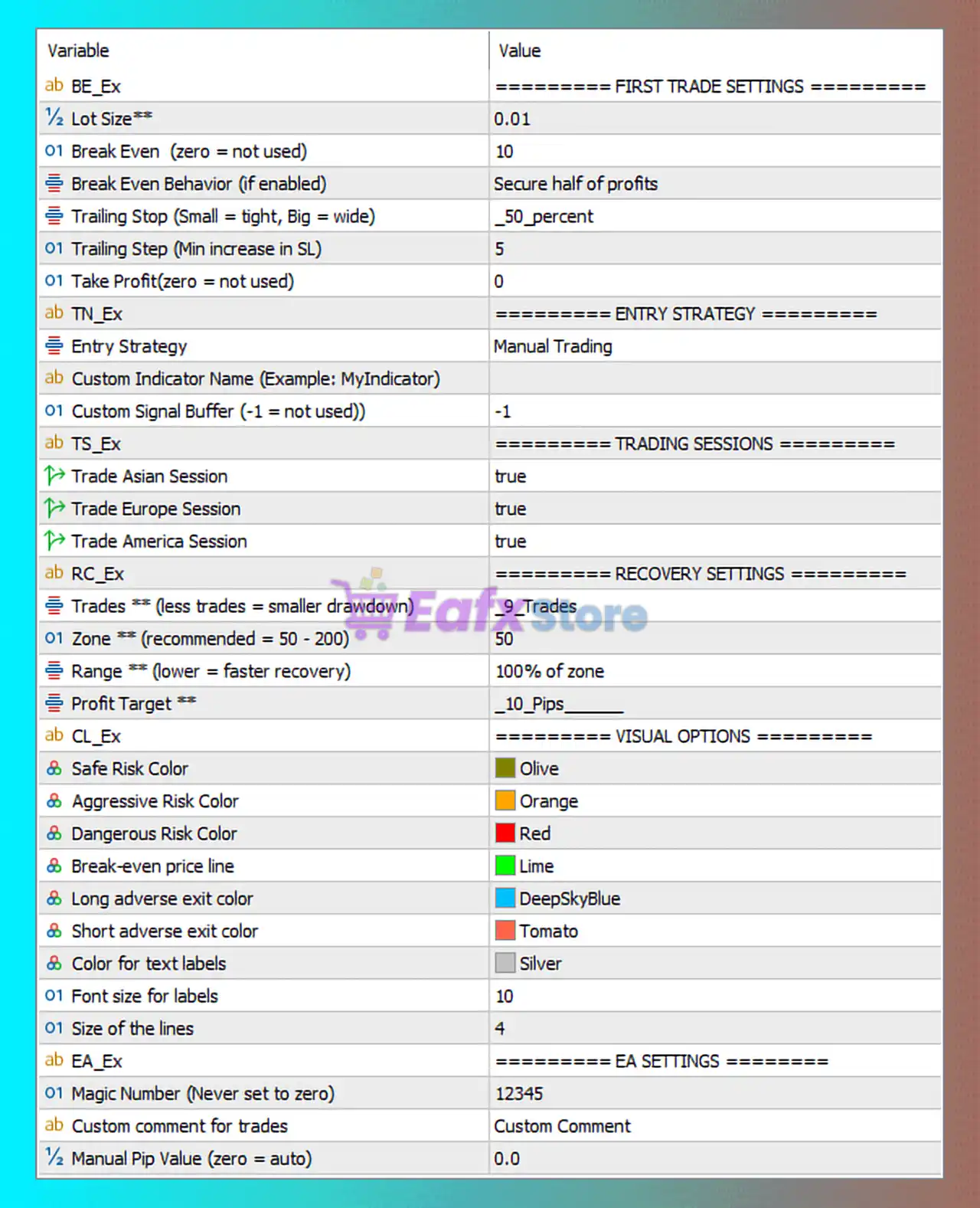
🔶 First Trade Settings (Break-Even & Trailing)
| Parameter | Value | Explanation |
|---|---|---|
| Lot Size | 0.01 | Defines the base lot size used for the initial trade opened by the EA. |
| Break Even | 10 | Moves the stop loss to break-even after the trade gains 10 points. |
| Break Even Behavior | Secure Half of Profits | Locks in 50% of profits when break-even conditions are triggered. |
| Trailing Stop | -50 percent | Dynamic trailing stop based on percentage distance from the price movement. |
| Trailing Step | 5 | Defines the step size used when adjusting the trailing stop. |
| Take Profit | 0 | No fixed take-profit level is set for the first trade. |
These parameters ensure that the initial trade is protected once it becomes profitable.
🔶 Entry Strategy Settings
| Parameter | Value | Explanation |
|---|---|---|
| Entry Strategy | Manual Trading | The EA requires manual trade initiation rather than automatic signal generation. |
| Custom Indicator Name | Not specified | Allows the use of an external custom indicator for generating signals. |
| Custom Signal Buffer | -1 | Disables custom indicator signal input. |
This configuration indicates that the EA acts mainly as a trade management and hedging tool rather than a fully automated strategy.
🔶 Trading Session Filters
| Parameter | Value | Explanation |
|---|---|---|
| Trade Asian Session | true | Enables trading during the Asian market session. |
| Trade European Session | true | Allows trading during the London session. |
| Trade American Session | true | Allows trading during the New York session. |
These filters enable trading during all major Forex sessions.
🔶 Recovery & Hedging System
| Parameter | Value | Explanation |
|---|---|---|
| Maximum Trades | 9 Trades | Limits the number of positions used in the hedging recovery cycle. |
| Zone Size | 50 | Defines the price range where recovery trades are triggered. |
| Range | 100% of zone | Determines the distance used to place additional hedge trades. |
| Profit Target | 10 Pips | Defines the profit level required to close the recovery cycle. |
This recovery system is designed to gradually offset losing trades using hedge positions.
🔶 Visual Display Settings
| Parameter | Value | Explanation |
|---|---|---|
| Safe Risk Color | Olive | Indicates safe trading conditions on the chart. |
| Aggressive Risk Color | Orange | Represents moderate risk exposure. |
| Dangerous Risk Color | Red | Indicates high-risk trading conditions. |
| Break-even Price Line | Lime | Displays the break-even level visually on the chart. |
| Long Adverse Exit Color | DeepSkyBlue | Color used for exit indicators in long positions. |
| Short Adverse Exit Color | Tomato | Color used for exit indicators in short positions. |
| Text Label Color | Silver | Color used for information labels on the chart. |
| Font Size | 10 | Size of the text used in the EA interface. |
| Line Size | 4 | Thickness of graphical lines displayed on the chart. |
These parameters affect only the graphical interface.
🔶 EA Core Settings
| Parameter | Value | Explanation |
|---|---|---|
| Magic Number | 12345 | Unique identifier used to track trades managed by this EA. |
| Custom Comment | Custom Comment | Label attached to trades for easier identification. |
| Manual Pip Value | 0.0 | Automatically calculates pip value based on the trading instrument. |
These settings ensure the EA operates independently from other automated systems.
🔶 Strategy Overview
PZ Hedging EA MT5 is primarily a trade management and hedging tool rather than a fully automated trading system. It allows traders to manually open positions while the EA manages risk through break-even protection, trailing stops, and recovery hedging.
The recovery logic opens additional positions when the market moves against the initial trade, aiming to close the entire cycle once the overall profit target is reached.
This approach can be effective in volatile markets where price fluctuations create multiple recovery opportunities.
🔶 Risk Macontrol features include:
- Break-even protection
- Trailing stop adjustment
- Maximum number of recovery trades
- Defined recovery zone range
- Profit target for closing the hedge cycle
However, since the strategy relies on hedging and multiple positions, proper account size and leverage management are essential.
🔶 Conclusion
PZ Hedging EA MT5 is a flexible trading management tool designed to assist traders using hedging strategies. With break-even protection, recovery logic, and session filters, the EA helps manage positions more effectively while reducing manual workload.
To achieve optimal results, traders should combine the EA with a disciplined trading plan, appropriate lot sizing, and careful monitoring of market conditions. When used properly, PZ Hedging EA MT5 can enhance risk control and improve trade management in MetaTrader 5 automated trading environments.