This article provides a professional breakdown of the Quantum Scalper EA settings for GBPUSD on MetaTrader 4, explaining what each parameter does, how it affects trading performance, and the overall risk profile suggested by the configuration.
🧩 Spread & Market Conditions Control
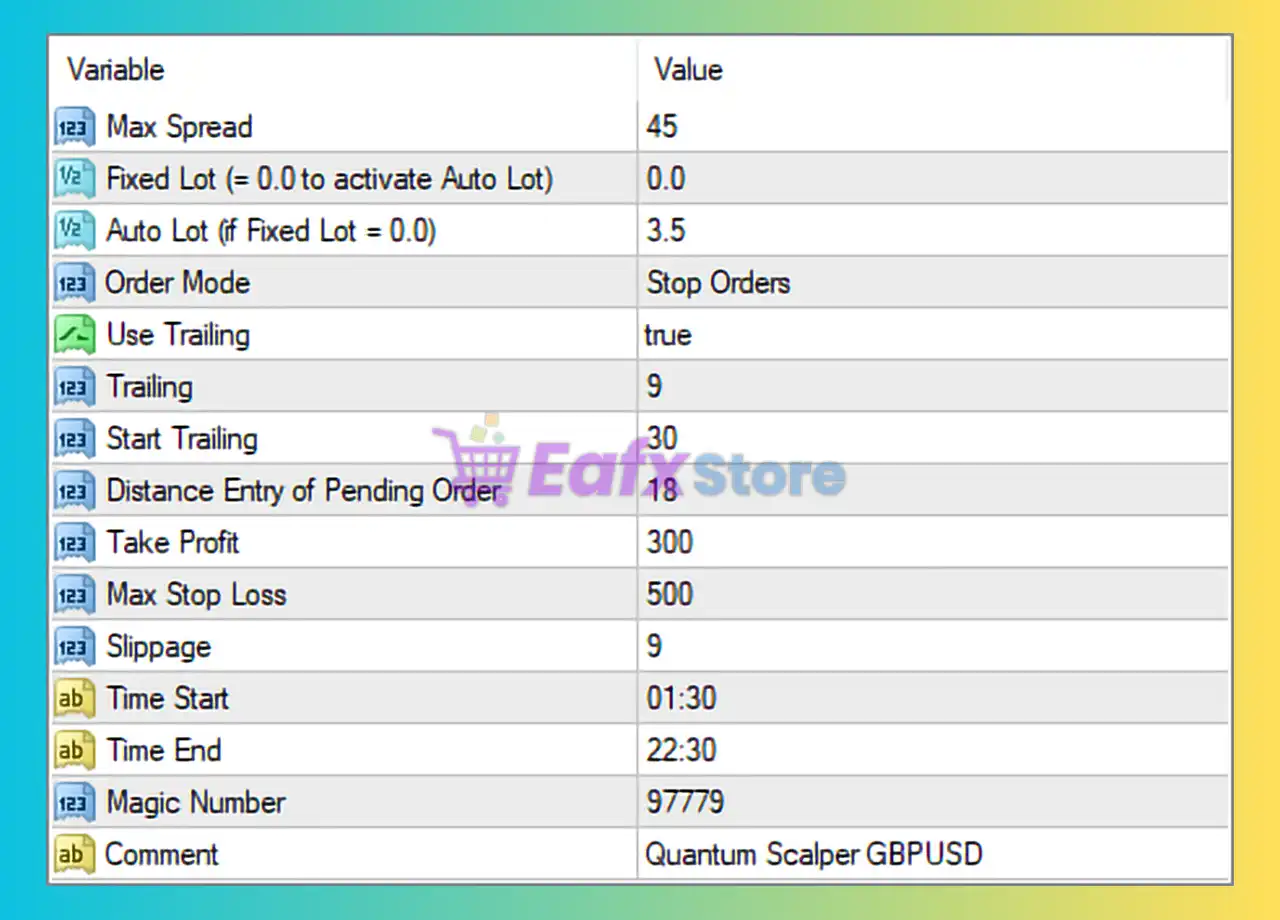
Max Spread: 45
- Defines the maximum allowed spread (in points) for opening trades.
- A value of 45 is relatively high, meaning the EA can trade even during volatile or low-liquidity periods.
- Pros: More trading opportunities.
- Cons: Higher transaction costs and potential slippage.
Best for: Brokers with variable spreads or high-volatility sessions.
🧩 Lot Size & Risk Management
Fixed Lot: 0.0
- Fixed lot trading is disabled.
Auto Lot: 3.5
- The EA uses automatic lot sizing, scaling position size based on account balance or equity.
- A value of 3.5 is considered aggressive, suitable only for well-capitalized accounts.
⚠️ Risk Note: High Auto Lot values can cause large drawdowns if not matched with sufficient capital.
🧩 Order Execution Strategy
Order Mode: Stop Orders
- The EA places pending stop orders instead of instant market orders.
- This allows trades to be triggered only when price breaks a certain level.
Benefit: Reduces false entries and improves precision in scalping strategies.
🧩 Trailing Stop Configuration
Use Trailing: true
- Trailing stop is enabled.
Trailing: 9
- The stop loss trails price by 9 points once activated.
Start Trailing: 30
- Trailing begins only after the trade is 30 points in profit.
Analysis:
- Tight trailing stop → fast profit locking.
- Suitable for scalping but may exit trades early in strong trends.
🧩 Entry Distance Logic
Distance Entry of Pending Order: 18
- Pending orders are placed 18 points away from the current price.
- Helps filter market noise and avoid premature entries.
🧩 Profit & Loss Parameters
Take Profit: 300
- Target profit of 300 points per trade.
- Indicates a high reward expectation, especially for a scalping EA.
Max Stop Loss: 500
- Maximum loss per trade is 500 points.
- This creates a risk-to-reward ratio of approximately 1:0.6, which is relatively risky.
🧩 Execution Safety Settings
Slippage: 9
- Allows up to 9 points of slippage.
- Useful during fast markets but may worsen entry price accuracy.
🧩 Trading Time Filter
Time Start: 01:30
Time End: 22:30
- EA trades during most of the day, avoiding late-night low-liquidity hours.
- Covers London and New York sessions, ideal for GBPUSD volatility.
🧩 Trade Identification
Magic Number: 97779
- Unique identifier for the EA’s trades.
- Prevents conflict with other Expert Advisors.
Comment: Quantum Scalper GBPUSD
- Clear labeling for trade tracking and analysis.
🧩 Overall Conclusion
Based on the settings shown in the image, Quantum Scalper GBPUSD MT4 is configured as:
✅ High-frequency scalping EA
✅ Aggressive risk profile
✅ Optimized for volatile sessions
✅ Uses pending stop orders for precision
However:
⚠️ High Auto Lot (3.5)
⚠️ Large Stop Loss relative to Take Profit
⚠️ High spread and slippage tolerance
Who is this setup suitable for?
- Experienced traders
- Medium to large accounts
- Traders comfortable with higher drawdowns
- VPS and low-latency broker users
Who should avoid it?
- Beginners
- Small accounts
- Conservative risk traders
🧩 Final Verdict
Quantum Scalper GBPUSD, with these settings, is a powerful but aggressive scalping system. When used with proper capital, broker conditions, and monitoring, it can perform effectively—but risk management adjustments are strongly recommended for long-term stability.