
This guide walks through the inputs of Reactor Scalper EA MT4 with the values recommended for live trading. The set files that come with the EA already contain these settings, so you can load them in one click and adjust only what your broker or account needs.
🔢 Reactor Scalper EA MT4 Settings Guide
Reactor Scalper EA MT4 is an automated scalping Expert Advisor designed around fast market execution, configurable Stop Loss and Take Profit levels, Keltner Channel parameters, position sizing, money management, adaptive trailing stops, pending-order controls, and speed-sensitive trade management.
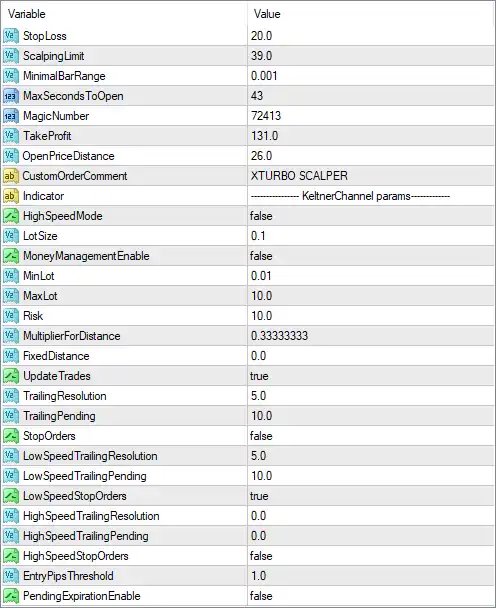
The supplied configuration shows a 20.0 Stop Loss, 131.0 Take Profit, 39.0 Scaling Limit, 0.1 lot size, Magic Number 72413, and the custom trade comment “XTURBO SCALPER.” The EA also includes separate controls for low-speed and high-speed trailing behavior, allowing traders to customize how positions are managed under different market conditions.
🔢 Reactor Scalper EA MT4 Settings Explained
🔄 Core Trading Settings
🔹 StopLoss: 20.0 — Sets the Stop Loss distance to 20.0 according to the EA's internal price-distance unit.
🔹 ScalpingLimit: 39.0 — Sets the scalping limit parameter to 39.0, controlling a key threshold within the EA's scalping logic.
🔹 MinimalBarRange: 0.001 — Sets the minimum required bar range to 0.001, helping define the minimum price movement considered by the strategy.
🔹 MaxSecondsToOpen: 43 — Sets the maximum permitted time for opening a trade to 43 seconds, according to the EA's execution logic.
🔹 MagicNumber: 72413 — Assigns 72413 as the EA's Magic Number, allowing MT4 to identify and manage Reactor Scalper positions separately from other trades.
🔹 TakeProfit: 131.0 — Sets the Take Profit distance to 131.0 according to the EA's internal price-distance unit.
🔹 OpenPriceDistance: 26.0 — Sets the required or permitted distance from the reference/open price to 26.0, according to the EA's internal entry logic.
🔹 CustomOrderComment: XTURBO SCALPER — Sets the trade comment to XTURBO SCALPER, making positions generated by the EA easier to identify.
🔄 Keltner Channel Parameters
🔹 Indicator: KeltnerChannel params — Identifies the indicator configuration section as Keltner Channel parameters, indicating that the EA's market/entry logic incorporates Keltner Channel-related calculations.
🔹 HighSpeedMode: false — Disables the high-speed trading mode.
🔄 Lot Size & Money Management
🔹 LotSize: 0.1 — Sets the configured trading volume to 0.1 lots.
🔹 MoneyManagementEnable: false — Disables the EA's automatic money-management system.
🔹 MinLot: 0.01 — Sets the minimum permitted lot size to 0.01 lots.
🔹 MaxLot: 10.0 — Sets the maximum permitted lot size to 10.0 lots.
🔹 Risk: 10.0 — Sets the configured risk parameter to 10.0. Because MoneyManagementEnable = false, the displayed fixed LotSize = 0.1 is the relevant active position-size setting.
🔄 Distance & Trade Update Settings
🔹 MultiplierForDistance: 0.33333333 — Sets the distance multiplier to 0.33333333, controlling how the EA scales or calculates certain price distances.
🔹 FixedDistance: 0.0 — Sets the fixed-distance parameter to 0.0, meaning no fixed distance is configured through this parameter.
🔹 UpdateTrades: true — Enables updating or modifying existing trades according to the EA's trade-management logic.
🔄 Trailing Stop Settings
🔹 TrailingResolution: 5.0 — Sets the trailing-stop resolution to 5.0, determining the precision or increment used when updating trailing protection.
🔹 TrailingTrending: 10.0 — Sets the trailing parameter for trending conditions to 10.0.
🔹 StopOrders: false — Disables the Stop Orders function in the displayed configuration.
🔄 Low-Speed Trailing Settings
🔹 LowSpeedTrailingResolution: 5.0 — Sets the low-speed trailing resolution to 5.0.
🔹 LowSpeedTrailingPending: 10.0 — Sets the low-speed trailing pending parameter to 10.0.
🔹 LowSpeedStopOrders: true — Enables Stop Orders under the low-speed trading configuration.
🔄 High-Speed Trailing Settings
🔹 HighSpeedTrailingResolution: 0.0 — Sets the high-speed trailing resolution to 0.0.
🔹 HighSpeedTrailingPending: 0.0 — Sets the high-speed trailing pending parameter to 0.0.
🔹 HighSpeedStopOrders: false — Disables Stop Orders under the high-speed configuration.
🔄 Entry & Pending Order Settings
🔹 EntryPipsThreshold: 1.0 — Sets the entry threshold to 1.0 pip, defining the configured minimum/reference price movement for entry conditions.
🔹 PendingExpansionEnable: false — Disables pending-order expansion in the displayed configuration.
🔄 Key Configuration Highlights
🔹 Stop Loss: The EA uses StopLoss = 20.0.
🔹 Take Profit: The configured Take Profit is 131.0.
🔹 Trade Identification: MagicNumber = 72413 identifies Reactor Scalper's trades.
🔹 Trade Comment: Positions are labeled XTURBO SCALPER.
🔹 Lot Size: The configured LotSize is 0.1 lots, with a minimum of 0.01 and maximum of 10.0 lots.
🔹 Money Management: MoneyManagementEnable = false, so automatic money management is disabled.
🔹 Risk Parameter: The displayed risk value is 10.0, although the fixed lot configuration is being used while money management is disabled.
🔹 Scalping Threshold: ScalpingLimit = 39.0, defining an important threshold in the EA's scalping logic.
🔹 Entry Timing: MaxSecondsToOpen = 43, limiting the configured trade-opening time window to 43 seconds.
🔹 Price Distance: OpenPriceDistance = 26.0, while MultiplierForDistance = 0.33333333 controls distance calculations.
🔹 Keltner Channel: The indicator section identifies KeltnerChannel as part of the EA's configured indicator logic.
🔹 High-Speed Mode: HighSpeedMode = false, so the dedicated high-speed mode is disabled.
🔹 Trade Updates: UpdateTrades = true, allowing the EA to update existing trades according to its management rules.
🔹 Low-Speed Stop Orders: LowSpeedStopOrders = true, while the general StopOrders = false.
🔹 High-Speed Stop Orders: HighSpeedStopOrders = false, so high-speed Stop Orders are disabled.
🔹 Pending Expansion: PendingExpansionEnable = false, meaning pending-order expansion is disabled.
🔹 Entry Threshold: EntryPipsThreshold = 1.0, providing a 1.0-pip entry threshold.
🔄 Risk & Execution Considerations
🔹 Fixed Position Size: With LotSize = 0.1 and MoneyManagementEnable = false, the EA is configured around a fixed 0.1-lot position size rather than actively calculating lots from the Risk = 10.0 parameter.
🔹 Lot Limits: The permitted lot range is displayed as 0.01 to 10.0 lots, giving the EA a broad configurable position-size range.
🔹 Stop Loss vs. Take Profit: The displayed values are 20.0 SL and 131.0 TP, creating a numerical TP-to-SL relationship of approximately 6.55:1 if both values use the same unit.
🔹 Trailing Management: The EA has multiple trailing parameters, including TrailingResolution = 5.0, TrailingTrending = 10.0, LowSpeedTrailingResolution = 5.0, and LowSpeedTrailingPending = 10.0.
🔹 Speed Modes: Both HighSpeedMode = false and HighSpeedStopOrders = false, while low-speed Stop Orders are enabled.
🔹 Execution Timing: MaxSecondsToOpen = 43 provides a specific time-based execution constraint that may be important for scalping strategies.
Note: The screenshot does not explicitly specify whether values such as StopLoss = 20.0, TakeProfit = 131.0, ScalpingLimit = 39.0, and OpenPriceDistance = 26.0 are measured in points, pips, price units, or another internal unit. These units should be verified from the EA's documentation before live deployment.
🔢 Conclusion
Reactor Scalper EA MT4 provides a highly configurable scalping framework focused on fast execution, Keltner Channel-based analysis, fixed position sizing, adaptive trade updates, trailing-stop management, and different speed-sensitive order-management modes.
The supplied configuration uses LotSize = 0.1, StopLoss = 20.0, TakeProfit = 131.0, ScalpingLimit = 39.0, and MagicNumber = 72413. Automatic money management is disabled, while the EA maintains a configurable lot range from 0.01 to 10.0 lots.
The trailing architecture is particularly detailed. General trailing uses 5.0 resolution and 10.0 trending parameters, while the low-speed configuration enables Stop Orders with 5.0 resolution and 10.0 pending. High-speed Stop Orders remain disabled, consistent with HighSpeedMode = false.
For traders evaluating Reactor Scalper EA MT4, the most important parameters to test are the 20.0 Stop Loss, 131.0 Take Profit, 39.0 ScalpingLimit, 43-second MaxSecondsToOpen, 0.1 LotSize, and 10.0 Risk setting. Because the exact units and internal relationships are not fully visible in the screenshot, backtesting and forward testing on the intended broker are strongly recommended before using the EA with live capital.
Get Reactor Scalper EA MT4
Download Reactor Scalper EA MT4 with its set files, read the full product details and requirements here: Reactor Scalper EA MT4 →