

This guide walks through the inputs of Scalper Investor EA MT5 with the values recommended for live trading. The set files that come with the EA already contain these settings, so you can load them in one click and adjust only what your broker or account needs.
Scalper Investor EA MT5 Settings Guide
Scalper Investor EA MT5 is an automated trading Expert Advisor built around a multi-filter scalping framework that combines Keltner Channel analysis, Bollinger Bands, Standard Deviation, Momentum, RSI, Moving Average, CCI, ProfessionalSwing, and MACD conditions. The EA also provides configurable trading hours, spread control, fixed or automatic lot sizing, Take Profit and Stop Loss settings, and multiple entry and exit filters.
The displayed configuration is organized into several independent modules, allowing traders to activate or deactivate individual indicators according to their preferred trading conditions. This makes Scalper Investor EA MT5 highly configurable for traders who want to fine-tune entry confirmation, trade management, and market-filtering conditions.
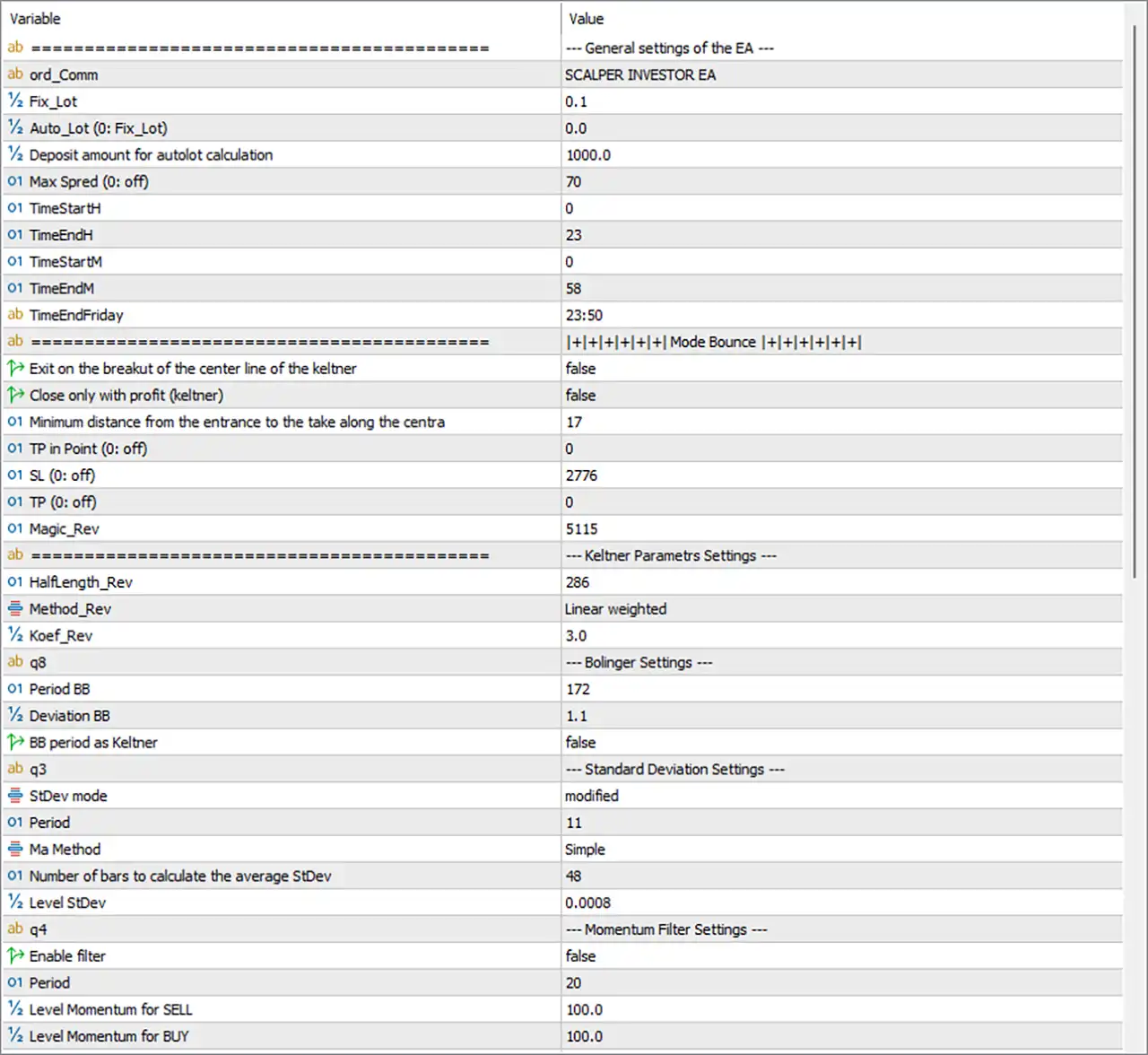
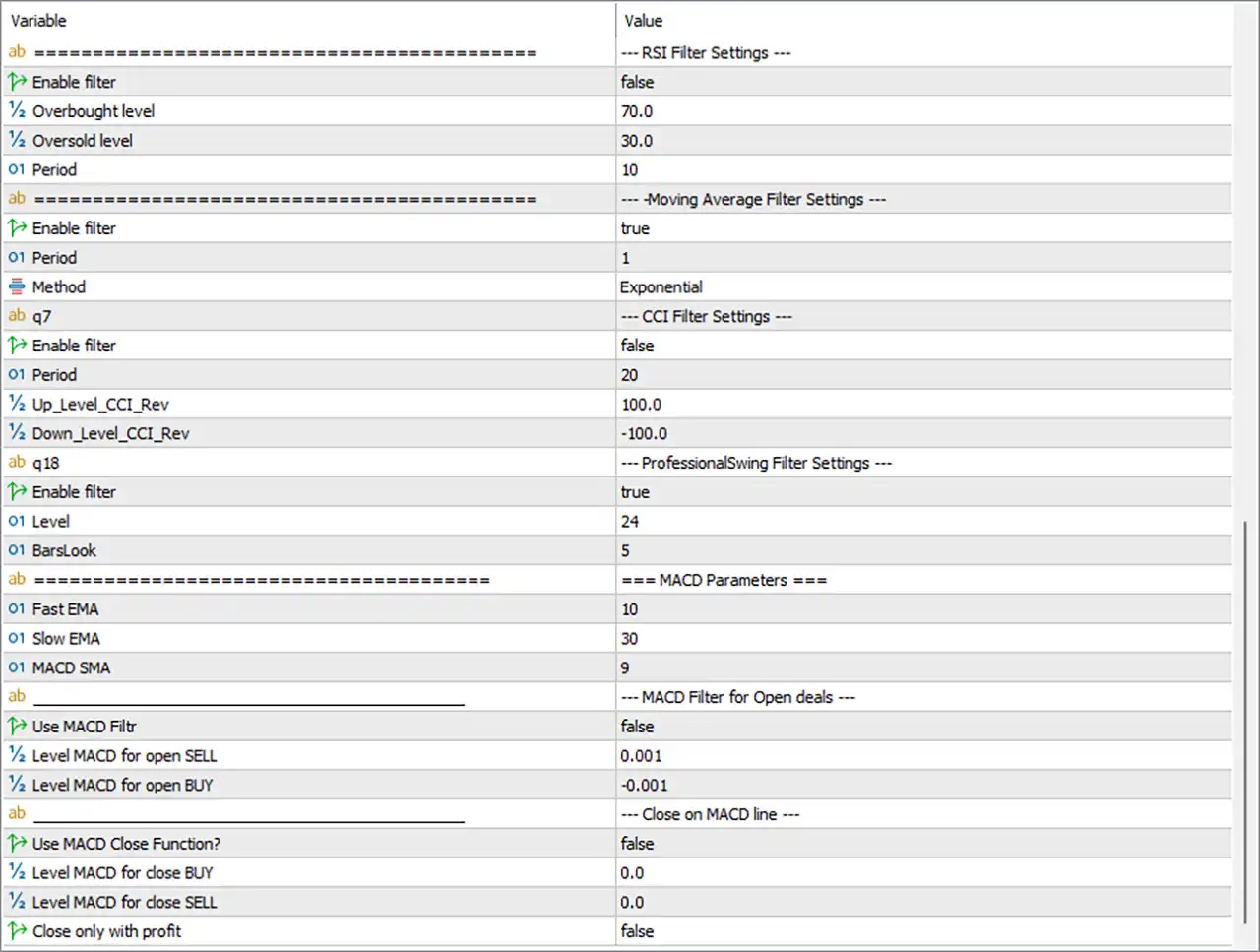
General EA Settings
🔹 ord_Comm = SCALPER INVESTOR EA — Sets the trade comment to SCALPER INVESTOR EA, making EA-generated orders easier to identify.
🔹 Fix_Lot = 0.1 — Sets the fixed lot size to 0.1 lots when fixed-lot trading is used.
🔹 Auto_Lot (0: Fix_Lot) = 0.0 — Sets the automatic lot parameter to 0.0, meaning the EA uses the Fix_Lot setting rather than automatic lot sizing.
🔹 Deposit amount for autolot calculation = 1000.0 — Defines a 1000.0 deposit amount as the reference value for automatic lot-size calculations if Auto Lot is activated.
🔹 Max Spred (0: off) = 70 — Sets the maximum allowed spread to 70 points; a value of 0 would disable the spread restriction.
🔹 TimeStartH = 0 — Sets the trading start hour to 00:00.
🔹 TimeEndH = 23 — Sets the trading end hour to 23:00.
🔹 TimeStartM = 0 — Sets the trading start minute to 00.
🔹 TimeEndM = 58 — Sets the trading end minute to 58.
🔹 TimeEndFriday = 23:50 — Sets the Friday trading end time to 23:50.
Mode Bounce Settings
🔹 Exit on the breakout of the center line of the keltner = false — Disables closing a trade when price breaks through the Keltner Channel center line.
🔹 Close only with profit (keltner) = false — Disables the requirement that a Keltner-based exit must close the trade only when it is profitable.
🔹 Minimum distance from the entrance to the take along the centra = 17 — Sets the minimum distance from the entry point to the Keltner center-line target at 17 according to the EA's internal calculation.
🔹 TP in Point (0: off) = 0 — Sets the direct Take Profit to 0 points, which disables this fixed TP method.
🔹 SL (0: off) = 2776 — Sets the Stop Loss parameter to 2776 according to the EA's internal point calculation.
🔹 TP (0: off) = 0 — Sets the additional Take Profit parameter to 0, meaning this specific TP function is disabled.
🔹 Magic_Rev = 5115 — Sets the Magic Number for this strategy/reversal module to 5115.
Keltner Parameters Settings
🔹 Halflength_Rev = 286 — Sets the Keltner/reversal calculation half-length to 286 periods.
🔹 Method_Rev = Linear weighted — Uses the Linear Weighted calculation method for the reversal Keltner component.
🔹 Koef_Rev = 3.0 — Sets the Keltner/reversal coefficient to 3.0, controlling the channel calculation multiplier.
Bollinger Settings
🔹 Period BB = 172 — Sets the Bollinger Bands period to 172.
🔹 Deviation BB = 1.1 — Sets the Bollinger Bands deviation multiplier to 1.1.
🔹 BB period as Keltner = false — Disables using the Bollinger Bands period as the Keltner calculation period.
Standard Deviation Settings
🔹 StDev mode = modified — Selects the modified Standard Deviation calculation mode.
🔹 Period = 11 — Sets the Standard Deviation calculation period to 11.
🔹 Ma Method = Simple — Uses the Simple Moving Average (SMA) method in the Standard Deviation calculation.
🔹 Number of bars to calculate the average StDev = 48 — Uses 48 bars to calculate the average Standard Deviation.
🔹 Level StDev = 0.0008 — Sets the Standard Deviation threshold level to 0.0008.
Momentum Filter Settings
🔹 Enable filter = false — Disables the Momentum filter.
🔹 Period = 20 — Sets the Momentum indicator period to 20.
🔹 Level Momentum for SELL = 100.0 — Sets the Momentum threshold for SELL signals to 100.0.
🔹 Level Momentum for BUY = 100.0 — Sets the Momentum threshold for BUY signals to 100.0.
RSI Filter Settings
🔹 Enable filter = false — Disables the RSI filter.
🔹 Overbought level = 70.0 — Sets the RSI overbought threshold to 70.0.
🔹 Oversold level = 30.0 — Sets the RSI oversold threshold to 30.0.
🔹 Period = 10 — Sets the RSI calculation period to 10.
Moving Average Filter Settings
🔹 Enable filter = true — Enables the Moving Average filter.
🔹 Period = 1 — Sets the Moving Average period to 1.
🔹 Method = Exponential — Selects the Exponential Moving Average (EMA) calculation method.
CCI Filter Settings
🔹 Enable filter = false — Disables the CCI filter.
🔹 Period = 20 — Sets the CCI calculation period to 20.
🔹 Up_Level_CCI_Rev = 100.0 — Sets the upper CCI reversal level to 100.0.
🔹 Down_Level_CCI_Rev = -100.0 — Sets the lower CCI reversal level to -100.0.
ProfessionalSwing Filter Settings
🔹 Enable filter = true — Enables the ProfessionalSwing filter.
🔹 Level = 24 — Sets the ProfessionalSwing filter level to 24.
🔹 BarsLook = 5 — Sets the number of bars examined by the ProfessionalSwing filter to 5.
MACD Parameters
🔹 Fast EMA = 10 — Sets the MACD fast EMA period to 10.
🔹 Slow EMA = 30 — Sets the MACD slow EMA period to 30.
🔹 MACD SMA = 9 — Sets the MACD signal/SMA period to 9.
MACD Filter for Open Deals
🔹 Use MACD Filter = false — Disables the MACD filter for opening new trades.
🔹 Level MACD for open SELL = 0.001 — Sets the MACD threshold for opening SELL positions to 0.001.
🔹 Level MACD for open BUY = -0.001 — Sets the MACD threshold for opening BUY positions to -0.001.
Close on MACD Line Settings
🔹 Use MACD Close Function? = false — Disables the MACD-based trade-closing function.
🔹 Level MACD for close BUY = 0.0 — Sets the MACD closing level for BUY positions to 0.0.
🔹 Level MACD for close SELL = 0.0 — Sets the MACD closing level for SELL positions to 0.0.
🔹 Close only with profit = false — Disables the requirement that MACD-based closing must occur only when the position is profitable.
Current Configuration Summary
🔹 Lot Management: The EA uses Fix_Lot = 0.1, while Auto_Lot = 0.0, so the displayed configuration is based on the fixed lot setting.
🔹 Spread Protection: The maximum spread is set to 70 points and is active because the value is not 0.
🔹 Trading Schedule: Normal trading hours are configured from 00:00 to 23:58, while Friday trading ends at 23:50.
🔹 Keltner Strategy: The Keltner reversal module uses Halflength = 286, Linear weighted calculation, and Koef = 3.0.
🔹 Bollinger Bands: Bollinger Bands use Period = 172 and Deviation = 1.1.
🔹 Standard Deviation: The configuration uses modified StDev mode, Period = 11, 48 bars, and Level StDev = 0.0008.
🔹 Momentum Filter: The Momentum filter is disabled, with Period = 20 and both BUY and SELL levels set to 100.0.
🔹 RSI Filter: The RSI filter is disabled, using Period = 10, Overbought = 70.0, and Oversold = 30.0.
🔹 Moving Average Filter: The MA filter is enabled with Period = 1 and the Exponential method.
🔹 CCI Filter: The CCI filter is disabled, with Period = 20, Up Level = 100.0, and Down Level = -100.0.
🔹 ProfessionalSwing Filter: The ProfessionalSwing filter is enabled with Level = 24 and BarsLook = 5.
🔹 MACD Entry Filter: The MACD filter for opening trades is disabled, although its parameters are configured with Fast EMA = 10, Slow EMA = 30, and MACD SMA = 9.
🔹 MACD Exit Function: The MACD close function is disabled, with both BUY and SELL closing levels set to 0.0.
Important Notes About the Settings
🔹 Fixed Lot vs Auto Lot: Because Auto_Lot = 0.0, the EA uses the configured Fix_Lot = 0.1 rather than automatic lot sizing.
🔹 Spread Limit: The Max Spred = 70 setting is active because the parameter description states that 0 means off.
🔹 Take Profit: Both displayed direct TP parameters are 0, meaning those specific fixed TP functions are disabled.
🔹 Stop Loss: The SL = 2776 setting remains configured and should be interpreted according to the EA's internal point calculation.
🔹 Keltner Exit: Both Exit on the breakout of the center line = false and Close only with profit (keltner) = false, so those optional Keltner exit restrictions are disabled.
🔹 Moving Average Filter: Unlike several other filters, the MA filter is currently enabled with an EMA Period = 1.
🔹 Multiple Filters: Momentum, RSI, CCI, and MACD entry filtering are disabled, while the Moving Average and ProfessionalSwing filters are enabled.
🔹 MACD Parameters: The MACD periods remain configured even though Use MACD Filter = false, meaning the MACD entry thresholds are not currently being used as an active entry filter.
🔹 ProfessionalSwing: The ProfessionalSwing filter is active with Level = 24 and BarsLook = 5, making it one of the enabled confirmation components in the displayed setup.
Conclusion
Scalper Investor EA MT5 provides a highly configurable scalping framework combining Keltner Channels, Bollinger Bands, Standard Deviation, Moving Average, ProfessionalSwing, Momentum, RSI, CCI, and MACD modules. The EA also provides configurable lot sizing, spread protection, trading schedules, Take Profit, Stop Loss, and strategy-specific exit conditions.
The displayed configuration uses a 0.1 fixed lot, a 70-point maximum spread, trading hours from 00:00 to 23:58, and a Friday cutoff of 23:50. The Keltner module uses 286 half-length and a 3.0 coefficient, while Bollinger Bands use 172 periods and 1.1 deviation.
Among the indicator filters, the Moving Average filter and ProfessionalSwing filter are enabled, while the Momentum, RSI, CCI, and MACD entry filters are disabled. This configuration therefore places greater emphasis on the enabled MA and ProfessionalSwing components while retaining detailed settings for the other optional confirmation modules.
Before using the EA on a live account, traders should verify the EA's point calculations, especially the SL = 2776, Max Spread = 70, and other distance-based values, against the broker's symbol specifications.
FAQs
❓ What lot size does Scalper Investor EA MT5 use?
The displayed configuration uses Fix_Lot = 0.1. Auto_Lot = 0.0, so the automatic lot-sizing mode is not active.
❓ What indicators does Scalper Investor EA MT5 use?
The Inputs include Keltner, Bollinger Bands, Standard Deviation, Momentum, RSI, Moving Average, CCI, ProfessionalSwing, and MACD settings.
❓ Which filters are enabled in the current configuration?
The Moving Average filter and ProfessionalSwing filter are enabled. Momentum, RSI, CCI, and MACD entry filters are disabled.
❓ What are the Bollinger Bands settings?
The EA uses Period BB = 172 and Deviation BB = 1.1. The BB period as Keltner option is set to false.
❓ What are the MACD settings in Scalper Investor EA MT5?
The MACD uses Fast EMA = 10, Slow EMA = 30, and MACD SMA = 9. However, Use MACD Filter = false and Use MACD Close Function = false, so the MACD functions are currently disabled.
Get Scalper Investor EA MT5
Download Scalper Investor EA MT5 with its set files, read the full product details and requirements here: Scalper Investor EA MT5 →