


Scalping Enslaver EA MT4 (Platform build 1476+)

Subscriptions for Special Plan
- 30 EA package is more economical!
- Special package with 99%
- Download 1 EA/Day

Subscriptions for Premium Membership
- Download Unlimited in 1 Year
- Get 100% Discount
- Get free access to all

Subscriptions for Gold Membership
- 1 Year Membership
- Get 100% Discount
- Access EA+Indicator+Course
Frequently bought together 🎁
Add these products to enhance your purchase




What is Scalping Enslaver EA?
Scalping Enslaver EA is an Expert advisor (EA) designed to operate autonomously using “Enslaver” on the MetaTrader 4 platform. This trading EA diligently scans the market to pinpoint optimal moments for initiating trading orders, particularly focusing on capturing price reversals subsequent to sudden and volatile market movements.
It employs specialized technical indicators for market analysis, catering to the needs of professional traders, including those capable of trading with Prop firms like FTMO.
Key Features of Scalping Enslaver EA
🔹Beginner-Friendly Design: Tailored for novices, guaranteeing straightforward installation and user-friendly operation.
🔹Automated Money Management: Determines the ideal trade size to minimize risk and optimize capital management.
🔹Smart Market Analysis: Utilizes technical indicators to achieve a trade execution accuracy of over 95%.
🔹Trailing Stops for Optimal Returns: Dynamically adjusts Stop Loss (SL) levels to lock in profits and limit losses.
🔹Impressive Performance: Exhibits remarkable efficiency, with potential monthly growth ranging from 5% to 100%.
Key Benefits
🔹Professional tools: Integrate premium features and efficiently trade with PropFirms companies.
🔹Verified tool: Proven effective on the FXBlue system, statistics show a steady increase in performance.
🔹Easy to set up and use: Install on the VPS system once and the EA does all the trading work for the trader.
Scalping Enslaver EA Review
The Scalping Enslaver EA stands out as one of the most stable and low-risk trading bots on the market. With an outstanding total return of +4,348.47%, very low drawdowns and a stable monthly return, this EA offers the perfect balance between profit and protection. Scalping Enslaver is ideal for traders looking for long-term, automated profits without taking on high risks.
✅ Total Gain: +4,348.47%
✅ Profit: $46,347.49
✅ Monthly Growth: 13.22%
✅ Maximum Drawdown: 4.78%
Scalping Enslaver EA Review

Scalping Enslaver EA Reviews

Scalping Enslaver MT4 Review
Trading Specifications
Recommended settings and parameters to pay attention to from developers and experts:
| Features | Type |
|---|---|
| Trading platform | MetaTrader 4 (MT4) |
| Minimum / Recommended deposit | $500+ |
| Minimum / Recommended leverage | 1:30+ |
| Time frames | M5 (5 minute chart) |
| Currency pairs | GOLD, GBPUSD, AUDCAD, EURGBP and EURAUD. (Any Pairs) |
| Product type | NoDLL / Unlimited / Unlocked |
| Additional services | Unlock And Decompile |
| Recommended brokers | Exness Broker, Icmarkets Broker |
| Recommended VPS | MyfxVPS.com ( Blue VPS, Golden VPS). Lowest Latency, 2 week Free Trial, 100% Free for 12-18 Months. |
What’s in the package?
The download package of the product suite includes:
✅ Experts: Scalping Enslaver EA.ex4
✅ URLs.txt
✅ How to install Scalping Enslaver EA.pdf
➡️ Reviewed by David Easton
Conclusion
In short, Scalping Enslaver EA is a powerful and intelligent forex trading robot for MetaTrader 4 (MT4), engineered to deliver low-risk, high-accuracy trades by capturing sharp price reversals after sudden market movements. Designed for both beginner and professional traders, including those working with Prop firms like FTMO, this EA offers a fully automated solution with smart technical indicators, dynamic trailing stops, and automated money management for optimized performance.
🔢 Scalping Enslaver EA MT4 – Complete Settings & Configuration Guide
Scalping Enslaver EA MT4 is an automated scalping Expert Advisor designed to combine Buy & Sell rotation, adaptive lot sizing, progressive position management, technical filters, news protection, and scheduled trading. Its configuration provides detailed control over trade frequency, position distance, lot growth, risk limits, market volatility filtering, and trading sessions.
The settings shown below represent the complete configuration visible in the supplied image, with all values, numbers, modes, and on/off states preserved exactly.
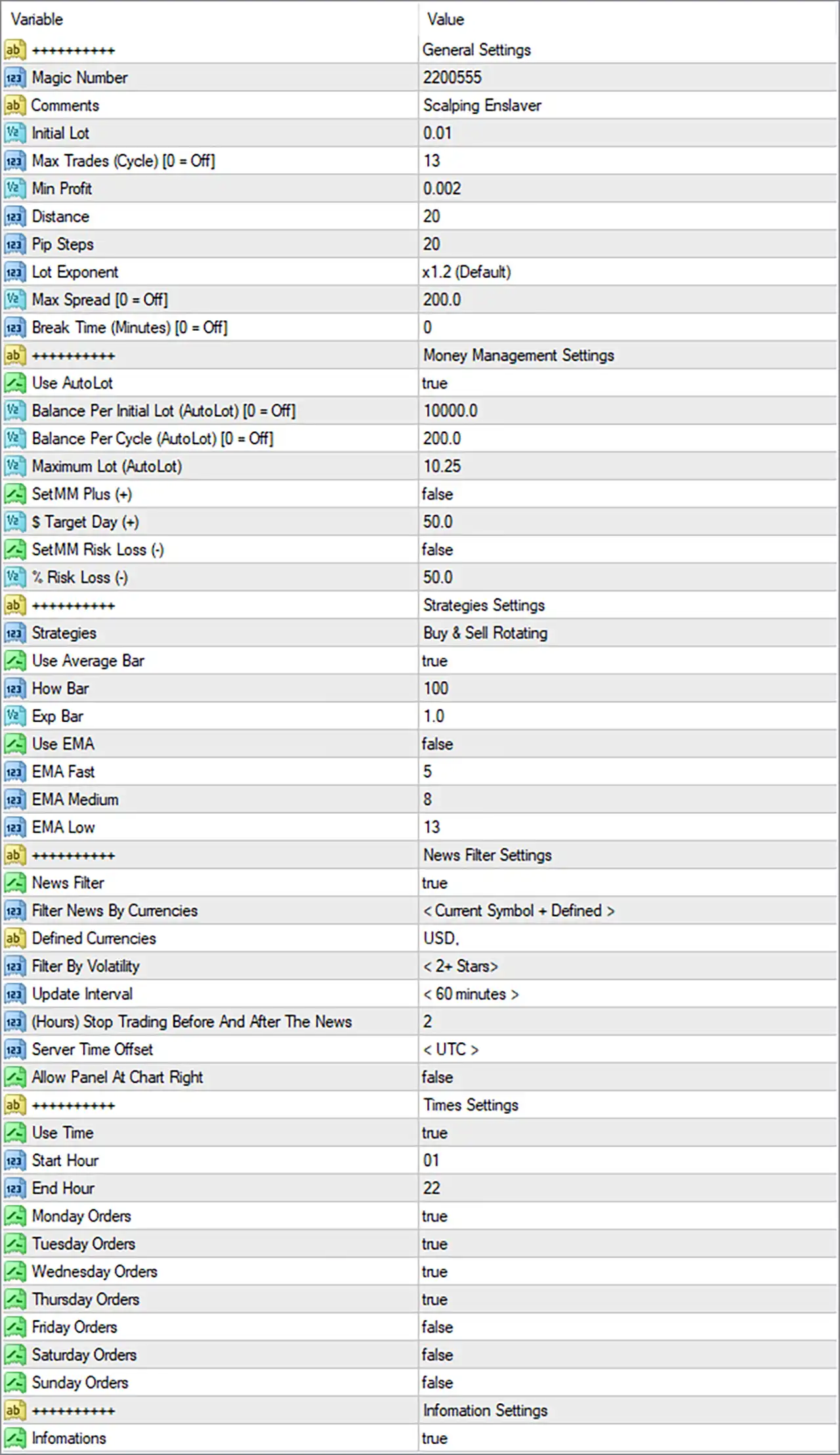
Scalping Enslaver EA Settings Panel
🔄 General Settings
🔹 Magic Number = 2200555 — Unique identifier used by the EA to distinguish its own trades from other trading systems or manual positions.
🔹 Comments = Scalping Enslaver — Defines the trade/order comment attached to positions created by the EA.
🔹 Initial Lot = 0.01 — Sets the initial trading volume to 0.01 lot before any automatic lot calculation or progression is applied.
🔹 Max Trades (Cycle) [0 = Off] = 13 — Limits the number of trades within one trading cycle to 13; 0 would disable this limit.
🔹 Min Profit = 0.002 — Defines the minimum profit threshold required by the EA’s profit-management logic.
🔹 Distance = 20 — Sets the configured distance between applicable trades/orders to 20 points according to the EA’s internal distance calculation.
🔹 Pip Steps = 20 — Sets the step distance to 20 pips/points according to the EA’s internal pip-step calculation.
🔹 Lot Exponent = x1.2 (Default) — Uses a 1.2× lot progression factor when the EA increases position size according to its scaling logic.
🔹 Max Spread [0 = Off] = 200.0 — Restricts trading when spread exceeds 200.0; 0 would turn the spread restriction off.
🔹 Break Time (Minutes) [0 = Off] = 0 — Sets the trading break duration to 0 minutes, meaning the break-time function is disabled.
🔄 Money Management Settings
🔹 Use AutoLot = true — Enables automatic lot-size calculation.
🔹 Balance Per Initial Lot (AutoLot) [0 = Off] = 10000.0 — Defines 10000.0 units of account balance as the reference amount for the initial automatic lot calculation; 0 would disable this AutoLot parameter.
🔹 Balance Per Cycle (AutoLot) [0 = Off] = 200.0 — Defines 200.0 balance units as the reference increment for automatic lot calculation per cycle; 0 would disable this parameter.
🔹 Maximum Lot (AutoLot) = 10.25 — Caps the automatically calculated position size at 10.25 lots.
🔹 SetMM Plus (+) = false — Disables the additional positive money-management adjustment.
🔹 $ Target Day (+) = 50.0 — Sets the daily positive target parameter to 50.0 in account-currency terms.
🔹 SetMM Risk Loss (-) = false — Disables the additional money-management risk-loss adjustment.
🔹 % Risk Loss (-) = 50.0 — Sets the risk-loss parameter to 50.0% when the corresponding SetMM Risk Loss (-) feature is activated.
🔄 Strategies Settings
🔹 Strategies = Buy & Sell Rotating — Configures the EA to rotate between Buy and Sell trading directions according to its strategy logic.
🔹 Use Average Bar = true — Enables the Average Bar calculation/filter used by the EA’s strategy logic.
🔹 How Bar = 100 — Sets the number of bars used for the Average Bar calculation/reference to 100.
🔹 Exp Bar = 1.0 — Sets the expansion-bar parameter to 1.0.
🔹 Use EMA = false — Disables the EMA-based strategy filter.
🔹 EMA Fast = 5 — Sets the Fast EMA period to 5; it is currently inactive because Use EMA = false.
🔹 EMA Medium = 8 — Sets the Medium EMA period to 8; it is currently inactive because Use EMA = false.
🔹 EMA Low = 13 — Sets the Low EMA period to 13; it is currently inactive because Use EMA = false.
🔄 News Filter Settings
🔹 News Filter = true — Enables the economic-news filtering system.
🔹 Filter News By Currencies = < Current Symbol + Defined > — Configures news filtering to consider both the current trading symbol and explicitly defined currencies.
🔹 Defined Currencies = USD. — Adds USD as the explicitly defined currency for news filtering.
🔹 Filter By Volatility = < 2+ Stars > — Configures the EA to filter news events according to a volatility rating of 2+ Stars.
🔹 Update Interval = < 60 minutes > — Sets the news-calendar update interval to 60 minutes.
🔹 (Hours) Stop Trading Before And After The News = 2 — Configures the EA to stop trading 2 hours before and 2 hours after qualifying news events.
🔹 Server Time Offset = < UTC > — Uses UTC as the configured server-time offset reference for the news filter.
🔹 Allow Panel At Chart Right = false — Disables positioning the information panel at the right side of the chart.
🔄 Times Settings
🔹 Use Time = true — Enables the EA’s trading-time restriction.
🔹 Start Hour = 01 — Sets the trading start hour to 01.
🔹 End Hour = 22 — Sets the trading end hour to 22.
🔹 Monday Orders = true — Allows the EA to place orders on Monday.
🔹 Tuesday Orders = true — Allows the EA to place orders on Tuesday.
🔹 Wednesday Orders = true — Allows the EA to place orders on Wednesday.
🔹 Thursday Orders = true — Allows the EA to place orders on Thursday.
🔹 Friday Orders = false — Prevents the EA from placing orders on Friday.
🔹 Saturday Orders = false — Prevents the EA from placing orders on Saturday.
🔹 Sunday Orders = false — Prevents the EA from placing orders on Sunday.
🔄 Information Settings
🔹 Infomations = true — Enables the EA’s information/display functionality.
🔢 Key Configuration Highlights
🔹 Automatic position sizing is active: Use AutoLot = true, with Balance Per Initial Lot = 10000.0 and Maximum Lot = 10.25.
🔹 The EA uses progressive lot sizing: Lot Exponent = x1.2 (Default) provides a 1.2× progression factor when the relevant strategy logic increases lot size.
🔹 The trading cycle is limited: Max Trades (Cycle) = 13, preventing the cycle from exceeding the configured 13 trades.
🔹 The EMA filter is inactive: Although EMA Fast = 5, EMA Medium = 8, and EMA Low = 13 are configured, Use EMA = false, so the EMA filter is not currently enabled.
🔹 News protection is active: News Filter = true, with USD defined and < 2+ Stars > volatility filtering.
🔹 News trading protection is substantial: The EA is configured to stop trading 2 hours before and after qualifying news events.
🔹 Trading is restricted by schedule: The active window is 01–22, with orders enabled Monday through Thursday and disabled Friday through Sunday.
🔹 Friday trading is disabled: Friday Orders = false, even though the general trading schedule is otherwise active.
🔹 Spread protection is configured: Max Spread = 200.0, while 0 would turn this restriction off.
🔹 Break Time is disabled: Break Time = 0, meaning no configured trading break is applied.
🔢 Conclusion
Scalping Enslaver EA MT4 offers a highly configurable framework for automated scalping, combining rotational Buy/Sell strategy logic, automatic lot sizing, progressive position management, Average Bar analysis, news filtering, and scheduled trading.
The supplied configuration is particularly notable for AutoLot = true, Maximum Lot = 10.25, Lot Exponent = x1.2, and Max Trades (Cycle) = 13. At the same time, the EA has active news protection, filtering 2+ Star events and using a 2-hour trading pause before and after qualifying news.
Trading is currently enabled from 01 to 22, Monday through Thursday, while Friday, Saturday, and Sunday are disabled. The EMA system is configured with periods 5, 8, and 13, but remains disabled through Use EMA = false.
Because automatic lot scaling and a 10.25-lot maximum can materially affect exposure, traders should carefully evaluate the EA’s position-sizing behavior, maximum cycle size, spread conditions, and news protection through backtesting and demo testing before considering live deployment.
🔢 FAQs
❓ What is the initial lot size of Scalping Enslaver EA MT4?
The configured Initial Lot is 0.01. However, Use AutoLot = true, so the actual trading volume can be calculated automatically according to the AutoLot settings.
❓ What is the maximum automatic lot size?
The Maximum Lot (AutoLot) is set to 10.25 lots.
❓ Does Scalping Enslaver EA MT4 use an EMA filter?
No. Use EMA = false. The EMA parameters are nevertheless configured as EMA Fast = 5, EMA Medium = 8, and EMA Low = 13.
❓ Does the EA have an economic news filter?
Yes. News Filter = true, with USD defined, < 2+ Stars > volatility filtering, a < 60 minutes > update interval, and 2 hours of trading protection before and after qualifying news.
❓ Which days does the EA currently trade?
Trading is enabled from 01 to 22 on Monday, Tuesday, Wednesday, and Thursday. Friday Orders = false, Saturday Orders = false, and Sunday Orders = false.
User Reviews
Only logged in customers who have purchased this product may leave a review.
❓ What is Scalping Enslaver EA and how does it work?
Scalping Enslaver EA is an automated Forex trading robot for MetaTrader 4, designed to detect price reversals after volatile movements and execute trades based on technical indicator signals with over 95% accuracy.
❓ Is this EA suitable for beginners?
Yes, it is beginner-friendly, featuring easy installation, automated money management, and a fully autonomous operation, making it ideal for novice traders.
❓ What currency pairs and timeframes does it support?
It is optimized for M5 timeframe and works best on GOLD, GBPUSD, AUDCAD, EURGBP, and EURAUD, though it's also compatible with any currency pair.
❓ How much capital is required to start using Scalping Enslaver EA?
The minimum recommended deposit is $500, with a leverage of 1:30 or higher for optimal performance and safety.
❓ Does the EA include risk management features?
Yes, the EA comes with automated money management, trailing stop-loss, and a low drawdown profile (as low as 4.78%) to protect your capital.
❓ What kind of returns can I expect from using this EA?
Backtest and live data show up to +4,348.47% total gain, with a monthly growth of approximately 13.22%, depending on market conditions and risk settings.
❓ Can this EA be used for Prop Firm trading like FTMO?
Yes, the Scalping Enslaver EA is designed to meet the risk and performance requirements of Prop Firm challenges such as FTMO, making it a great tool for professional traders.
❓ Does the EA require manual intervention or constant monitoring?
No, it works in a fully automated environment. Once installed on a VPS or terminal, the EA manages all trades independently without human intervention.
❓ How is Scalping Enslaver EA different from other scalping bots?
It provides a balance of safety and profitability, featuring advanced market scanning, dynamic SL management, and FXBlue-verified results with very low drawdown.
❓ Is the performance of the EA verified?
Yes, the EA's results are verified via the FXBlue system, showing steady, consistent growth and low-risk behavior in both backtests and live environments.
🔥 Get This EA for FREE with Our Membership! 🚀🚀
Unlock access to this EA, premium Indicators, and exclusive trading tools completely FREE with any of our Membership Plans! Thousands of traders already benefit from our VIP library—join them and level up your trading instantly. Choose Your Membership:
- SPECIAL – 1 Month Membership
- GOLD – 1 Year Membership
- PREMIUM – 1 Year Membership
-
 Original price was: $8,000.00.$249.00Current price is: $249.00.
-
 Original price was: $7,000.00.$249.00Current price is: $249.00.
-
 Original price was: $8,000.00.$249.00Current price is: $249.00.
-
 Original price was: $25,000.00.$249.00Current price is: $249.00.
-
 1Original price was: $1,599.00.$59.00Current price is: $59.00.
-
 1Original price was: $11,000.00.$89.00Current price is: $89.00.
-
 3Original price was: $999.00.$69.00Current price is: $69.00.
-
 1Original price was: $950.00.$59.00Current price is: $59.00.
There are no reviews yet.