🔶 What is Severa MT5?
Severa MT5 is an automated trading Expert Advisor (EA) developed for the MetaTrader 5 platform. The EA appears to use a structured pending order strategy combined with virtual stop loss, trailing stop, and trade management features. By placing pending orders at predefined distances and managing positions through internal logic, Severa EA aims to capture market movements while maintaining flexible risk control.
🔶 Basic Trading Parameters
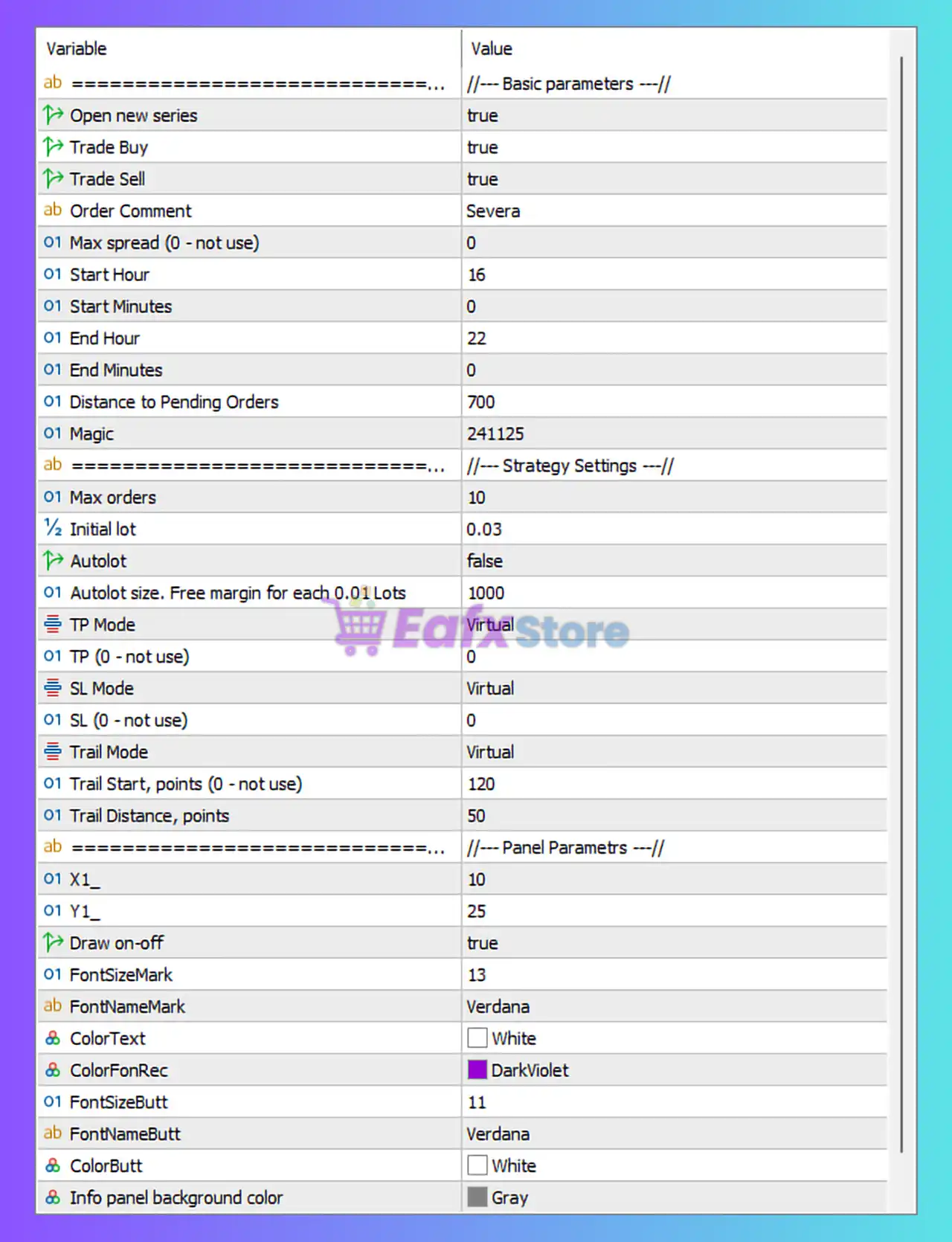
| Parameter | Value | Explanation |
|---|---|---|
| Open New Series | true | Enables the EA to start a new trading cycle once the previous sequence of trades is completed. |
| Trade Buy | true | Allows the EA to open buy positions when trading conditions are met. |
| Trade Sell | true | Allows the EA to open sell positions when trading conditions are satisfied. |
| Order Comment | Severa | Adds a custom label to each trade for identification in the trading history. |
| Max Spread | 0 | Spread filtering is disabled. The EA will not restrict trading based on spread levels. |
| Start Hour | 16 | Defines the hour when the EA begins trading activity. |
| Start Minutes | 0 | Specifies the exact minute when trading starts. |
| End Hour | 22 | Defines the hour when the EA stops opening new trades. |
| End Minutes | 0 | Specifies the exact minute when trading ends. |
| Distance to Pending Orders | 700 | Distance in points between the current market price and pending orders placed by the EA. |
| Magic Number | 241125 | Unique identifier used by the EA to manage its own trades. |
➡️ These parameters define the EA’s operational environment and trading schedule.
🔶 Strategy Settings
| Parameter | Value | Explanation |
|---|---|---|
| Max Orders | 10 | Maximum number of trades allowed in a trading cycle. |
| Initial Lot | 0.03 | Starting lot size used when opening the first trade. |
| Autolot | false | Automatic lot calculation is disabled, so the EA uses a fixed lot size. |
| Autolot Size | 1000 | Defines margin requirements for auto lot calculation if enabled. |
| TP Mode | Virtual | Take profit is handled internally by the EA rather than through broker-level orders. |
| TP | 0 | No fixed take profit is set directly in the trading platform. |
| SL Mode | Virtual | Stop loss is controlled internally by the EA instead of being sent to the broker. |
| SL | 0 | No hard stop loss level is defined. |
| Trail Mode | Virtual | Trailing stop is handled internally by the EA. |
| Trail Start | 120 points | Trailing stop activates once the trade gains 120 points in profit. |
| Trail Distance | 50 points | Defines the distance between the trailing stop and current price. |
➡️ Virtual stop management can help hide exit levels from the broker.
🔶 Trading Panel & Visual Settings
| Parameter | Value | Explanation |
|---|---|---|
| Panel Position X | 10 | Horizontal position of the EA dashboard on the chart. |
| Panel Position Y | 25 | Vertical position of the EA dashboard. |
| Draw On/Off | true | Enables display of the EA control panel on the chart. |
| Font Size Mark | 13 | Font size used for text labels displayed by the EA. |
| Font Name Mark | Verdana | Font used for informational labels on the chart. |
| Color Text | White | Color used for panel text elements. |
| Color Font Rectangle | DarkViolet | Color of panel background highlight areas. |
| Button Font Size | 11 | Font size used for control buttons. |
| Button Font | Verdana | Font style used for EA panel buttons. |
| Button Color | White | Color of the panel buttons. |
| Info Panel Background | Gray | Background color of the EA information panel. |
➡️ These parameters only affect the visual interface and do not influence trading logic.
🔶 Strategy Overview
Severa MT5 appears to use a pending order strategy, placing orders at a fixed distance from the current price. When price reaches these levels, trades are triggered automatically.
The EA then manages the positions using virtual stop loss, take profit, and trailing stop mechanisms, allowing more flexible control over exit conditions.
➡️ This type of strategy is commonly used to capture breakout or momentum moves in the market.
🔶 Risk Management Perspective
Key risk-related elements in Severa EA include:
- Maximum trade limit of 10 orders
- Fixed starting lot size for predictable exposure
- Trailing stop to secure profits
- Virtual stop loss and take profit management
➡️ However, because the EA uses virtual stop loss instead of broker-side stop orders, traders should ensure the platform remains connected to maintain proper risk control.
🔶 Conclusion
Severa MT5 is an automated trading system that relies on pending order placement and virtual trade management to capture price movements. With flexible trailing stop settings, fixed lot sizing, and time-based trading filters, the EA offers structured trade management while allowing traders to customize risk exposure.