
This guide walks through the inputs of Razor MT5 with the values recommended for live trading. The set files that come with the EA already contain these settings, so you can load them in one click and adjust only what your broker or account needs.
🔢 Razor MT5 – Complete Settings & Parameters Guide
Razor MT5 is a powerful automated trading Expert Advisor (EA) designed for MetaTrader 5 traders who want advanced grid trading, smart hedging, volatility filtering, dynamic profit management and economic news protection.
The EA supports multi-pair trading, One Chart Mode, FTMO-safe settings, RSI filtering, weighted take profit systems, and adaptive grid management for professional forex trading environments.

🔢 Razor MT5 General Settings
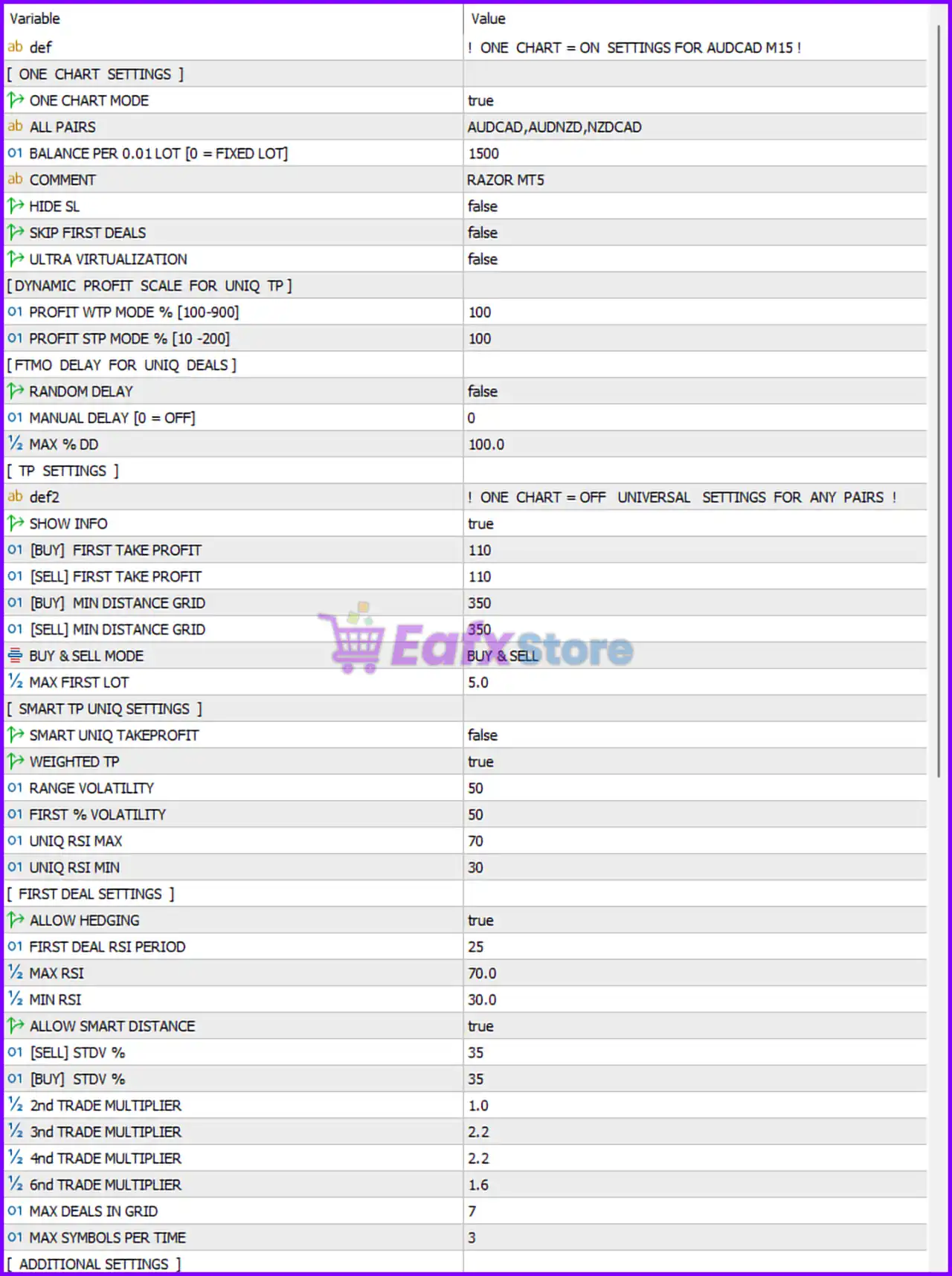
Below are the details of the parameters in the advisor’s trading system settings table:
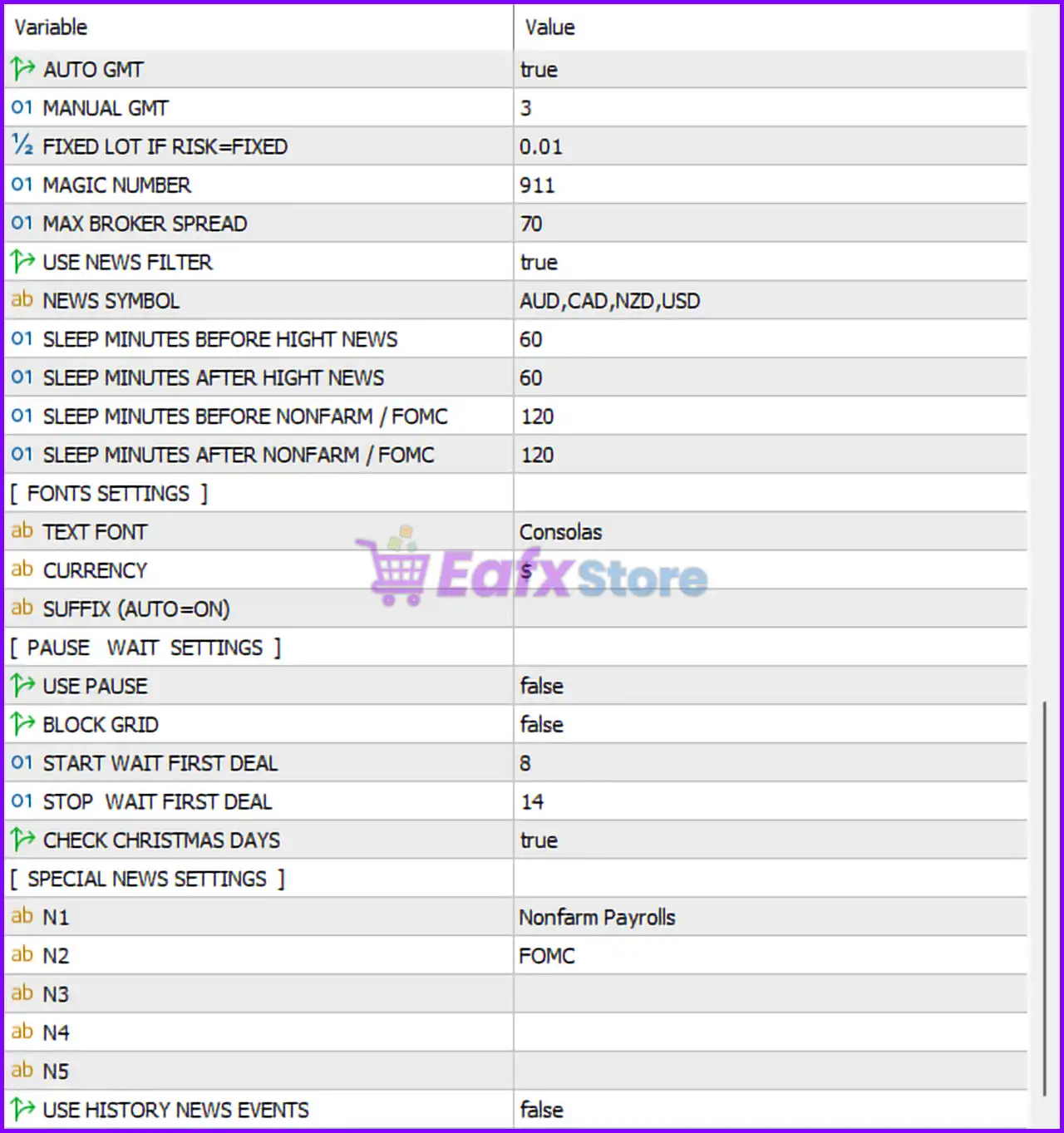
🔹 AUTO GMT = true — Automatically detects broker GMT offset for accurate trading session timing.
🔹 MANUAL GMT = 3 — Manual GMT offset value used if AUTO GMT is disabled.
🔹 FIXED LOT IF RISK=FIXED = 0.01 — Uses a fixed lot size of 0.01 when risk mode is fixed.
🔹 MAGIC NUMBER = 911 — Unique identifier assigned to all Razor MT5 trades.
🔹 MAX BROKER SPREAD = 70 — Maximum spread allowed before the EA stops opening new trades.
🔢 Razor MT5 News Filter Settings
🔹 USE NEWS FILTER = true — Enables economic news filtering protection.
🔹 NEWS SYMBOL = AUD,CAD,NZD,USD — News filter monitors AUD, CAD, NZD, and USD currencies.
🔹 SLEEP MINUTES BEFORE HIGHT NEWS = 60 — Stops trading 60 minutes before high-impact news.
🔹 SLEEP MINUTES AFTER HIGHT NEWS = 60 — Resumes trading 60 minutes after high-impact news.
🔹 SLEEP MINUTES BEFORE NONFARM / FOMC = 120 — Pauses trading 120 minutes before NFP or FOMC events.
🔹 SLEEP MINUTES AFTER NONFARM / FOMC = 120 — Resumes trading 120 minutes after NFP or FOMC events.
🔢 Fonts Settings
🔹 TEXT FONT = Consolas — Uses the Consolas font for EA display information.
🔹 CURRENCY = $ — Displays account currency symbol as USD ($).
🔢 Pause Wait Settings
🔹 USE PAUSE = false — Trading pause functionality is disabled.
🔹 BLOCK GRID = false — Grid blocking system is disabled.
🔹 START WAIT FIRST DEAL = 8 — Trading wait period begins at hour 8.
🔹 STOP WAIT FIRST DEAL = 14 — Trading wait period ends at hour 14.
🔹 CHECK CHRISTMAS DAYS = true — EA checks holiday periods during Christmas trading sessions.
🔢 Special News Settings
🔹 N1 = Nonfarm Payrolls — Special news keyword filter for NFP events.
🔹 N2 = FOMC — Special news keyword filter for FOMC announcements.
🔹 N3 = Empty — Additional custom news filter slot not configured.
🔹 N4 = Empty — Additional custom news filter slot not configured.
🔹 N5 = Empty — Additional custom news filter slot not configured.
🔹 USE HISTORY NEWS EVENTS = false — Historical news event filtering is disabled.
🔢 One Chart Settings
🔹 ONE CHART MODE = true — Enables multi-symbol trading from a single chart.
🔹 ALL PAIRS = AUDCAD,AUDNZD,NZDCAD — Currency pairs managed in One Chart Mode.
🔹 BALANCE PER 0.01 LOT [0 = FIXED LOT] = 1500 — Dynamic lot scaling based on every $1500 balance per 0.01 lot.
🔹 COMMENT = RAZOR MT5 — Trade comment label attached to all orders.
🔹 HIDE SL = false — Stop Loss visibility remains enabled.
🔹 SKIP FIRST DEALS = false — The EA does not skip initial trade entries.
🔹 ULTRA VIRTUALIZATION = false — Advanced virtualization mode is disabled.
🔢 Dynamic Profit Scale for Unique TP
🔹 PROFIT WTP MODE % [100-900] = 100 — Weighted Take Profit percentage configuration.
🔹 PROFIT STP MODE % [10-200] = 100 — Smart Take Profit scaling percentage.
🔢 FTMO Delay for Unique Deals
🔹 RANDOM DELAY = false — Random order execution delay is disabled.
🔹 MANUAL DELAY [0 = OFF] = 0 — Manual execution delay is disabled.
🔹 MAX % DD = 100.0 — Maximum account drawdown limit before restriction.
🔢 TP Settings
🔹 SHOW INFO = true — Displays trading information panel on the chart.
🔹 [BUY] FIRST TAKE PROFIT = 110 — Initial Buy Take Profit target set to 110 points.
🔹 [SELL] FIRST TAKE PROFIT = 110 — Initial Sell Take Profit target set to 110 points.
🔹 [BUY] MIN DISTANCE GRID = 350 — Minimum grid spacing for Buy positions set to 350 points.
🔹 [SELL] MIN DISTANCE GRID = 350 — Minimum grid spacing for Sell positions set to 350 points.
🔹 BUY & SELL MODE = BUY & SELL — EA can open both Buy and Sell trades simultaneously.
🔹 MAX FIRST LOT = 5.0 — Maximum allowed first lot size is 5.0 lots.
🔢 Smart TP Unique Settings
🔹 SMART UNIQ TAKEPROFIT = false — Smart unique take-profit system is disabled.
🔹 WEIGHTED TP = true — Weighted take-profit calculation is enabled.
🔹 RANGE VOLATILITY = 50 — Volatility range threshold used for smart TP calculations.
🔹 FIRST % VOLATILITY = 50 — Initial volatility percentage filter.
🔹 UNIQ RSI MAX = 70 — Maximum RSI threshold for trade entries.
🔹 UNIQ RSI MIN = 30 — Minimum RSI threshold for trade entries.
🔢 First Deal Settings
🔹 ALLOW HEDGING = true — Hedging functionality is enabled.
🔹 FIRST DEAL RSI PERIOD = 25 — RSI indicator period for first trade confirmation.
🔹 MAX RSI = 70.0 — Maximum RSI overbought level.
🔹 MIN RSI = 30.0 — Minimum RSI oversold level.
🔹 ALLOW SMART DISTANCE = true — Enables dynamic distance calculations between grid orders.
🔹 [SELL] STDV % = 35 — Standard deviation percentage for Sell trades.
🔹 [BUY] STDV % = 35 — Standard deviation percentage for Buy trades.
🔹 2nd TRADE MULTIPLIER = 1.0 — Lot multiplier applied to the second trade.
🔹 3rd TRADE MULTIPLIER = 2.2 — Lot multiplier applied to the third trade.
🔹 4nd TRADE MULTIPLIER = 2.2 — Lot multiplier applied to the fourth trade.
🔹 6nd TRADE MULTIPLIER = 1.6 — Lot multiplier applied to the sixth trade.
🔹 MAX DEALS IN GRID = 7 — Maximum grid trade levels allowed.
🔹 MAX SYMBOLS PER TIME = 3 — Maximum simultaneously traded symbols allowed.
🔢 Additional Settings
🔹 ONE CHART = ON SETTINGS FOR AUDCAD M15 ! — Indicates optimized One Chart Mode setup for AUDCAD M15 timeframe.
🔹 ONE CHART = OFF UNIVERSAL SETTINGS FOR ANY PAIRS ! — Universal settings mode available for any currency pair.
🔢 Conclusion
Razor MT5 is an advanced MetaTrader 5 Expert Advisor built for traders who prefer intelligent grid trading, hedging systems, and volatility-based automation. With features such as One Chart Mode, weighted take profit, FTMO-friendly delay controls, smart RSI filtering, and advanced news protection, Razor MT5 provides a flexible and professional automated trading solution for forex traders seeking high-performance risk-managed trading.
🔢 FAQs
❓ What is Razor MT5?
Razor MT5 is an automated MetaTrader 5 Expert Advisor focused on grid trading, hedging, volatility filtering, and smart take-profit management.
❓ Does Razor MT5 support multi-currency trading?
Yes, Razor MT5 supports multi-pair trading using One Chart Mode.
❓ Can Razor MT5 filter economic news events?
Yes, the EA includes advanced news filters for high-impact news, FOMC, and Nonfarm Payrolls.
❓ Is Razor MT5 suitable for prop firm trading?
Yes, Razor MT5 includes FTMO-safe settings, drawdown controls, and execution delay options suitable for prop firms.
❓ Does Razor MT5 support hedging strategies?
Yes, the EA supports simultaneous Buy and Sell hedging strategies with configurable grid multipliers.
Get Razor MT5
Download Razor MT5 with its set files, read the full product details and requirements here: Razor MT5 →