🧩 What is SZ Scalper EA?
SZ Scalper EA helps traders understand how to configure the EA, the level of risk involved, and overall trading behavior. This analysis is suitable for both beginners and experienced forex traders looking to optimize scalping trading performance.
➡️ Vendor Website: View here
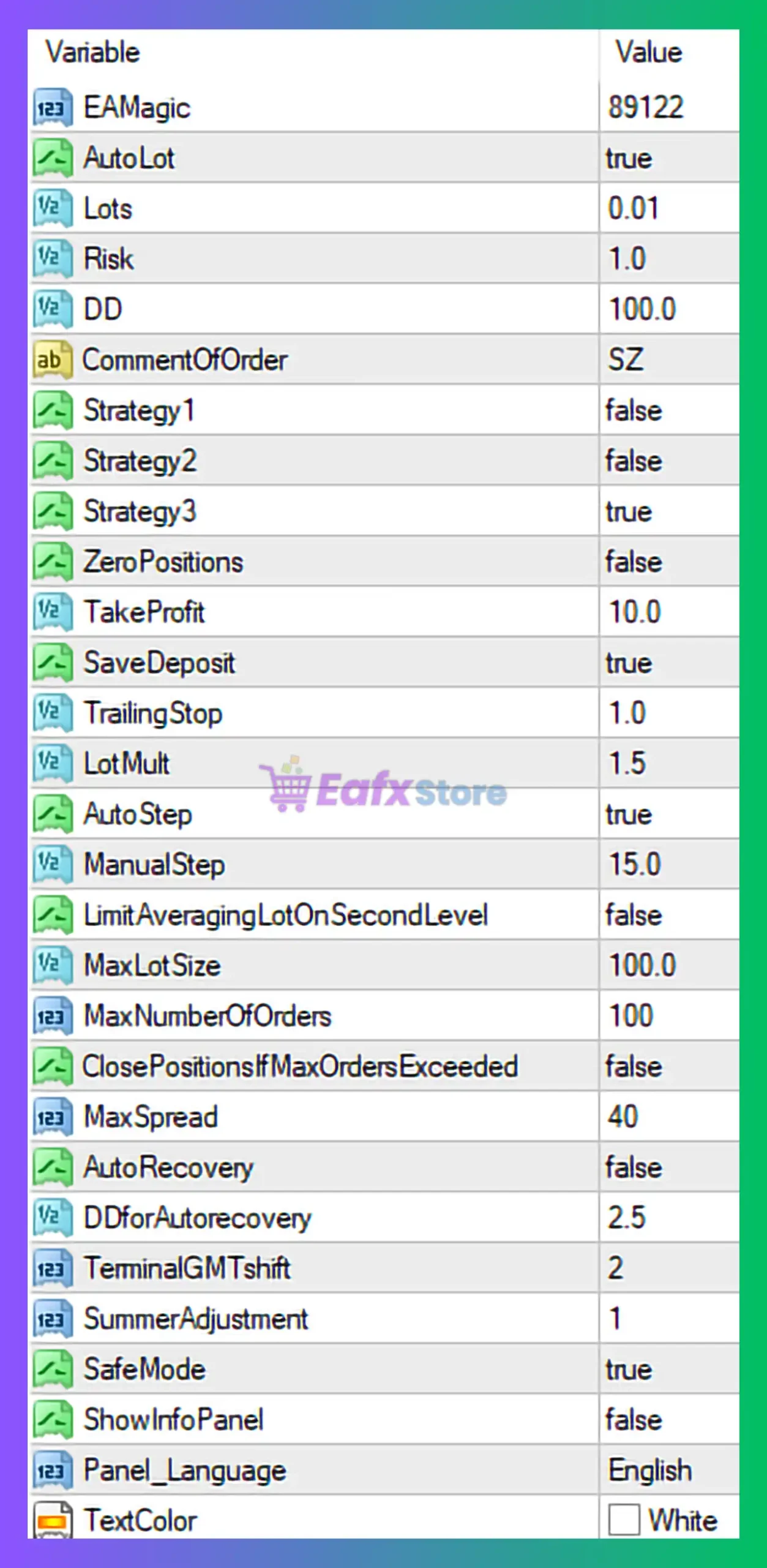
🧩 General EA Information
- EA Magic Number (89122)
A unique identifier that allows SZ Scalper EA to manage its own trades independently from other EAs or manual trades. - CommentOfOrder (SZ)
Helps easily identify trades opened by the EA in the MT4 terminal.
🧩 Lot Size & Risk Management Settings
- AutoLot: true
The EA automatically calculates lot size based on account balance and risk parameters. - Lots: 0.01
Base lot size, mainly used if AutoLot is disabled. - Risk: 1.0
A conservative risk level, meaning approximately 1% risk per trade, suitable for long-term account safety. - LotMult: 1.5
Lot multiplier for recovery or grid logic. This value indicates moderate risk escalation. - MaxLotSize: 100.0
Maximum lot cap to prevent uncontrolled exposure.
🧩 Drawdown & Safety Controls
- DD (Drawdown Limit): 100.0
Indicates the EA allows up to 100% drawdown, which effectively disables drawdown protection. This is a high-risk configuration. - SafeMode: true
Adds internal protection logic to reduce extreme trading behavior. - ClosePositionsIfMaxOrdersExceeded: false
The EA will continue trading even if the maximum number of orders is reached.
🧩 Order & Execution Management
- MaxNumberOfOrders: 100
Allows up to 100 simultaneous trades, typical for grid-based scalping systems. - MaxSpread: 40
Trades will only open if the spread is ≤ 40 points, protecting against volatile market conditions. - AutoStep: true
Automatically adjusts grid distance based on market conditions. - ManualStep: 15.0
Grid step size (in points) if AutoStep is disabled. - LimitAveragingLotOnSecondLevel: false
No restriction on lot size increase from the second grid level onward.
🧩 Strategy Configuration
- Strategy1: false
- Strategy2: false
- Strategy3: true
Only Strategy 3 is enabled, meaning SZ Scalper EA is running on a single predefined trading logic, likely optimized for specific market conditions.
🧩 Profit & Trade Exit Settings
- TakeProfit: 10.0
Small take-profit target, consistent with scalping strategies. - TrailingStop: 1.0
Very tight trailing stop, allowing profits to be locked quickly. - SaveDeposit: true
Enables capital preservation logic when equity conditions change.
🧩 Recovery & Advanced Features
- AutoRecovery: false
Recovery trading is disabled. - DForAutoRecovery: 2.5
Recovery distance parameter (inactive unless AutoRecovery is enabled). - TerminalGMTShift: 2
Aligns EA trading logic with broker server time (GMT+2). - SummerAdjustment: 1
Adjusts trading behavior for daylight saving time.
🧩 Interface & Display Settings
- ShowInfoPanel: false
Information panel is hidden for a clean chart view. - PanelLanguage: English
User interface language. - TextColor: White
Chart display preference.
🧩 Final Conclusion
The SZ Scalper EA MT4 configuration shown in the image reflects a low-risk per trade scalping setup combined with potentially high overall exposure due to:
- High maximum order count
- Lot multiplier enabled
- No effective drawdown protection (DD = 100%)
This setup is best suited for:
- High-balance accounts
- Low-spread brokers
- Traders who actively monitor EA performance
➡️ Pros:
- Conservative per-trade risk (1%)
- AutoLot enabled
- Tight take-profit for scalping
- Spread protection active
➡️ Cons:
- Unlimited drawdown risk
- Large grid depth (100 orders)
- Recovery logic disabled
➡️ Recommendation:
For safer trading, traders should consider lowering the drawdown limit, reducing maximum orders, or enabling recovery controls. Always test SZ Scalper EA on a demo account before using it on a live trading account.