

Introduction
The Last Broker EA is an automated Forex trading Expert Advisor (EA) developed for the MetaTrader 5 platform, featuring configurable trading strategies, dynamic position sizing, automated Stop Loss (SL) and Take Profit (TP) management, and advanced trade protection mechanisms.
The EA includes a dedicated trading algorithm for Gold (XAUUSD), making it suitable for traders seeking automated gold trading with customizable risk management settings.

The Last Broker EA MT5 provides two groups of trade protection parameters, including primary strategy protection and classic strategy protection. Both systems feature configurable profit targets, loss protection levels, and trailing stop mechanisms designed to manage open positions as market conditions change.
Additionally, the EA includes account drawdown protection, spread and execution deviation controls, trading session restrictions, and an economic news filter. Traders can customize these features according to their account balance, trading preferences, broker conditions, and risk tolerance.
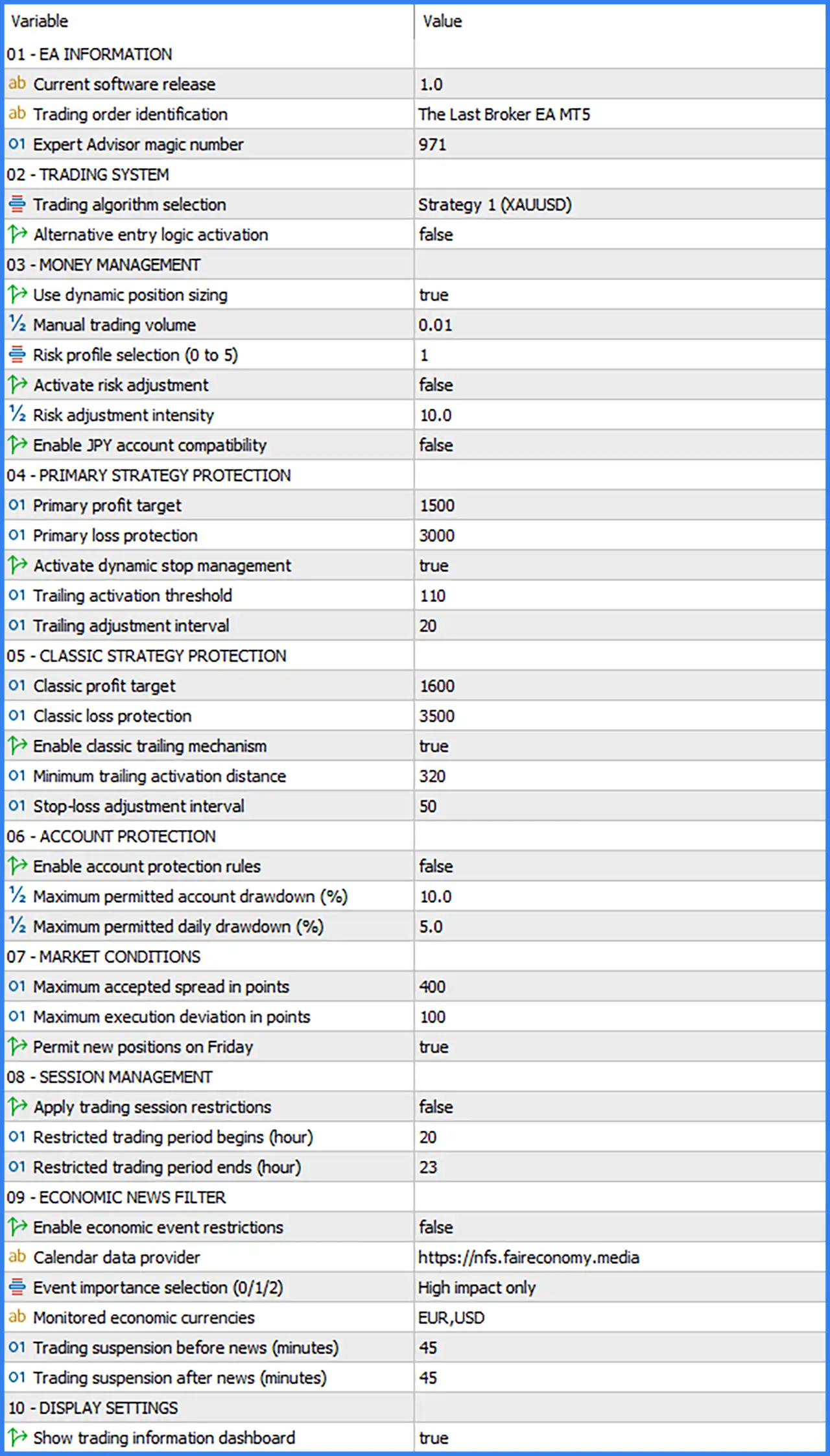
This The Last Broker EA MT5 settings guide explains every input parameter shown in the provided configuration, including its original default value, function, and practical considerations.
EA Information Settings
🔹 Current software release: 1.0 – Displays the current software version of The Last Broker EA MT5. Version 1.0 identifies the installed release and helps traders distinguish it from future updates or modified configurations.
🔹 Trading order identification: The Last Broker EA MT5 – Defines the trading order identification text used by the Expert Advisor, helping traders recognize automated positions and distinguish them from orders placed by other trading systems.
🔹 Expert Advisor magic number: 971 – Assigns the unique Magic Number 971 to trades managed by The Last Broker EA MT5, allowing the system to identify, monitor, modify, and close its own positions independently of other Expert Advisors.
Trading System Settings
🔹 Trading algorithm selection: Strategy 1 (XAUUSD) – Selects Strategy 1, the trading algorithm configured for Gold (XAUUSD). This setting determines which internal trading logic the EA uses to evaluate market conditions and generate automated trading signals.
🔹 Alternative entry logic activation: false – Disables the alternative entry algorithm, allowing the EA to operate using the standard entry conditions associated with the selected trading strategy. Enabling this option activates an alternative entry mechanism whose exact rules depend on the EA's internal programming.
Money Management Settings
🔹 Use dynamic position sizing: true – Enables automatic position sizing, allowing The Last Broker EA MT5 to calculate trading volume dynamically according to its configured money management parameters rather than relying exclusively on a fixed lot size.
🔹 Manual trading volume: 0.01 – Sets the manual trading volume to 0.01 lots, providing a fixed position size when dynamic position sizing is disabled or when the EA's internal trading logic requires a manually specified volume.
🔹 Risk profile selection (0 to 5): 1 – Selects Risk Profile 1 from the available range of 0 to 5. This parameter determines the EA's predefined risk configuration, with the exact exposure and position-sizing behavior of each level controlled by the internal algorithm.
🔹 Activate risk adjustment: false – Disables the additional risk adjustment mechanism, meaning the EA does not apply the optional risk modification feature to its position-sizing calculations.
🔹 Risk adjustment intensity: 10.0 – Sets the risk adjustment intensity to 10.0, defining the adjustment strength used when the optional risk adjustment mechanism is enabled. Since risk adjustment is currently disabled, this parameter does not activate the feature by itself.
🔹 Enable JPY account compatibility: false – Disables the special compatibility mode for accounts denominated in Japanese Yen (JPY). Traders using JPY-based accounts should verify whether enabling this option is necessary for correct monetary calculations and position sizing.
Primary Strategy Protection Settings
🔹 Primary profit target: 1500 – Sets the primary strategy profit target to 1500, defining the configured profit-taking threshold for positions managed under the primary trading strategy. The exact price-distance unit should be verified against the EA's internal calculations.
🔹 Primary loss protection: 3000 – Sets the primary strategy loss protection threshold to 3000, establishing the configured protective loss boundary for the primary trading algorithm. This parameter helps define when the EA should apply its primary loss-limiting mechanism.
🔹 Activate dynamic stop management: true – Enables dynamic stop management, allowing the EA to adjust protective stop levels as trading conditions develop. This feature is intended to manage open positions and potentially protect accumulated profits.
🔹 Trailing activation threshold: 110 – Sets the trailing activation threshold to 110, defining the minimum favorable price movement or internal threshold required before the primary strategy's dynamic trailing mechanism begins operating.
🔹 Trailing adjustment interval: 20 – Sets the trailing adjustment interval to 20, controlling the incremental distance or adjustment step used when the primary trailing stop mechanism updates protective stop levels.
Classic Strategy Protection Settings
🔹 Classic profit target: 1600 – Sets the classic strategy profit target to 1600, defining the configured profit-taking threshold used by the classic trading protection system when that strategy or management logic is active.
🔹 Classic loss protection: 3500 – Sets the classic strategy loss protection threshold to 3500, establishing the configured protective loss boundary for positions managed through the classic strategy system.
🔹 Enable classic trailing mechanism: true – Activates the classic trailing stop mechanism, allowing the EA to automatically adjust protective stop levels when the relevant trading positions reach the configured activation conditions.
🔹 Minimum trailing activation distance: 320 – Sets the minimum trailing activation distance to 320, defining the favorable movement required before the classic trailing stop mechanism begins adjusting the position's protective stop.
🔹 Stop-loss adjustment interval: 50 – Sets the Stop Loss adjustment interval to 50, controlling the distance or incremental step used when the classic trailing mechanism updates protective Stop Loss levels.
Account Protection Settings
🔹 Enable account protection rules: false – Disables the dedicated account protection rules, meaning the EA does not activate the account-level drawdown restrictions controlled by this setting. Traders should enable this feature when they want the EA to apply the configured account protection thresholds.
🔹 Maximum permitted account drawdown (%): 10.0 – Sets the maximum permitted account drawdown to 10.0%, defining the configured overall account drawdown threshold when account protection rules are enabled. The EA's exact response to reaching this threshold depends on its internal protection logic.
🔹 Maximum permitted daily drawdown (%): 5.0 – Sets the maximum permitted daily drawdown to 5.0%, defining the configured daily loss threshold when account protection is enabled. This setting can help traders establish a daily risk boundary, although the protection system is currently disabled.
Market Conditions and Execution Settings
🔹 Maximum accepted spread in points: 400 – Sets the maximum accepted market spread to 400 points, allowing the EA to evaluate transaction costs before opening new trades. Trading opportunities exceeding this spread threshold may be rejected by the execution filter.
🔹 Maximum execution deviation in points: 100 – Sets the maximum permitted execution deviation to 100 points, defining the acceptable difference between the requested order price and the execution price where supported by the broker's execution model.
🔹 Permit new positions on Friday: true – Enables new trading positions on Friday, allowing The Last Broker EA MT5 to continue opening trades before the weekend when its strategy conditions and other trading restrictions are satisfied.
Trading Session Management Settings
🔹 Apply trading session restrictions: false – Disables the trading session restriction mechanism, allowing the EA to operate without applying the restricted trading period defined below, subject to other active trading conditions.
🔹 Restricted trading period begins (hour): 20 – Sets the beginning of the restricted trading period to 20:00, defining the hour when the EA should start limiting new trading activity if trading session restrictions are enabled.
🔹 Restricted trading period ends (hour): 23 – Sets the end of the restricted trading period to 23:00, defining when the EA can resume normal trading activity after the configured restriction window, subject to the EA's internal time reference.
Economic News Filter Settings
🔹 Enable economic event restrictions: false – Disables the economic news filter, allowing the EA to continue evaluating trading opportunities during scheduled economic announcements without applying the news restrictions configured in this section.
🔹 Calendar data provider: https://nfs.faireconomy.media – Specifies the external economic calendar data source used by the EA to retrieve scheduled financial announcements. The URL may need to be added to the MetaTrader 5 WebRequest permissions for the news filter to access external calendar information.
🔹 Event importance selection (0/1/2): High impact only – Selects high-impact economic events for monitoring, allowing the EA to focus its news restrictions on major financial announcements rather than lower-impact calendar events.
🔹 Monitored economic currencies: EUR,USD – Configures the news filter to monitor economic announcements associated with the Euro (EUR) and US Dollar (USD), allowing the EA to apply its event restrictions to these selected currencies.
🔹 Trading suspension before news (minutes): 45 – Sets the pre-news trading suspension period to 45 minutes, allowing the EA to restrict new trading activity before monitored economic announcements when the news filter is enabled.
🔹 Trading suspension after news (minutes): 45 – Sets the post-news trading suspension period to 45 minutes, allowing the EA to wait for the configured interval after monitored economic announcements before resuming normal trading activity.
Display Settings
🔹 Show trading information dashboard: true – Enables the on-chart trading information dashboard, allowing traders to view information provided by The Last Broker EA MT5 directly within the MetaTrader 5 trading interface.