

Introduction to Vortex EA MT5
Vortex EA MT5 is an automated trading Expert Advisor (EA) developed for the MetaTrader 5 platform. It features two configurable trading strategies, allowing traders to select between Strategy 0 and Strategy 1 according to their preferred trading approach.

The EA provides comprehensive trading controls, including automatic lot sizing, risk management, Stop Loss, Take Profit, Trailing stop, spread restrictions, trading sessions, and economic news filtering. Strategy 1 additionally includes range-based trading, Smart Recovery, additional trading functionality, and scheduled profit closing.
With customizable execution settings and account protection features, Vortex EA MT5 allows traders to configure different trading conditions and position management rules within a single Expert Advisor.
Strategy Selection and General Settings
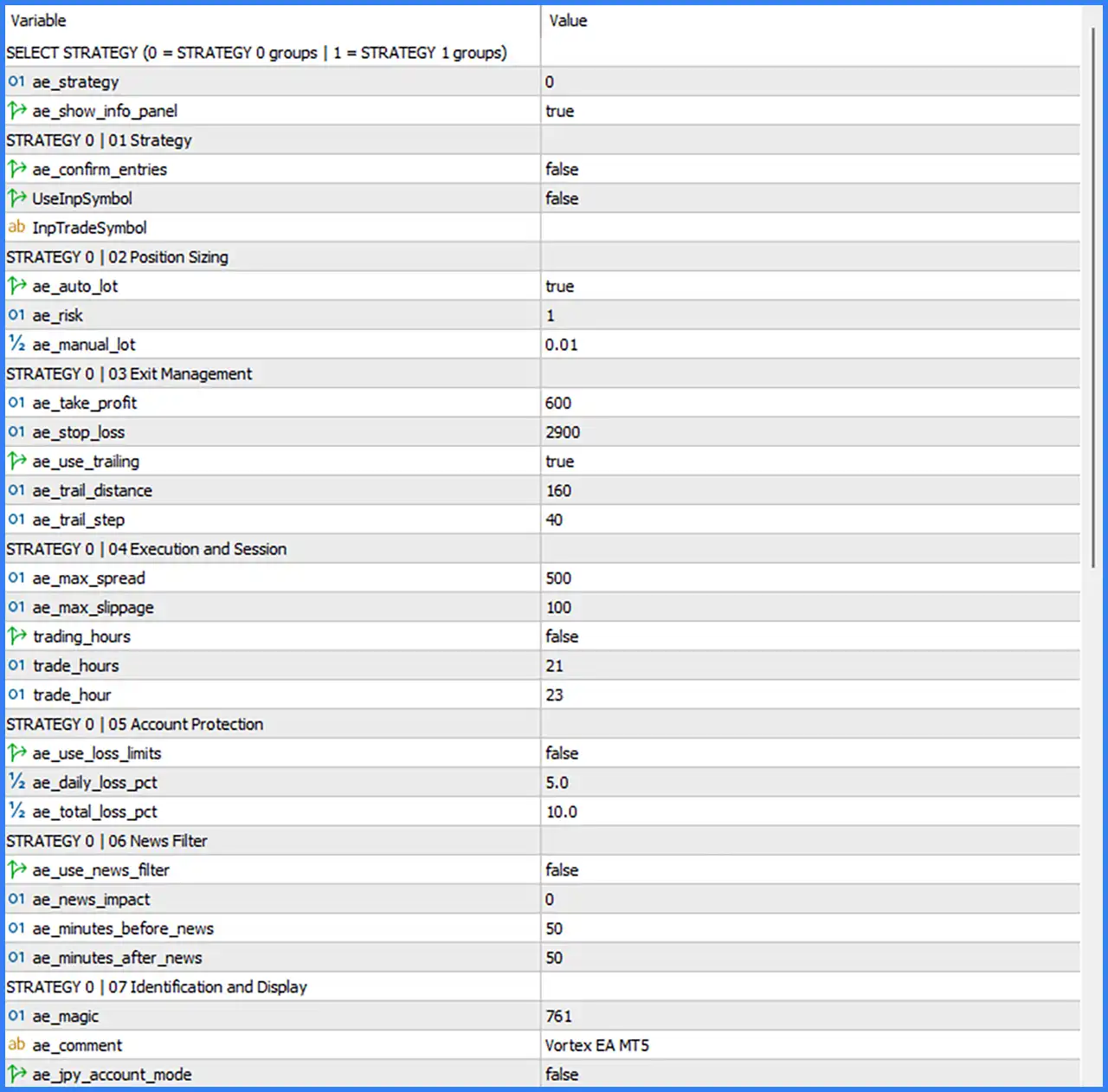
This section controls the active trading strategy and the EA's general information panel.
🔹 ae_strategy = 0: Selects Strategy 0 as the active trading configuration. The available options are 0 for Strategy 0 groups and 1 for Strategy 1 groups.
🔹 ae_show_info_panel = true: Enables the information panel on the trading chart, allowing traders to view relevant EA information and trading status.
Strategy 0 – Strategy Settings
Strategy 0 contains the main trading configuration, including entry confirmation, trading symbol selection, and market execution preferences.
🔹 ae_confirm_entries = false: Disables the entry confirmation option, allowing the EA to follow its configured entry logic without requiring the additional confirmation feature.
🔹 UseInpSymbol = false: Disables the custom trading symbol option, indicating that the EA does not use the manually specified InpTradeSymbol value under this configuration.
🔹 InpTradeSymbol = (Blank): Leaves the custom trading symbol field empty. Since UseInpSymbol is false, the EA is configured not to use this manually specified symbol.
Strategy 0 – Position Sizing
These parameters control automatic lot calculation, risk allocation, and manual trading volume.
🔹 ae_auto_lot = true: Enables automatic lot sizing, allowing the EA to calculate trading volume according to its configured risk management settings.
🔹 ae_risk = 1: Sets the risk parameter to 1, providing the numerical risk input used by the automatic position-sizing calculation.
🔹 ae_manual_lot = 0.01: Sets the manual trading volume to 0.01 lots, providing an alternative fixed position size when automatic lot sizing is disabled.
Strategy 0 – Exit Management
The Exit Management section controls profit targets, protective stop-loss levels, and trailing stop adjustments.
🔹 ae_take_profit = 600: Sets the Take Profit target to 600, defining the configured profit-taking distance for Strategy 0 positions.
🔹 ae_stop_loss = 2900: Sets the Stop Loss distance to 2900, establishing the configured protective exit threshold for Strategy 0 trades.
🔹 ae_use_trailing = true: Enables trailing stop functionality, allowing the EA to adjust protective stop levels as market prices move favorably.
🔹 ae_trail_distance = 160: Sets the trailing stop distance to 160, defining the configured distance maintained by the trailing mechanism relative to market price.
🔹 ae_trail_step = 40: Sets the trailing stop adjustment step to 40, controlling the incremental movement required for the EA to update the trailing stop.
Strategy 0 – Execution and Session Settings
These parameters control trading execution conditions, maximum spread, slippage, and trading-hour restrictions.
🔹 ae_max_spread = 500: Sets the maximum permitted spread to 500, defining the spread threshold used by the EA when evaluating whether market conditions are suitable for order execution.
🔹 ae_max_slippage = 100: Sets the maximum permitted slippage to 100, controlling the acceptable execution price deviation when the EA submits trading orders.
🔹 trading_hours = false: Disables the trading-hours restriction, allowing the EA to operate without applying the configured time-window limitation.
🔹 trade_hours = 21: Sets the trading-hour parameter to 21, representing the configured starting or reference hour used by the trading schedule.
🔹 trade_hour = 23: Sets the second trading-hour parameter to 23, representing the configured ending or reference hour for the trading schedule.
Strategy 0 – Account Protection Settings
This section provides daily and total account loss thresholds designed to support risk management.
🔹 ae_use_loss_limits = false: Disables the account loss-limit functionality, meaning the configured daily and total loss percentages are not activated through this option.
🔹 ae_daily_loss_pct = 5.0: Sets the daily loss threshold to 5.0%, defining the configured maximum daily loss percentage when loss-limit protection is enabled.
🔹 ae_total_loss_pct = 10.0: Sets the total loss threshold to 10.0%, establishing the configured overall loss restriction when the corresponding account protection feature is active.
Strategy 0 – News Filter Settings
The News Filter section provides controls for avoiding trading around scheduled economic announcements.
🔹 ae_use_news_filter = false: Disables the economic news filter, allowing Strategy 0 to operate without applying the configured news-related trading restrictions.
🔹 ae_news_impact = 0: Sets the news-impact parameter to 0, representing the configured impact-level selection. The exact mapping between numerical values and news categories is not specified in the screenshot.
🔹 ae_minutes_before_news = 50: Sets the pre-news restriction period to 50 minutes, defining how long before an economic announcement the EA should avoid trading when the news filter is enabled.
🔹 ae_minutes_after_news = 50: Sets the post-news restriction period to 50 minutes, defining how long after an economic announcement the EA should continue applying its news-related restrictions.
Strategy 0 – Identification and Display
These parameters identify the EA's trading orders and provide additional account configuration options.
🔹 ae_magic = 761: Assigns the Magic Number 761 to Strategy 0 trades, allowing MetaTrader 5 to identify and distinguish positions managed by this EA.
🔹 ae_comment = Vortex EA MT5: Sets the order comment to Vortex EA MT5, making it easier to recognize the EA's positions in the trading terminal.
🔹 ae_jpy_account_mode = false: Disables the JPY account mode, indicating that the EA is configured to operate without activating its dedicated Japanese yen account handling option.
Strategy 1 – Range and Session Settings
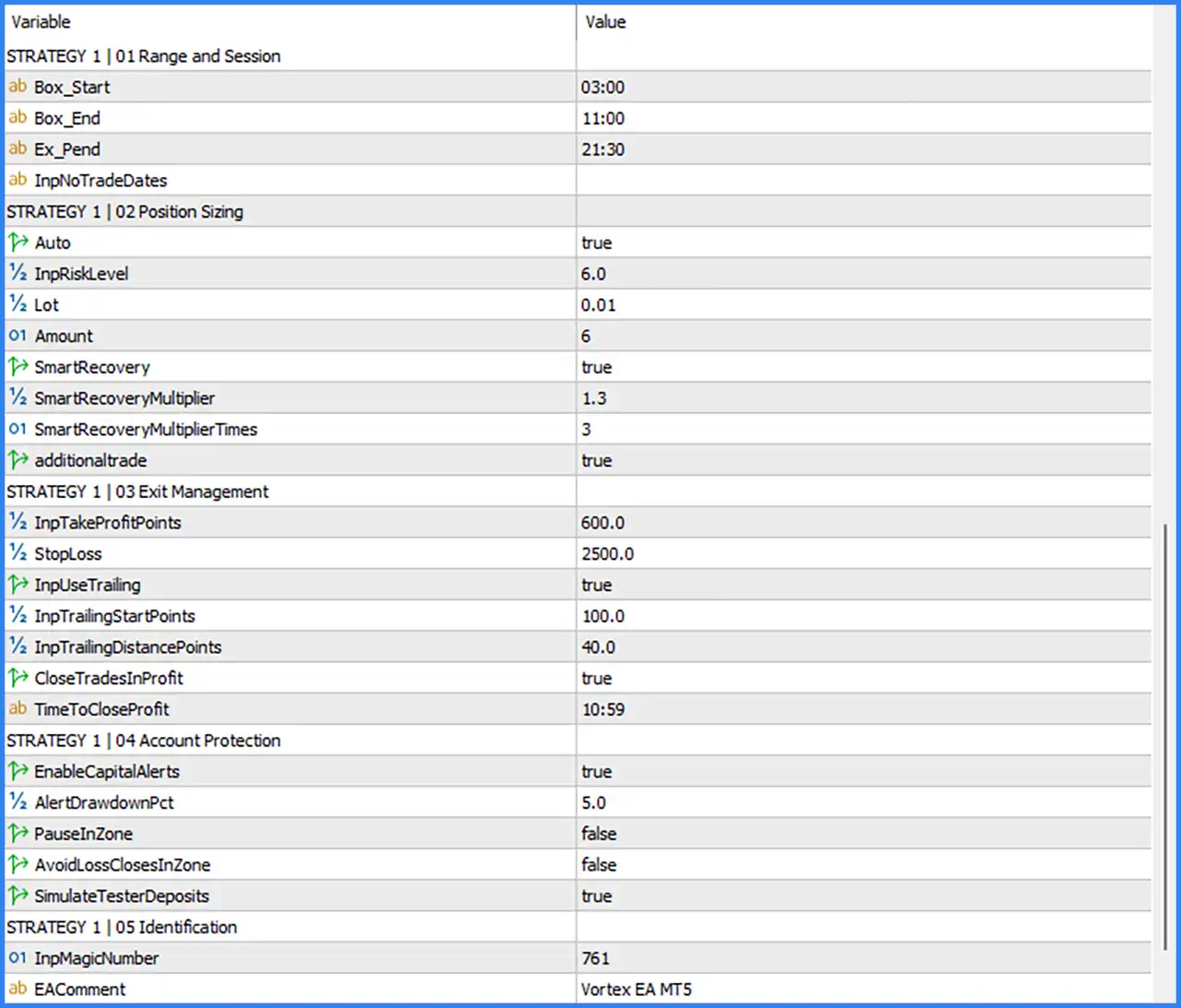
Strategy 1 includes a range-based trading configuration with specific starting, ending, and pending-order expiration times.
🔹 Box_Start = 03:00: Sets the beginning of the trading range to 03:00, defining when the EA starts calculating or monitoring the configured price box.
🔹 Box_End = 11:00: Sets the end of the trading range to 11:00, defining when the EA finishes the configured range calculation period.
🔹 Ex_Pend = 21:30: Sets the pending-order expiration or cutoff time to 21:30, defining the configured time associated with pending-order management.
🔹 InpNoTradeDates = (Blank): Leaves the no-trading-dates field empty, meaning no specific restricted trading dates are entered in the supplied configuration.
Strategy 1 – Position Sizing and Smart Recovery
This section controls automatic lot calculation, risk levels, recovery functionality, and additional trade activation.
🔹 Auto = true: Enables automatic position sizing, allowing Strategy 1 to calculate trading volume according to its configured risk parameters.
🔹 InpRiskLevel = 6.0: Sets the risk level to 6.0, providing the numerical risk input used by the Strategy 1 position-sizing configuration.
🔹 Lot = 0.01: Sets the manual trading lot size to 0.01 lots, providing the configured fixed-volume alternative when automatic sizing is disabled.
🔹 Amount = 6: Sets the Amount parameter to 6, providing a numerical input for the Strategy 1 position-sizing or trading calculation.
🔹 SmartRecovery = true: Enables Smart Recovery functionality, allowing the EA to activate its configured recovery mechanism when managing trading positions.
🔹 SmartRecoveryMultiplier = 1.3: Sets the Smart Recovery multiplier to 1.3, defining the coefficient used by the recovery position-sizing mechanism.
🔹 SmartRecoveryMultiplierTimes = 3: Sets the Smart Recovery multiplier frequency to 3, defining the configured number of times the recovery multiplier can be applied.
🔹 additionaltrade = true: Enables additional trading functionality, allowing Strategy 1 to activate its configured additional trade mechanism.
Strategy 1 – Exit Management
These parameters control position exits, trailing stop management, and scheduled profit-taking operations.
🔹 InpTakeProfitPoints = 600.0: Sets the Take Profit target to 600.0 points, defining the configured profit-taking distance for Strategy 1 positions.
🔹 StopLoss = 2500.0: Sets the Stop Loss distance to 2500.0 points, establishing the protective exit threshold for Strategy 1 trades.
🔹 InpUseTrailing = true: Enables trailing stop functionality, allowing the EA to adjust protective stop levels as positions move into profit.
🔹 InpTrailingStartPoints = 100.0: Sets the trailing activation threshold to 100.0 points, defining the minimum favorable price movement required before trailing management begins.
🔹 InpTrailingDistancePoints = 40.0: Sets the trailing stop distance to 40.0 points, defining the configured distance between the market price and the protective stop.
🔹 CloseTradesInProfit = true: Enables automatic closing of profitable trades according to the configured profit-closing schedule.
🔹 TimeToCloseProfit = 10:59: Sets the scheduled profit-closing time to 10:59, defining when the EA is configured to close eligible profitable positions.
Strategy 1 – Account Protection
This section provides additional account monitoring, drawdown alerts, and trading protection options.
🔹 EnableCapitalAlerts = true: Enables capital-related alerts, allowing the EA to notify traders when the configured account monitoring conditions are triggered.
🔹 AlertDrawdownPct = 5.0: Sets the drawdown alert threshold to 5.0%, defining the percentage level at which the EA is configured to generate a capital or drawdown warning.
🔹 PauseInZone = false: Disables the Pause In Zone feature, meaning the corresponding zone-based trading pause functionality is inactive by default.
🔹 AvoidLossClosesInZone = false: Disables the Avoid Loss Closes In Zone option, meaning this specific zone-related loss-closing restriction is inactive by default.
🔹 SimulateTesterDeposits = true: Enables simulated tester deposits, allowing the EA to apply its configured deposit simulation functionality during testing.
Strategy 1 – Identification Settings
These parameters identify the trades opened by Strategy 1.
🔹 InpMagicNumber = 761: Assigns the Magic Number 761 to Strategy 1 trades, allowing MetaTrader 5 to identify and distinguish positions managed by this strategy.
🔹 EAComment = Vortex EA MT5: Sets the order comment to Vortex EA MT5, providing a recognizable label for Strategy 1 positions in the trading terminal.