🔶 What is XenClarity EA? XenClarity EA is an automated breakout trading Expert Advisor (EA) designed for MetaTrader 5, optimized mainly for Gold (XAUUSD). The EA uses a pending-order breakout strategy combined with technical filters such as RSI signals, pin bar detection, and optional trend confirmation. XenClarity also integrates session management, trailing stop protection, and spread […]
XenClarity EA is an automated breakout trading Expert Advisor (EA) designed for MetaTrader 5, optimized mainly for Gold (XAUUSD). The EA uses a pending-order breakout strategy combined with technical filters such as RSI signals, pin bar detection, and optional trend confirmation. XenClarity also integrates session management, trailing stop protection, and spread control to maintain stable performance in volatile markets.
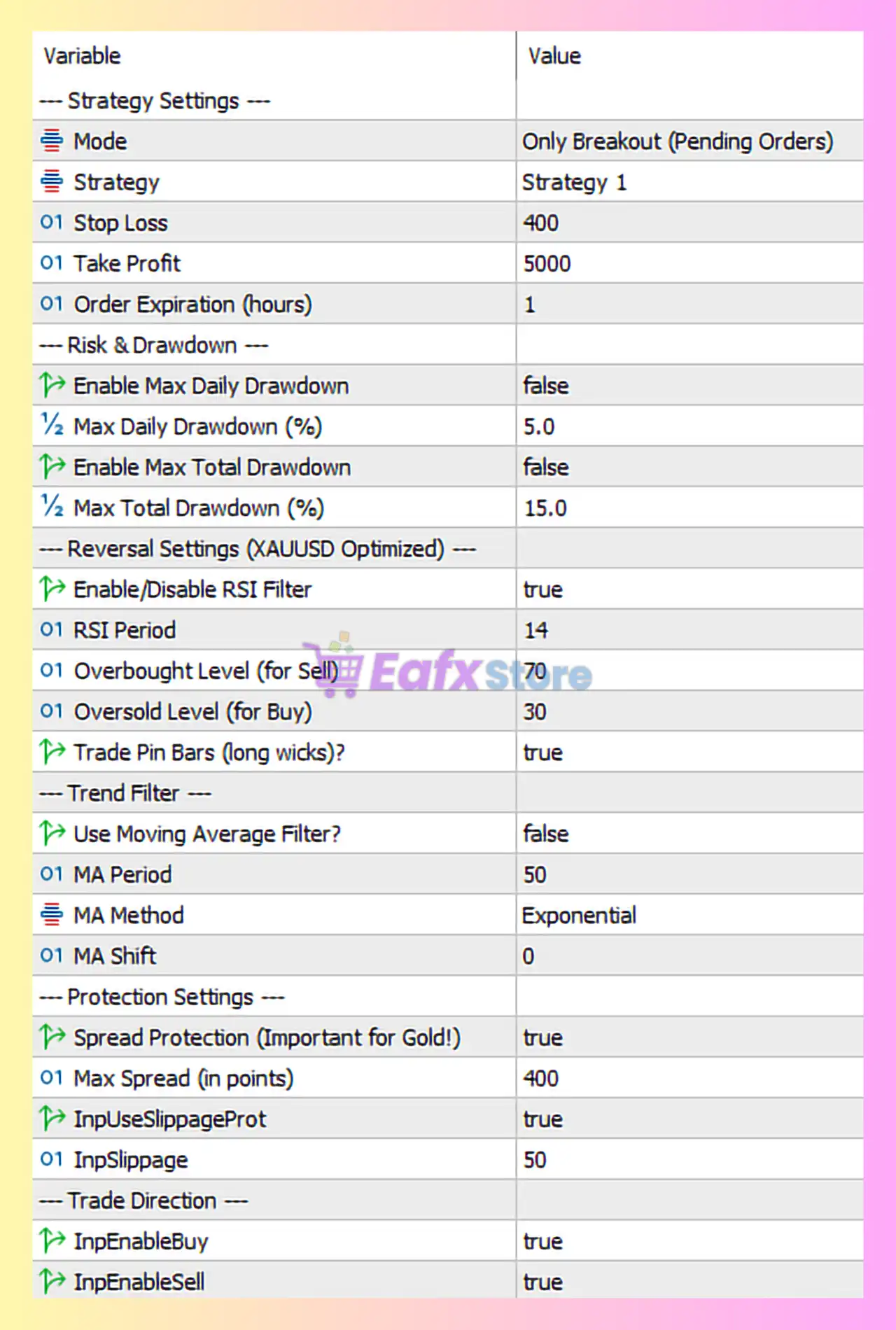
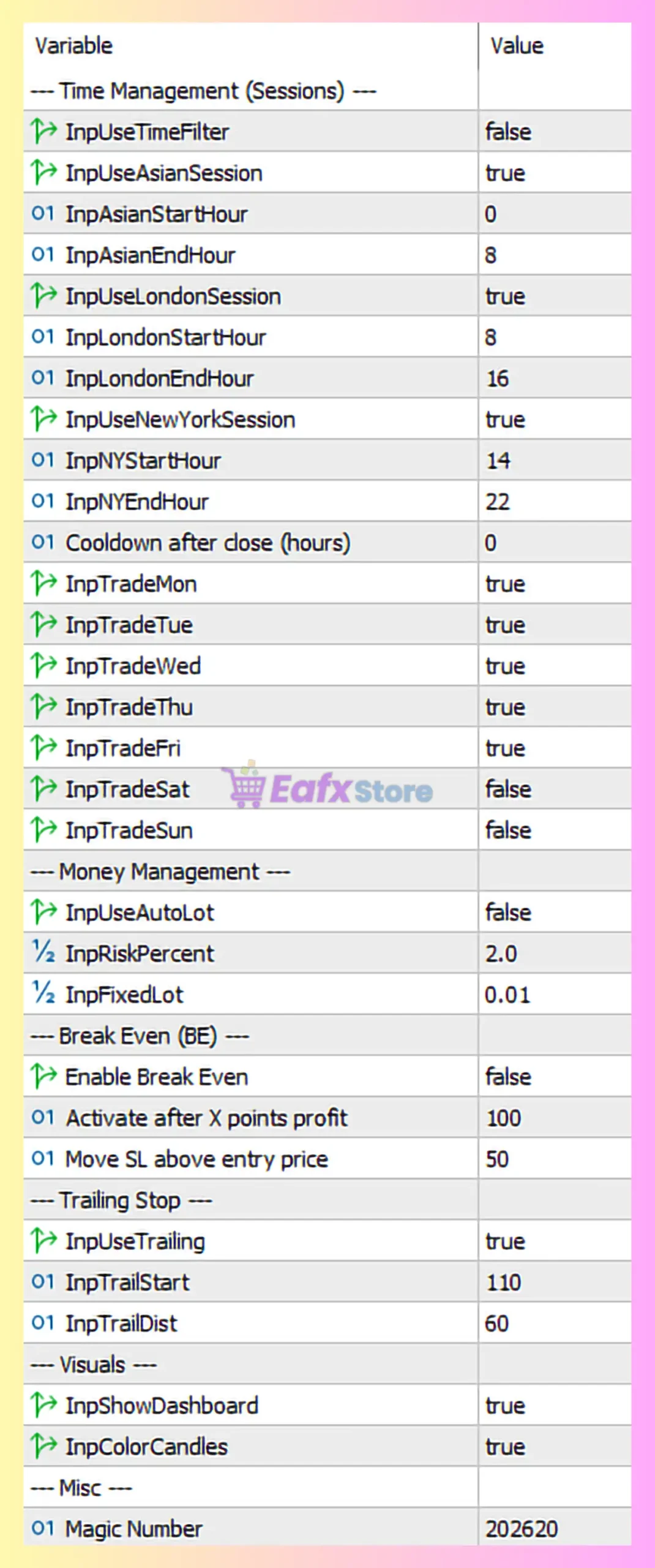
XenClarity EA MT5 Settings PanelXenClarity EA Settings Panel
🔶 Time Management (Trading Sessions)
Parameter
Value
Explanation
Use Time Filter
true (or false)
Disables strict time filtering, allowing trading across multiple sessions.
Use Asian Session
true (or false)
Enables trading during the Asian session.
Asian Session Start
00:00
Defines the start of the Asian trading session.
Asian Session End
08:00
Defines the end of the Asian trading session.
Use London Session
true (or false)
Enables trading during the London market session.
London Session Start
08:00
London trading session begins at 08:00 server time.
London Session End
16:00
London session ends at 16:00 server time.
Use New York Session
true (or false)
Allows trading during the New York session.
New York Session Start
14:00
Defines the beginning of the US trading session.
New York Session End
22:00
Defines the end of New York trading hours.
Cooldown After Close
0
No cooldown delay after closing trades.
🔶 Trading Days
Parameter
Value
Explanation
Trade Monday–Friday
true (or false)
EA trades on all standard Forex trading days.
Trade Saturday
fatrue (or false)
Trading disabled during weekends.
Trade Sunday
falstrue (or false)
Trading disabled on Sunday market open.
🔶 Money Management Settings
Parameter
Value
Explanation
Use Auto Lot
faltrue (or false)
Automatic lot sizing disabled.
Risk Percent
2.0
Defines risk percentage when auto lot is enabled.
Fixed Lot
0.01
Sets the default lot size per trade.
This configuration indicates conservative risk exposure suitable for smaller accounts.
🔶 Break-Even (BE) Settings
Parameter
Value
Explanation
Enable Break Even
faltrue (or false)
Break-even function disabled in this configuration.
Activate After Profit
100 points
Profit threshold to move stop loss to entry price if enabled.
Move SL Above Entry
50 points
Locks additional profit beyond entry when BE activates.
🔶 Trailing Stop Settings
Parameter
Value
Explanation
Use Trailing
true (or false)
Activates trailing stop protection.
Trailing Start
110 points
Trailing begins after trade gains 110 points.
Trailing Distance
60 points
Stop loss follows price at a 60-point distance.
Trailing stop helps secure profits during strong market moves.
🔶 Strategy Configuration
Parameter
Value
Explanation
Mode
Only Breakout (Pending Orders)
EA uses pending orders to capture breakouts.
Strategy
Strategy 1
Defines internal breakout algorithm.
Stop Loss
400 points
Maximum loss per trade.
Take Profit
5000 points
Large profit target suitable for strong trends.
Order Expiration
1 hour
Pending orders expire after one hour if not triggered.
🔶 Risk & Drawdown Control
Parameter
Value
Explanation
Enable Max Daily Drawdown
fatrue (or false)
Daily drawdown control disabled.
Max Daily Drawdown
5%
Defines daily loss threshold if enabled.
Enable Max Total Drawdown
faltrue (or false)
Total account drawdown limit disabled.
Max Total Drawdown
15%
Maximum allowable drawdown if activated.
🔶 Reversal & Signal Filters
Parameter
Value
Explanation
Enable RSI Filter
true (or false)
Uses RSI indicator to confirm breakout signals.
RSI Period
14
Standard RSI calculation period.
Overbought Level
70
Prevents buying when RSI indicates overbought conditions.
Oversold Level
30
Prevents selling when RSI indicates oversold conditions.
Trade Pin Bars
true (or false)
Allows trading signals based on pin bar candle patterns.
🔶 Trend Filter Settings
Parameter
Value
Explanation
Use Moving Average Filter
true (or false)
Trend confirmation using MA is disabled.
MA Period
50
Moving average period if filter is activated.
MA Method
Exponential
Uses EMA calculation method.
MA Shift
0
No offset applied to the moving average.
🔶 Protection Settings
Parameter
Value
Explanation
Spread Protection
true (or false)
Prevents trades when spreads are excessively high.
Max Spread
400 points
Maximum allowed spread before trade entry.
Use Slippage Protection
trutrue (or false)
Protects against poor execution during fast market moves.
Slippage Limit
50 points
Maximum allowed slippage during order execution.
🔶 Trade Direction Settings
Parameter
Value
Explanation
Enable Buy
true
Allows long positions.
Enable Sell
true
Allows short positions.
🔶 Visual Interface Settings
Parameter
Value
Explanation
Show Dashboard
true (or false)
Displays EA trading panel on chart.
Color Candles
trtrue (or false)
Changes candle colors for visual signals.
Magic Number
202620
Unique identifier for EA trades.
🔶 Strategy Overview of XenClarity EA MT5
XenClarity EA MT5 operates using a breakout-based pending order strategy. Instead of entering trades immediately, the EA places buy stop or sell stop orders above and below key price levels. This allows the system to capture strong price movements once market momentum confirms the breakout.
The RSI filter and pin bar detection enhance signal quality by avoiding overbought or oversold conditions. Meanwhile, trailing stop protection secures profits once trades move favorably.
Session-based trading ensures the EA operates during the most liquid market hours across Asian, London, and New York sessions.
🔶 Conclusion
XenClarity EA MT5 is a breakout-focused automated trading system optimized for volatile markets like Gold. With pending order entries, RSI confirmation, trailing stop protection, and spread filtering, it offers a structured approach to automated trading.
For best results, traders should run XenClarity EA on low-spread brokers and adjust lot sizes according to account balance. Proper risk management and periodic optimization remain essential for maintaining long-term stability in automated trading strategies.