


AF Supply and Demand EA Settings Explained – Complete MT4 Configuration Guide
AF Supply and Demand EA is a fully automated MetaTrader trading robot designed around supply and demand zone strategies. The EA combines smart entry logic, multi-trade execution, trailing stop systems, money management, session filtering and customizable visual dashboards.
AF Supply and Demand EA is suitable for forex traders seeking structured automated trading with flexible risk control and advanced chart visualization.
AF Supply and Demand EA Full Settings Explanation
Below are the details of the parameters in the advisor’s trading system settings table:
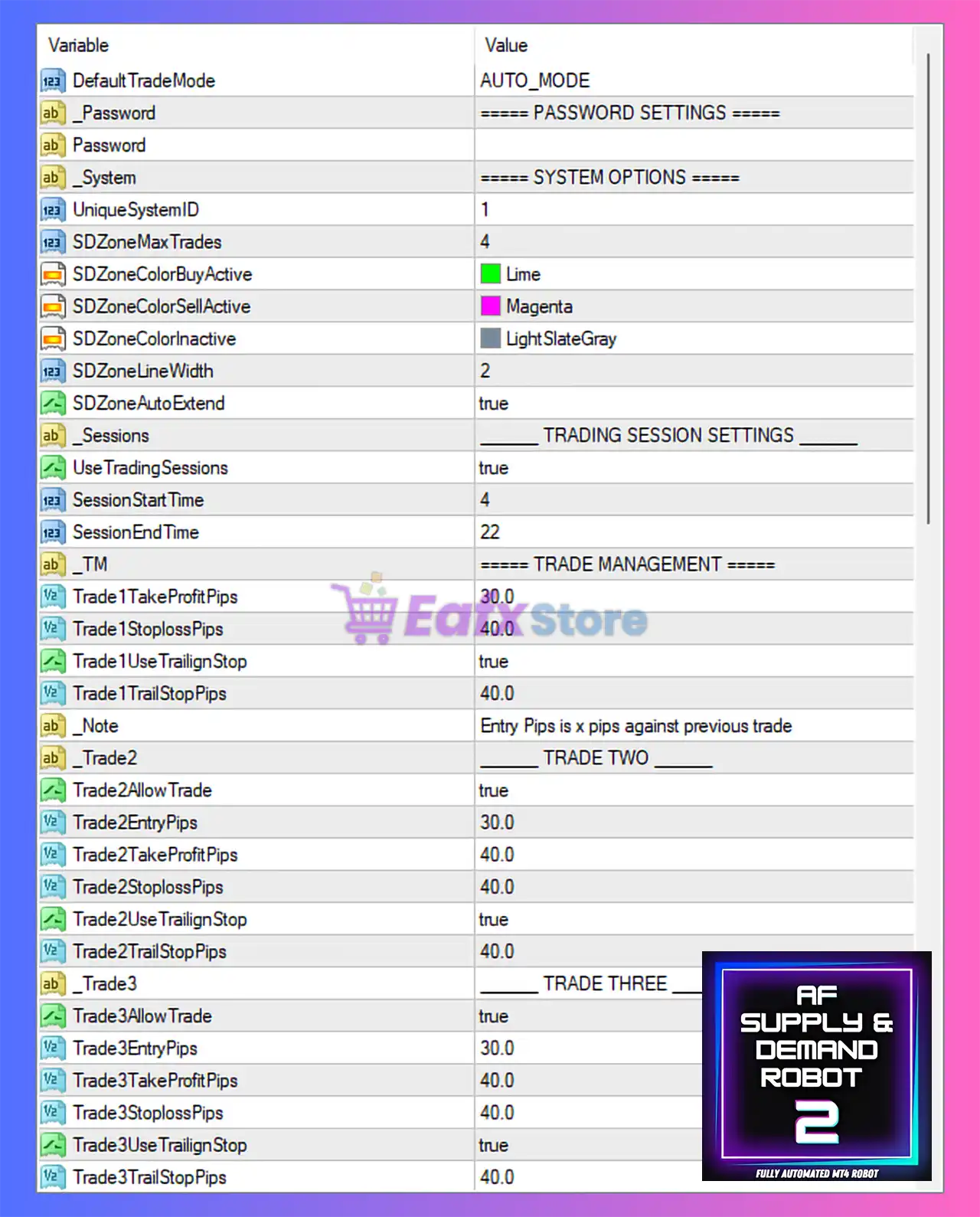
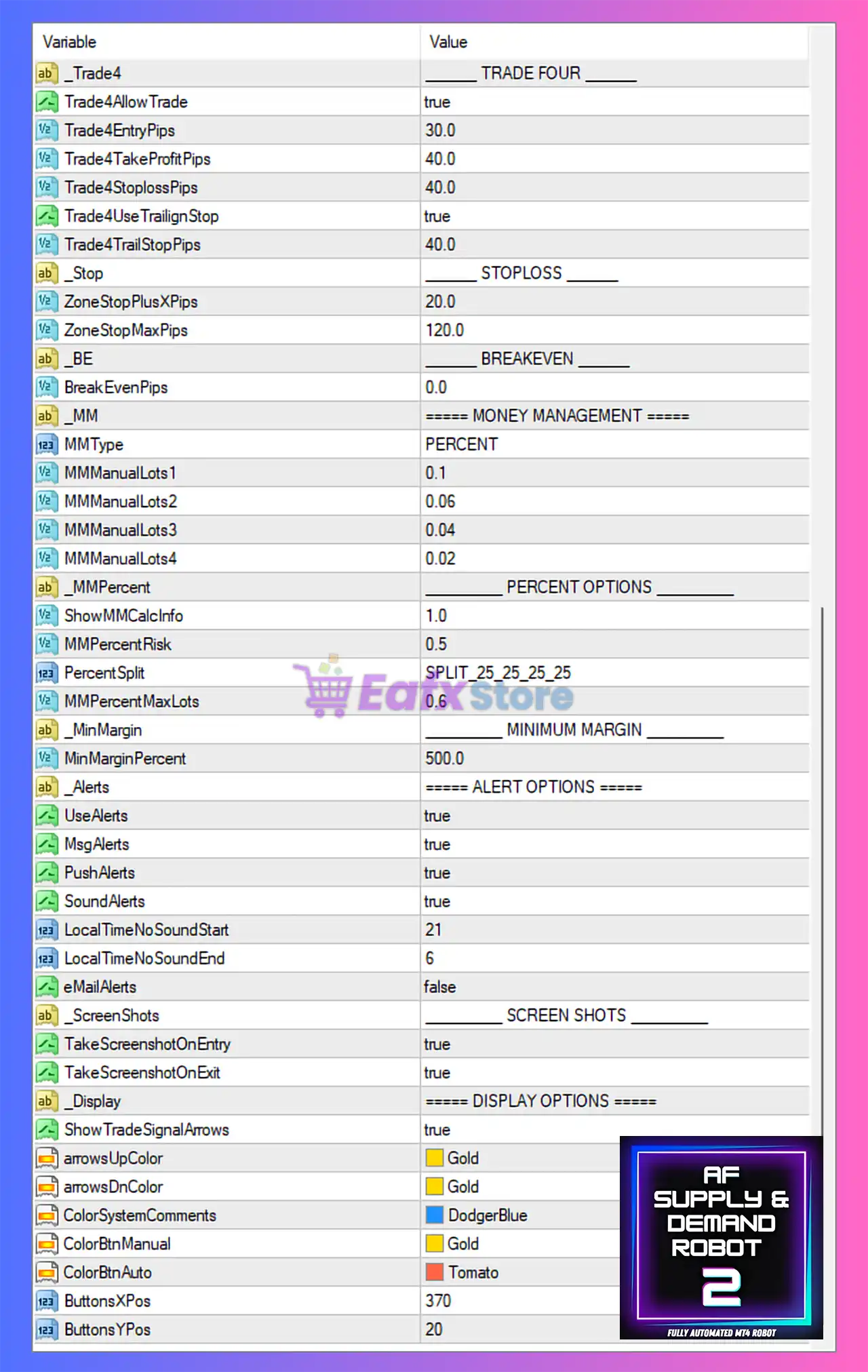
System & Default Trading Settings
🔹 DefaultTradeMode = AUTO_MODE: Enables fully automatic trading mode.
🔹 Password: Field used for EA authorization and password protection.
🔹 UniqueSystemID = 1: Unique identification number for the EA instance.
🔹 SDZoneMaxTrades = 4: Maximum allowed trades per supply/demand zone is 4.
🔹 SDZoneColorBuyActive = Lime: Active BUY supply/demand zones are displayed in Lime color.
🔹 SDZoneColorSellActive = Magenta: Active SELL zones are displayed in Magenta.
🔹 SDZoneColorInactive = LightSlateGray: Inactive zones appear in LightSlateGray.
🔹 SDZoneLineWidth = 2: Width of supply and demand zone lines set to 2.
🔹 SDZoneAutoExtend = true: Automatically extends supply and demand zones on chart.
Trading Session Settings
🔹 UseTradingSessions = true: Enables trading session time filter.
🔹 SessionStartTime = 4: Trading starts at hour 4.
🔹 SessionEndTime = 22: Trading ends at hour 22.
Trade Management Settings – Trade One
🔹 Trade1TakeProfitPips = 30.0: Take profit target for Trade 1 is 30.0 pips.
🔹 Trade1StoplossPips = 40.0: Stop loss for Trade 1 is 40.0 pips.
🔹 Trade1UseTrailingStop = true: Enables trailing stop for Trade 1.
🔹 Trade1TrailStopPips = 40.0: Trailing stop distance for Trade 1 is 40.0 pips.
🔹 Entry Pips is x pips against previous trade: Trade entries are spaced according to previous trade distance.
Trade Two Settings
🔹 Trade2AllowTrade = true: Enables Trade 2 execution.
🔹 Trade2EntryPips = 30.0: Entry spacing for Trade 2 is 30.0 pips.
🔹 Trade2TakeProfitPips = 40.0: Take profit target for Trade 2 is 40.0 pips.
🔹 Trade2StoplossPips = 40.0: Stop loss for Trade 2 is 40.0 pips.
🔹 Trade2UseTrailingStop = true: Enables trailing stop for Trade 2.
🔹 Trade2TrailStopPips = 40.0: Trailing stop distance for Trade 2 is 40.0 pips.
Trade Three Settings
🔹 Trade3AllowTrade = true: Enables Trade 3 execution.
🔹 Trade3EntryPips = 30.0: Entry spacing for Trade 3 is 30.0 pips.
🔹 Trade3TakeProfitPips = 40.0: Take profit target for Trade 3 is 40.0 pips.
🔹 Trade3StoplossPips = 40.0: Stop loss for Trade 3 is 40.0 pips.
🔹 Trade3UseTrailingStop = true: Enables trailing stop for Trade 3.
🔹 Trade3TrailStopPips = 40.0: Trailing stop distance for Trade 3 is 40.0 pips.
Trade Four Settings
🔹 Trade4AllowTrade = true: Enables Trade 4 execution.
🔹 Trade4EntryPips = 30.0: Entry spacing for Trade 4 is 30.0 pips.
🔹 Trade4TakeProfitPips = 40.0: Take profit target for Trade 4 is 40.0 pips.
🔹 Trade4StoplossPips = 40.0: Stop loss for Trade 4 is 40.0 pips.
🔹 Trade4UseTrailingStop = true: Enables trailing stop for Trade 4.
🔹 Trade4TrailStopPips = 40.0: Trailing stop distance for Trade 4 is 40.0 pips.
Stop Loss Settings
🔹 ZoneStopPlusXPips = 20.0: Additional stop loss buffer added to zone boundaries is 20.0 pips.
🔹 ZoneStopMaxPips = 120.0: Maximum stop loss distance allowed is 120.0 pips.
Break Even Settings
🔹 BreakEvenPips = 0.0: Break-even feature currently disabled with value 0.0.
Money Management Settings
🔹 MMType = PERCENT: Uses percentage-based money management system.
🔹 MMManualLots1 = 0.1: Manual lot size for level 1 trades is 0.1.
🔹 MMManualLots2 = 0.06: Manual lot size for level 2 trades is 0.06.
🔹 MMManualLots3 = 0.04: Manual lot size for level 3 trades is 0.04.
🔹 MMManualLots4 = 0.02: Manual lot size for level 4 trades is 0.02.
Percent Risk Options
🔹 ShowMMCalcInfo = 1.0: Displays money management calculation information.
🔹 MMPercentRisk = 0.5: Risk per trade set to 0.5%.
🔹 PercentSplit = SPLIT_25_25_25_25: Risk allocation split equally across four trades.
🔹 MMPercentMaxLots = 0.6: Maximum lot size allowed under percentage risk mode is 0.6.
Minimum Margin Protection
🔹 MinMarginPercent = 500.0: Minimum required free margin level is 500.0%.
Alert Options
🔹 UseAlerts = true: Enables all trading alerts.
🔹 MsgAlerts = true: Enables popup message alerts.
🔹 PushAlerts = true: Enables mobile push notifications.
🔹 SoundAlerts = true: Enables sound alerts.
🔹 LocalTimeNoSoundStart = 21: Sound alerts disabled starting at hour 21.
🔹 LocalTimeNoSoundEnd = 6: Sound alerts re-enabled at hour 6.
🔹 eMailAlerts = false: Email alerts are disabled.
Screenshot Settings
🔹 TakeScreenshotOnEntry = true: Captures chart screenshot when entering trades.
🔹 TakeScreenshotOnExit = true: Captures chart screenshot when closing trades.
Display Options
🔹 ShowTradeSignalArrows = true: Displays buy/sell arrows on chart.
🔹 arrowsUpColor = Gold: BUY signal arrows displayed in Gold.
🔹 arrowsDnColor = Gold: SELL signal arrows displayed in Gold.
🔹 ColorSystemComments = DodgerBlue: System comments color set to DodgerBlue.
🔹 ColorBtnManual = Gold: Manual trading button color set to Gold.
🔹 ColorBtnAuto = Tomato: Auto trading button color set to Tomato.
🔹 ButtonsXPos = 370: Horizontal position of control buttons.
🔹 ButtonsYPos = 20: Vertical position of control buttons.
Conclusion
AF Supply and Demand EA is a professional MetaTrader EA focused on supply and demand zone trading with advanced automation capabilities. The robot includes multiple trade layers, percentage-based money management, trailing stop systems, session filtering, visual zone mapping, and integrated alerts. With flexible configuration options and strong risk controls, AF Supply and Demand EA is designed for traders who want structured automated trading with detailed market zone analysis.
FAQs
❓ What is AF Supply and Demand EA?
AF Supply and Demand EA is an automated MT4 trading robot based on supply and demand zone strategies.
❓ Does AF Supply and Demand EA support multiple trades?
Yes, the EA supports up to four separate trade levels with individual settings.
❓ Can AF Supply and Demand EA use trailing stop?
Yes, trailing stop functionality is available for all trade layers.
❓ Does AF Supply and Demand EA include risk management?
Yes, the EA includes percentage-based money management and margin protection systems.
❓ Can AF Supply and Demand EA send mobile alerts?
Yes, the EA supports push notifications, popup alerts, and sound alerts.



